Post-apocalyptic survival in Project Zomboid is gripping and immersive. But why not spice things up customize your adventures with a mod? In this article, we'll explain how to find and install mods.
Step 1: Find Project Zomboid mods via the Steam workshop
the Workshop steam is a marketplace for gamers by gamers, where anyone can offer downloadable content to enjoy additional features ou d’objets d’autres licences. Cet community tool vous permet ainsi d’échanger des mods et de personnaliser vos aventures sur les jeux.
Wondering how to find Project Zomboid mods? Find out how:
- Première étape : Allez dans l’onglet “COMMUNAUTÉ” top of page

- Step 2: Choose “Workshop”

- Step 3: Write “Project Zomboid” in the search bar
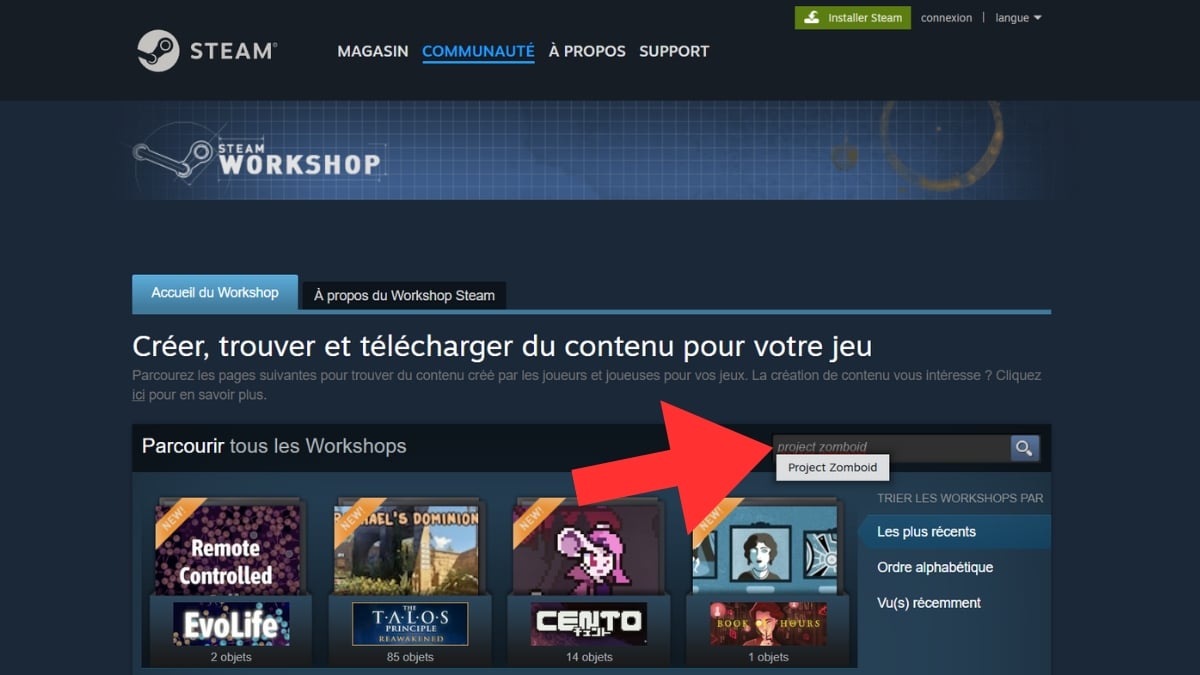
- Quatrième étape : Cherchez un mod à l’aide des various filters (la barre de recherche en rouge dans l’image, selon leur popularité ou la date de parution en bleu dans l’image ou par tags en vert dans l’image)

And if you're curious about the best Project Zomboid modsClick on the link to read our article!
Step 2: Installing a mod on Project Zomboid
We'll show you step by step how to download a mod and l’installer :
- Step 1: Start by choose a mod by clicking on it (for us it will be: Fallout pip-boy)

- Step 2: On the mod page, click on “S’abonner”

- Step 3: Once the download is complete, go to the game and cliquez sur “MODS”

- Fourth step: Go to your mod's line on the far right and click on “Désactivé” (pour l’ajouter aux futurs parties que vous allez créer), il sera alors On in green

FAQs
How do I add a Project Zomboid mod to an existing game?
Vous avez déjà une partie en cours, mais vous voulez quand même ajouter le dernier mod que vous avez téléchargé ? C’est facile :
- Step 1: Start by check qu’il n’est not already activated on the

- Step 2: Go to “PLUS …” to add the mod

- Step 3: Click on “Choisir les mods” to access your list

- Step 4: Select the mod of your choice and click on “Désactivé”it will then be On in green

- Fifth step: You can click on “JOUER” pour l’ajouter sur votre partie

How do I add a Project Zomboid co-op mod?
Want your friends to enjoy your mods too? Follow this quick and easy guide:
- Step 1: Start by clicking on “HÉBERGER” to create a server

- Second step: Click on “Paramétrer…” on the right
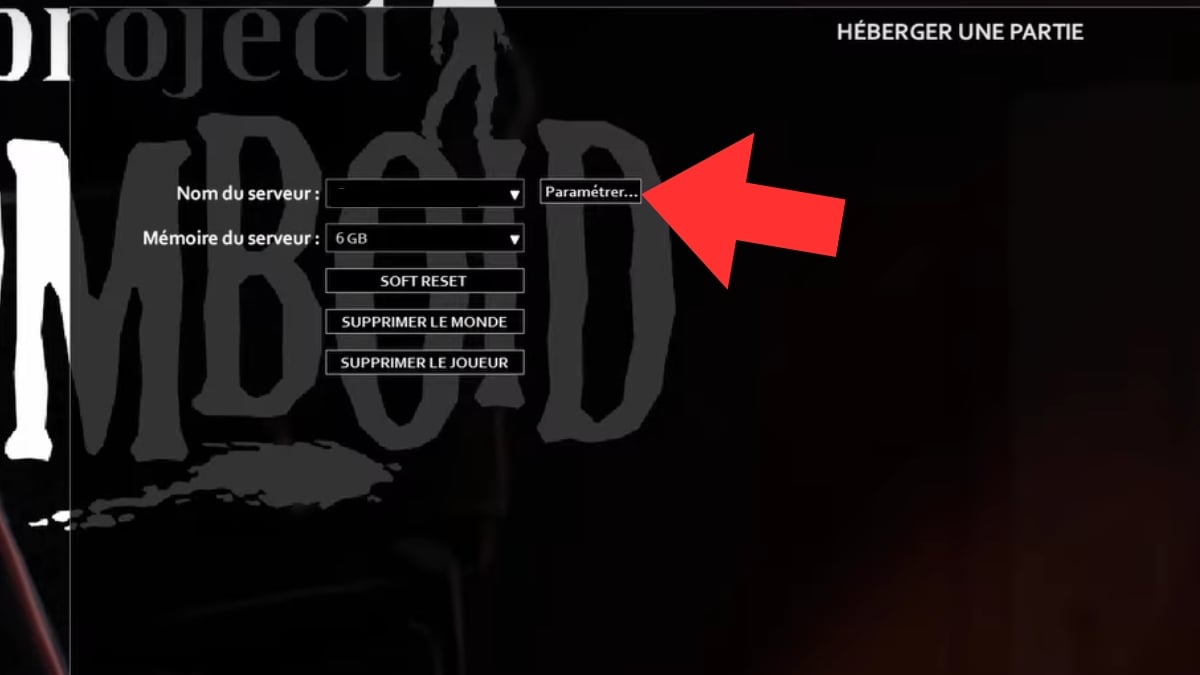
- Step 3: Go to “Créer de nouveaux réglages”

- Step 4: Give him a name to find it easily, then click on “Suivant” Footer

- Step 5: You can now choose “Ajouter à la liste un mod installé”

- Step six: Choose a mod among those you own

- Seventh step: Go to “Steam Workshop” to add mod to list (cela permet à vos amis de pouvoir l’utiliser)

- Eighth step: Click on “SAUVER” at the bottom of the page save your additions
You can now play in cooperation with your friends and enjoy your mods together for a much more fun and enjoyable game.
And if you want to know how to play multiplayer on Project ZomboidYou can read our article by clicking on the link.
How do I add a mod to a Projet Zomboid server?
Si vous utilisez un hébergeur externe, vous aurez besoin d’go to game filesas well as to recover Workshop ID and mod ID to add them to your server.
IMPORTANT: The server must be off to add mods!
We'll explain it all below:
- First step: Go to Workshop to see the mod page
- Step 2: Find the two IDs in Description
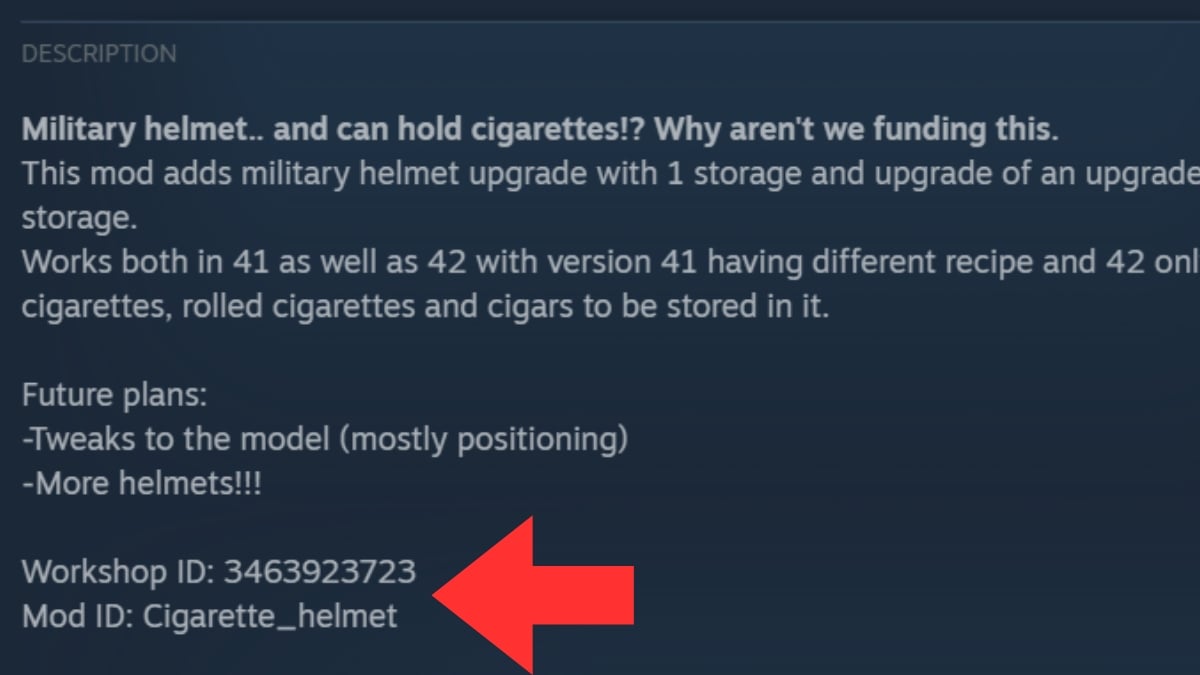
- Troisième étape : Allez dans vos fichiers d’ordinateur : Disque Local > Utilisateurs > Votre nom d’utilisateur > Zomboid
- Fourth step: Click in the “Server”

- Step 5: Open the file “servertest.ini” with a text editor (Notepad++, Notepad)

- Step six: Look for the line “Mods=”

- Seventh step: Enter the mod ID
- Step eight: Then look for the line “WorkshopItems=”
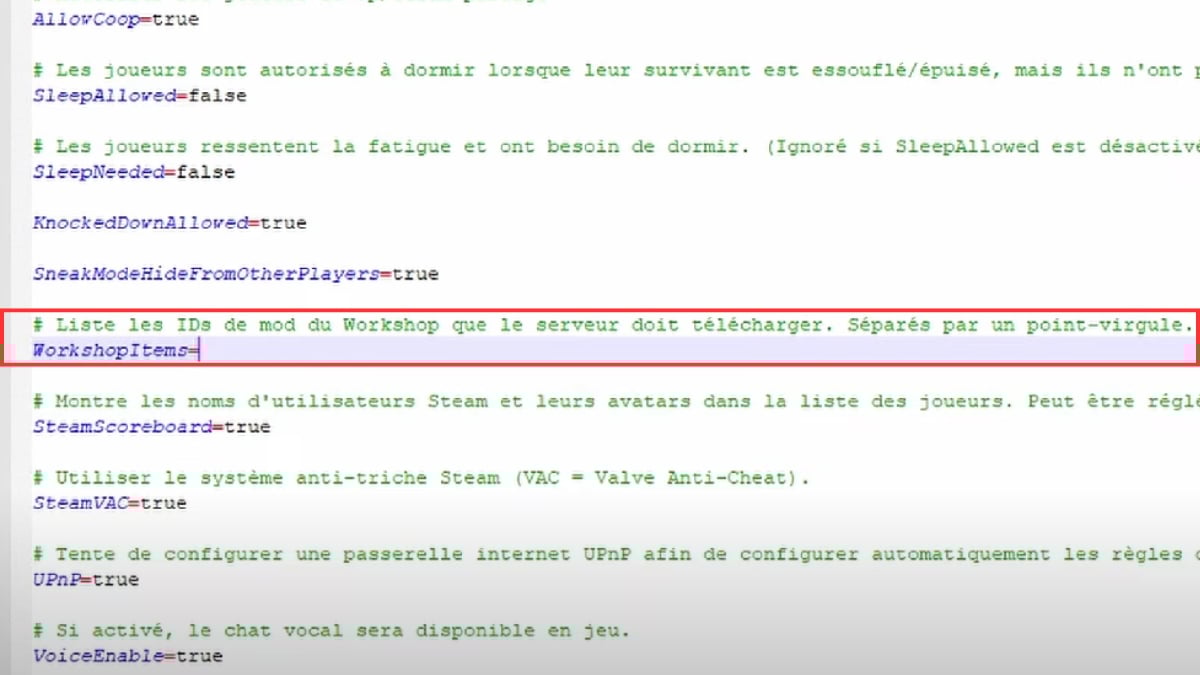
- Step 9: Enter the Workshop ID
- Tenth stage : Save et fermez l’éditeur de texte
You can now launch your server and enjoy your mod additions!
To conclude, install mods on Project Zomboid via Steam Workshop n’est pas très compliqué when you know what you have to do. You can now enhance your solo or group adventures with full of new products, ofcontent improvements or quality of life.
N’oubliez pas de regarder les mods the most popular and those with le plus d’abonnés, c’est bon signe pour les regular updates. Si vous avez d’autres questions à propos de Project Zomboid, n’hésitez pas à parcourir nos articles sur le sujet.
And if you're curious and want to know how to install a mod on Minecraft, n’hésitez pas à cliquer sur le lien pour consulter notre guide complet !









 English