On Discord, you may accidentally delete a message already sent. This can get in the way of your daily activities on the platform.
Découvrons dans cet article s’il est possible de voir un message effacé et quelles sont les possible solutions.

Is it possible to view a deleted message on Discord?
There is no no built-in functionality which allows you to view a deleted message on Discord. Indeed, once it's deleted from your computer or smartphone, it will be lost forever. What's more, Discord considers having access to private messages a violation of users' privacy.
However, there is still a possibility of recovering and viewing the deleted message using an app or resorting to a bot on Discord. Read on to find out more.
How can I view deleted messages on Discord?
Voir les messages supprimés sur Discord nécessite l’usage de certains outils. Voici deux méthodes qui vous permettront de récupérer et de voir les messages supprimés sur Discord.
- La méthode la plus simple consiste à utiliser un bot tel que Koya Bot et de l’intégrer à l’application Discord.
- BetterDiscord is another popular application for Discord message retrieval.
Here's what you need to know about it.
1. Using Koya Bot
Explanatory video in French by Alucare, ideal complement to the page. View video (you can use youtube's automatic translation)

One of the most effective ways of finding a deleted Discord conversation is to use a bot such as Koya Bot. Bots can automatically copy each deleted message to a server or channel, allowing you to view it later.
However, this functionality is restricted to your own serverswhich limits its usefulness. Nevertheless, it is a valuable tool for managing discussions on Discord.
Here's how l’utiliser :
- Download Koya Bot.

Télécharger Koya Bot pour l’ajouter à Discord. ©Mia pour Alucare.fr - Check your logs on Discord.

The Logs section on Discord. Mia for Alucare.fr - Select the exhibition which contains the deleted message.
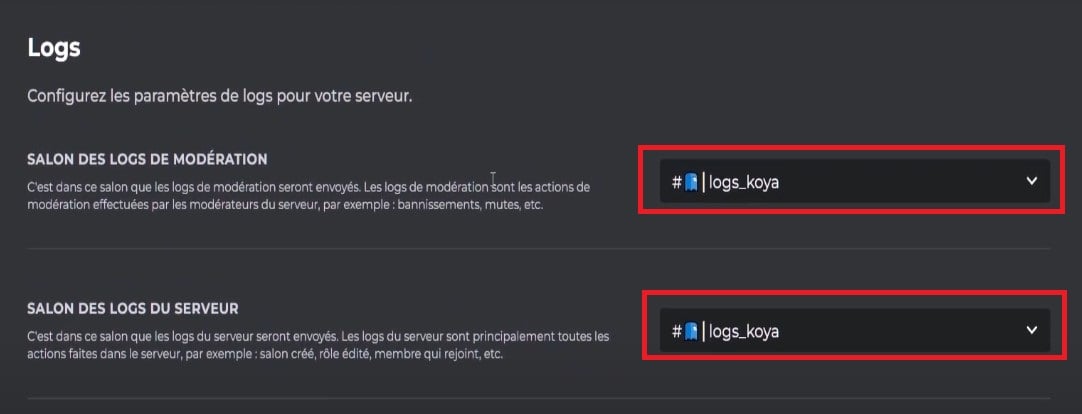
Salons Discord in the Logs. ©Mia for Alucare.fr - Dans “Éléments de message”, veillez à ce que la mention “message supprimé” is checked.
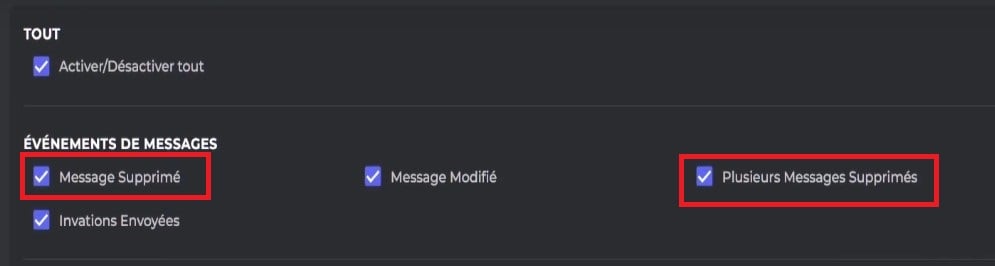
Mark deleted messages on Discord. Mia for Alucare.fr
Koya Bot will then show you the message deleted.
2. Use BetterDiscord
BetterDiscord is one of the best multifunctional applications for viewing and recovering deleted messages on Discord. To use it, here's what you need to do:
Install BetterDiscord
Download BetterDiscordThe application will automatically determine the operating system you're using, whether Windows, Linux or Mac, and automatically suggest the appropriate file. Here's how it works:
- Install BetterDiscord by double-clicking on it.

Fichier d’installation de BetterDiscord. ©Mia pour Alucare.fr - Accept la licence et cliquer sur “Suivant”.
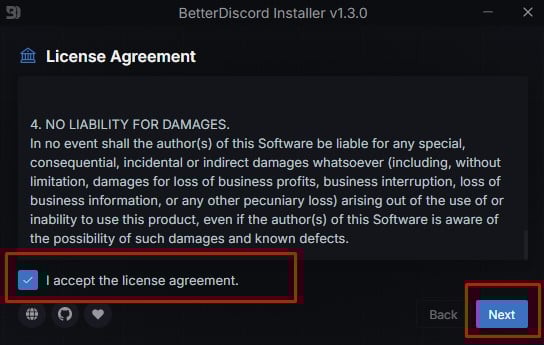
Acceptance of the terms of the license agreement on BetterDiscord. Mia for Alucare.fr - Then click on “Installer BetterDiscord”, puis “suivant”.
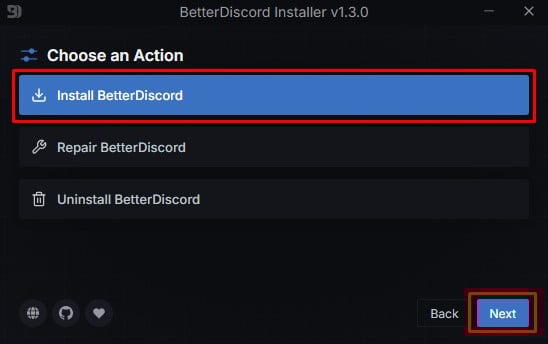
Choose Install BetterDiscord. Mia for Alucare.fr - Select the folder path vers lequel installer BetterDiscord et cliquer sur “Installer” pour poursuivre.

Choose the folder path in which to install BetterDiscord. Mia for Alucare.fr - Si Discord est déjà ouvert au moment de l’installation de BetterDiscord, il will restart automatically.
Get MessageLoggerV2
Restoring deleted messages from BetterDiscord works with MessageLoggerV2. Once you have installed BetterDiscord on your PC, download MessageLoggerV2.
Include MessageLoggerV2 in your plugins
To integrate this plugin on Discord, follow these steps :
- Access the Discord application on your PC and click on the settings bottom left.

Parameters on Discord. Mia for Alucare.fr - Scroll down to the section for BetterDiscord, then click on plugins.

Plugins in the BetterDiscord section on Discord. Mia for Alucare.fr - Tout en haut, cliquez ensuite sur l’folder icon, puis déplacez le fichier MessagerLoggerV2 téléchargé dans le dossier qui s’ouvre.

Open the plugins folder on Discord. Mia for Alucare.fr - Return to Discord and activate the to the right of the plugin. Once activated, it should be colored green.

Button to activate MessageLoggerV2 on Discord. Mia for Alucare.fr - You will then be asked if you wish to download XenoLib and ZeresPluginLibrary. Confirm the procedure, then activate these two elements.

Activate XenoLib and ZeresPluginLibrary on Discord. Mia for Alucare.fr
Show deleted messages on discord
Once all these phases have been completed, it's time to recuperate and relax. see your deleted messages on Discord. To do this, proceed as follows:
- Open Discord. Locate the waiter which contains the deleted message you wish to recover and view.

Selection of the server on Discord where the deleted message is located. Mia for Alucare.fr - Make a right click on the server and select "Message Logger".

Message Logger on Discord. Mia for Alucare.fr - In the new menu, click on “Add to Whitelist”. BetterDiscord will then start recording your messages.

Add to whitelist option on Discord. Mia for Alucare.fr - Then, to view deleted messages, click on “Open Logs”.

Open Logs on Discord. Mia for Alucare.fr - You will then see that deleted messages disposent d’une mention de la date et de l’heure de suppression à gauche de l’écran.

Messages deleted on Discord. ©Mia for Alucare.fr
Note that this tool only works for deleted messages. après l’intégration de BetterDiscord.
FAQs
What other bot can replace Koya Bot?
Dyno Bot est une option intéressante si vous ne pouvez pas accéder à Koya Bot. Cet outil offre à l’utilisateur quasiment les mêmes avantages que ce dernier.
Here is the method to use for the configure :
- Go to the Dyno website and log in avec votre compte Discord à l’aide du bouton qui s’affiche sur la page.

Official Dyno Bot website ©Mia for Alucare.fr - Click on the server Discord with the salon where you want to follow deleted messages or conversations.

Selection of the server where to use the bot. Mia for Alucare.fr - Tune the necessary authorizations to the bot, making sure you have management rights on the selected server.

Management of bot permissions. Mia for Alucare.fr - Configure the required parameters and the bot is ready for use.
Dyno messages are logged by sending them to a dedicated channel. To do this :
- Create a new text channel on your Discord server by clicking on the "+" symbol next to the Text Shows tab.

Ajout d’un nouveau salon sur Discord. ©Mia pour Alucare.fr - Give it an appropriate name and define it as private.

Configuration of the living room in Private mode. Mia for Alucare.fr - Add Dyno as sole member that can publish on this channel.
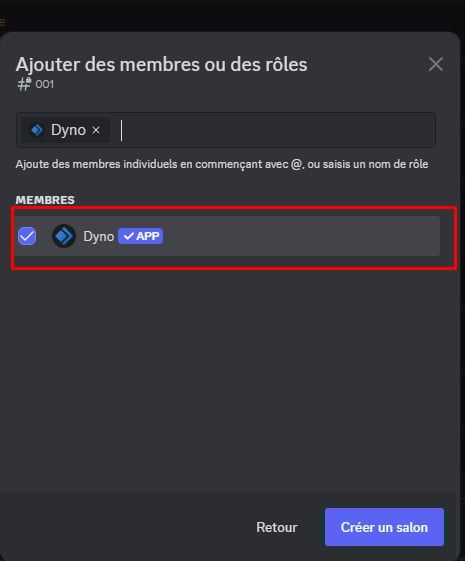
Dyno Bot in the living room ©Mia for Alucare.fr
Then, from the Dyno :
- Go to the Modules.
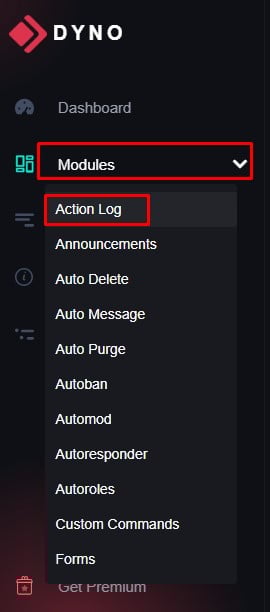
Modules on Dyno Bot ©Mia for Alucare.fr - Open the activity log module and select the channel you have just created as the channel to use.

Show selection on Discord. Mia for Alucare.fr - In the Message event section, mark all that concern deletions messages, images and mass deletions.

Selection of deleted items. Mia for Alucare.fr - To check whether this works, delete a message or conversation on your Discord server. It should appear in the created channel with Dyno Bot.

Message deleted by a user on Discord. Mia for Alucare.fr
And if you want to improve your experience on Discord get Discord Nitro cheaper with Twitch ! We tell you more in our article on the subject.
Quelqu’un peut-il voir si je supprime un message sur Discord ?
No parameter on Discord to see who has deleted a message. Once a message has been deleted, it simply disappears from Discord.
Les administrateurs d’un serveur Discord peuvent-ils voir les messages supprimés ?
Non, les administrateurs d’un serveur Discord cannot see deleted messages. Les seuls moyens de voir les messages sur Discord sont les techniques citées plus haut dans l’article.
How to recover deleted photos from Discord?
Tout d’abord, notez que vous ne pouvez pas récupérer les photos supprimées si vous utilisez Discord sur un navigateur web. Seule l’application Discord allows you to view stored photos. This is done by following the path below:
- C:\Users\your username\AppData\Roaming\discord\Cache
Is it possible to recover a deleted Discord server?
En général il n’est not possible de récupérer un serveur Discord effacé. Cependant, vous pouvez essayer d’envoyer un e-mail à support@discordapp.com et voir s’il est possible de trouver une solution.
Where are Discord messages stored?
Si vous utilisez l’application Discord, les données des messages seront enregistrées localement on your device. Discord possède également des serveurs cloud qui stockent les messages et les données d’un serveur.
Les messages supprimés sont-ils visibles dans le journal d’audit de Discord ?
Le journal d’audit de Discord does not l’affichage ou la récupération des messages supprimés sur un serveur. À titre d’information, cette fonctionnalité permet de consulter les actions que les membres du serveur ont initié. Cependant, les possibilités sont limitées.
L’outil ne conserve que les informations depuis the last server backup. Le journal d’audit sert surtout aux modérateurs et aux administrateurs des serveurs sur Discord dans le suivi des infractions aux règles.
Can I report a message that has been deleted?
He is impossible de signaler un message déjà supprimé sur Discord. La solution est d’agir avant que le message ne soit effacé.
- Dans ce cadre, si le message est offensant, l’idéal est de réaliser une screenshot pour ensuite l’envoyer à l’équipe de Discord. Cette pièce est nécessaire pour prouver l’infraction liée au message.
- Also note the identifiers de l’auteur si vous recevez un message désagréable sur Discord.
So, even if it is deleted, you can still report the case by providing the following information supporting documents.
La suppression d’un compte Discord supprime-t-elle les messages ?
No, the messages remain visible même si la personne a supprimé son compte Discord. La conservation des messages a été mise en place pour permettre d’utiliser les anciennes conversations et les images sur les serveurs dans le futur.
N’hésitez pas à visiter notre page Discord, si vous souhaitez connaitre d’autres fonctionnalités de cette plateforme.
This article on how to see deleted messages on Discord How has it helped you? We've found that although Discord offers many features that will meet the needs of all users, it also has certain limitations.
- Without the installation of a specific software or a botIt is not possible to view deleted messages on Discord.
- Koya Bot is one of the easiest tools to display deleted messages on the platform.
- DynoBot, an alternative to Koya, is also often used to view messages that have been deleted.
- Parmi les méthodes également utilisées pour restaurer une conversation, nous pouvons citer l’usage de BetterDiscord.
Quoi qu’il en soit, nous espérons avoir pu vous aider à travers cet article. Si vous avez des questions, n’hésitez pas à laisser un comment.









 English