You're looking for Prime Gaming (former Twitch prime) free of charge?
👉 Good news, you've come to the right place! Here are a few tips to get Prime Gaming (formerly Twitch Prime) legally and free !
First of all, a word of clarification:
❌ There is no Prime Gaming 100 % free for life—it's included with Amazon Prime. The only legal and free way is to sign up for an Amazon Prime trial, free of charge, and terminable before you're charged. We'll show you how!
What do you really get with Prime Gaming and how do you claim it?
Once your trial is activated, here's what you get in concrete terms:
Free games every month
Loot in your favorite games (GTA, Valorant, Apex)
And as a bonus, you also get a free Twitch subscription which you can give to the streamer of your choice.
How to claim your free PC games
To claim your games and gifts, your accounts Amazon and Twitch must be linked. We'll show you how below.
Once your Amazon and Twitch accounts have been linked, your Prime member It automatically appears on Twitch and gives you access to your free games, loot, and your free channel subscription.
To do this :
Meeting on gaming.amazon.com,
Select « Claim »,
Then retrieve the game from the corresponding launcher (Epic, GOG, Amazon Games App).
If your accounts aren't linked, you won't receive the monthly items and loot.
Loot not received?
If you haven't received the loot, you can check the following points :
Check that the accounts are linked, then relaunch the launcher.
The delivery time for drops ranges from a few hours to 1–2 days before they arrive.
If you still need help, please ask your question by comment or directly on the Alucare.fr on Discord We'll get back to you and help you collect your products.
How to get Prime Gaming (former prime twitch) for free?
By the way, since mid-August 2020, Twitch Prime became Prime Gaming. As a result, we have revised and updated the article. However, please note that it is still relevant.
The following offers are currently available:
Take advantage of the AMAZON PRIME STUDENT offer (3 months free)
Enjoy a free one-month trial of Amazon Prime
🎁 Bonuses : Gift giving on discord!
1. Take advantage of the Amazon Prime Student offer for 3 months
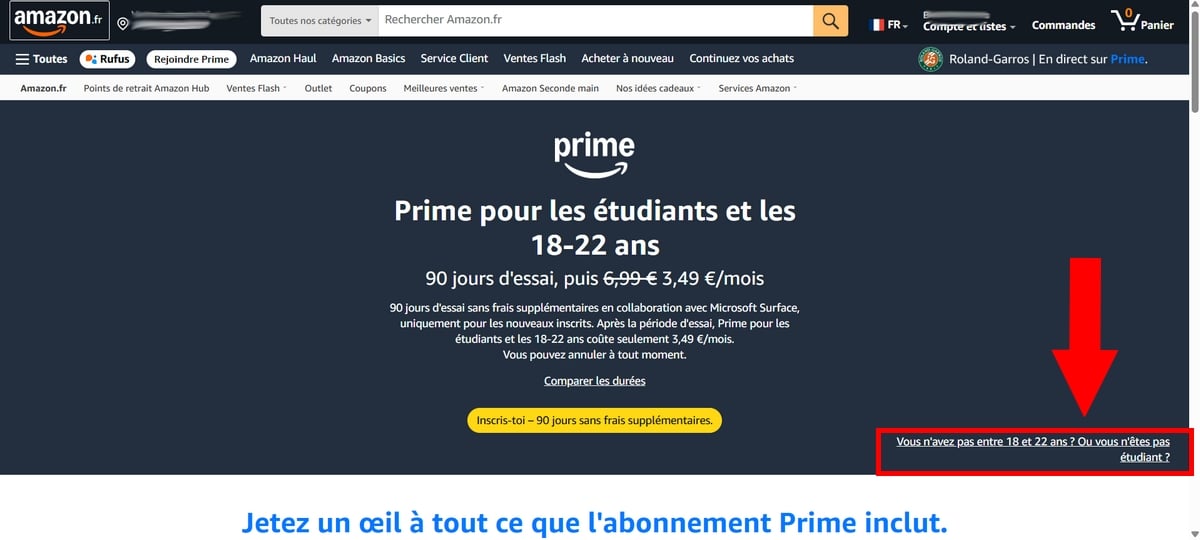
If you are a student (or not), aged between 18 to 22 years old, you can benefit from Prime Gaming free for 3 months with this offer Amazon Prime Student.
After that, you pay €3.49/month (or €34.95/year, i.e. -50 % on the normal price of €69.90/year).
So you can enjoy all the benefits.
⚠️ Please note: if you are already a subscriber, you must cancel your current subscription!
To sign up for Amazon Prime Student, click this button, which will take you directly to this page :
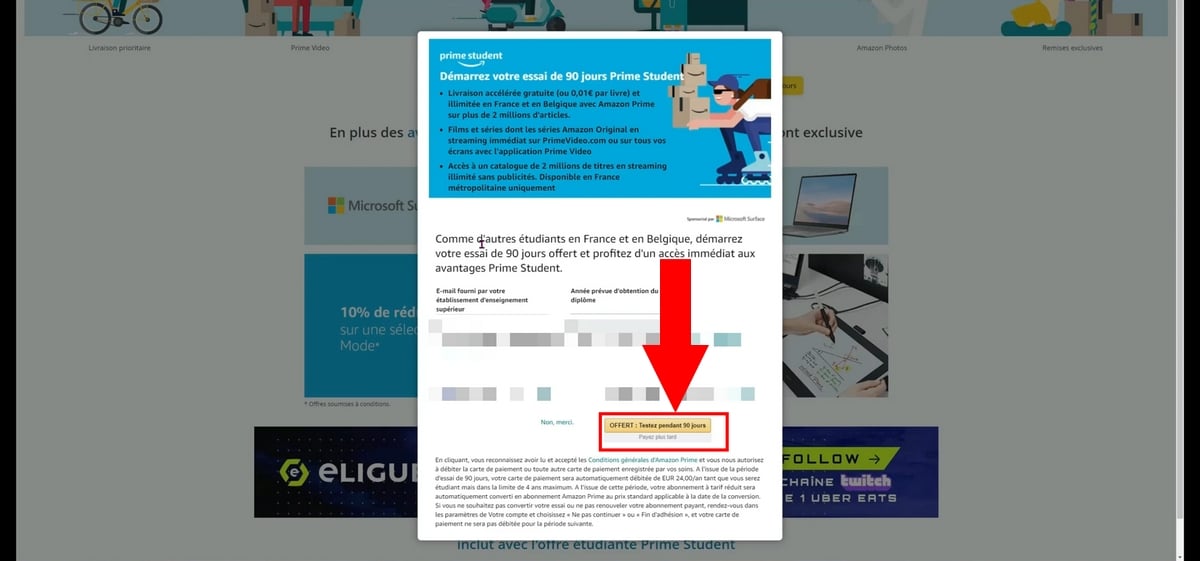
Next, you will be redirected to a new page : Enter the’e-mail address which was provided to you by your institution of higher education (school, university). If you don't have one, that's okay: you can use other forms of identification (ID card, passport, or driver's license).
Please also indicate the expected date of graduation.
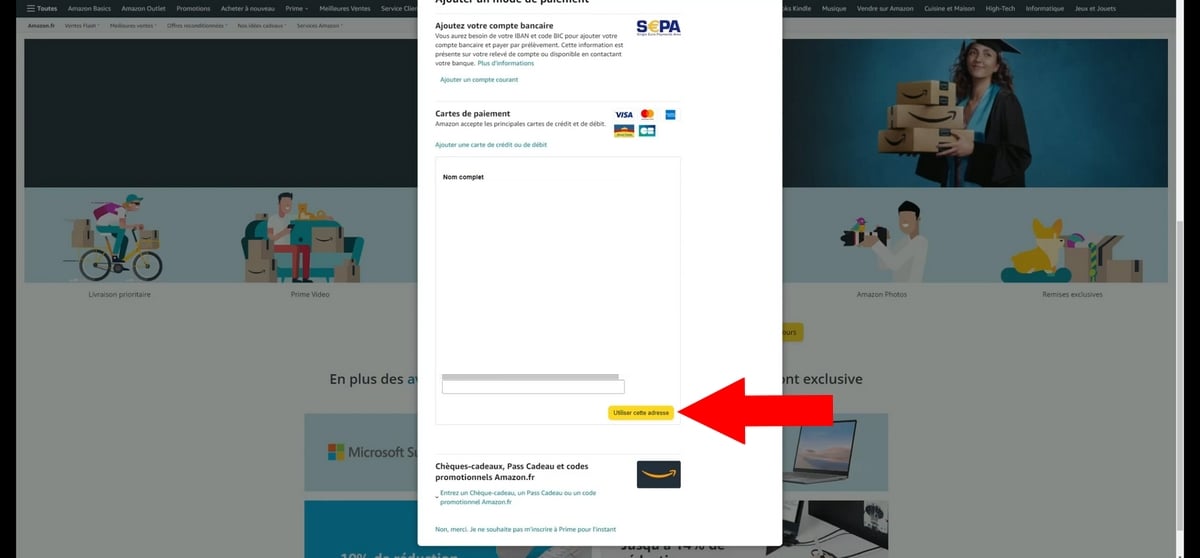
This amount will be charged only’at the end of 3 months if you do not cancel. You can choose between a credit card, a bank account, a gift certificate or an Amazon discount voucher.
Fill in your postal address (city, region, zip code) linked to your payment account.
All you need is to be between 18 and 22 years old (whether you're a student or not) and have a credit card. Don't forget to go to « Manage your Amazon Prime membership » and’activate the reminder email.
All you have to do is link the account to your Twitch account:
Go to gaming.amazon.com.
Log in with your username and password Amazon.
Click on " Associate a Twitch account » and log in with your Twitch username.
As a reminder, Prime Student It's not just about gaming: you also get free expedited shipping, plus Prime Video and Prime Music included. In short, you get everything Amazon Prime has to offer at half price once the trial ends.
2. Take advantage of the free one-month trial of Amazon Prime
AmazonPrime offers a free one-month trial to give users an idea of what to expect when they sign up for a subscription.
It is also a technique for’have Prime gaming free.
To try it for free, simply visit the website by clicking this button:
And follow the on-screen instructions to confirm it!
3. How to use your free Twitch channel subscription?
Every month, your Prime membership entitles you to a free subscription to a Twitch channel (equivalent to a standard Level 1 subscription, worth about €5).
To subscribe to a Twitch channel :
Go to the channel of your choice,
Click the «Subscribe» button and select the subscription included with your Prime membership.
By subscribing to a channel, you unlock several benefits:
A badge displayed next to your nickname in the chat,
Channel-exclusive emotes,
And you support the streamer directly.
The badge is also a practical way to stand out from the crowd. Twitch raids.
A small but important point:
It's a monthly subscription that needs to be renewed; it doesn't drive itself on the same channel. You can therefore subscribe to a Twitch channel different every month if you like. And if you don't know where to use your sub, you can do so on our Twitch channel:
Here's a video that shows you how to subscribe to your favorite streamer for free:
Explanatory video in French by Alucare, ideal complement to the page.
View video
(you can use YouTube's automatic translation)
Bonus: Collect Prime Loot that others aren't using
Don't forget to read Part 2 on how to get 1 month of Amazon Prime for free (right above 🙂
As for me, I have Prime Gaming (Twitch prime) and it often happens that I don't use codes (for example, for games (dauntless, fifa, etc.). If you wish to retrieve them, go to Discord to avoid losing these rewards (loot) insofar as they are useful to you.
So if you'd like to share loot If you don't use it, no problem—head over to DISCORD ALUCARE.FR (button below)!
If this guide has helped you, feel free to share it (That's the only way you can help me :)) And if you have any loot to give away, share it too! (It's okay if you don't know how or if you'd rather keep it ^^).
What is Prime Gaming?
Prime Gaming, formerly known as Twitch Prime, is a premium subscription service offered by Amazon.
Prime Gaming is generally available as part of an Amazon Prime subscription, which also includes benefits such as unlimited free shipping, access to movies, TV shows, and music, and more.
Prime Gaming is not available for free download as a stand-alone service, but you can try it for free. Amazon Prime for 30 days by signing up for a free trial, or the’try for 90 days if you are between 18 and 22 years old.
This will give you access to Prime Gaming during this trial period, as well as all the other Amazon Prime benefits.
✅ Note :
The website gaming.amazon.com works equally well on the web and on mobile, so you canz claim your games and your gifts no matter where you are. You can also manage your membership and access your information from the’Amazon mobile application.
List of tutorials on the Twitch platform that might help you :
Creator of the Alucare.fr website launched in December 2018.
Player of Raid Shadow Legends since December 29, 2019, and I became official content creator of RSL in 2020 (one of only 30 people in the world!). This allows me to provide information on the site 24 hours in advance. I cover topics where I can share my expertise to help you.
The aim is for each article to teach you something interesting!
Social Media and Contact: (ALUCARE)
9 comments on the discussion forum for «How to get Prime Gaming (formerly Twitch prime) for free?»
Hello,
First of all, I wanted to thank Alucare and this wonderful project, whether for the nitro, the battle pass or other, a big thank you.
Don't hesitate to join the discord to also benefit from a free reward in exchange for simple advertising. I myself received a batch a few days ago, so feel free to join and share?.
How to get Prime Gaming (formerly Twitch prime) for free? - Alucare
How can you get Prime Gaming (formerly twitch Prime) for free in October 2026? Check out our tips in this guide.
Alucare.fr
How can I get Prime Gaming (formerly Twitch prime) for free?
Alucare
Alucare - video games, tutorial, High-tech AI and Web
ALUCARE INDUSTRY LLP is the company behind alucare.fr. The managing director of ALUCARE INDUSTRY LLP is Antonin Choplin. The alucare.fr website is designed to help website visitors in their research, whether in the world of video games, the web or elsewhere.
How can I get Prime Gaming (formerly Twitch prime) for free?










9comments on the discussion forum for «How to get Prime Gaming (formerly Twitch prime) for free?»