How to get the Royal Duck on Rush Royale? [Complete Guide]

Author :

React :

Comment

In this article, I'll explain how to unlock the Royal Duck as quickly as possible. I will guide you step by step through this tutorial.. So you'll have all the cards in your hand to get the Royal Duck as quickly and efficiently as possible on Rush Royale.

For those who want to support me for free, don't forget the code: "ALU" in the store.
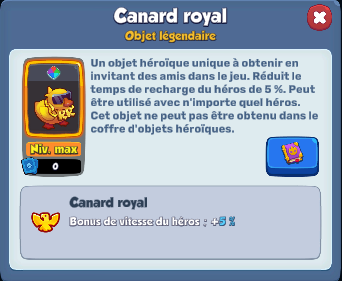
Here's the description of the Royal Duck, which briefly explains how to obtain it on Rush Royale
Here's the description of the Royal Duck, which briefly explains how to obtain it on Rush Royale ©️ Karen for Alucare.fr

By the way, if you're just starting out on Rush Royale and are looking for a clan that really helps beginners, don't hesitate to :

⚔️Rejoindre the Discord from Mustangs⚔️

Explanatory video in French by Alucare, ideal complement to the page. View video (you can use youtube's automatic translation)

1. Copy sponsorship code

To get your referral code, please follow these steps:

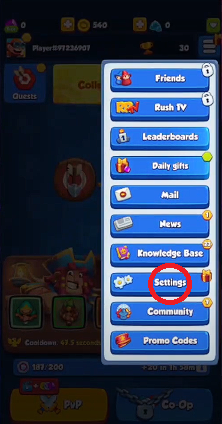
  1. After launching Rush Royale, click on the button at top right.
This capture comes from Alucare's video when he explains the first steps to find your invitation code on Rush Royale
This capture comes from Alucare's video when he explains the first steps to find your referral code on Rush Royale ©️ Karen for Alucare.fr
  1. Once the menu is open, select "Friends"..
Then click on the first button in the list, "Friends". Your list of friends on Rush Royale will then appear, and you'll need to click on the "Invitation" tab.
Then click on the first button in the list, "Friends". Your list of friends on Rush Royale will then appear, and you'll need to select the "Invitation" tab ©️ Karen for Alucare.fr
  1. Once you're in the "Invitation" tab, you'll need to press the "Invitation" button.
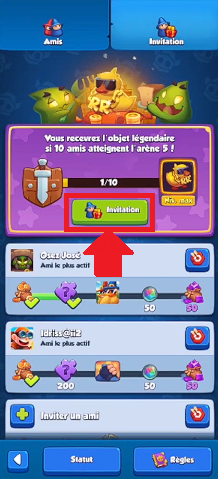
As shown here, the "Invitation" tab is to the right of your Friends list. Once you're in the right tab, click on the "Invitation" button.
As shown here, the "Invitation" tab is to the right of your Friends list. Once in the right tab, click on the "Invitation" button ©️ Karen for Alucare.fr
  1. This action will copy a link you'll have to put aside by sticking it on your smartphone's notepad, for example.
This screenshot comes from Alucare's video after he clicked on the "Invitation" button to copy the link and paste it into a page in his smartphone's notepad.
This screenshot comes from Alucare's video after clicking on the "Invitation" button to copy the link and paste it into a notepad page on his smartphone ©️ Karen for Alucare.fr

Remark : The referral code can be found at the end of the link after "code="It corresponds to a series of 13 capital letters and numbers.

  1. Keep your code safeYou'll need them before you reach 200 trophies.

2. Save your main account on Rush Royale

Before continuing, please make sure that you have backed up your main account via RRID.

Your Rush Royale account is saved if you are "Connected" and "Progress saved!" in the Game Settings.
Your Rush Royale account is saved if you have a green tick and the word "Connected" underneath. MY.GAMES in Set parameters ©️ Karen for Alucare.fr
Once your progress has been saved, you need to remember email address and password from your main account.

If you have them in mind, great. If you don't, I suggest you write them down somewhere since you'll need it to reconnect to your main account.

3. Create another Rush Royale account from the same phone

FIRST, WE'LL CHECK THAT LON IS WELL CONNECTED and that we remember our password.

You can create several accounts from the same phone as your main account, but you will need to the following instructions must be followed :

  1. After checking that your main account is connected via RRID, press the "Connected" button.
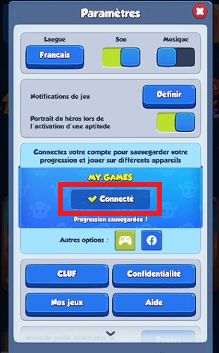
Still in Rush Royale Settings, click on the "Connected" button.
Still in the Rush Royale Settings, click on the "Connected" button ©️ Karen for Alucare.fr
  1. Click on the "Quit" button.
Always select the "Quit" button to switch from one account to another on Rush Royale!
Always select the "Quit" button to switch between accounts on Rush Royale ©️ Karen for Alucare.fr

WARNING : NEVER click on the "Logout" button!

  1. You will then need to click on the "Login" button.
After clicking on the "Quit" button, the button in the middle will turn orange and read "Login".
After clicking on the "Quit" button, the button in the middle will turn orange and say "Login" ©️ Karen for Alucare.fr
  1. Pressing it will take you to the login page for MY.GAMES and you'll need reconnect to your account.
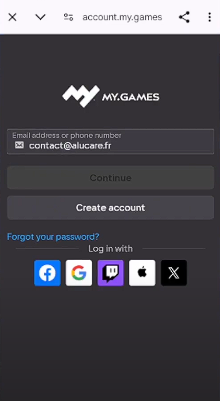
You_will_be_redirected_to_MY_GAMES

READ: NOW THAT YOU ARE RECONNECTED, you can follow the rest of the tutorial.

If you are not reconnected DO NOT PROCEED WITH THE REST OF THE TUTORIAL. Otherwise you will lose your account.

  1. Once connected again, click on "Start.
In the Game Settings, scroll down until you see "Start". Click on it to start a new game on Rush Royale
In Game Settings, scroll down until you see "Start". Click on it to start a new game on Rush Royale ©️ Karen for Alucare.fr
  1. Then select "New game.
After launching a "New Game" on Rush Royale, you will start with the tutorial
After launching a "New Game" on Rush Royale, you will start with the ©️ Karen tutorial for Alucare.fr.
  1. Watch the Rush Royale tutorial.
Here's an image of the tutorial on Rush Royale (Mobile)
Here's an image of the tutorial for Rush Royale (Mobile) ©️ Karen for Alucare.fr

4. Recovering certain rewards after the Rush Royale tutorial

Be sure to follow the list I'm about to share with you, because these rewards will help you set up your troops :

Collecting tutorial rewards

Once you have completed the tutorial, you can collect your first reward :
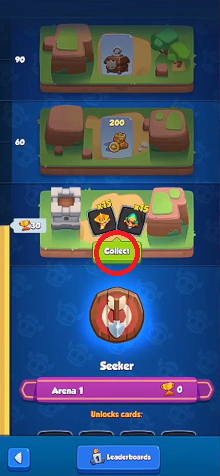
This is the only reward you'll need to collect in Arena 1.
This is the only reward you'll need to collect in Arena 1 ©️ Karen for Alucare.fr

Click on "Collect" or "Collect"then choose the Archer :
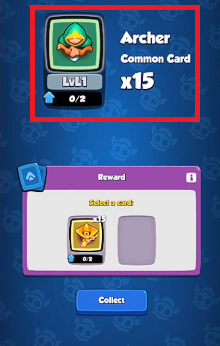
Here, you only collect one reward, so make sure you take all 15 "Archer" common cards.
Here, you only get one reward, so make sure you take the 15 common cards representing the Archer ©️ Karen for Alucare.fr

Recover referral code rewards

  1. Once this is done, concentrate directly on the icon of the magician holding a gift in his hands and click on it:

The mage with a gift in his hands is on the left of your screen. Concentrate only on him, and don't collect any other rewards before he does.
The mage with a gift in his hands is on the left of your screen. Concentrate only on him and don't collect any other rewards before he does ©️ Karen for Alucare.fr
  1. This is where you go enter the sponsorship code from your main account on Rush Royale :

By entering a friend's invitation code (the referral code from your main account), you'll reach Arena 2 and earn rewards.
By entering a friend's invitation code (the referral code from your main account), you'll reach Arena 2 and earn rewards ©️ Karen for Alucare.fr
  1. After confirming the code, you'll earn the following rewards :
Thanks to the referral code, you will be entitled to 4 totally free rewards
Your referral code entitles you to 4 free rewards ©️ Karen for Alucare.fr
  • An Avatar
  • 500 Gold
  • 10 common cards
  • The Reaper (Epic card)

Recovering rewards after connecting an RRID

  1. Then go to Settings or "Settings your account.
If you open the menu from the three horizontal lines, you'll see that some tabs are blocked and you'll get other notifications. But for now, just concentrate on your account's "Parameters" or "Settings".
If you open the menu from the three horizontal lines, you'll see that some tabs are blocked and you'll get other notifications. But for now, just concentrate on the "Settings" of your ©️ Karen account for Alucare.fr
  1. You'll need to create a new account on MY.GAMES by pressing theConnect“.
By creating an account at MY.GAMES, you can earn rewards at Rush Royale
By connecting an account to MY.GAMESyou'll earn rewards on Rush Royale ©️ Karen for Alucare.fr
  1. You will be redirected to the MY.GAMES and you'll need create a new account.
As a reminder, this new account will be created on the same phone as your main account on Rush Royale, so remember to make a note of the email address and password you'll be using.
As a reminder, this new account will be created on the same phone as your main account on Rush Royale. So remember to note down the email address and password you'll be using ©️ Karen for Alucare.fr
  1. Once connected, you'll reap the rewards below:
    • 100 Gems
    • 65 Common cards
    • 20 Rare Cards
    • 3 Epic Cards
    • 1000 Gold

Retrieve rewards from the "Community" tab

Then go to the "Community" tab to collect Gems.
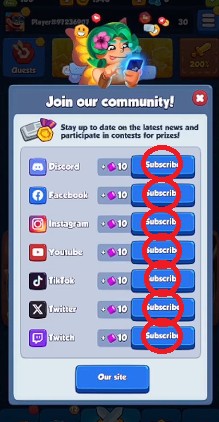
To redeem social network rewards, you must click on each "Subscribe" button.
To redeem social network rewards, you must click on each "Subscribe" button ©️ Karen for Alucare.fr

You'll gain 70 Gems free.

Remark : You don't need an account. Just return and move on to the next one.

Retrieve knowledge base rewards

Finally, you will need to collect the knowledge base rewards (Knowledge Base).
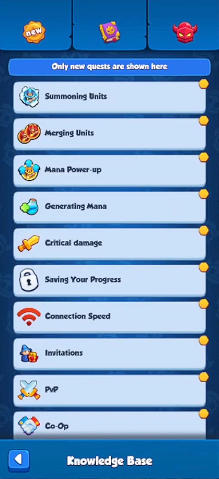
You can scroll through the list with a "chain click" and that's all there is to it.
You can browse the list by "chain clic"©️ Karen for Alucare.fr
This way, you get your hands on gold and gem coins en masse.

WARNING : Do not open anything else, be it a chest or any other reward!

By scrupulously respecting the list I've shared with you, you must be at :

  • 210 Gems
  • 2290 Gold
As in his video, Alucare has respected the list of rewards to be collected on his new account
As in his video, Alucare has complied with the list of rewards to be collected on his new account ©️ Karen for Alucare.fr

Remark : You have to wait until you reach 200 trophies to collect the rewards.

5. Build your starting deck on Rush Royale

We are now going to change default deck to reach 200 trophies.

The default deck on Rush Royale is made up of, in order: Archer, Poisoner, Fiery Mage, Thunder Mage and Ice Mage.
The default deck for Rush Royale is made up of, in order: Archer, Poisoner, Fiery Mage, Thunder Mage and Glacial Mage ©️ Karen for Alucare.fr

The Archer

Here's Archer's icon in Rush Royal
Here's the Archer icon in Rush Royal ©️ Karen for Alucare.fr

Mount theArcher to the max. He's a very good DPS now that he's got the talents :

  • From the level 4put the talent on the right.
  • Visit level 6Put the talent on the left.

The Poisoner

Here's the Poisoner icon in Rush Royale
Here's the Poisoner icon for Rush Royale ©️ Karen for Alucare.fr

Keep thePoisonerbut don't mount it! You'll quickly replace it as you move forward.

Tips : Keep only one on the board. If you get a higher tier, you merge the smaller tiers together.

Le Mage Ardent (to be replaced)

Here's the Fiery Mage icon in Rush Royale
Here's the Ardent Mage icon in Rush Royale ©️ Karen for Alucare.fr

Replace it immediately with the Priestess.

Here's the Priestess icon in Rush Royale
Here's the Priestess icon in Rush Royale ©️ Karen for Alucare.fr

You can raise the Priestess to level 6 as soon as possible. But don't go any higher, as it's not a full-fledged DPS.
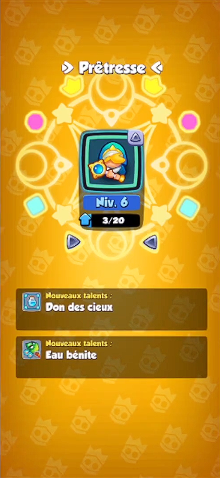
These are the talents obtained once you raise the Priestess to level 6: Gift of the Heavens and Holy Water
These are the talents obtained once you raise the Priestess to level 6: Gift of the Heavens and Holy Water ©️ Karen for Alucare.fr

Then choose the talent on the leftthe "Gift of Heaven".
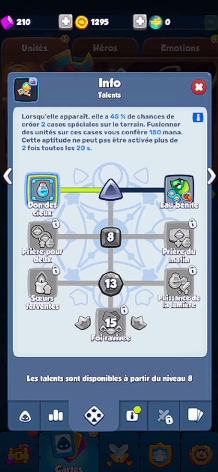
As soon as your Priestess is at level 6, choose the "Gift of the Heavens" talent to gain more Mana each time you merge on the Mana squares.
As soon as your Priestess is level 6, choose the "Gift of the Heavens" talent to gain more Mana each time you merge on the ©️ Karen Mana squares for Alucare.fr

Le Mage Tonitruant

Here's the Thunder Mage icon in Rush Royale
Here's the Thundering Mage icon in Rush Royale ©️ Karen for Alucare.fr

As with the Poisoner, you keep it for nowbut don't mount it.

All you need is one Thundering Mage on the tray. When you get a higher tier, you merge the smaller tiers together.

Le Mage Glacial (to be replaced)

Here's the Ice Mage icon in Rush Royale
Here's the Ice Mage icon in Rush Royale ©️ Karen for Alucare.fr

Replace it immediately with the Mower and raise its level as soon as possible.

Here's the Reaper icon in Rush Royale
Here's the Reaper icon for Rush Royale ©️ Karen for Alucare.fr

All you need isa single Reaper on the set. But when you get a higher tier, you can merge the smaller tiers together.

Once all the changes have been made, you will see the following deck:

This capture comes from the video of Alucare after the modifications to his deck: the Archer, the Poisoner, the Priestess, the Thunder Mage and the Reaper ©️ Karen for Alucare.fr
This capture comes from Alucare's video after modifications to his deck: Archer, Poisoner, Priestess, Thunder Mage and Reaper ©️ Karen for Alucare.fr

6. Win up to 200 trophies

Now you have the deck to go up to 200 trophies to unlock the Hunter and the Alchemist.

Here is the announcement of a Victory on Rush Royale
Here is the announcement of a Victory on Rush Royale ©️ Karen for Alucare.fr

Tips :

  • Fill your tray completely.
  • Don't watch commercials after wins
  • Keep on fighting until you reach 200 trophies.

WARNING : You still don't open ANY rewards!

Explanatory video in French by Alucare, ideal complement to the page. View video (you can use youtube's automatic translation)

7. Get more rewards from Rush Royale

Once the 200 Trophies have been reached, the serious business can begin !

Here's a look at the maps unlocked after reaching Arena 2 on Rush Royale
Here's a look at the maps unlocked after reaching Arena 2 on Rush Royale ©️ Karen for Alucare.fr

In order, you must :

  1. Collect career quests.
  2. Collect daily quests.
  3. Collect season quests.
  4. Refresh shop for buy the Hunter, the Alchemist and the Archer.
  5. Recovering division rewards.
  6. Retrieve your daily gift.
  7. Spend your gems in the Season Pass, open everything.
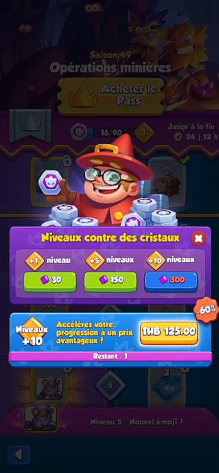
You unlock levels in the Season Pass by spending your gems.
You unlock levels in the Season Pass by spending your ©️ Karen gems for Alucare.fr

Remark : If you don't get any Hunters or Alchemists, you can continue with the same deck until you do.
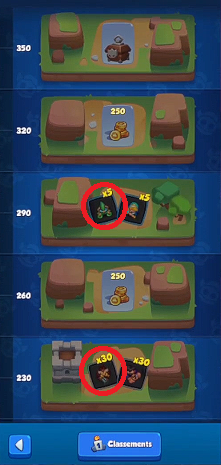
You can collect the Hunter at 230 trophies and the Alchemist at 290 trophies.
You can collect the Hunter at 230 Trophies and the Alchemist at 290 Trophies ©️ Karen for Alucare.fr

8. Adjusting your deck with the Hunter and the Alchemist

Once you have the troops you need, you can modify your deck on Rush Royale.

The Hunter

Here's the Hunter icon in Rush Royale
Here's the Hunter icon in Rush Royale ©️ Karen for Alucare.fr

He replaces l'Empoisonneur. Then raise the level of your Hunter :

  • From the level 4Put him on the right-hand talent (Big Game).
  • If you arrive at the level 6Put him on the right-hand talent (Sudden Fire).

The Alchemist

This is the Alchemist icon in Rush Royale
Here's the Alchemist icon in Rush Royale ©️ Karen for Alucare.fr

He replaces Mage Tonitruant. Then raise the level of your Alchemist :

  • From the level 6If you've got the right-hand talent (Combat Elixir), give it the right-hand talent (Combat Elixir). Once they've launched their vials, you can merge them together (No vial with no vial).
  • Optional : If you manage to get him up to level 8, give him the right-hand talent (Successful experience).

Remark : Don't forget to increase your Archer's level as soon as you can. If he reaches level 4, choose the talent on the right (Explosive Arrows).
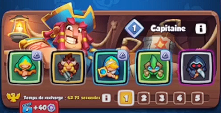
Your deck should look like this if you have followed the tutorial correctly
Your deck should look like this if you have followed the tutorial ©️ Karen for Alucare.fr

As soon as you have rewards to collect, keep increasing:

  • l'Archer, the Hunter, l'Alchemist and the Mower.
  • Priestess remaining level 6 MAX.

9. Fight to 1000 trophies

Now that your deck is ready, I'm going to to share tips for future battlesespecially against certain boss :

  1. For each fight : Fill your tray and merge only to make room as you go.
  2. Against Bedlam: Try to have a balanced board and merge the Priestesses to get a Mana boost.
  3. Against the Puppeteer: Prohibition to make "power up"from Mana.
  4. Against the Tribunal : Three seconds before he arrives, merge as much as possible to empty your board and save your mana. Once he's cast his spell, immediately go back to filling your board.
  5. Against the Sorcerer: Merge the targeted unit if you can, to avoid losing a troop.
  6. Against the Gorgon: You don't have to do anything special, you just have to make a mess.
  7. Against the Tamer: You don't have to do anything special, just kill him.

As a reminder, the power up mana is just as important than your units, so don't neglect it.

If you'd like to find out how I use this deck live, please visit watch my video at the top of the article from time code 9:00 where I show you a demo to get up to 1000 Trophies.

10. Return to your main account in Rush Royale

Once you have reached 1000 Trophies on your mini accountClick here to return to your main account to see the progress of your quest for the Royal Duck.

This capture comes from Alucare's video, once he's back on his main account. His second account "minialu" is still there, with its 240 trophies.
This capture comes from Alucare's video, once he's back on his main account. His second account "minialu" is well present with its 240 Trophies ©️ Karen for Alucare.fr

The creating a duck account like this will take you between 1h30 and 2h (from start to finish). It all depends on your victories and defeats.

Found this helpful? Share it with a friend!

This content is originally in French (See the editor just below.). It has been translated and proofread in various languages using Deepl and/or the Google Translate API to offer help in as many countries as possible. This translation costs us several thousand euros a month. If it's not 100% perfect, please leave a comment for us to fix. If you're interested in proofreading and improving the quality of translated articles, don't hesitate to send us an e-mail via the contact form!
We appreciate your feedback to improve our content. If you would like to suggest improvements, please use our contact form or leave a comment below. Your feedback always help us to improve the quality of our website Alucare.fr


Alucare is an free independent media. Support us by adding us to your Google News favorites:

Post a comment on the discussion forum

Rush Royale

Released on : December 15, 2020

Developed by : IT Territory

Edited by : My.Games

Available on : PC, Android, iOS

Genres : Multiplayer, Tower defense, Strategy