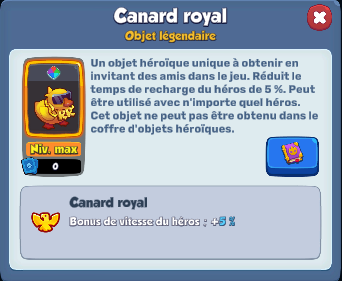
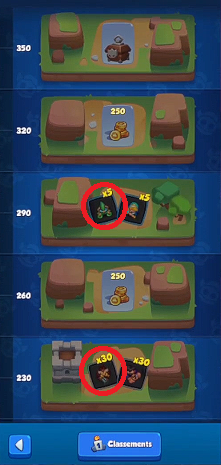
the Royal Duck is obtained by increasing a secondary account up to 1,000 Trophies thanks to your referral code. This guide walks you through every step: creating a new account, building the right starting deck, and racking up wins until you unlock the Royal Duck in your main account.
To support me for free, use the code ALU in the game store.
You're just getting started with Rush Royale And are you looking for a clan that really helps new players? You can join us:
⚔️Rejoindre the Discord from Mustangs⚔️
Explanatory video in French by Alucare, ideal complement to the page. View video (you can use YouTube's automatic translation)

1. Copy sponsorship code
The first step involves retrieving your referral code. This code is essential for unlocking your second account and progressing toward the Royal Duck.
Here's how to do it in Rush Royale :
- Start the game, then press the button in the upper right corner from the main menu.

- Once the menu is open, select «Friends», the first button in the list.

- In your friends list, Open the «Invitation» tab» located on the right, then press the «Invite» button».
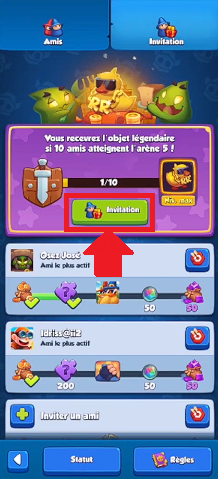
- This action copies a link you should bookmark. For example, paste it into the Notepad app on your smartphone.

Remark : The referral code is at the end of the link, right after « code= ». It's a a sequence of 13 uppercase letters and numbers.
- Keep this code safe : You need it before you reach the 200 Trophies on your new account.
2. Back up your main account on Rush Royale
Before you go any further, make sure you have backed up your main account via RRID. This is a step you absolutely must not skip. Without this backup, you risk losing all your progress on Rush Royale.

Once your progress has been saved, be sure to note the email address and password from your main account. You'll need it later to log back in.
3. Create another Rush Royale account from the same phone
You can create multiple accounts on the same phone as your main account. However, you You must follow these instructions exactly. so you don't miss a thing:
- Once you've successfully backed up your main account via RRID, press the button «Connected».
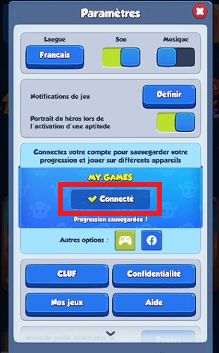
- Press the «Exit» button».

WARNING: NEVER click the «Log Out» button. It's not the same as «Quit.».
- Next, click the button "Connection.

- Click on it. You'll be redirected to the page for MY.GAMES Login to log back into your account.
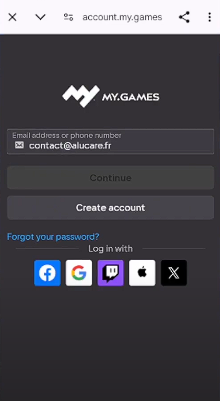
Important: Don't continue unless you're logged in again. If you aren't, the new game will overwrite your old account without saving, and you'll lose all your progress.
- Once you're logged in again, click «Start».

- Then select «New Game».

- Complete the Rush Royale tutorial in its entirety.

4. Recovering certain rewards after the Rush Royale tutorial
Be sure to follow the list of awards below. These units and resources will help you field your first troops on Rush Royale.
Collecting tutorial rewards
Once you've finished the tutorial, you can Claim your first reward in theArena 1.
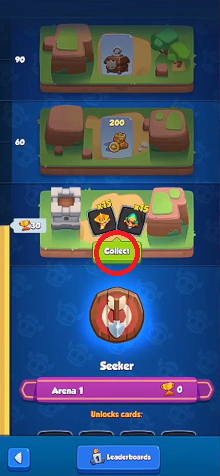
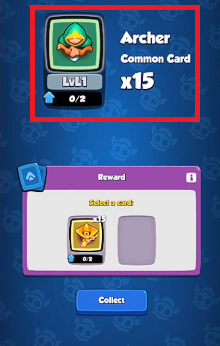
Tap «Collect» or « Collect », then Choose the Archer. You only get one reward here: be sure to take the 15 common cards representing the Archer.
Recover referral code rewards
- Once that's done, mark the icon of the mage holding a gift on the left side of your screen and tap it. Focus only on it and don't collect any other rewards before that.

- That's where you're going Enter the referral code from your main account. When you enter this code, you'll be taken to the’Arena 2 and you earn rewards.

- After confirming the code, You'll earn the following rewards :

- An Avatar
- 500 Gold
- 10 common cards
- the Mower (Epic Card)
Recovering rewards after connecting an RRID
- Go to Settings (or « Settings ») from your account.
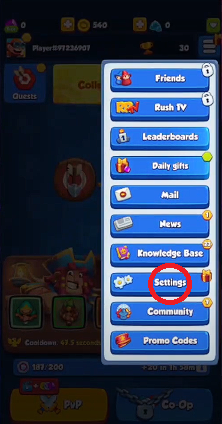
- You're going to Create a new account on MY.GAMES by pressing the Connect ".

- You will be redirected to the MY.GAMES login page. There, Create a new account. Be sure to write down the email address and password you used.

- Once connected, You'll receive the following rewards :
- 100 Gems
- 65 Common cards
- 20 Rare Cards
- 3 Epic Cards
- 1000 Gold
Claim rewards from the «Community» tab»
Next, go to the «Community» tab» to get free Gems. Tap each «Subscribe» button: you don’t need to create an account—just hit «Back» right away and move on to the next one.
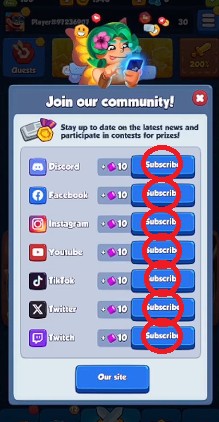
That's how you win 70 Gems free.
Redeem Rewards from the Knowledge Base
Finally, collect the rewards from the knowledge base (Knowledge Base). Browse the list by « chain clic » to get your hands on some’Gold and Gems en masse.
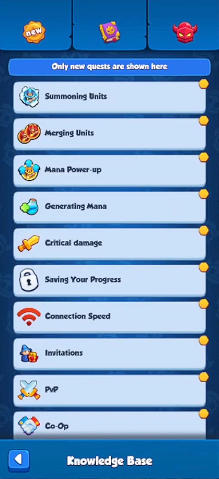
Attention : It does not unlock anything else at all—neither a chest nor any other reward. By strictly following the list above, you should be at:
- 210 Gems
- 2290 Gold

Remark : You must reach the 200 Trophies before you can claim these rewards.
5. Build your starting deck on Rush Royale
Now you're going to change default deck to aim for your first 200 Trophies. Keep the good units and replace two of them. If you want to take it a step further, check out the best deck to advance to the next stages.

The Archer

Put the’Archer to maximum. That's your best DPS at the start, especially once he has acquired his talents:
- From the level 4, take the right-wing talent.
- Visit level 6, take the left-wing talent for a real damage bonus over time.
The Poisoner

Keep the’Poisoner, but don't equip it. You'll quickly replace it as you progress through the arenas. Leave only one on the board: if you get a one level higher, merges the small thirds together.
Le Mage Ardent (to be replaced)

Replace it immediately by the Priestess.

Put it on Priestess up to level 6 as soon as possible, but no higher: this isn't a full-fledged DPS; it's a true support in mana.
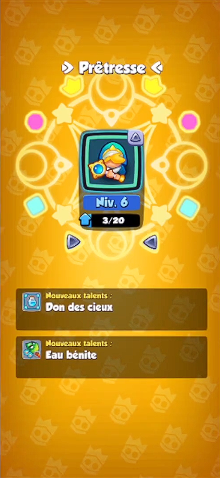
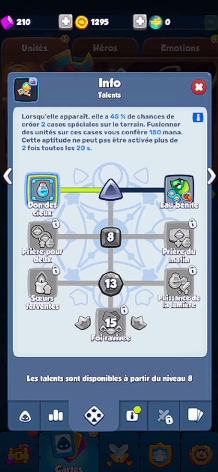
Prioritize talent from the left, namely the «Gift from the Heavens»: you gain more mana every time you fuse on mana tiles.
Le Mage Tonitruant

Keep the Thundering Mage without leveling it up. Same rule as for the Poisoner.
Le Mage Glacial (to be replaced)

Replace it immediately by the Mower and upgrade it as soon as possible. Same rule as for the Poisoner: only one on the board; merge the lower-level ones together when you get a higher-level one.

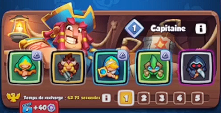
Once you've made all the changes, your deck will look like this:

6. Win up to 200 trophies
Your starting deck is ready to climb up to 200 Trophies. This is the step that unlocks the Hunter and theAlchemist, two units that will come in very handy later on. To move from one battle to the next as quickly as possible, keep these tips in mind:
- Fill up your entire tray in each round. The more units you deploy, the higher their level and your damage will be.
- Don't watch the commercials offered after wins. You save time on every game.
- Keep fighting until you reach the 200 Trophies.

Attention : You still shouldn't open ANY rewards at this point. Keep your chests and bonuses closed for now.
Explanatory video in French by Alucare, ideal complement to the page. View video (you can use YouTube's automatic translation)

7. Get more rewards for Rush Royale
Once the 200 Trophies Once you've reached these goals, you'll unlock the’Arena 2. New maps are becoming available, and most importantly, new awards to pick up before continuing on your way to the 1,000 Trophies.

In order, you must:
- Retrieve the career goals.
- Retrieve the daily quests.
- Retrieve the seasonal quests.
- Refresh the store to buy the Hunter, the Alchemist and the Archer.
- Retrieve the division awards.
- Get your daily gift.
- Spend your gems in the Season Pass, and open everything.
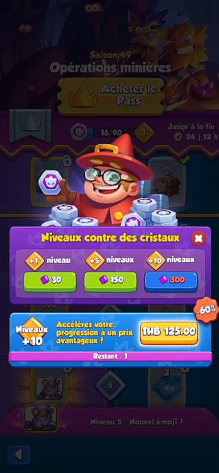
To note : If you don't draw any Hunters or Alchemists, don't panic. Keep playing with the same deck until you draw one.
8. Customize your deck with the Hunter and the Alchemist
Once you've combined these two units, you can edit your deck.
The Hunter

He replaces l'Empoisonneur. Then turn up the volume Hunter To increase its damage:
- From the level 4, select the talent on the right (Big Game).
- If you reach the level 6, choose the talent on the right (Sudden Shot).
The Alchemist

He Replaces the Thunder Mage. Then turn up the volume Alchemist :
- From the level 6, select the ability on the right (Battle Elixir). Once they've thrown their vials, you can merge them with each other. Note: You can only merge a unit without a vial with another unit without a vial.
- Optional : If you go up to the level 8, choose the talent on the right ("Successful Experience").
Remark : Don't forget to level up your Archer as soon as you can. If he reaches the level 4, select the ability on the right (Explosive Arrows) for a real damage boost.
As soon as you have rewards to claim, keep upgrading your key units first:
- L'Archer, the Hunter, I'Alchemist and the Reaper.
- The Priestess remains at the Level 6 maximum.
9. Fight to 1000 trophies
Your deck is ready. Here are some tips for winning battle after battle until 1,000 Trophies, particularly against certain boss models from Rush Royale :
- For each part: Keep your board full at all times. Only merge tiles to make room as you go.
- Against Bedlam: maintains a balanced diet. Combines the Priestesses to trigger a mana boost.
- Against the Puppeteer: prohibition against making a power up of mana.
- Against the Tribunal : Three seconds before it arrives, merge as many units as possible to clear your board and conserve your mana. Once its spell is cast, immediately start refilling your board.
- Against the Sorcerer: Merge the targeted unit if you can, to avoid losing a troop.
- Against the Gorgon: Nothing special—just do as much damage as possible.
- Against the Tamer: Nothing special—you can take him down easily.
As a reminder, the A mana boost is just as important as your units. Never overlook it.
Explanatory video in French by Alucare, ideal complement to the page. View video (you can use YouTube's automatic translation)

10. Return to your main account in Rush Royale
Once the 1,000 trophies earned on your mini account, go back to your main account. You'll then see the Your Quest Progress to obtain the Royal Duck in Rush Royale.

In practice, setting up a dummy account like this one takes you between 1 hour and 30 minutes and 2 hours approximately, from start to finish. This time varies depending on your wins and losses: the more consecutive battles you win, the more you reach the Required trophies quickly.
Don't forget the code ALU in the in-game store to support me for free!








 FR
FR  RU
RU  EN
EN  ES
ES  IT
IT  DE
DE  ZH
ZH  PT
PT  ID
ID  JA
JA  DA
DA