Visit All active gift codes on PUBG-Mobile. Copy them from the list below, then follow the tutorial to enable.
Bonus for PUBG Mobile:
You can also earn money by playing PUBG Mobile :
PS : The game may no longer be available. To get your €5 bonus, install at least one game within 24 hours.
List of gift codes on PUBG Mobile
Disclaimer: This article will be updated as coupons for the game become available.
Here is the complete list of gift codes for PUBG Mobile that are still active:
- CMCKZBZBAW
- CLPOZFZ56S
- CLPOZEZVEG
- CLPOZDZ6PP
- CLPOZCZTVW
- CLPOZBZ6JE
- CLHFZFZ7VE
It's best to copy and paste the code from this list to avoid any typing errors. Just one character entered incorrectly is enough for the code to be rejected on the official website.
This list is updated regularly. If a code no longer works, please let us know in the comments.
How to use gift codes on PUBG Mobile?
To redeem a gift code, you go through the official exchange website, not directly through the game.
Step 1: Find your Character ID (player ID)
This is the most important step. Your player ID is long and is used to credit the correct account.
- Open the app PUBG Mobile.

- On the main lobby screen, opens the «Player Profile» section». It's usually in the top-left corner; just click on your avatar.

- Your Character ID (also known as User ID) appears next to your name.

- Copy this ID and paste it into a notepad. Given its length, this is the best way to avoid typing errors on the exchange website.
Step 2: Access the exchange portal
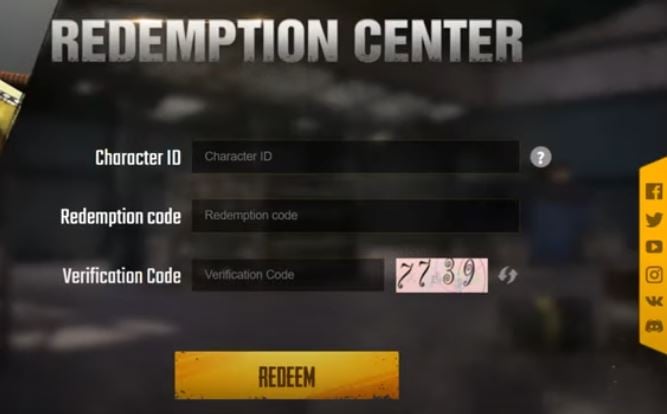
Go to the PUBG Mobile's official code exchange page. You must enter three pieces of information there:
- Character ID (player ID): Paste the one you just got.
- Redemption Code (gift code): Enter the code you want to use.
- Verification Code (captcha): a short code displayed next to it, to prove that you're not a robot.
Step 3: Validate and collect rewards
- Click on the Redeem (exchange) or «OK».
- If the code is valid and the ID is correct, a success message appears.
- Go back to PUBG Mobile to claim your rewards.
Please note: Your rewards don't automatically appear in your inventory. They go into your mailbox («Mail») in the game.
Advice : keep your Character ID in a text file. You won't have to restart the game every time you enter a new code.
For more gift codes for other games:
- Discover all the Frag Pro Shooter gift codes.
- Don't miss the gift codes for Critical Strike.








 FR
FR  RU
RU  EN
EN  ES
ES  IT
IT  DE
DE  ZH
ZH  PT
PT  ID
ID  JA
JA  DA
DA