In this article, you'll find codes Shining Nikki and a tutorial on how to use them.
Disclaimer: This article will be updated regularly to add new codes as they become available.
BONUS for Shining Nikki:
You can earn money by playing Shining Nikki:
PS : The game may no longer be available. To get your €5 bonus, install at least one game within 24 hours.

List of usable codes
Copy and paste each code directly from the list to avoid typing errors, which are very common with capital letters and numbers.
Here is the list of valid codes:
- beautyboost0825 – 100 pink gems (new!)
- masterpiece0901 – 100 pink gems (new!)
- OURSHAREDWANDER – 120 pink gems, 100 stamina points, 80,000 gold coins, 6 Memory Keys: SR, 15 Memory Keys: R
- JOURNEYBEGINS – 2 Event Summon Tickets, 100 pink gems, 10 Fantasy Tickets, 1,060 Stamina Points, 300,000 gold coins, 100 Memory Clues, 100 Memory Keys: SR, 250 Memory Keys: R (new!)
- FIVEYEARSWITHNIKKI – 365 pink gems, 5 Fantasy Tickets, 666 stamina points, 80,000 gold coins
- YUKAJAX0531 – 35 pink gems, 25,000 gold coins, 50 stamina points
- AEONMARINA0529 – 35 pink gems, 20,000 gold coins, 50 stamina points
- GoldRain : 1,000,000 Gold
- DragonGirl 80 pink gems, 2 fancy tickets
- happyaprilfools 50 pink gems
- PinkGemsComing 100 pink gems, 200 energy
- FollowYourHeart0320 : 20 Pink Gems, 10 Poems of Time, 10,000 Gold
- SUNANDMOON 50 pink gems
How do I use codes in Shining Nikki?
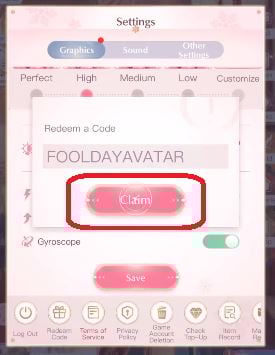
To activate a code in Shining Nikki, you need to go through the data entry menu for the gift code. Here are the steps to follow:
- Spear Shining Nikki and Complete the introductory tutorial. The code entry field becomes available once the tutorial is complete.
- Stay on the main screen of the city or the lobby before continuing.
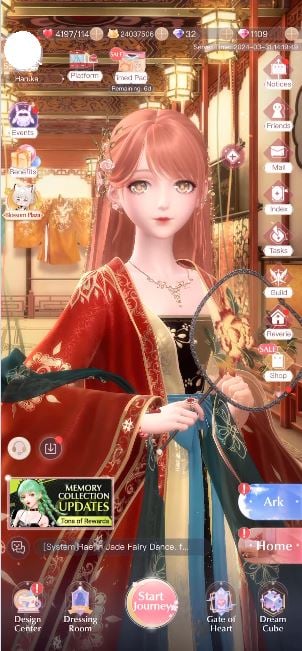
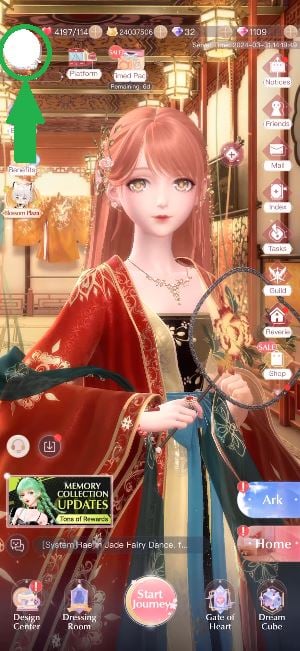
- Open Settings: hit your avatar, then tap the «Settings» icon (the gear).
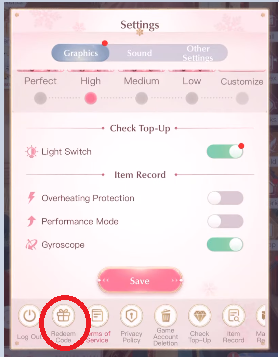
- Find the section on codes: In the settings, select the option «Enter the gift code» (also known as Redeem Code Where Gift Code).
- Enter the code: Enter your gift code in the text field provided.
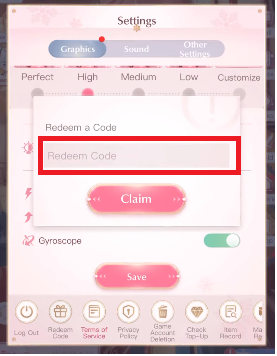
- Confirm the code: Press the confirmation button to receive your rewards.
How long are the codes valid?
The validity period varies by code. Some are valid for a few days, others a few weeks. Activate them as soon as you get them so you don't miss out.
A rejected code is often a code expired or already used on your account.
Where can I find new codes?
The new redeem codes are distributed during the events, anniversaries, and game updates. Keep an eye on this page Alucare, updated as soon as a new code is released.
For more codes for other games:
- Discover all the codes for Call of Duty: Mobile
- Don't miss the Brawlhalla codes








 FR
FR  RU
RU  EN
EN  ES
ES  IT
IT  DE
DE  ZH
ZH  PT
PT  ID
ID  JA
JA  DA
DA