A2F from Epic game
Hey, are you looking to find out what the A2F, the double authentication Fortnite or epic games, how it works, or even how theenable where the deactivate ?
Don't forget that you receive a reward. (More info below)
Then you've come to the right place. First, we'll explain what A2F is used for and why this protection is in place.
What is the A2F epic game?

L'A2F is a security mode for your epic games account, if you want to connect to your account from a new place or computer you will then receive a email fromepic games asking you to accept this new location using a CODEDThis code is sent directly to your contact email address, and if you do not use this code to log in, you cannot play or install any games on the Epic game platform.
Is it useful?
So YES! You should know that for a while, I myself had access to more than 75,000 fortnite accounts Steal! It's pretty simple since now there are "robots" that can log into accounts. If they manage to log in, they notify the person who set them up. That person either resells the accounts (if there are skins) or gives them away (I got my accounts this way, and since I like to test everything, I set it up myself). So I can tell you one thing: A2F (two-factor authentication) IS ULTRA IMPORTANT, if you don't want your account to be stolen!!! (unless you have an unsecured mailbox (I recommend Gmail for security)
You should know that the easiest way for hackers is to have your password and email (on another platform) so CHANGE YOUR PASSWORD AS OFTEN AS POSSIBLE.
If you want me to go into more detail about how it works, I'll explain (just leave a comment or ask me on Discord). The more we know about how a hack is possible, the easier it is to protect ourselves from it! So, on any type of platform, set up two-factor authentication. If it's available, it's often useful! (linked bank card, possible sale of the account, etc.)
How do I activate two-factor authentication on Epic Games?
So, activating it is very simple. Just go to the epic games websiteHere is the link (you can click on it to open it in a second tab and follow the tutorial at the same time). CLICK HERE.
FYI, this should take you DIRECTLY to the password change page and 'TWO-FACTOR AUTHENTICATION‘.
(to see it you have to scroll down to the bottom of the page)
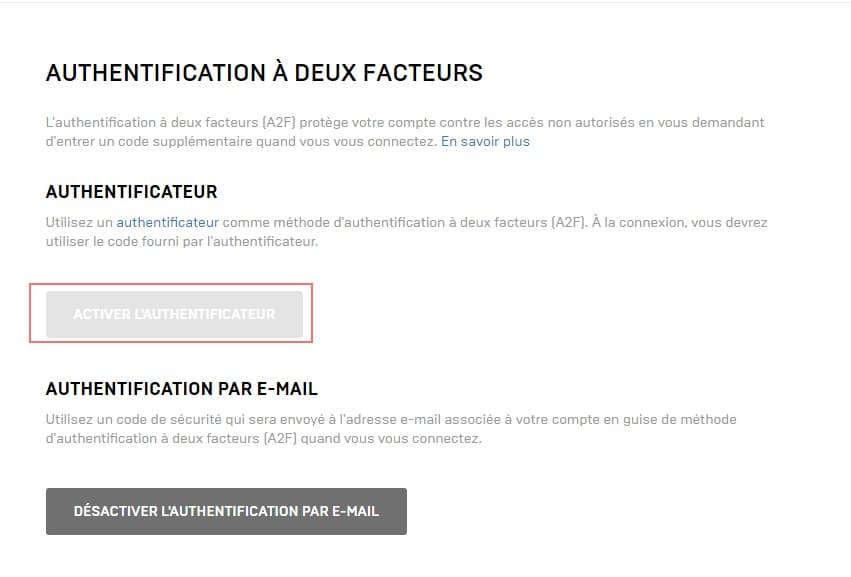
Click on 'Enable authenticator‘
Choose between phone and email, if you decide to choose Email you will receive emails in the following type:
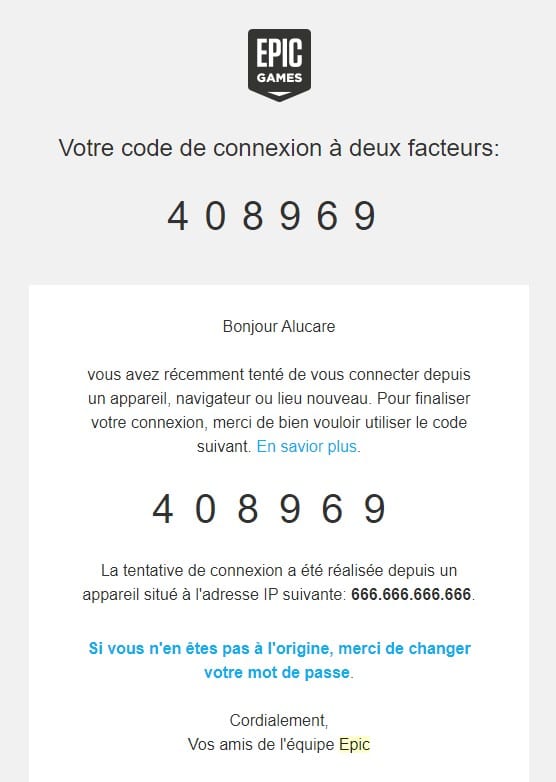
After that, if you want to log in, you will need to enter a code received either by an "authenticator" or by email, as described above.
If you choose by phone, you must download Google Authenticator, LastPass Authenticator, Microsoft Authenticator, or Authy and link it to Epic Games. I recommend Authy, or else do it by email if it is a secure email such as Gmail!
For your information, you are not required to enter it each time you log in. You can request that it not be requested for 30 days, provided that you do not delete the cookies on your computer.
How do I create an Epic Games account?
To create an Epic Games account, follow this link and fill in the requested information. Once your account has been created, you can activate 2FA to secure your account.
Free fortnite skin and dance/emote?
If you activate the A2F from Epic gamesIn the game Fortnite, you are entitled to the Boogie Down emote for free!
Those who play Save the World will receive :
- 1 legendary troll loot llama
- 10 backpack slots
- and 50 slots in their arsenal
I hope this page and tutorial have been helpful. If you still have questions, feel free to leave a comment below!
Feel free to share this page as much as you can for more security on Fortnite and less account theft! (Change your password often enough too!)
Back to Fortnite Wiki:









 English
I would like to have the A2F to offer the Rubi skin.
Hi
I would like to have the 2f
how to activate the 2f please ji can't
You have read the article? 🙂