On Instagram, The Enter key is actually there in the Biography field, but it's hidden: on an iPhone, you have to use the number pad (123 key) to make it appear.
And even once you've found it, Instagram sometimes removes your line breaks when you save it, especially blank lines. The most reliable method is still to write your bio somewhere else, then copy and paste on your Instagram profile.
Why Does Instagram Remove Your Line Breaks?
When you press Enter in the field Instagram Bio, a single line break between two lines of text is generally preserved.
When you save a post on Instagram, it removes blank lines (when you press Enter twice to add spacing) and line breaks preceded by a space at the end of the line.
Result:
Some of your formatting is being skipped, and your text ends up crammed together. This behavior also applies to post captions, and it may vary depending on your device and the app version. That's why the safest method involves writing your text outside of Instagram.
Main method: Using the Notes app to create line breaks

This is the most reliable method for add line breaks in your bio or captions. It works on telephone as on computer, without any third-party tools.
Here are the 3 steps more ..:
- Open the’Notes Application on your iPhone Where Android, or a simple text editor on your computer. Keep a draft from your bio in your notes so you can easily paste it back in whenever you want to edit it.
- Write your text and press Entrance whenever you want a line break. Be sure to check the spacing between lines before continuing.
Here's an example:
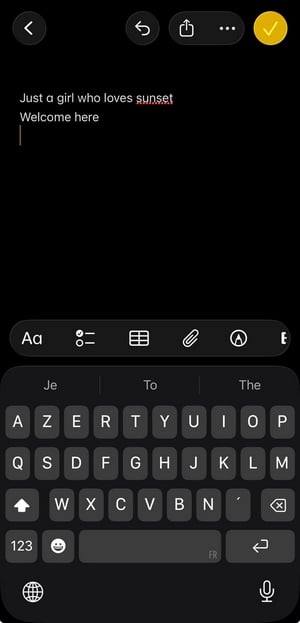
- Select all the text, copy it, and then paste it into the field Biography of your instagram account.

Attention : Do not make any further adjustments after gluing. Even the slightest change can delete your spacing and line breaks. If that happens, delete everything and paste it back in from your notes.
Here's the rendering:
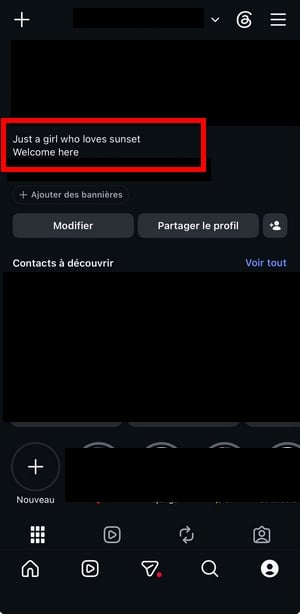
Method Using an Invisible Character to Force Line Breaks
Another method A common method is to insert a invisible character between each line. This character, which is invisible to the naked eye, prevents Instagram from removing the spaces.
Here's how it works:
- Write your bio in the’Notes Application, line by line.
- Between each line, insert a non-breaking space or an invisible character (you can use find on websites dedicated to formatting instagram). Some users simply use a dot on a single line to create a space visual.
- Copy the whole thing and paste it into your field Biography.
The final result is lines clearly separated on your profile, even after registration. It is a option Useful if the first method does not produce the desired result.
Use Instagram on your computer to write your bio
From a browser at computer, you can access your Instagram profile and edit your biography directly. This option offers greater control over the line breaks.
Open Instagram In your browser, click on your profilethen on Modify profile. In the field Biography, you can paste the text you've prepared into your notes.
The spaces are often better preserved in the web version than in the mobile app. Check how they look after saving, and adjust them if necessary.
Add line breaks to captions and stories
Line breaks in captions follow the same logic. When you write a caption for a post or video, a single line break is usually fine, but Instagram removes blank lines and line breaks followed by a space.
The solution remains the same: write your legend in the’Notes Application, opens the field of publication, then paste the text without making any changes. Your jumps will remain intact in the publication final.
In Stories, it's perfectly possible to insert a line break.
For the legends of videos, be sure to use the first ones lines to grab people's attention. The legends Long ones are truncated after a few lines : Place the most important information at the top, before the “See more” link.
How do you center the text in your Instagram bio?
instagram does not offer a built-in option to center the text in your biography. You have to go through a tool an online platform specializing in the implementation of shape organic.
Here's how to do it:
- Looking for a tool text alignment for instagram (Several websites offer this option (for free).
- Type or paste your text into the field provided.
- Select the centered alignment and copy the result.
- Paste it into the field Biography of your profile.
Centering works by using spaces invisible characters placed before each line. The result may vary depending on the screen, but it remains legible for the vast majority of your audience. That's a good way to give your Instagram profile.
Add special characters and symbols to your bio
The special characters and the game's symbols help make your biography more original. You can use arrows, stars, geometric shapes, or symbols typographic symbols to replace standard bullets.
The method is simple:
- Find the symbols that match your Mark or to your style (specialized websites offer thousands of characters (copyable).
- Paste them into your text in the’Notes Application, at the beginning of line to create a visual list effect.
- Copy everything and paste it into your bio Instagram.
You can also to add emojis at the beginning of each line to replace the chips. It's a tip widely used by accounts with a lot of’subscribers, because it breaks up the text and draws the reader's attention to each important point.
The characters in stylized bold or italic (created using tools implementation shape) are also a option to help you stand out. They don't require any application : Just copy the formatted text and paste it into your biography.
Tips for an Effective Instagram Bio
Once you've line breaks Once you're set up, focus on the content. The goal: to make people want to follow you in just a few points key points and improve your commitment.
- Square 2 or 3 keywords clear descriptions of your business, your Mark or your business.
- Add a call to action at the end line : “Click on the link,” “Check out my latest video“, “Write to me at comment“.
- Inserts a hashtag or a reference to another account : Instagram automatically turns it into a clickable link.
- Remember to to share your main link to keep all your other links in one place social networks or your website.
- Stay below the 150 characters allowed so that your bio appears in full without being truncated.
See also the accounts who have a lot of’subscribers within your topic. Observe how they structure their lines, their emojis, and their calls to action on this social network. It's the best way to come up with concrete ideas for improving your own bio.
You can also add a personal touch and Change the font in your Instagram bio.
Optimize the "Name" field to appear in more results
The field Last name of your profile is indexed by the search engine of’instagram. The words you put there directly influence your visibility when your audience Type a query.
Here's how the’improve in just a few points :
- Press Modify profile, to the right of your photo in profile.
- Open the field Last name, just below the photo.
- Replace the existing text with a name that represents you, with one or two words clear (your topic, your profession, your Mark).
- Press Finish in the upper right corner to confirm.
The "Name" field is different from yours username (your @). This is unique on the platform, while the Name field is primarily used to help others find you and to describe what you shares on this social network. Some users list their main line of work, such as “Fitness Coach” or “Photographer,” to get greater visibility in the pages results.
List your accounts and hashtags in your bio
You can insert clickable text directly into your bio. You have the right to to add a hashtag or a reference to another account : instagram automatically turns it into a link.
It's handy if you're in charge several accounts for your business or your Mark, or if you want to share a campaign centered on a hashtag precise. For to add a hashtag below in your bio, open your profile, press Modify profile, then type the hashtag (for example #alucare) or the @ symbol followed by the name of the account directly in the field Biography.
The publications and posts large brands use regularly this tip to centralize their accounts related and get greater visibility. It's a simple way to’improve your profile without tool additional.
Get inspired by accounts with a lot of followers within your theme. Observe their bio, their legends and their publications to find your own way to introduce yourself and attract Instagram followers.







 English