Legends of Elements is a mobile MMORPG an open-world idle game available on android and iOS, where you awaken elementary powers to automatically fight demons and dragons.
Here are all the active promo codes from the game: copy them quickly, because they're temporary and offer gems, materials, and source objects.
BONUS:
If you make in-game purchases, you can use Aptoide to pay less for your packs:
You can also earn money by playing Legends of Elements:
P.S.: If "Legends of Elements" is no longer available on FreeCash, install another game in the 24 hours To unlock your €5 bonus.
Disclaimer : This article adds new codes as soon as they are released.
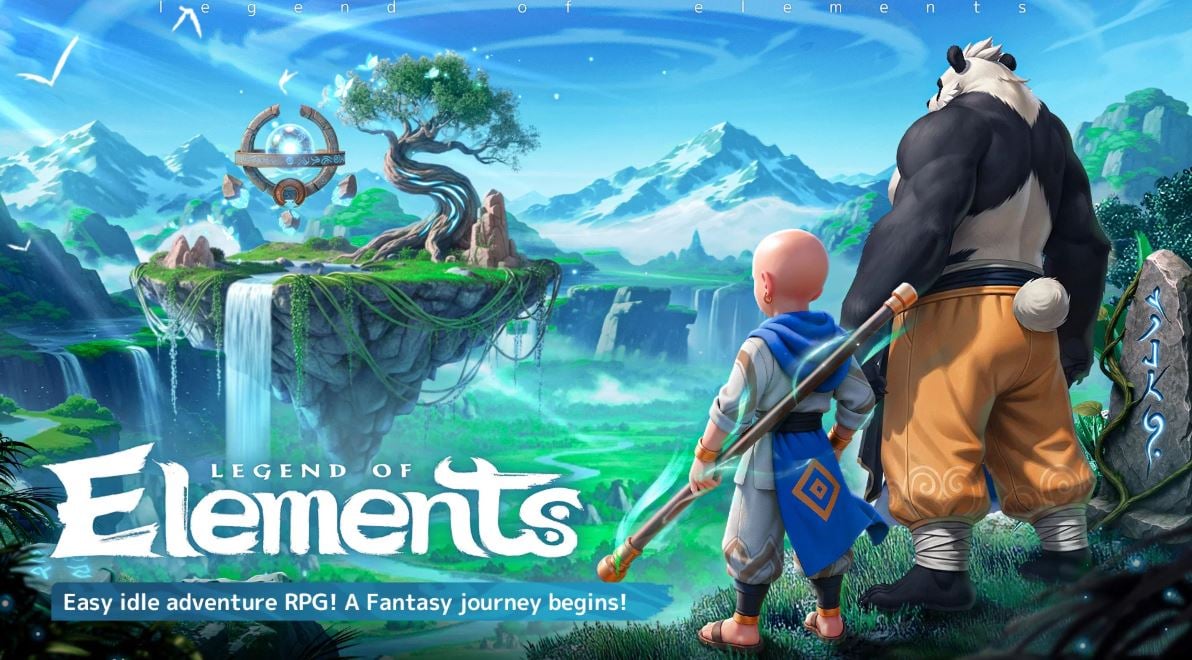
List of all active promo codes for Legends of Elements
Here are the active promo codes on Legends of Elements, verified in September 2026. Each code gives you free rewards (gems, gold, items) that can be collected directly in the game.
- Food
- Demon
- DC10K
- CREATOR
- LOEOG
- LOE123
- LOE1M
- LOE1010
- LOE1337
- LOE500K
- LOE777
- LOE2025
- WELCOME (Welcome rewards to get you started)
These codes generally offer gems, progression resources, and starter items. These are really useful rewards that help you advance faster in this mobile game.
Tip: Codes can expire without warning, and new ones are added with every event or major update. Be sure to check back on this page regularly so you don't miss any new codes.
How to use promo codes on Legends of Elements?
Enter a gift code on Legends of Elements It takes less than a minute. Follow these steps:
- Open the game and tap the icon Profile on the main screen.

- In the new window, open the settings then press the « Gift code ".
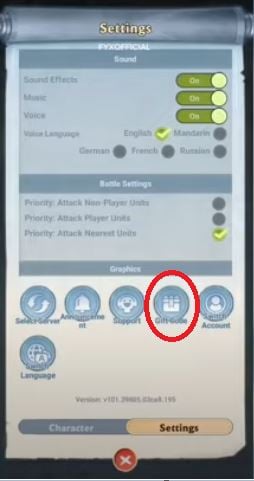
- Select one of the codes from the list above into the text box provided.

- Click on « Exchange » to receive your awards in play.
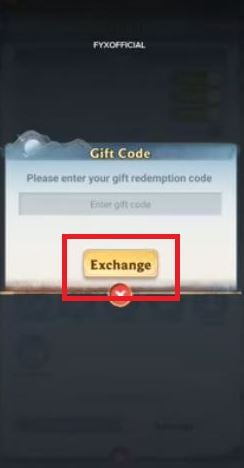
A valid code will credit your winnings in a few seconds. If nothing appears, check the’correct spelling the code before trying again, or move on to the next one in the list.
Why isn't the promo code for Legends of Elements working?
There are several reasons why a promo code to operate on Legends of Elements :
- Code expired: This is the most common cause. Most codes are temporary and have an expiration date set by the development team.
- Usage limit reached: Some codes are valid only for the first few thousand players. Once this limit is exceeded, the code no longer works.
- Already used on your account: Each code claims to be only’only once per account. If you've already entered it, it becomes invalid on the second attempt.
- Input error: The codes are fragile (upper- and lowercase letters) and spaces. It's best to just copy and paste them directly.
Where can I find new codes for Legends of Elements?
New codes are released regularly, often on the occasion of’special events or download tiers. So you don't miss a thing:
- Follow the official social media accounts of the game (page Facebook and community account).
- Join the Discord official, where the team prioritizes sharing code.
- Check back on this page—it will be updated as soon as a new code becomes available.
Looking for more gift codes for your mobile games? Check out our articles on Code Legend of Mushroom Where Mech Arena Code.







 FR
FR  RU
RU  EN
EN  ES
ES  IT
IT  DE
DE  ZH
ZH  PT
PT  ID
ID  JA
JA  DA
DA