Coosub lets you pay less netflix , Spotify Where YouTube Premium by joining a bundled subscription.
Here are all the rates Depending on the duration and the service, to find out how much you can save money.

How much does a Coosub subscription cost?
Coosub offers a selection of services covering the essentials of streaming and digital tools. The concept is simple: you join a bundled subscription, you share the cost with other users and pay a discounted price compared to an official individual subscription.
Here are all the rates Available depending on duration and service:
| Services | Number of profiles | 1 month | 3 months | 6 months | 12 months | 24 months |
|---|---|---|---|---|---|---|
| Netflix | 4 | 19,99 € | 54,99 € | 109,99 € | 198,99 € | X |
| Netflix | 1 | 7,49 € | 19,99 € | 33,99 € | 56,99 € | X |
| Spotify Premium | 1 | X | X | X | 28,79 € | X |
| YouTube Family | 1 | X | X | 26,99 € | 43,79 € | 81,79 € |
| Disney+ Premium | 1 | X | X | X | 36,79 € | 71,79 € |
| Crunchyroll MEGA FAN | 1 | X | X | 19,99 € | 38,99 € | X |
| MAX Premium | 1 | X | 11,69 € | 21,69 € | 41,69 € | X |
| Deezer Family | 1 | X | 11,79 € | 19,69 € | 37,79 € | X |
| Prime Video | 1 | X | 10,69 € | 15,69 € | X | X |
| Canva Pro | 1 | 5,99 € | X | X | 37,99 € | X |
| TIDAL Plus | 1 | X | 10,69 € | 19,99 € | 39,69 € | 76,69 € |
| Super Duolingo | 1 | X | X | 19,99 € | 29,99 € | X |
| Paramount Plus | 1 | X | X | X | 38,99 € | X |
| Office 365 Family | 1 | X | 10,99 € | 18,99 € | 30,99 € | 51,99 € |
| NordVPN | 1 | X | X | 9,99 € | 17,99 € | 32,99 € |
| Grammarly Business | 1 | 5,79 € | X | X | X | X |
| Qobuz Studio Family | 1 | X | 12,99 € | 24,99 € | 46,99 € | 89,99 € |
| GPT Plus | 1 | 10,99 € | 29,99 € | 57,99 € | 110,99 € | X |
| DeepL Pro | 1 | 8,99 € | X | X | X | X |
Prices listed on the website as of September 2026; please confirm them on the platform before making any payment.
The difference from the official rates is clearly visible: for example, a profile netflix shared amounts to only €7.49/month, much less than the Standard plan purchased on its own.
A promo code can lower the price even further, depending on current deals.
Still not sure how to subscribe? Here's how it works:
- Creates a account on the platform.
- Select the service that you want to subscribe to.

- Choose your plan: duration and number of profiles.

- Select a payment method (credit card, Apple Pay…).
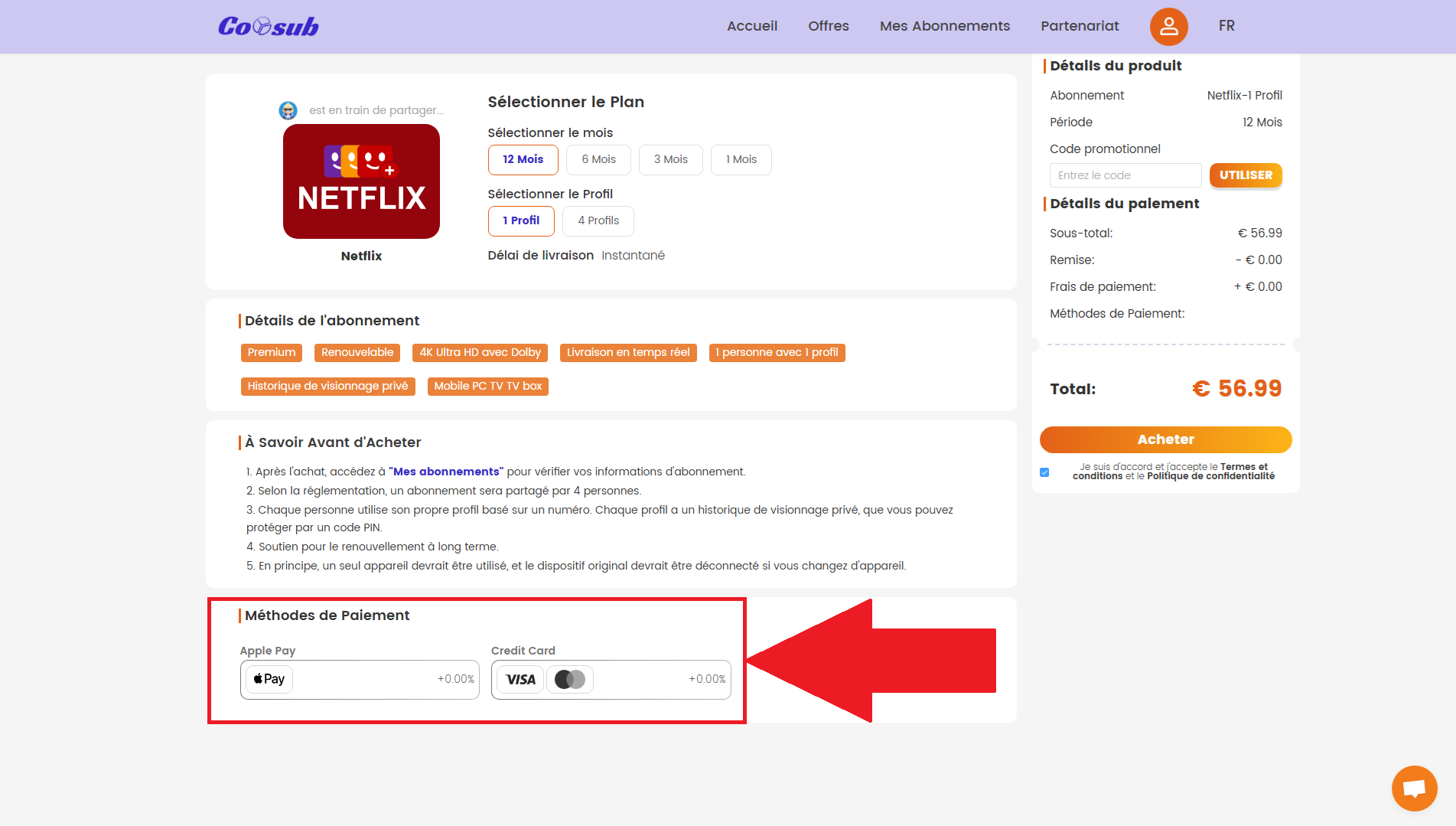
- Confirm your payment and enjoy the service.
How does Coosub work?
Coosub acts as a trusted intermediary between users who want to share a subscription. The platform connects members, securely manages payments, and distributes access. You don’t have to coordinate anything yourself with friends or family—everything goes through your Coosub account.
Each user joins a bundled subscription existing one or creates a new one. The cost is split among the participants based on the number of available profiles. Payment information remains protected by the platform’s terms of use, and you can cancel or change your service at the end of each subscription period.
The solution covers more than 26 services : video streaming (netflix , Disney+, Prime Video, YouTube Premium), music (Spotify, Deezer, TIDAL, Qobuz), AI tools (GPT Plus, DeepL Pro), productivity (Microsoft Office 365, Canva Pro), VPN (NordVPN) and others.
Meeting on Our full review of Coosub for all the details!
Why take out a subscription with Coosub?
The main reason is obvious: save money on your digital subscriptions. Instead of paying full price for a service on your own, you join a shared subscription and split the cost with other users each month.
Here's what sharing a subscription through Coosub actually offers you:
- A discounted price compared to official individual subscriptions, on netflix , Spotify, YouTube Premium or AI tools.
- the access to more than 26 services available, ranging from video streaming to music and productivity apps.
- A simple interface and secure payments, from registration through the first month.
- The possibility of pool a subscription without handling payments between individuals.
If you want to compare it with other options before making a decision, take a look at the alternatives to Coosub such as Sharesub or GamsGo. This way, you can weigh the pros and cons based on your own criteria to choose the solution that really saves you money.
Have you tried sharing subscriptions with Coosub yet? Share your thoughts in the comments—it helps other readers make up their minds.









 FR
FR  RU
RU  EN
EN  ES
ES  IT
IT  DE
DE  ZH
ZH  PT
PT  ID
ID  JA
JA  DA
DA