A Snapchat filter It can be completely free or cost as much as several thousand euros. It all depends on the type of filter and who creates it. The Lenses (augmented reality effects) are free to use, and a custom Lens created by a professional can cost more than 5 000 €. Here are the full details.
How much does a Snapchat filter cost?

First, we need to distinguish between two main categories of filters on Snapchat.
- The Lens : the augmented reality effect that puts dog ears on you or distorts your face. You can create one free with Lens Studio.
- the geofilter : a graphic frame associated with a place or event. It begins at approximately 5 $ (that is, nearly 4,60 €) depending on the area and duration.
Price of a professional-grade AR lens
If you go through a service provider for a Lens Custom-made; the price depends mainly on the design complexity and interactions. Here are the general ranges:
- Basic Filter (simple 2D effects on the face): starting at 1 000 €.
- Filter by logic, method quiz Where random roulette : around 2,000 to 3,000 €.
- Filter rich in 3D, featuring modeling, custom assets, and advanced interactions: 5,000 € and up at a specialized agency.
The more time and logical reasoning the filter requires, the more the estimate is on the rise. For a brand that wants to make an impact with its social media communications, this is often a major undertaking marketing in its own right. Unlike a filter Instagram or a filter TikTok, creating a filter on Snapchat requires a dedicated tool and involves technical constraints specific to the platform.
Creating a Free Snapchat Filter: Is It Possible, and How Does It Work?
Yes, you can create a free Snapchat filter. All you need is the right software and a little time. Here are the steps to design your own Lens for free.
1. Install the correct software
The reference tool is called Lens Studio. He is totally free and offers a wide variety of templates to help you create your first effects with ease.
Another option: Lens Web Builder, an online tool that lets you create AR filters right from your browser, without downloading anything. Handy if you want to get things done quickly.
2. Understand how the software works
Lens Studio remains a technical software program that requires a minimum level of skills. To create a simple filter, keep these three key concepts in mind:
- The stage : You can change the position, scale, and rotation of 3D objects.
- Objects : a list of all the elements in your scene, which can be connected to each other using drag-and-drop.
- Overview : You can preview how your filter will look in real time before publishing.
3. Review the visuals for your filter
A Snapchat filter is based on elements 2D or 3D. For 2D graphics, software such as Photoshop is perfect for drawing your designs and your assets.
To make your filter more appealing, add some animations. For example, an effect that triggers when the person open your mouth Where blinks. It's details like this that make people want to use it.
Need some inspiration? Explore the Lenses already published on the app, including cat filters, Disney filters, or face effects.
4. Post the filter on Snapchat
Once your Lens is finished, submit it from Lens Studio through the section dedicated to publishing. Snapchat then reviews your filter before posting it; this usually takes a few days waiting period. After that, your creation is available, and you can share it for free.
How much does it cost to use a Snapchat filter?
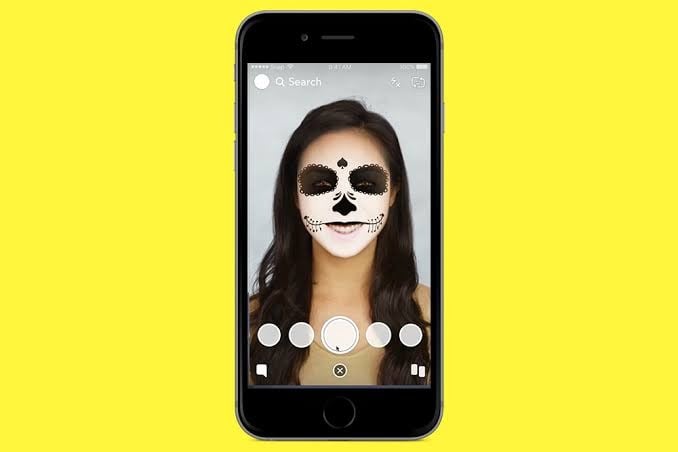
The price of a Snapchat filter depends entirely on how it's used. Here are the three scenarios, ranging from free to paid.
1. Community Lenses: Free
These are the classic AR filters, like the one that puts dog ears or distorts your vision. Do you use them? free From within the app, swipe across the screen after pointing the camera at your face.
These filters are posted by the community or by brands, and you don't have to pay anything to apply them to a Snap. The filters on Instagram, Facebook Where TikTok work on the same principle: the service is free for the end user.
2. Personal geofilter: starting at 5 $
the geofilter is a custom graphic frame linked to a geographic area. Think of the “Sophie’s Wedding in Lyon” filter, which is displayed only at that location. You can create one for an event starting from 5 $ (approximately 4,60 €).
The price varies based on two factors: the covered area and the display duration. For a residential-sized area, the cost is generally between 5 $ and 20 $ per day. Go to the page snapchat.com/create, without an advertising account. The Snapchat team will approve your request if it complies with their guidelines.
3. The business filter: available by quote

A company or brand can order a permanent geofilter, sometimes lasting up to a year. This requires a professional advertising account via Snapchat Ads Manager, with a few conditions to keep in mind:
- The price is set when your order is placed.
- No refunds is not applicable if you cancel an annual filter that is already in effect.
- You can customize the design of an annual filter once an hour, with each new version being reviewed by Snapchat.
The choice depends on your goal: a simple keepsake, a promotional campaign, or a full-fledged social media marketing strategy.
If you want to learn more about this network, check out our article on ads on Snapchat to compare budgets.







 English