In this article, I will explain how to put money into PayPal. I'll be presenting 2 techniques showing you how to add money to PayPal so you can pay directly with your account.
Explanatory video in French by Alucare, ideal complement to the page. View video (you can use YouTube's automatic translation)

First technique for putting money into your PayPal account
Knowing how to add money to PayPal is very important, but also very easy to do. All you have to do is follow these steps :
- Once you have logged in to your account, click on “Transfer money” from your PayPal Balance.

- Then focus on the “Credits” section and select “Add money to your PayPal balance”.

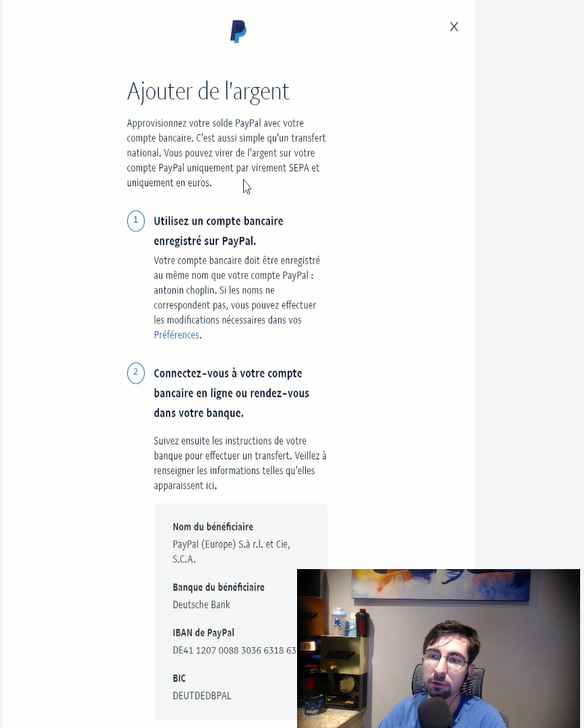
- To add money to your PayPal account, you will need to:
-
- Register a bank account with PayPal.
- Add beneficiary information on your online bank account or make an appointment with your bank to do so.
-
- Receive an e-mail once the action has been taken into account.
- By following these steps, you will receive the money directly on your PayPal balance.
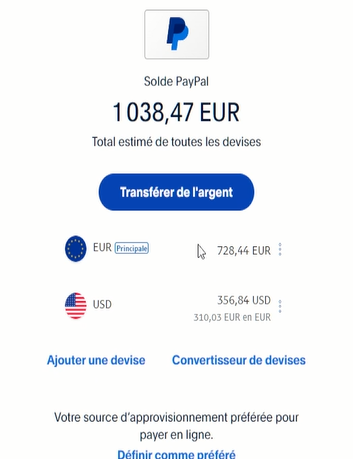
Remark : It usually takes two business days to add money from your bank account. The processing time depends on the bank, so please confirm this information with your bank.
Second method for adding money to PayPal
The second technique involves have someone else pay you directly to your PayPal account.
The first method consists of ask someone for money by following these steps:
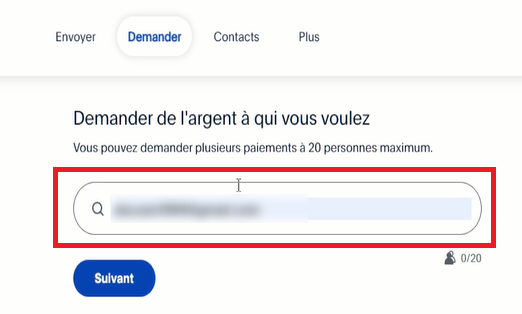
- Click on “Send and Request”.

- Make sure you are in the “Request” section, then enter the person's email address who will send you the money via PayPal.
The second method consists of share your profile on PayPal by following these steps:
- Select “Share your personal profile”.

- Once you are on “Edit your profile,”, click on the arrow to share.
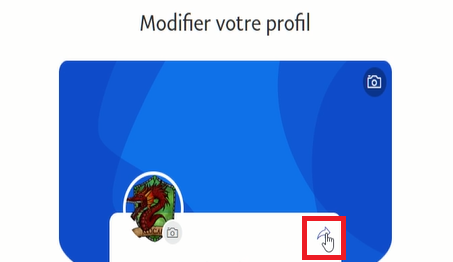
- Then select “Copy link”.

Perfect! Now you can share the link with the person who will be redirected to make the payment directly on PayPal.
How do I open a PayPal account?
If you don't have an account yet, follow these steps to open a PayPal account:
- Go to the official PayPal.
- Then click on "Connection Where "Open an accountat the top of the first page.
- Next, a pop-up will appear asking you to choose your account type. Follow the instructions to complete your registration.
- After a few steps, PayPal will ask you to enter your 16 credit card numbers in your account, so put your card next to you.
Attention : Remember your password, as you will be asked for it each time you want to access your customer account, unless you choose to remember it by clicking on “Remember me.”.
Linking your bank account to a digital platform requires everything another level of vigilance to avoid any attempt at infiltration or theft, especially as the bank account hacking is becoming increasingly common!
Note: To add funds to your PayPal balance from your bank account, make sure the names on your bank account and PayPal account match. Also, ensure you have sufficient funds in your bank account to authorize the transfer.

If you succeed in completing the above steps, you can start charging your account now.
In addition to classic transfer methods, there are ways to receive money directly into your PayPal account using mobile and PC applications. I've personally tested 4 free apps that allow you to accumulate winnings (games, missions, cashback) and withdraw them to your PayPal balance. Here's my feedback and bonuses to get you started:
Explanatory video in French by Alucare, ideal complement to the page. View video (you can use YouTube's automatic translation)








 English
I will, my dear brother, thank you for your kind reply. With best regards, as the work you have is one that seeks good things for all members of the family who wish for them.