WHOOP tracks calories burned accurately. The wristband estimates your calorie expenditure continuously, whether at rest or during exercise, starting from your heart rate and your biometric data.
But keep in mind that this isn't its main function: WHOOP is primarily designed for recovery and the sleep.

Take advantage of this exclusive offer and join the WHOOP community:
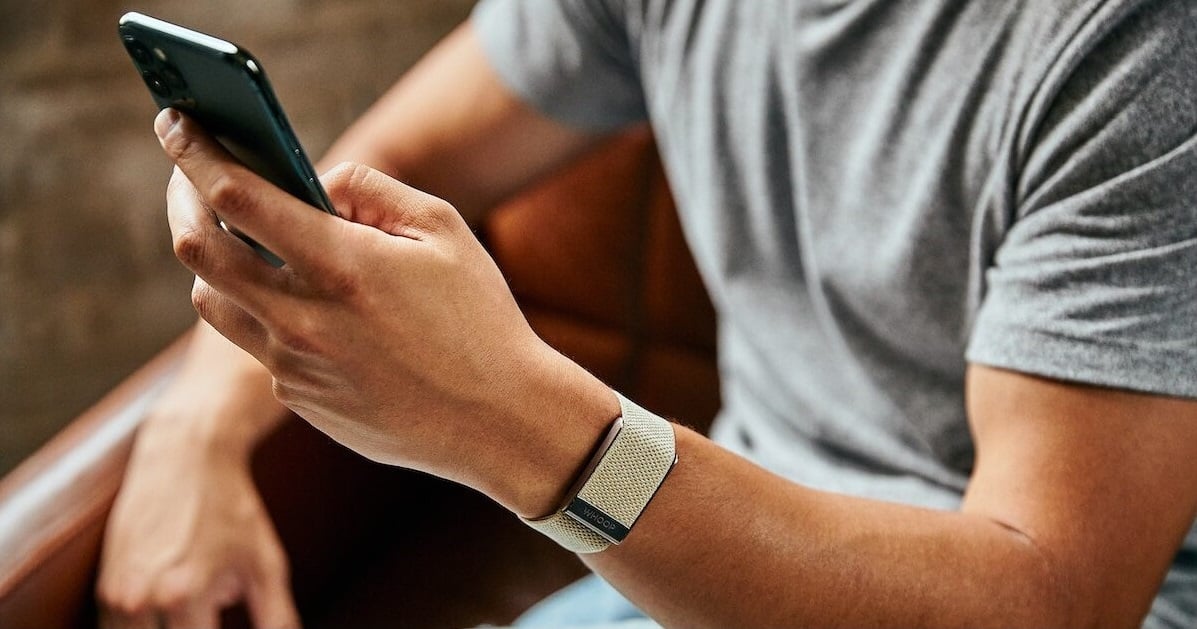
Where can I find the calorie count in the WHOOP app?
It's very simple. To access your calories burned, follow these two steps:
- Open the’WHOOP application on your smartphone.
- Scroll down to the section Calories.
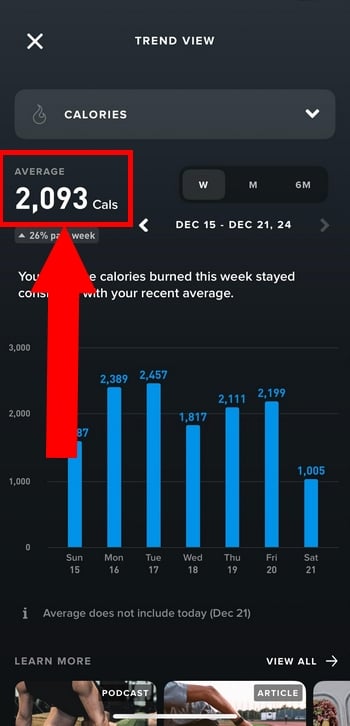
There you'll find a daily summary of your total calorie expenditure. The app also breaks down the distribution among your calories at rest (tone BMR (estimated) and your active calories, burned during exercise.
An important point: WHOOP only tracks calories burned, not the calories consumed. Nothing related to nutrition. For that, you'll need to use a dedicated nutrition app.
In the app, calories are still a secondary consideration. The focus is primarily on three metrics:
- the sleep (Sleep)
- The recovery (Recovery)
- L'effort (Strain)
We'll tell you more about these three features in our full review of WHOOP.
How does WHOOP calculate calories burned?
WHOOP provides a estimate based on your heart rate measured continuously based on your biometric data. Specifically, the wristband combines several types of information:
- Your personal data information entered into the app (age, gender, height, weight)
- Your physical activity data (duration, intensity of the exercise)
- Your basal metabolic rate estimated (BMR)
- The heart rate variability (HRV) and resting heart rate
The calculation is based on scientific models rather than relying on simple, generic averages. The goal is to avoid overestimates and to get as close as possible to your actual effort.
This video clearly shows the measurements taken by the wristband on a daily basis:
How accurate is WHOOP calorie tracking?
WHOOP itself emphasizes this point: the The calorie counts shown are estimates, not an exact figure. To date, the company has not released no official accuracy percentage.
The cost is calculated based on your heart rate continuously, from the heart rate variability (HRV), skin temperature, and motion detected by the accelerometer.
The more the wristband knows about you (age, weight, resting heart rate), the more accurate the estimate becomes.
The sensor remains the most reliable way to track a trend over several days ...in order to give an exact figure, down to the calorie.
To get a more accurate picture of your nutrition, it's best to cross-reference this data with a dedicated app.
Comparison: WHOOP vs Apple Watch vs Garmin for calorie tracking?
The three devices estimate your calories burned based on heart rate, but they're in different leagues.
WHOOP focuses entirely on recovery and effort, while the’Apple Watch and Garmin add the GPS and a screen that displays your activity right on your wrist.
| WHOOP | Apple Watch | Garmin | |
| Count calories at rest | Yes | Yes | Yes |
| Counting calories during sport | Yes | Yes | Yes |
| Uses heart rate | Yes | Yes | Yes |
| Use GPS during the activity | Nope | Yes | Yes |
| Displays calories on the watch | No (in the app only) | Yes | Yes |
| Give an exact figure 100 %? | Nope | Nope | Nope |
| Ideal for | Monitor recovery and overall effort | Daily use and general activities | Athletes who train regularly |
No sensor provides a perfect reading: they are all estimates. A lab test reported in the press put the’Apple Watch among the most reliable, at 10 % close to the actual result.
Watches Garmin remain a reliable choice for athletes thanks to GPS and detailed activity data.
The real difference lies in what each device is designed for. If calories and a display right on your wrist are important to you, the’Apple Watch Where Garmin are more suitable.
If you want to understand your recovery, your sleep and your heart rate variability To optimize your performance, WHOOP It remains one of the best bracelets on the market.
So, are you ready to keep a close eye on your progress?
Using WHOOP to optimize my efforts
You can check out our article on alternatives to WHOOP to learn more about the features of other smartwatches.
Can you really lose weight with WHOOP?
WHOOP doesn't help you lose weight on its own. Weight loss depends primarily on three factors:
- Your calorie deficit over time
- Your Daily Diet
- Your consistency, day after day
So the wristband isn't a substitute for a healthy lifestyle. However, it helps you stay on track with concrete data:
- Better understand your energy expenditure real
- Follow your activity level throughout the day
- Improve your sleep, which plays a key role in weight management
- Adjust your training depending on how you're recovering
In practical terms, you can rely on your recovery score to adjust your effort. On a high-intensity day, your body burns more calories and needs more fuel.
Conversely, a day of rest calls for a more moderate intake.
In a nutshell, WHOOP isn't a miracle solution for losing weight, but it is a A great tool for tracking your calories burned and stay true to your goals.
To ensure that the calculation is as reliable as possible, the sensor placement is essential.
In this video, you'll learn about the different ways to wear the WHOOP (on your wrist, arm, or in connected clothing) to adapt to all your sports activities.

What are the advantages and disadvantages of calorie tracking with WHOOP?
Tracking calories burned with WHOOP It has real advantages, but also some limitations you should be aware of before buying.
| Advantages | Disadvantages |
|---|---|
|
|
Should I use WHOOP to track my calories or not?
All depends on your goals. WHOOP is especially great if your priority is to track:
- The recovery day-to-day
- Optimizing your performance at practice
- the sleep and your resting heart rate
On the other hand, if your goal is to count your calories burned or to track your weight loss in detail, WHOOP might not be the best choice. A Garmin or a Apple Watch will be better suited to this specific need.
For effective nutritional monitoring, it's best to combine WHOOP a dedicated app such as MyFitnessPal.
FAQs
Is WHOOP accurate for bodybuilding?
WHOOP tracks your heart rate continuously, but it does not directly measure the mechanical work performed by your muscles. These estimates based on heart rate are therefore much less accurate For :
- Short series
- Heavy loads
- Short, explosive bursts of effort
The analysis of calories burned is as follows: less relevant for strength training and interval training.
On the other hand, estimates of calorie expenditure are much more consistent for continuous cardio activities, such as running or cycling, where the heart rate remains stable and corresponds to the level of exertion.
Want to make recovery a priority?
Can I connect WHOOP to MyFitnessPal?
Yes, you can Synchronize WHOOP with MyFitnessPal in just a few seconds. Here are the steps to follow:
- Open the settings for the’WHOOP application
- Go to the «Connected Apps» section»
- Select MyFitnessPal and log in to your account
- Enables data synchronization with WHOOP
You can then export your activity data and compare them with your nutrition log. This is a handy way to adjust your diet on high-intensity training days.
Why doesn't WHOOP put calories at the heart of its interface?
Because the bracelet is primarily intended as a tool for performance and well-being. Its three pillars are:
- Optimizing the recovery
- Management of the physiological stress
- Improving the performance day-to-day
Calories remain a secondary indicator, far behind the trio Strain, Recovery and Sleep. That's where WHOOP's true strength lies.
And for further reading:










 FR
FR  RU
RU  EN
EN  ES
ES  IT
IT  DE
DE  ZH
ZH  PT
PT  ID
ID  JA
JA  DA
DA