Here are all the gift codes Clash Royale active in October 2026. These codes come from Supercell and its partner creators. They unlock emotes, of the banner decorations and other cosmetic items that can be used directly in Clash Royale.
BONUS for Clash Royale :
You can earn money by playing Clash Royale :
P.S.: The game may no longer be available. To get your €5 bonus, install at least one game within 24 hours.
List of usable codes
This is the list of codes Clash Royale assets in October 2026. They provide access to free rewards : emotes, banner backgrounds, and decorations.
| CODED | REWARD |
|---|---|
| HEROVALKYRIE | Valkyrie Emote Freeze! banner background |
| PRINCESSEVO | Frozen & Fearless banner decoration Freeze! banner background |
| MINIONHORDE! | Gargoyle Horde Emote |
| ROYALEAFFAIR | Emote Royal goblin affair |
| FIREANDICE!! | Firestorm banner background Ember banner background Escape banner decoration |
| TRUSTYTURRET | Musketeer Heroine Emote |
| WHENHOGSFLY! | Flying Royal Pigs Emote |
| REINABARRIG | Sleeping Dragon Banner Set |
Remember to Copy and paste the code directly from this table to avoid any typos when using it on the Supercell Store.
How to use the codes on Clash Royale ?
To claim your free reward, just go to the Supercell Store, not directly in the game. Here are the steps to follow:
- Go to the Supercell Store official (store.supercell.com) and select Clash Royale in the list of games.

- Log in to your Supercell ID, the one linked to your account Clash Royale.
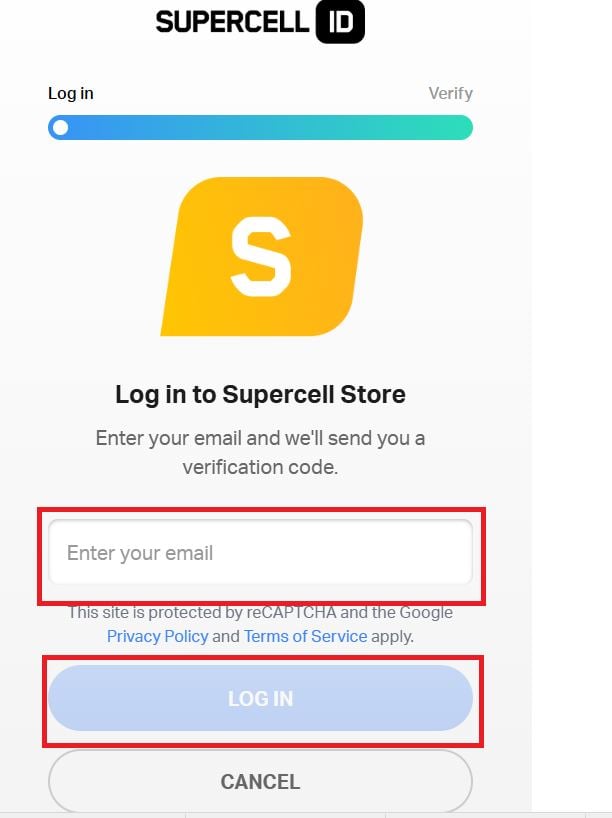
- Scroll down the page until you reach the «Use a code» section. The title may vary depending on the store version.
- Between the code exactly as shown in the table, then click "Submit.".

- Open Clash Royale to automatically receive your reward (emotes, banner decorations, chests…).
This page is updated regularly with new codes Clash Royale available. Use them as soon as possible: free codes can expire at any time.
For even more codes for other games:
- Discover all the codes for Rush Royale
- Don't miss the codes LootBoy
- Check out the codes for Mobile Legends
- See also the codes for Apex Legends








 FR
FR  RU
RU  EN
EN  ES
ES  IT
IT  DE
DE  ZH
ZH  PT
PT  ID
ID  JA
JA  DA
DA