the Discord Party Mode (the Party Mode) no longer exists. It was a a limited-time event lasting a few days in May 2022, organized for the 7 years of the platform.
The famous « Free Nitro »The promise at the end of the achievements was just a joke, not a real gift.".
Here you'll find all the answers to the Festive Mode achievements, and how to get Real Nitro for free today.
Enable Party Mode (History Reminder)
Back in the days of the Festive Style, you had to go to the User Settings of Discord, since your profile, then click the tab Party Mode. This new tab (Party Mode (in English) had slipped in between «Voice and Video» and «Notifications.».
The option has disappeared from the settings May 16, 2022, at the end of the event. There’s still a little Easter egg : hover over the icon nitro a boost message from your profile, and you'll trigger the confetti with Wumpus.

The Complete List of Festive Mode Achievements (May 2022)
Festive Mode had 19 successes to unlock, plus one-twentieth on the side: the famous «Click here to get your gift», as detailed in the following section. These successes fell into three categories: the character combinations, them combo multipliers and the game's parameters and interactions.
To answer a common question on community forums: how to do mention combos with a friend (you and a friend in private message) made it possible to validate them one after another, which was a real time-saver.
This tip was widely shared in community discussions Discord at the time of the event.
Character combinations (spamming the letter A in a message)
- Member of the elite : combo of 1,337 characters
- One day I'll make the best combos : 898 characters
- The Club of Five : 555 characters
- Two birds with one stone : 430 characters
- Animation Fan : 113 characters
- 80s pop : 99 characters
- Time Travel : 88 characters
- Will you still need me? : 64 characters
- A real headache : combo score of 2048 (or 2x combo on 1024)
Combo multipliers (mentioning users in a message)
- Happy Birthday : multiplier x7
- Received 5 out of 5 : multiplier x5
- power four : multiplier x4
- Word Counts Double : multiplier x2
Parameters and Interactions
- Does this thing work? : Turn on Party Mode in your profile settings
- Restart to see? : Turn off and then turn on Party Mode
- Always more ! : Increase the intensity of the vibrations to maximum in the settings
- Fan of the character creation screen : Customize your confetti in your profile settings
- Notification Sound Discord : Receive a notification with your username (a friend mentions you in a conversation or via private message)
- Are you looking for me? : mention (@) someone in a message within a conversation
The «Click Here to Get Your Gift» Success: How to Unlock It
This success was the highlight of the show of the event. Contrary to what many people thought, it wasn't enough to simply click the button displayed in the Party Mode tab. The real trigger was hidden.
Many players have asked this question on the forums without finding a definitive answer.
Here is the exact method:
- Quickly switch between the «Party Mode» tab» and another settings tab, such as «Voice and Video.».
- A hidden meter increased each time the tab was visited.
- Once the counter at 100, the achievement was automatically unlocked.
- Clicking on the achievement badge would then play the famous video Rick Roll (Never Gonna Give You Up).
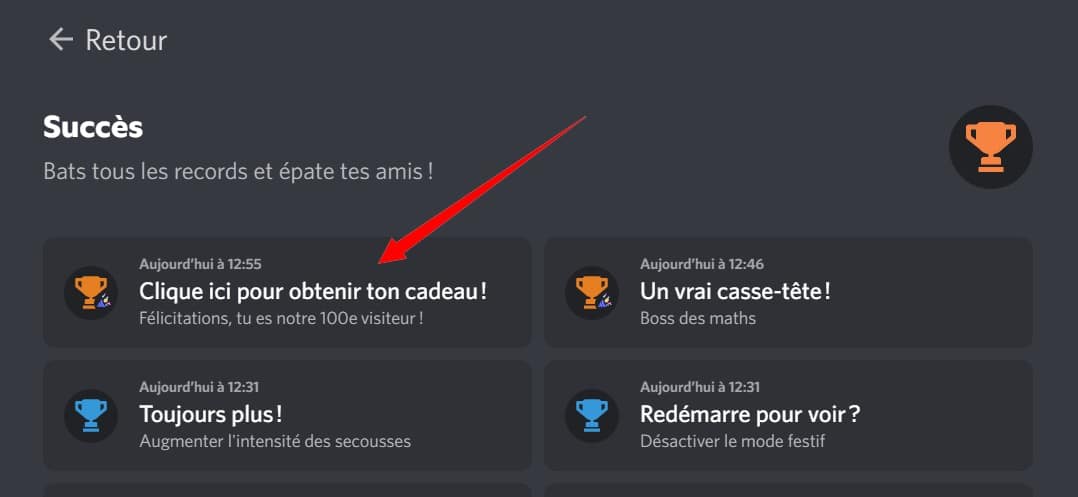
Many people thought you had to place an order or write a coded or spam the button. In reality, it was simply about 100 miter saws. The «gift» promised as a result of this success was the video itself, not a Nitro code. Just a good joke, nothing more. You'd have had to search a long time to find the full answer to that question on the forums back then.
Will Festive Mode be coming back?
Discord has never held the event again since May 2022. The Festive Style remained a one-time event, launched to celebrate the 7 years of the platform. To date, There is no indication that he will return, whether it's for the 10th anniversary or later.
How can I get real Nitro for free today?
There are honest ways to get Free Nitro, through official websites.
- Epic Games Store : The store regularly offers periods of Free Nitro. Link your account Discord Go to your Store account from your profile, then claim the available offer. All the steps are in our Free Nitro Guide with the Epic Games Store.
- Twitch : via Twitch and with its Amazon Prime-related offers, you can enjoy discounts and gaming perks. These offers change frequently, so be sure to check what's available before you confirm. Details are in the Cheaper Nitro guide via Twitch.
- The complete list : All the tips (promo codes, current partnerships) are listed in our A Complete Guide to Getting Free Nitro.
Be wary of messages like this «Click here to get» A gift: Are they traps or just pranks? The real Free Nitro Always use an official website such as Epic Games Store Where Twitch.









 FR
FR  RU
RU  EN
EN  ES
ES  IT
IT  DE
DE  ZH
ZH  PT
PT  ID
ID  JA
JA  DA
DA
pk I can not do everything at once? the other remains lock .
Have to do them 1 by 1
* before clicking on receive my gifts *: the people who made this site I love you thank you so much for this free nitro
after : ;_; I will die in my corner
We love you too 🙂 (Music Rick Roll haha)
hello pk "click here to get your gift" is still in gray with question marks while g does all the challenges?
hello, you have to spam to be in the 100th 🙂
Never Gonna Give You UP
Haha
Well that's all lies, no one can get Nitre that way.
Never Gonna Give You UP
wow no dec
haha
"time travel" not working a solution?
88
thanks for the help, but extremely disappointed XD
I expected a little nitro but have to believe that they are stingy xDDD
Never Gonna Give You UP
Time travel doesn't work. I do not understand why
You have to put 88 🙂