You want to modify your stairs in House Flipper 2 but you don't know how?
You've come to the right place! Thanks to this article, discover all steps to easily replace your stairs in House Flipper 2 !
Here's a YouTube video quickly explaining the steps to transform your stairs in the game:
Explanatory video in French by Alucare, ideal complement to the page. View video (you can use YouTube's automatic translation)

What are the steps involved in changing staircases in your home? House Flipper 2 ?
To change the stairs in House FlipperHere are the steps to follow:
- Open the game or launch House Flipper 2 from your game library ;
- Choose then the house you wish to renovate and load it ;
- In the game, open the build menu by pressing the appropriate key (usually "C" on a PC);
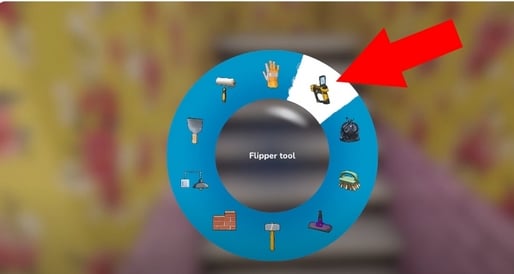
- In this menu, click on the Flipper tools and point your cursor at the stairs on the right;
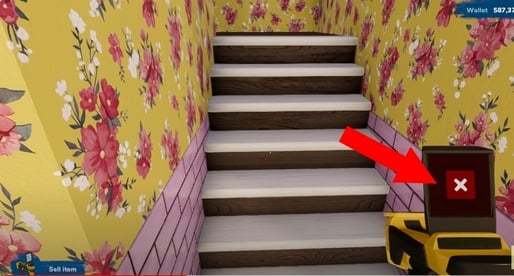
- You will then notice a X on red background that will be formed. This simply means that the deletion/sale stairs is impossible in House Flipper 2 !
- But don't worry! You can change the look and design of your stairs! To do so, click on R by selecting the option Modify the design left;

- By clicking on this icon, the X symbol on a red background will change to in green, which means you can now move on to customizing your steps!

- In this case, personalize them by choosing the type of staircasers for your project.
- Make sure you adjust size, the shape, the color and their orientation.
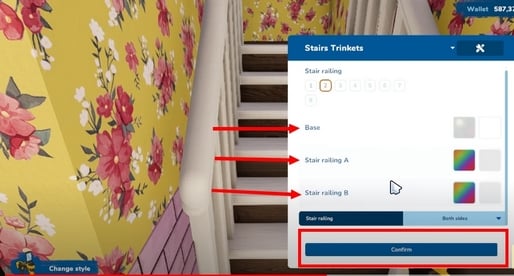
- Once customized, place them in the in your home. They can be rotated or adjusted to fit the space in which they are installed. House Flipper 2 !
- Then validate and save your progress to see the result, by clicking on confirm.
Now you can customize your staircases in House Flipper 2 Have you encountered any other difficulties in the game? If so, feel free to leave a comment! We would be delighted to help you!
Other articles that may also be of interest:
- The 25 best gacha games of the moment !
- The best free PC games !








 English
Hello in flipper 1 cover with all dlc's
You can buy new stairs. But when you buy a house to renovate it, you can't sell the existing stairs to replace them with new ones. You can only install new stairs and remove the new ones, not the old ones.
Do you have to do a specific mission to remove it? Like unlocking new skills?
Hi, I personally think it's more of a bug.