
You've just started out on WoW Forever And you're not sure which add-ons to install? Here are the 10 that really deserve a spot in your folder WoW Addons Forever.
In this article, you'll find details about each one.
| Rank | Add-on | Category | Perfect if you want to… |
|---|---|---|---|
| 1 | RestedXP | Fast Leveling | Get to 60 as fast as possible |
| 2 | DungeonJournal | Dungeons | Pick up all the quests for a dungeon before entering it |
| 3 | Auctionator | Auction House | Sell quickly and find out the prices |
| 4 | What Is Training? | Advancement to the Next Grade | Knowing when to visit your homeroom teacher |
| 5 | Leatrix Plus | Gaming Comfort | Automate repairs, sales, and invitations |
| 6 | OpenMap | Map | A continuous map that you can zoom in on freely |
| 7 | Spoken | Immersion | Listen to the quests instead of reading them |
| 8 | Baganator | Bags | Bags that tidy themselves up |
| 9 | EllesmereUI | Interface | Redesign your entire interface |
| 10 | GearQuest Forever | Equipment | Knowing which object to aim for at each level |
1. RestedXP: To reach level 60 as quickly as possible
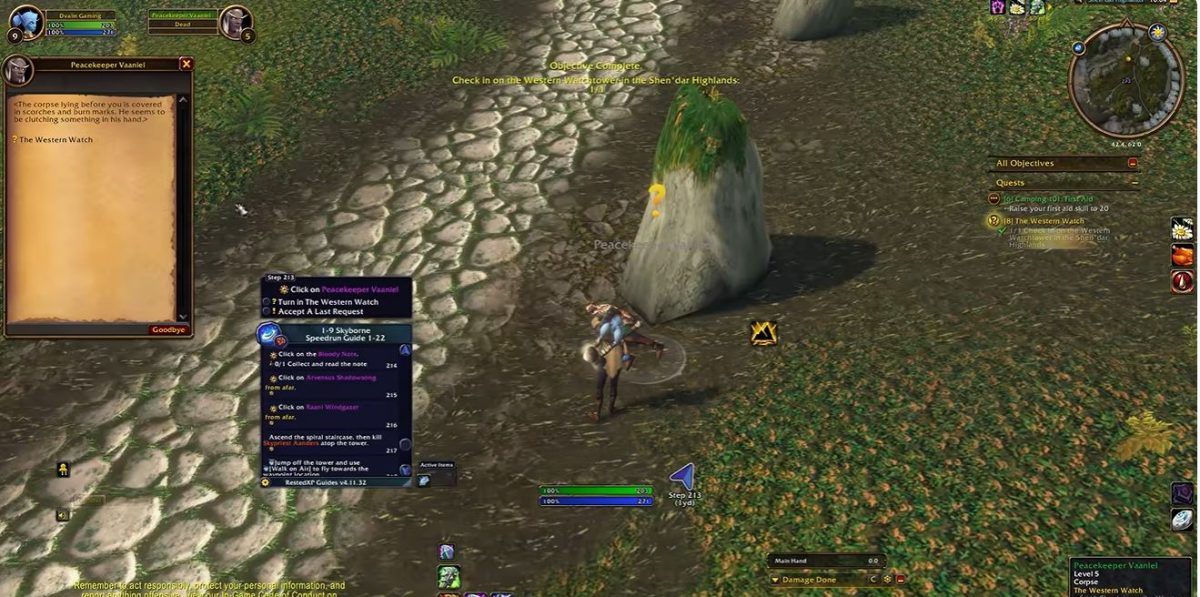
If your goal is to Fast leveling, RestedXP is the go-to tool. It gives you a Optimized quest route, step by step, directly in the game.
What it does exactly:
- an arrow that guides you to each goal;
- automatic acceptance and completion of quests;
- a targeting macro to find NPCs and monsters along the way;
- track your leveling time.
It is the leveling add-on the one that's getting the most attention right now. Several French designers are showcasing it as their favorite leveling add-on.
The add-on and the first few levels are free; the rest of the guide requires a purchase. For a discount of 10% on all guides, you can use our RestedXP promo code.
2. DungeonJournal: so you never miss a dungeon quest

For each dungeon, DungeonJournal shows you the Available quests, where to retrieve them and the loot from each boss. It's useful for Retrieve all quests from a dungeon before you go, rather than finding out once you're there. Plus, it's available in French.
Under the Bellular Warcraft video, a comment praises its "Quests" tab, which shows the quests associated with each dungeon eand their combos. On Reddit, one player describes it as the add-on he uses the most.
Other points :
- It displays the loot and rewards in advance. An RPG mode hides this information until you've defeated the last boss.
- Its database is not yet complete: check the important information.
3. Auctionator: for hassle-free buying and selling at auction houses

Auctionator simplifies the auction house and helps you Track the value of your items.
Here's what he suggests:
- a Sales tab which automatically fills in the price: you list the item for sale by pressing the spacebar;
- a alert If you sell an item for too little, and a indication when the dealer buys it back for more than the auction house did;
- of the shopping lists for your regular purchases.
We especially like it because it displays auction house prices in tooltips.
Good to know : The add-on only recognizes the prices you've seen. Run a full scan of the auction house at the start of your session; otherwise, the prices displayed may be incorrect.
4. What’s Training? : to find out when to go back to your homeroom teacher

What Is Training? you shows spells and items available from your homeroom and vocational teacher. He Add a tab to your spellbook along with the required level and the cost of each spell.
With this add-on, you'll know how much gold to save for your next trip to the blacksmith, and when the trip is worth it. Keep in mind that in WoW Forever, delaying a visit by two levels can save you a round trip.
So far, there have been no complaints about this add-on. On Reddit, one player uses it all the time to schedule visits with the homeroom teacher and in terms of gameplay. In the comments under Bellular's video, another user notes that it fits in so well, you'd think it came bundled with the game.
Note that "What’s Training?" updates when you open your master’s window. If you like the surprise from the new spells, just know that he's showing them to you in advance.
5. Leatrix Plus: Dozens of Small Time-Saving Features

Leatrix Plus is a modular, lightweight comfort accessory. You can enable only the options you're interested in using the /ltp command.
Here's what he suggests:
- Automatic repair and sale of gray items at stores;
- Acceptance of Resurrections, group invites, and summons without an extra click;
- blocking duels.
It's highly recommended on Reddit.
But before you go out and buy one, here's what you need to know:
- Be sure to use the file that ends with «-forever».
- Automatically accepting quests can cause dialogues to skip: turn this feature off if you're using Spoken.
- Check the automatic sale options before enabling them.
- Don't install it along with OneForAll, which does pretty much the same thing.
6. OpenMap: A Single, Seamless World Map

OpenMap replaces the world map with a continuous map, which you can zoom in and scroll freely, in the Vanilla graphic style. It blends in with the regular map.
Many players call it a «must-have.» They enjoy seeing their friends in real time and sharing landmarks and drawings on the map. It’s the standout release of the season.
Good to know :
- Do not use another world map add-on, such as Leatrix Maps or Mapster, at the same time.
- A player on Reddit reports that the feature for locating your guild members doesn't work with the controller interface.
- One player noticed lag, and another noticed that the view sometimes automatically refocuses on a nearby city.
7. Spoken: All quests read aloud

With Spoken, NPCs read their quest lines and dialogue, areas tell their stories, and books read themselves. The voices are AI-generated and tailored to each character.
Its main advantage is that You can enjoy the story without having to stop to read. The text continues even after you close the quest window, and the dialogues flow seamlessly without interruption.
It's an add-on that gets mentioned a lot on Reddit. Under the Bellular Warcraft video, the most upvoted comment about Spoken praises the description of each new area.
To get it in French: install Spoken French from the CurseForge app. If the quests remain untranslated, the translated quest packs can also be downloaded from GitHub.
Please note :
- Without the voice packs, the add-on remains silent;
- You can't speed up the playback, and pausing it restarts the dialogue from the beginning;
- The lines are pre-recorded: the NPCs call you «Adventurer»;
- When a line is missing, a «Contribute» button lets you report it.
8. Baganator: Bags That Pack Themselves

Baganator Sort your bags by category where the combines everything into a single window, and it supports controllers on Forever.
In short:
- he automatically sorts your items into categories, which you can customize with keywords;
- he remember the contents of your bank and your other characters, without having to log in again.
Before you use it, here's what you need to know:
- He needs Syndicator, which is installed automatically by the CurseForge app; you'll need to download it separately if you're installing it manually.
- Keep just one bag handler: no need for an additional Bagnon.
9. EllesmereUI: to completely redesign your interface

EllesmereUI is a modular interface suite. A visual editor lets you move, align, and resize each element, and each module is independent: You only enable the features that interest you.
On WoW Forever, all of its add-ons work, including action bars and raid frames. An add-on «Forever Essentials» In particular, it adds a threat counter and borders by dissipation type.
It is highly regarded for its stability and for the frequency of updates by its author. But before you use it, take note of these points:
- If you want to keep the Blizzard interface, the module Forever Essentials is also available as a standalone version, without the rest of the suite.
- Don't entrust your toolbars or frames to two different add-ons.
10. GearQuest Forever: Find the Best Gear at Every Level

Right-click on an equipment slot, and GearQuest Forever you shows the greatest improvements for your class, specialization, and level, from 1 to 60, along with where they come from. You can track an object like a quest, and aAn alert appears when it falls.
It's a good one WoW Forever Add-on.
Please Note :
- He is memory-intensive : Approximately 200 to 400 MB depending on the class, according to the author. Only activates the module for your class.
- This is not a complete simulation, and its data is still incomplete.
- Players have reported Dungeon Errors, which have since been fixed with a patch, as well as a few incorrectly assigned items.
How to Choose Your WoW Forever Add-ons: Our Tips
Here are a few recommendations to help you make the best choice.
Which add-ons are best for your profile?
- Do you want to Reach level 60 as quickly as possible on WoW Forever : RestedXP, What’s Training?, GearQuest Forever, Leatrix Plus
- You play for the story and the immersion : Spoken, Dialogue UI, OpenMap, DungeonJournal in RPG mode
- Do you like making gold? : Auctionator, Baganator
- You play with a controller : Baganator
- Do you want a custom interface? : EllesmereUI, or just the Forever Essentials module
Our advice
- Start small. Install two or three add-ons, then add the rest as needed.
- Only one add-on per function. Two add-ons that do the same thing conflict with each other.
- Always choose the Forever version, and check its last update date on CurseForge before installing.
- First, take a look at what the game has to offer. The built-in Edit mode, damage counter, and quest tracking already cover some of these needs.
- Monitor resource-intensive add-ons. For GearQuest Forever, activate only your class module.
- Cherish your discovery if it matters to you. Enable RPG mode in DungeonJournal and leave map reveal disabled in Leatrix Maps.
- Update your add-ons regularly : The CurseForge app takes care of that for you.
And if you had to choose just one, go with RestedXP. If your goal is to reach level 60 quickly, this is the add-on that will make the biggest difference to your experience. You’ll spend your time playing instead of figuring out where to go.
You can also form your own opinion by reading our article about our Reviews of RestedXP.
Alternatives You Should Know About
These four add-ons aren't in the top 10, but they can replace or Choose one of the options based on your playing style.
| Add-on | Who is it for? | What you need to know |
|---|---|---|
| Question | Those who want a free 100 % quest tool, or an add-on for RestedXP | It displays the quests available on your map. Some Forever quest markers may be incomplete. Questie sometimes displays quests as available even if they are the next step in a quest chain. |
| UI Dialog | People who use Spoken, or who find the quest text too small | It replaces the quest window with a more readable page. Disable the camera zoom with F1 if you find it annoying. |
| Leatrix Maps | Those who prefer a proven alternative to OpenMap | It adds dungeon coordinates and icons, and can reveal unexplored areas. Do not install it with OpenMap. |
| Deadly Boss Mods | Those planning to participate in the raids, starting December 9 | For dungeons, add the Forever-compatible packs. Coverage of the new boss depends on the available modules. |
In summary, the good ones WoW Forever Add-ons are the ones that make your life easier without cluttering up your interface. Start by RestedXP If you want to level up faster, complete your selection based on your play style.







 FR
 RU
 EN
 ES
 IT
 DE
 ZH
 PT
 ID
 JA
 DA