The slowing potion slows down mobs and enemy players in Minecraft. At Level I, it reduces movement speed by 20%. At Level IV, the penalty reaches nearly 60%, rendering a target almost immobile. It’s a formidable potion in PvP for blocking a creature or stopping a target from fleeing in Survival mode.
What is the Slowing Potion used for in Minecraft?
The slowing potion apply the effect Slowness (ID: minecraft:slowness, also known as Potion of Slowness (in English) to any target it hits. It reduces movement speed based on its level. It is one of the most useful negative effects in alchemy.
In PvP combat, a disposable slow potion When cast on an opponent, it restricts their movement. They become easier to hit, and unable to flee. In Survival mode, you can slow down fast creatures like spiders or skeletons to keep your distance. The Persistent Slowing Potion, ...it leaves a cloud on the ground: perfect for trapping an area where people pass through.
Be careful not to confuse this with slow fall. Slow fall reduces fall damage, whereas slow only affects movement speed. These are two very distinct effects. See also our guide on jump potion if you want to explore mobility potions.
Effects Based on Level and Duration
Here is a summary table of the variants of the slowing potion available in alchemy in Minecraft :
| Variant | Level | Speed reduction | Duration | Additional ingredient |
|---|---|---|---|---|
| Slowing Potion | I | 20% | 1 min 30 | (base) |
| Potion of Prolonged Slowness | I | 20% | 4 minutes | Redstone Powder |
| Slow Potion IV | IV | ~60% | 20 seconds | luminous powder |
| Disposable Slowing Potion | I or IV | Basically the same | Basically the same | Gunpowder |
| Persistent Slowing Potion | I or IV | Basically the same | 30-Second Cloud | Dragon's breath |
The slowness arrow is another option. You craft it by dipping an arrow into a single-use slow potion. It applies the effect from a distance, making it ideal for archer ambushes.
How can I get a slow potion without brewing it?
You can find slow potions without using alchemy. Witches cast them during combat: they use the single-use version to slow down players who approach them. You can also fish up potions using the Sea’s Fortune enchantment, but this is rare. Some chests in world-generated structures may contain potions, though slow potions aren’t guaranteed.
If you're playing in Creative mode or using commands, you can get any variant right away. For example:
- Slow Potion I:
/give @p minecraft:potion{Potion:"minecraft:slowness"} 1 - Slow Potion IV:
/give @p minecraft:potion{Potion:"minecraft:strong_slowness"} 1 - Single-use Slowing Potion:
/give @p minecraft:splash_potion{Potion:"minecraft:slowness"} 1
These commands work on Java Edition. On Bedrock, the syntax is slightly different.
How do you make a slow potion in Minecraft?
This tutorial applies to recent versions of Minecraft Java Edition and Bedrock Edition. Values may vary depending on updates to Mojang.
Step 1: Make vials
You need vials to hold your potions. Each vial is filled with water before being placed in the still.
Ingredient: 3 glass blocks (crafting table).
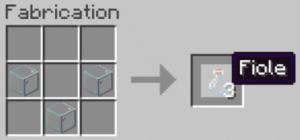
©Alucare for Alucare.fr
Next, fill each vial with water by right-clicking on a water block or a spring.
Step 2: Build a still
The still is essential to the entire alchemical process in Minecraft. Without it, you won't be able to make a single potion on your own.
Ingredients: 3 smooth stones + 1 stick of blaze. The stick of blaze is obtained by killing blazes in the Nether.
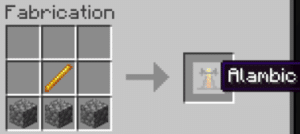
©Alucare for Alucare.fr
Place the still in your base. Right-click to open its interface. You can brew up to 3 potions at the same time.
Step 3: Craft the Level I Slow Potion (1 min 30)
Ingredients: 1 wart from the Nether, 1 sugar, 1 fermented spider's eye, 1 powder of blaze (fuel).
The Fermented Spider Eye craft is made at the crafting table using: 1 spider eye + 1 brown mushroom + 1 sugar.
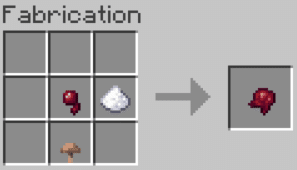
©Alucare for Alucare.fr
Add the powder blaze in the still's fuel chamber:
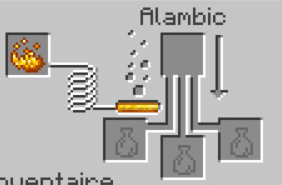
©Alucare for Alucare.fr
Follow these steps in the still:
- Place the vial of water, then add the wart from the Nether.
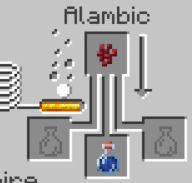
©Alucare for Alucare.fr
- Add the sugar. You'll get a speed potion.
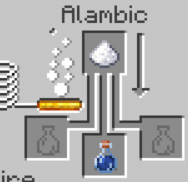
©Alucare for Alucare.fr
- Add the fermented spider eye. The speed potion turns into slowing potion.
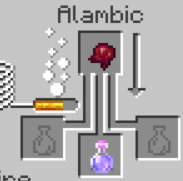
©Alucare for Alucare.fr
Your Level I Slowing Potion The 1-minute-30-second video is ready.
Alternative method using a speed potion or a jump potion
You can start with a speed potion already made. Just add a fermented spider eye to the still. The speed potion turns into slowing potion. A teleportation potion works the same way. It's the fastest option if you already have these potions in your inventory. This method works in Java as in Bedrock.
How can I improve the slow potion?
There are three possible upgrades to the basic potion. Each one alters either the potency, the duration, or the casting method.
Increase duration: redstone powder
Add a redstone powder to your slowing potion in the still. The duration ranges from 1 minute 30 seconds to 4 minutes. The level remains at I (20% reduction). This is the ideal version for long-duration traps or area control in survival mode.
Increase Power: Light Powder (Slowness IV)
Add a luminous powder to your Level I Slow Potion. You gain the Slow Potion IV, the most powerful version available in alchemy. It reduces movement speed by approximately 60%, but its duration is reduced to 20 seconds.
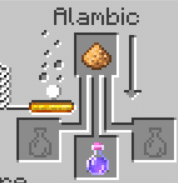
©Alucare for Alucare.fr
Note: Glow Powder and Redstone Powder cannot be combined in the same potion. You must choose one or the other.
Make the potion disposable or long-lasting
The disposable slow potion (also known as splash potion of slowness) launches itself like a projectile. Add some gunpowder to any version of your slowing potion in the still. It hits all targets within a radius around the point of impact. This is the most commonly used version in PvP.
The Persistent Slowing Potion It is created by adding Dragon's Breath to a single-use Slow Potion. It creates an area-of-effect cloud on the ground that lasts about 30 seconds. Ideal for trapping an enemy at a base entrance or slowing down waves of creatures.
Crafting Slowing Arrows
You can make slowness arrows in large numbers for PvP or hunting. Place a disposable slow potion Place it in the still and surround it with regular arrows in the crafting table (8 arrows around the potion). Each Slowness arrow applies the effect remotely to the target it hits.
Common Mistakes to Avoid
- Forgetting to add some powder blaze as fuel in the still: without it, nothing works.
- Confusing "slow fall" with "slowness": "slow fall" protects against fall damage, while "slowness" reduces movement speed on the ground.
- Trying to combine glow powder and redstone powder: it's not possible; the two effects cancel each other out.
- Casting a persistent slow potion in the wrong place: the cloud also affects nearby allies.
To learn more about other negative effects, check out our guide on potion of weakness.
See the rest of the guides on Minecraft :








 English