Keypoints
- The fire resistance potion makes you immune to fire and lava damage for 3 minutes, ideal in the Nether or against the blazes.
- To make this potion, you'll need vials of water, a still, and some powder made from blaze (fuel) and magma cream as the main ingredient.
- The resistance potion lasts 3 minutes, but can be extended to 8 minutes with redstone powder, or turned into a single-use version with gunpowder.
[Tuto Minecraft] Fire Resistance Potion, how to make a fire resistance potion?
The fire-resistance potion in Minecraft makes you completely immune to fire and lava damage for 3 minutes. You no longer burn when you come into contact with flames, magma blocks, or a jet of blaze.
It's the essential tool for exploring the Nether, cross a lava lake, or face creatures that deal this type of damage. To craft it, you'll need a vial of water, a still, blaze powder as fuel, and magma cream.
You can then upgrade this fire resistance potion: extend its duration to , or make it a single-use item by adding gunpowder so your allies can benefit from it.
The following sections detail the exact purpose of this effect, the complete step-by-step recipe, the ingredients you’ll need, and the variations (single-use, persistent, prolonged) to adapt the potion to each situation:
- 1) What is the purpose of the fire resistance potion?
- 2) How do you make the fire resistance potion?
1) What is the purpose of the fire resistance potion?
The fire resistance potion makes you completely immune to fire, lava, and magma damage for 3 minutes. In practical terms, the fire resistance effect allows you to walk through lava, cross through fire, or face a blaze without losing any health points. It’s one of the best forms of protection against fire available in the game, and it’s essential for exploring the Nether or retrieve blocks from the bottom of a lava lake.
Note: Fire resistance protects against heat, but not against falls or attack damage. Unlike a fire protection enchantment on armor, this potion provides total and immediate immunity. This potion comes in several versions (normal, single-use, and persistent), which we’ll detail below. This tutorial applies to the editions Java and Bedrock current issues of Minecraft, with the mechanics remaining unchanged for several updates of Mojang.
2) How do you make the fire resistance potion?
To make a fire-resistance potion, you'll need three things: vials of water, a still, and the right ingredients. Let's start with the equipment.
Making the vials
The vial is crafted using 3 glass blocks on a workbench. One recipe gives you 3 empty vials.
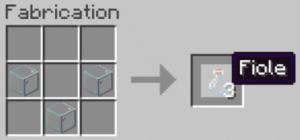
Next, right-click with your vials on a water source or a full cauldron to obtain water vials, the base ingredient for all potions.
Building the still
The still is the item you use to create all your potions. Without it, you can't brew anything. It's made from 3 stones and 1 stick of blaze (obtained by killing blazes in a fortress in the Nether).
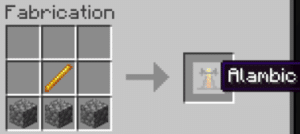
Place the still in your base, then right-click to open its interface. This is where you brew your potions—up to three at a time. Don't forget to fill your vials with water first.
Gather and obtain the ingredients
To make a fire resistance potion, you'll need:
- 1 wart on the Nether : it grows on the sand of the soul in the Nether and is used to create a strange potion (the basis for most potions).
- 1 magma cream : dropped by magma cubes, or crafted using 1 slime ball and 1 powder of blaze.
- Powder made from blaze : obtained by grinding a stick of blaze. It is used as fuel for the still; it is not an ingredient in the recipe.
How to Brew the Potion Step by Step
Open the still interface, then add your powder of blaze in the fuel compartment:
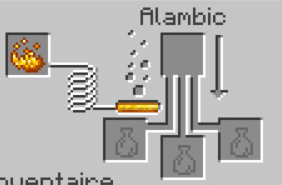
- Place your water vials at the bottom, then add the wart on the Nether Go up to get a strange potion:
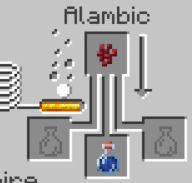
- Then add the magma cream To turn the strange potion into a fire-resistance potion:
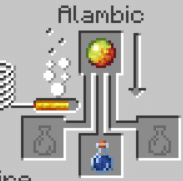
That's it: you now have your 3-minute fire resistance potion.
Upgrade and transform the potion
You can modify the base potion by adding an extra ingredient to the still. Here are the durations for each version:
- Normal potion: 3 minutes
- Extended (redstone powder): 8 minutes
- Disposable / splash (gunpowder): 2 min 15, called splash potion of fire resistance in English
The single-use version is cast on the ground or on an ally to apply the effect from a distance. You can also create a long-lasting potion, called lingering potion of fire resistance in English (persistent fire resistance), by adding "dragon's breath" to a single-use potion: it leaves a cloud of effect on the ground for a certain amount of time. This persistent fire resistance is useful for protecting multiple players at the same time in a given area.
These variants work the same way in editing Java and in print Bedrock.
Have a question about the fire resistance potion? That's what the comment box is for.
See the rest of the guides on Minecraft:








 English