The luck potion Improve your loot from fishing and from mobs in Minecraft. It is exclusive to the Java Edition and is not normally crafted at the brewer. You can only obtain it by ordering it or directly in Creative mode.
Tutorial Minecraft: What is the Lucky Potion used for?
The luck potion gives you the effect Chance (Luck) in Minecraft. This effect modifies your loot by increasing the attribute generic.luck of your character.
Specifically, this bonus affects the game's loot tables. You'll get rare items more often and in greater quantities. The effect is most noticeable while fishing and with certain loot chests generated throughout the world.
The basic potion applies the Level 1 Luck effect for 5 minutes. It was introduced in version 15w44b of Minecraft Java Edition.
This potion is exclusive to Minecraft Java Edition. The potion does not exist as an item on Bedrock Edition. His order ID is minecraft:luck, which you use to apply the effect in the game.
Note: The "Luck of the Sea" enchantment also affects your fishing catches, but in a different way. It directly adjusts the probabilities in the fishing tables. It does not provide the "Luck of the Potion" effect or the attribute bonus. generic.luck. These are two distinct mechanisms.
How do I get the lucky potion in survival mode?
The luck potion takes 5 minutes and applies the effect Luck. You can't craft it in the brewer. It's exclusive to Minecraft Java Edition and does not exist on Bedrock Edition.
In theory, it appears in some fishing loot tables and in the game code. In practice, you never get it in normal survival mode—neither from chests nor from fishing. The only reliable way to get it is through a command.
Please note: Orders for Minecraft Java Edition are always in English, regardless of the language of your game. There is no command /donner : you use /give.
- Open the console by pressing the key / on your keyboard.
- Enter the order /give @p minecraft:potion{Potion:”minecraft:luck”} 1 then press Entrance.
- You can also apply the effect directly using /effect give @p minecraft:luck 300 0 without needing to have the item in your inventory.
- Change the last digit to get multiple luck potions at once, or repeat the command as many times as you want.
Note: The "Luck of the Sea" enchantment improves your fishing loot, but it affects the game's internal probabilities. It does not provide the effect Luck of the potion. These are two very distinct mechanics.
Crafting a disposable luck potion
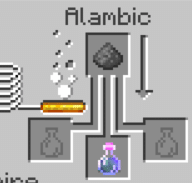
You can turn this potion into single-use luck potion Thanks to the brewer. Place your luck potion in one of the bottom slots, then add gunpowder to the top slot. Gunpowder acts as a universal ingredient: it converts any potion into a single-use version. You’ll then receive a single-use luck potion, which you can cast to apply the effect to an area.
Persistent Luck Potion
There is also a persistent version of the Luck Potion. To make it, place your Luck Potion in the brewer and add redstone dust to the top slot. Redstone dust changes the duration of any potion: the Luck effect is extended from 5 minutes to 8 minutes. This is useful for long fishing or exploration sessions.
How do I get lucky potions in creative mode?
In creative mode, the luck potion You can pick it up directly from the inventory, without needing a brewing table or a command. Here are the steps to follow in Minecraft Java Edition :
- Type the command /gamemode creative to switch to creative mode if you're not already there.
- Open the creative inventory, click the icon compass (the search tab), then type «chance.».
- Add the luck potion that appears in your results to your inventory.
- Once you have your potion, tap /gamemode survival to return to survival mode.
You can also get it by using a command without opening your inventory. On Java Edition, the controls remain in English regardless of the game's language. Use /give @p minecraft:potion{Potion:”minecraft:luck”} 1 to receive a luck potion in your inventory.
Turn the luck potion into a single-use version
To obtain the single-use luck potion, place your luck potion in the brewer along with some gunpowder. The gunpowder turns any standard potion into a throwable potion. You can then throw the throwable luck potion on the ground or at a target to apply the effect from a distance.
©Alucare.fr, Recipe for the single-use luck potion in Minecraft
The Arrow of Luck
There is also a lucky arrow in Minecraft Java Edition. It is available only by special order: /give @p minecraft:tipped_arrow{Potion:”minecraft:luck”} 1. When it hits a player or a mob, it applies the Luck effect for a few seconds. It's a handy way to modify another player's active effects in multiplayer mode.
Note: an enchanted fishing rod with A Chance from the Sea Improves your fishing catches, but does not grant you the potion's Luck effect. This enchantment acts directly on the fishing loot tables, without going through the attribute generic.luck nor by the potion's effect. These are two very distinct mechanics.
To learn more, check out other guides on potions: the potion of weakness, the healing potion, the potion of strength, the rejuvenation potion or the water breathing potion If you want to know how breathe underwater in Minecraft.









 English