The damage potion Deals instant damage to a player or creature as soon as it hits them. It comes in Level I (3 hearts) and Damage Potion II (6 hearts). You can drink it or use it as a one-time-use item by mixing it with gunpowder. To craft it, you'll need a still, a vial of water, and a fermented spider eye. This tutorial is still valid on Minecraft Java and Bedrock since version 1.9.
What is the damage potion used for?
The damage potion (in English Potion of Harming) causes an immediate loss of health. The Level I damage potion removes 3 hearts, or 6 health points. The Level II damage potion removes 6 hearts, or 12 health points. This damage is instantaneous and has no duration.
It affects other players as well as mobs. Undead creatures (zombies, skeletons, withers) are healed by this instant damage instead of losing health. On them, a healing potion therefore acts as an attack, and the poison potion That doesn't work either.
This recipe is valid on Minecraft in Java Edition as in Bedrock Edition, and has not changed since version 1.9.
How do you make the damage potion?
First and foremost, you'll need vials to hold your potions.
Ingredients needed to make them: 3 glasses (uses a workbench).
Here's how to arrange them to make your vials: 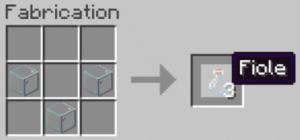
Once you have your vials in hand, you'll need a still. This item is used to craft all the potions in the game. Without a still, you won't be able to make your own potions.
Ingredients needed to make it: 3 stones and 1 stick of blaze (the stick of blaze (obtained by killing blazes in the Nether).
Here's how to arrange the ingredients to make it.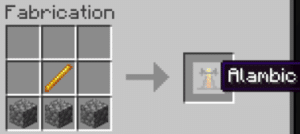
Place your still in your base, then right-click to open its interface. This is where you create your potions. You can actually brew up to 3 potions at the same time. Remember to fill your vials with water first.
Level I Damage Potion
Ingredients needed to craft it: 1 Nether Wart, 1 Shimmering Watermelon Slice, and 1 Fermented Spider Eye (excluding potions: 1 powder of blaze (as fuel).
Opens the interface for the still created earlier.
The still needs fuel to operate: the famous powder of blaze. Place it as shown in the image below.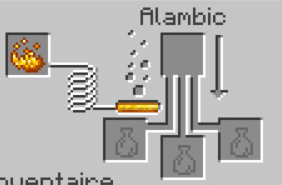
Tip: Here's how to make a glittery slice of watermelon and a fermented spider eye.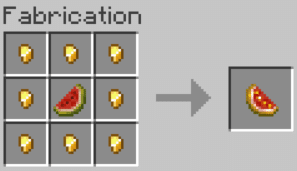
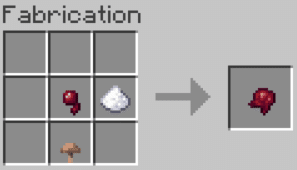
Now, follow these steps.
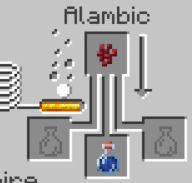
- Place the vial of water, then add the Nether Wart:
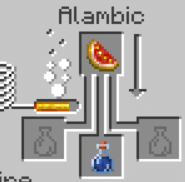
- Add the sparkling slice of watermelon:
- Finally, add the fermented spider's eye to taint the potion:
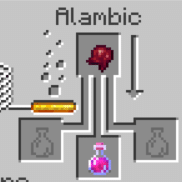
You obtain a Level I damage potion. Fermented spider eyes can also be used in a poison potion to produce the same result.
Upgrade and transform the damage potion
To create a tier II damage potion, adds a luminous powder to your Level I damage potion. It will then deal 6 hearts of instant damage.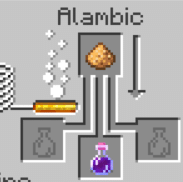
To get a single-use damage potion, add some gunpowder. Place it in the top compartment of the still, where the ingredients go, along with your potion in one of the bottom compartments. You’ll then be able to throw the potion at your target instead of drinking it.
Summary Table of Variants
| Variant | Effect | Ingredient to add |
|---|---|---|
| Damage Potion I | Deals instant damage (3 hearts, 6 HP) | Spider eye fermented in a healing or poison potion |
| Damage Potion II | Deals instant damage (6 hearts, 12 HP) | Glowing Powder on a Damage Potion I |
| Single-use damage potion | Throws itself at the target instead of being drunk | Gunpowder |
See the rest of the guides on Minecraft :








 English