The rejuvenation potion allows you to automatically regain your health in Minecraft, a valuable asset in the heat of battle. You craft it using a Nether Wart and a Ghast Tear in a still.
Tutorial Minecraft: What is the purpose of the regeneration potion?
The rejuvenation potion "Potion of Regeneration" triggers the Regeneration effect in Minecraft. You automatically regain your health without having to do anything while the effect lasts.
In practical terms, this potion heals you for half a heart every 2.5 seconds. The effect works in ticks: 1 tick equals 0.05 seconds, and the healing occurs every 50 ticks. The basic version lasts 45 seconds in Java Edit and 22 seconds in Bedrock Edition.
It's one of the best survival items in the game. In the heat of battle, it keeps you alive when facing a group of mobs or during a long fight, like the one against the Ender Dragon. You don't have to stop attacking to eat.
There is also an upgraded version, the Regeneration Potion II. It doubles the healing rate—half a heart every 1.25 seconds—but lasts for a shorter period (22 seconds in Java Edit, 11 seconds in Bedrock (Edition). Level II regenerates faster, while Level I regenerates for a longer period of time.
Good to know: These times apply to recent versions of the game. The values may vary slightly between major updates of Mojang, but the principle remains the same on Java Publishing and Bedrock Edition.
How is the regeneration potion made in Minecraft?
First and foremost, you need to vials. These are the containers that will hold your water—and then your potion—once the brewing is complete.
- Items needed to make them: 3 glasses (uses a workbench).
Here's how to arrange the glasses to make your test tubes: 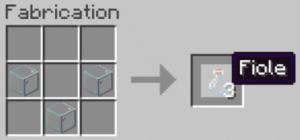
©Alucare.fr for Alucare.fr
Once your vials are ready, you'll need a still. This item is used to craft all the potions in the game. Without it, you won't be able to make your own potions.
Items needed to make it :
- 3 stones ;
- 1 stick of blaze (To get it, you or a tamed wolf must kill some blazes in the Nether).
Here's how to arrange the items to get it: 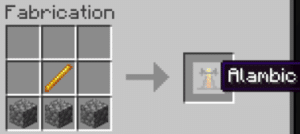
©Alucare.fr for Alucare.fr
- Set your still in your database.
- Right-click to open the interface. This is where you brew your potions.
- You can brew up to 3 potions at the same time. Remember to fill your vials with water first.
Let's move on to creating your rejuvenation potion Level I.
Ingredients needed:
- 1 wart on the Nether (It grows on the sand of souls, in a fortress of the Nether) ;
- 1 tear of ghast (she's been abandoned by the ghasts that you kill in the Nether) ;
- of the powder blaze as fuel.
The mixing is done in two steps, not all at once. Start by feeding the powder into your still blaze. Place it as shown in the image below: 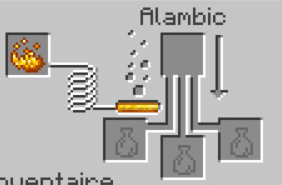
©Alucare.fr for Alucare.fr
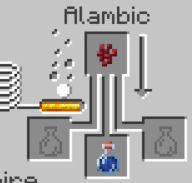
Step 1. Place your vial of water on the ground (fill an empty vial at a water source or from a cauldron filled with water), then add the wart from the Nether at the top. You get a strange potion—a base potion with no effect.
©Alucare.fr for Alucare.fr
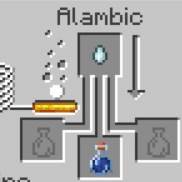
Step 2. Then add the tear of ghast on this strange potion. It then turns into a regeneration potion.
©Alucare.fr for Alucare.fr
There you go—your regeneration potion is ready. The Level I version restores half a heart every 2.5 seconds for 45 seconds by Java Editing (22 seconds in Bedrock (Edition). Perfect for restoring health in the middle of battle.
Don't feel like brewing? You can also achieve the regeneration effect in other ways: a golden apple, an enchanted golden apple, a suspicious soup, or a totem of immortality will also grant it to you (often combined with other effects). Other potions useful in combat include the healing potion, the potion of strength or the Turtle Master's Potion.
How can this regeneration effect be extended in Minecraft?
You now have your rejuvenation potion Level I. It lasts 45 seconds on Java Edit and 22 seconds on Bedrock Editing. At this level, you regain half a heart every 2.5 seconds.
There are two ingredients that can alter this effect in your still:
- Add some redstone powder for a longer-lasting potion. The duration increases to 1:30 minutes on Java Edit, at the same processing speed.
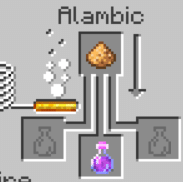
- Add some luminous powder to obtain a Regeneration Potion II. It lasts 22 seconds on Java Edit and 11 seconds on Bedrock Edit, but you regain half a heart every 1.25 seconds—twice as fast.
©Alucare.fr for Alucare.fr
You can also transform your basic potion. Gunpowder turns it into a disposable regeneration potion (splash): You cast it on an area or an ally to apply the effect. A dragon’s breath creates a lingering potion that generates a regeneration cloud on the ground. Finally, combining a lingering potion with arrows creates healing arrows, which apply the effect to the target they hit.
Summary Table of Variants
| Variant | Added ingredient | Effect and Duration |
|---|---|---|
| Regeneration Potion I | ghast tear | 1 half-heart / 2.5 s, 45 s (Java Edition) / 22 s (Bedrock Edition) |
| Extended Potion | Redstone Powder | 1 half-heart / 2.5 s, 1:30 min (Java Edition) |
| Regeneration Potion II | luminous powder | 1 half-heart / 1.25 s, 22 s (Java Edition) / 11 s (Bedrock Edition) |
| Disposable Regeneration Potion (splash) | Gunpowder | Cast on an area or an ally |
| Lingering Potion | Dragon's breath | Creates a regeneration cloud on the ground |
| Regeneration Arrow | Long-Lasting Potion + Arrows | Applies the effect to the target hit |
If you have any questions, please use the comments section. Here are the rest of our guides on Minecraft :








 English