The speed potion allows you to increase your movement speed in Minecraft. Here's how to make it and when to use it.
What is the purpose of the speed potion?
The speed potion Increases your movement speed when you walk or run. There are two levels: Speed I and Speed Potion II, more powerful. It is the exact opposite of the slowing potion, which reduces your movement speed.
This potion comes in handy in many situations: quickly exploring new areas, traveling long distances, fleeing a battle, or restarting one.
This guide applies to recent versions of Minecraft, as well as Java that Bedrock. In English, this potion is called Potion of Swiftness, with the username speed.
On Bedrock, the instructions and results are the same as those of the version Java. The durations and variations are also the same on Bedrock than on Java.
How do you make a speed potion in Minecraft?
To craft your speed potion, you'll need a Nether wart, sugar, a vial of water, and a still fueled by Blaze Powder. The crafting process takes place in two steps, and the Blaze Powder is used as fuel—not as an ingredient in the potion. Let’s start with the vials.
Step 1: Make the vials
First and foremost, you'll need vials to hold your potion.
Required item: 3 glasses (to be placed on a workbench). Here's how to arrange them to get your empty vials:
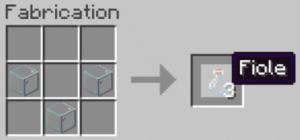
Remember to fill your vials with water afterward, because a vial of water serves as the base for all potions.
Step 2: Build the still
Without a still, you can't brew your own potions. It's the central tool of alchemy in the game.
Items required : 3 stones and 1 blaze stick. Here's how to arrange the items:
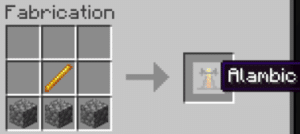
Place your still in your base. Right-click to open its interface. This is where you create your potions using alchemy. You can actually brew up to 3 potions at the same time.
Step 3: Brew the Level I Speed Potion
Items needed to make a Speed Potion I: 1 Nether wart and 1 sugar. In addition to the recipe, set aside 1 blaze powder to use as fuel for the still.
Go to the still interface. Place the blaze powder as shown in the image:
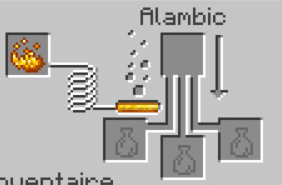
Everything is ready—just follow these steps:
- First, place your vial of water and the Nether Wart in the still. You'll get a strange potion (the basis of all potions in alchemy).
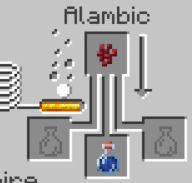
- Then add the sugar to turn the strange potion into a potion of speed.
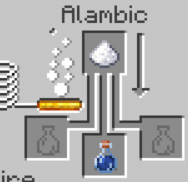
You now have your Level I Speed Potion, which lasts for 3 minutes.
Step 4: Improve Your Speed Potion
You can extend the duration of your potion, increase its level, or make it castable. Add luminous powder to a 3-minute speed potion to create the Speed Potion II, more powerful but shorter. As with the potion of strength or the healing potion, redstone powder extends the duration, and glow powder increases the level.
| Variant | Added ingredient | Effect / Duration |
|---|---|---|
| Speed I (Basic) | Sugar | Increased travel speed, 3 minutes |
| Speed I (long) | Redstone Powder | Increased travel speed, 8 minutes |
| Speed Potion II | luminous powder | Speed significantly increased, 1 min 30 |
| Single-Use Speed Potion | Gunpowder | Quick-Use Item: Throw it at yourself or another player |
| Persistent Speed Potion | Dragon's breath | Persistent Speed: Creates an effect cloud on the ground |
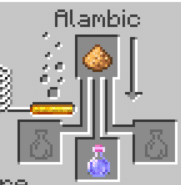
Gunpowder turns your potion into single-use speed potion. Redstone powder, on the other hand, simply extends the duration without changing the level. Starting with a single-use speed potion, you can create a long-lasting speed potion by adding dragon's breath.
Persistent Speed creates a cloud on the ground that applies the effect to players who walk through it. You can also craft a Speed Arrow by combining a Persistent Speed potion with arrows at a workbench, whether by Java or in Bedrock.
There you go—create all the speed potions in Minecraft, it's not that complicated. If you want to learn more, check out the rejuvenation potion to last longer in combat.
See the rest of the guides on Minecraft :








 English