Wisewand is an AI authoring tool that enables its customers to generate articles for their websites. This content is quality and SEO optimized for Google referencing.
You're wondering how to use Wisewand ? In our article, we offer you a complete tutorial on the use of its various modes.
Wisewand tutorial: Understanding the tool interface
Before jumping blindly into its use, we recommend that you first understanding the interface of Wisewand.
When you arrive tool dashboardYou'll have the opportunity to create a project, a persona or an article. What's more, you can integrate Wisewand on your WordPress to publish directly.
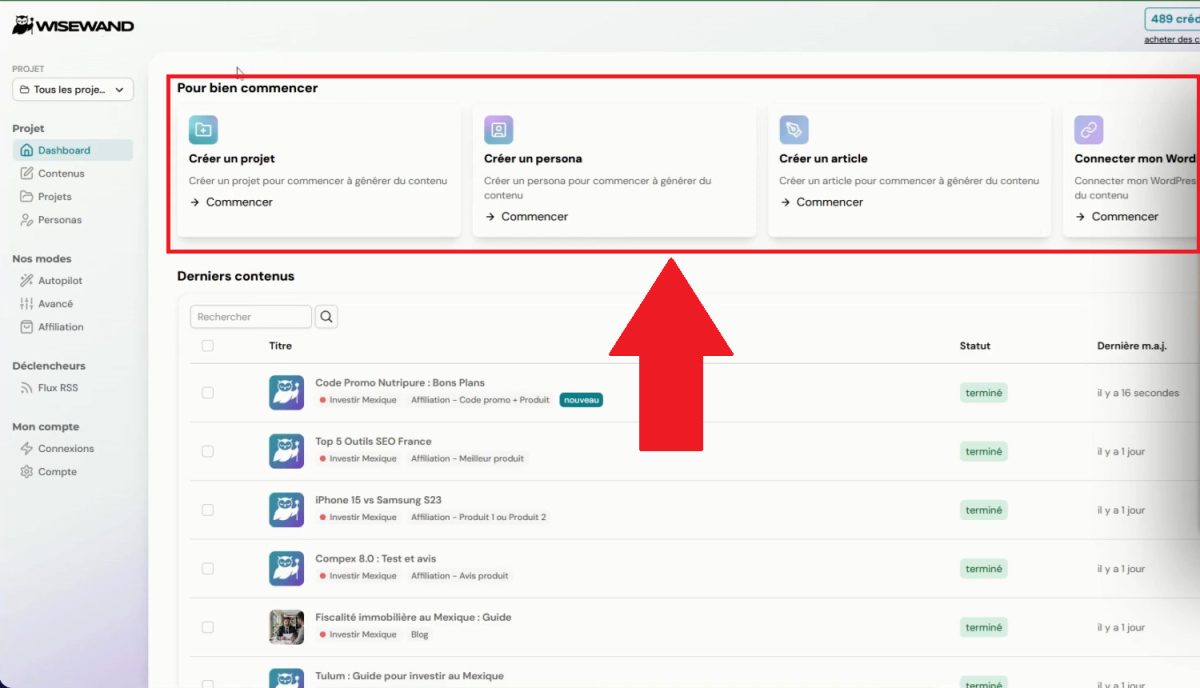
At the bottom, you'll find the list of your most recently generated content with their status and date of last update.

Next, what will be of great interest to us is the left-hand column, where you can access Wisewand's functions. We explain:
- The projects are displayed in columns and can include several sites.
- The Dashboard is in a way the tool's home.
- The "Content" tab allows you to manage what you generate. Depending on the project you're in, the content associated with it will be displayed.
- You can create and manage user profiles in “Personas”.
- You then have different ways of generating your items (Autopilot, Advanced, Affiliate).
- Follow competing publications using the RSS feed to create articles automatically.
- The “Connections” section” allows you to add or remove WordPress connections.
- Finally, the “Account” tab” is where you can change your first and last name, your profile photo, and view your invoices and payments.
- To add credits, click on the top right-hand corner.

How does Wisewand work?
Once you've got the hang of it elements of the Wisewand interfaceNow we can move on to how it works.
It operates mainly through using one of its three modes autopilot mode, advanced mode and affiliation mode. Here's how to handle them.
1. Wisewand Autopilot tutorial
the Autopilot mode of the IA Wisewand authoring tool is the simplest mode. It allows you to create SEO-optimized articles. quickly and in large quantities. To do this, you need :
- Click on the Autopilot tab.
- Write the subject of the content you want to generate.
- Find articles on the same subjects and use them as sources (not compulsory).
- Select the persona of your choice, as well as the length of the text and the site where it will be published.
- Choose publication mode (Direct? Scheduled? Draft?)
- Press generate.
- Go to the Contents tab.
- Let Wisewand do the work, then collect the items!

2. Wisewand Advanced mode tutorial
For its part, the advanced mode is aimed at people who want to have more control over the text generated by Wisewand. Here's how it works:
- Click on the Advanced tab.
- Write down the subject of the content you want to generate.
- Choose the type of article, its length, the site where it will be published and the persona who will write it.
- Add links to articles on the same subject so that they can be used as sources (not compulsory).
At this point, you have two choices. Either use the automatic filling and move on to the next steps continue :
- In the advanced settings, enter your target query and the answer to the search intent.
- Follow up by typing additional information or information to be avoided.
Once you've made your choice, we'll come back to the options you can choose to include in your article. (tables, bulleted lists, links, external sources, etc.).
- Press generate.
- Go to the Contents tab.
- Leave it to Wisewand, then collect the items!

3. Wisewand Affiliate mode tutorial
Finally, we have the affiliation modewith different types of content to create according to your needs. You'll be faced with four types of article :
- Product Reviews (create a detailed, objective review of a specific product).
- Product 1 or Product 2 (compare two products to help users make the best choice).
- Best + product (present the best product in a specific category).
- Promo code + product (create an article combining promo codes and product presentation).
No matter which option you choose, operation will be more or less the same. All you have to do is :
- Click on the item type you wish to generate.
- Write the subject of the text and add links as sources if you wish.
- Select persona, article length, publication site...
- Fill in the empty fields corresponding to the product.
- Choose the options to be added to the text (tables, bulleted lists, etc.).
- Press generate.
- Go to the Contents tab.
- Leave it to Wisewand, then collect the items!

What additional features does Wisewand offer?
In addition to these three text generation modes, which will be enhanced with further modes in the course of production, Wisewand includes additional functionalities :
- A intelligent SERP analysis from the best-positioned content on the web to integrate their keywords, titles and data into yours.
- A optimized internal linking with relevant embedded links within the content you've generated using the tool.
- A appropriate semantic optimization so that your articles are well referenced,
- A customized SEO score with detailed suggestions for improvement.
How much does it cost to subscribe to Wisewand?
Wisewand provides its customers with several subscription formulas. There are no free versions available, so this step will be mandatory to use the IA authoring tool:
| 📝 Packs | 💵 Price | 🔄 Equivalent/article | 🖋️ Articles/month |
|---|---|---|---|
| 19 credits | 47€ | 2,50€ | ~6 items |
| 88 credits | 259€ | 2,25€ | ~29 items |
| 249 credits | 689€ | 2€ | ~83 items |
| 570 credits | 1599€ | 1,75€ | ~190 items |
| 1331 credits | 3320€ | 1,50€ | ~444 items |
The purchase of one of these credit packs is valid for life. The whole package, without obligation. Flexibility that's sure to suit your needs.
What are the opinions on Wisewand?
While the tool is noted 4.3 out of 5 stars at TrustpilotThis is a finding we share wholeheartedly.

With time and new features on the way, there's no doubt that Wisewand will be one of the pillars of artificial intelligence editing.
We invite you to read our full article on our reviews of Wisewandall by clicking on the link.
All in all, intuitive interface makes Wisewand easy to use. Once you've identified your needs, all you have to do is use the appropriate mode to the content of your website.








 English