👉 If you want the quick answer: try Cloudflare (1.1.1.1 / 1.0.0.1). It's the fastest public DNS on average worldwide, free of charge and respectful of privacy.
⚠ But be careful If you're on Orange, Free, SFR or Bouygues fiber, your box's DNS is often faster than Cloudflare's local cache.
The only way to find out is to test it at home. We show you how in 1 minute below.
And let's be clear right away: a good DNS improves your loads but not your ping in part. If you're looking to gain ping, DNS isn't the answer.
How can you test which DNS is fastest for your business?
Before choosing a DNS on the basis of a generic classification, please note that performance varies according to your location and ISP.
❗ The best DNS for someone in Paris won't necessarily be the best for you. You might as well test it at home before making your choice.
👉 From a PC, Download DNS Benchmark (Windows) or Namebench (Windows/Mac). These tools test several DNS servers in just a few minutes and tell you which one responds fastest from your home. Make a note of the best two and enter them into your PS5.
👉 From the PS5, it's less precise but feasible:
- configure a DNS manually,
- then go to Network > Test Internet connection.
- Repeat with each DNS to be compared and keep the one that gives the best results.
👉 Fastest method (without installing anything) :
- go to dnsperf.com
- filter by Europe or France.
You can see in real time which DNS are responding fastest in your area. Not as accurate as a test from home, but it gives a good basis.
Best DNS for PS5: which one to choose in 2026?
A DNS (Domain Name System Where Domain name system) is a system that converts a domain name into an IP address.
- In this way, it acts as a directory that a device used for access another device on a network.
- This is the service that assign an IP address to an Internet site, or to a connected device/server, just as a telephone directory is used to link a telephone number to its owner's name.
In the case of a PlayStation 5, the DNS The main role of these ports is to ensure console access to the various servers (lobbies, games, applications) and facilitate downloading of games and other files.
Remember that using a connected PS5, you can quickly find games on PlayStation Store, movies on certain video streaming applications or even other players.
DNS can be classified according to speed, free access and security. We can therefore classify DNS for a PS5 in 2026 as follows:
| 🌐 DNS server | 1️⃣ DNS Primary | 2️⃣ DNS Secondary | 📌 Features | ✅ Benefits | ❌ Disadvantages | ⭐ Note |
| CloudFlare | 1.1.1.1 | 1.0.0.1 | DNS fast with a focus on confidentiality |
|
|
4,5/5 ⭐⭐⭐⭐☆ |
| Google-DNS | 8.8.8.8 | 8.8.4.4 | Public DNS overall from Google |
|
|
4,4/5 ⭐⭐⭐⭐☆ |
| Quad9 | 9.9.9.9 | 149.112.112.112 | DNS secure with malware blocking |
|
|
4,4/5 ⭐⭐⭐⭐☆ |
| OpenDNS | 208.67.222.222 | 208.67.220.220 | DNS with parental control and filtering |
|
|
4,3/5 ⭐⭐⭐⭐☆ |
| AdGuard DNS | 94.140.14.14 | 94.140.15.15 | DNS free that blocks ads and trackers |
|
|
4,3/5 ⭐⭐⭐⭐☆ |
⭐ Notes based on performance data DNSPerf and confidentiality criteria documented by Mozilla and EFF.
TOP 1: CloudFlare
CloudFlare DNS servers (1.1.1.1 and 1.0.0.1) stand out for their respect for privacy and their global average speed. In terms of pure performance, they remain competitive, even if your ISP's DNS can sometimes do better, depending on your region.
Indeed:
- They support the DNSSEC protocol (verification protocols that use electronic signatures based on a cryptographic system)
- They don't track pages that Internet users consult for commercial purposes.
The company also certifies that all users' browsing histories are automatically stored. deleted within 24 hours that follow.
TOP 2: Google DNS
Google DNS (8.8.8.8 / 8.8.4.4) is one of the world's most widely used resolvers. Its global infrastructure enables it to respond quickly from almost anywhere, which makes it a reliable alternative to Cloudflare if you want to test another player.
The reach of Google DNS is practically worldwide to place a name generator as close as possible to the user who needs it.
⚠ A word of caution about privacy Google stores a portion of DNS logs for 24 to 48 hours. Not a problem for most players, but good to know if you insist on maximum confidentiality.
TOP 3: Quad9
Quad9 focuses on safety, efficiency, reliability and speed. In addition to protect data, this public DNS server respects confidentiality.
He also ensures your safety against all kinds of fraud (phishing, malware, etc.). As an added bonus, this service offers undesirable site filtering and automatically blocks risky domains on the web.
TOP 4: OpenDNS
Provided free of charge by Cisco, OpenDNS is best known for its reliability and filtering.
It also offers advanced features such as parental control and blocking of malicious sites, which explains its adoption by millions of users.
⚠ Good to know: OpenDNS retains some browsing data. If maximum confidentiality is your priority, Cloudflare or Quad9 are stricter on this point.
TOP 5: AdGuard DNS
AdGuard DNS (94.140.14.14 / 94.140.15.15) is a free public resolver with a feature the others don't have: it automatically blocks ads and trackers at DNS level, even before they load.
On PS5, it's especially useful for ads in the integrated browser and certain applications. In terms of privacy, AdGuard keeps no logs linked to your identity.
⚠ The only downside: like any filtering DNS, it can very rarely block a legitimate domain. If you notice that an app or game is no longer connecting, temporarily switch back to an unfiltered DNS to check.
How to choose the best DNS server for gaming?
For the best gaming experience, you need to choose the best DNS server by looking at the following elements:
| 👉 Selection criteria | 📑 Details |
|---|---|
| Speed and latency |
|
| Reliability |
|
| Security |
|
| Privacy |
|
| Ease of use |
|
| Compatibility |
|
FAQs
How does DNS impact the gaming experience?
DNS acts mainly before you enter the game. It translates domain names into IP addresses, which determines how quickly your PS5 connects to the PlayStation Network, loads the Store or joins a lobby.
👉 In concrete terms, a fast DNS can save you from a few milliseconds to tens of ms on this initial resolution (even more so if your ISP's DNS is faulty). You'll feel it on the reactivity of menus and lobbies, not during the game itself.
Once in play, your ping depends on just two things:
- your type of connection (Ethernet is still far superior to Wi-Fi)
- and your physical distance from game servers. DNS is no longer a factor at this stage.
Ping is measured in milliseconds. The lower it is, the less lag there is between your actions and the game's response. To keep it really low, opt for a wired connection and choose game servers close to home.
Which DNS server is the fastest for games?
On global benchmarks (DNSPerf), Cloudflare 1.1.1.1 is in the lead, followed by Quad9.
But on French fiber (Orange, Free, SFR, Bouygues), your box's DNS often comes out ahead thanks to its local cache.
👉 The only reliable answer is to test it at home.
⚠ Are you an Orange customer with a Livebox 4 or 5?
Some of these boxes don't allow you to modify DNS directly from their interface. Don't panic: you don't need to go through the box. It's even quicker and easier to set up your DNS directly on the PS5 by following the tutorial below.
How to change DNS on PS5?
You can change DNS whenever necessary on your PS5, in order to remedy DNS server failures that may occur with your operator. To switch from one DNS to another on your PS5, follow these simple steps:
- Go to settings of the PS5.
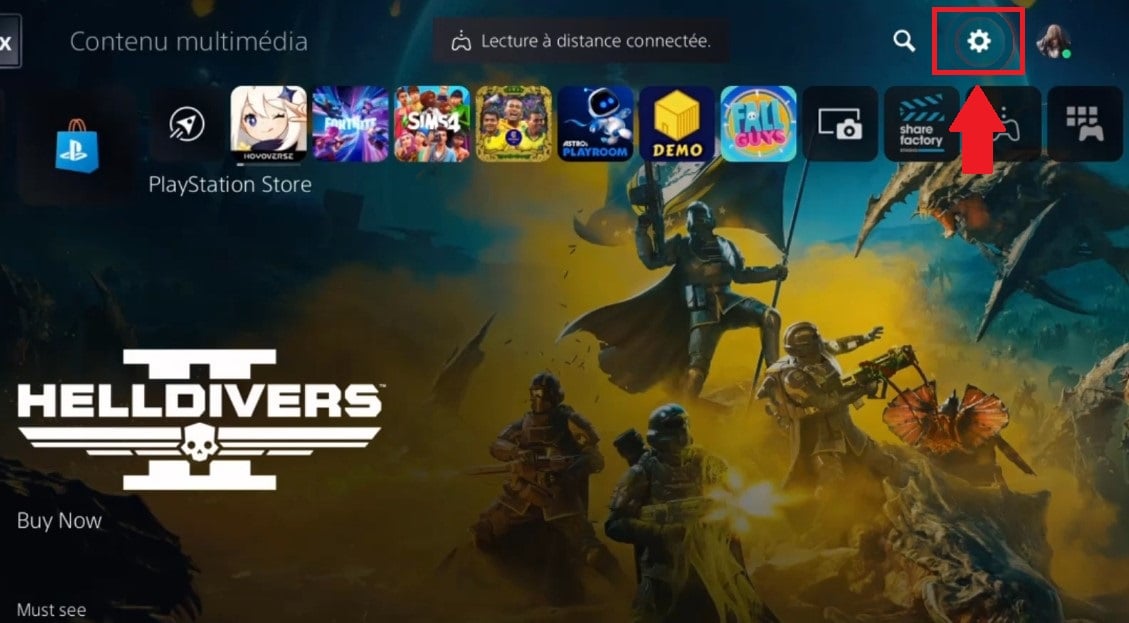
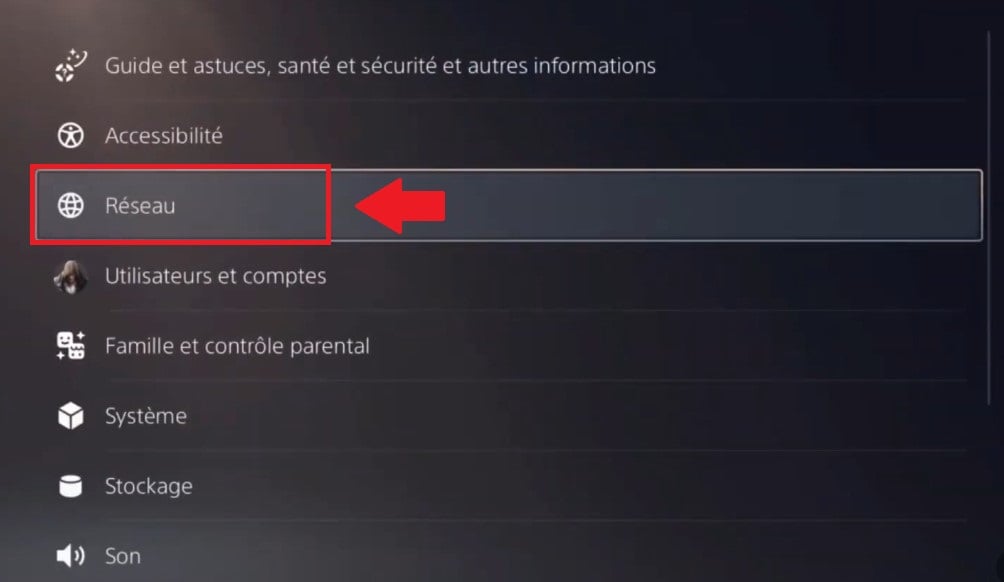
- Enter Network.
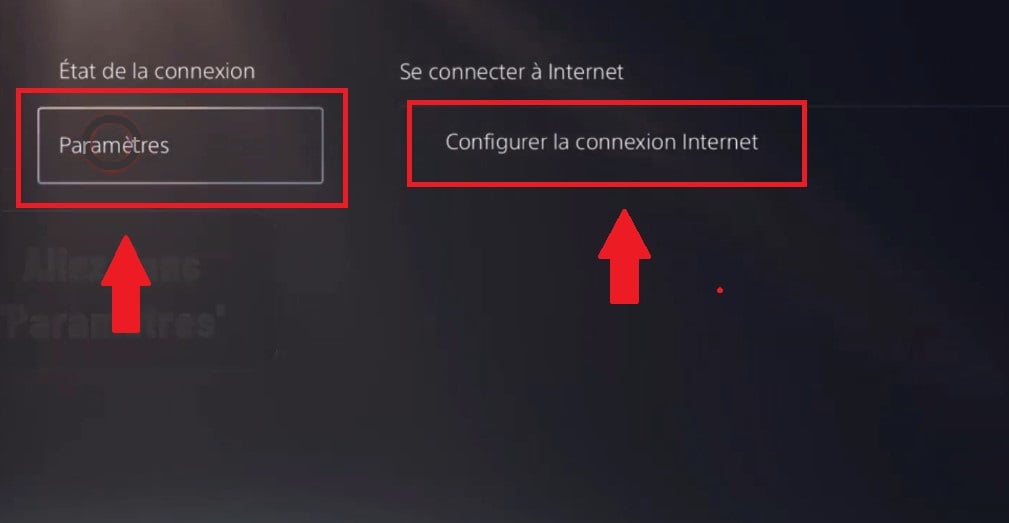
- Click on Settingsthen on Setting up your Internet connection.
- Choose the Internet connection you are using, then go to Advanced settings.
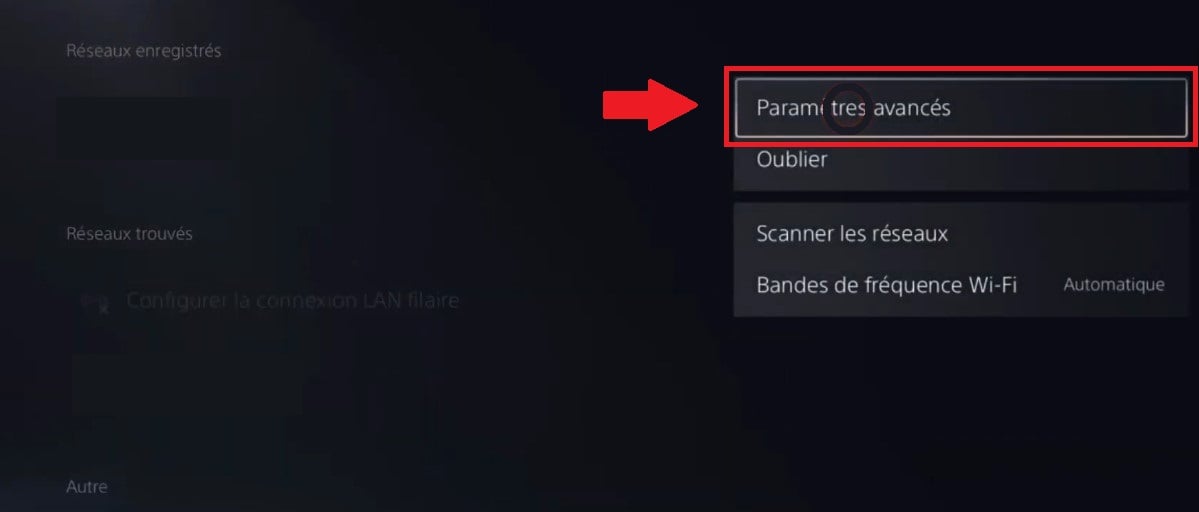
- Select DNS settings, and change the Automatic option to Manual.
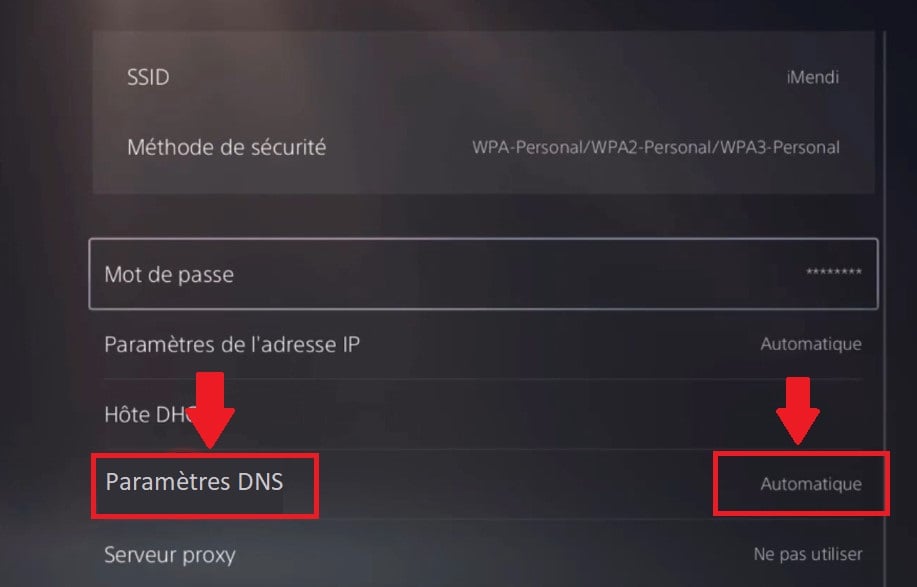
- You will then be required to complete the values Primary DNS and secondary DNS (test one at a time until the connection is re-established).
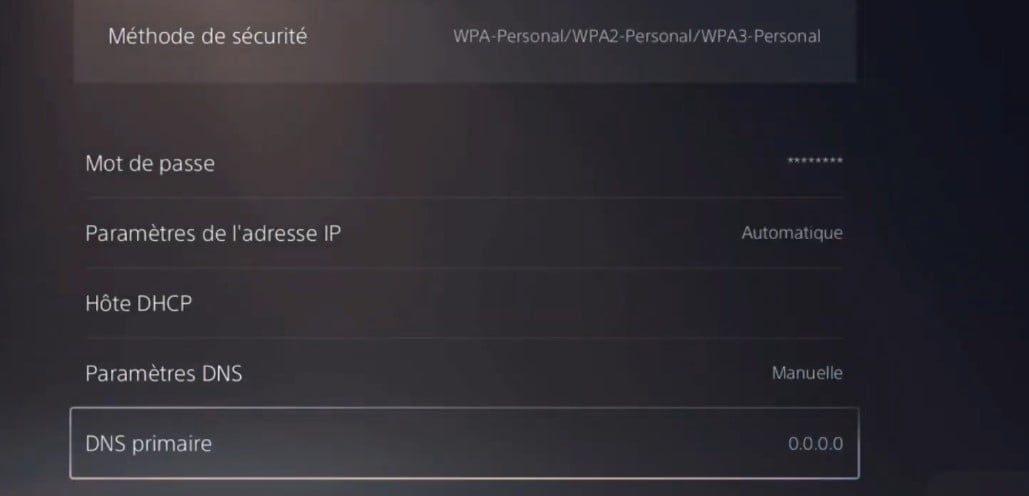
- To save changes, click on OK.
Note :
You can return to your operator's default settings by clicking on Automatic instead of Manual next to DNS Settings click OK.
How can I get a better connection on PS5?
In order, here's what really makes the difference:
- 👌 Ethernet cable, It's the best option, no question about it. Connect your PS5 directly to your box with an RJ45 cable, and you'll get a stable ping and maximum throughput. No cuts, no interference. If you can do it, do it.
- 👌 5 GHz Wi-Fi if cable is not an option. Go to Network > Configure Internet connection, choose your Wi-Fi network, press the Options button on the controller, then change the frequency band from 2.4 GHz to 5 GHz. The connection will be faster and less saturated.
- 👌 Bring the PS5 closer to your box. The shorter the distance and the fewer the obstacles between the two (thick walls, household appliances, metal objects), the better the Wi-Fi signal.
Should I opt for a VPN or a DNS server?
The two tools do not do the same thing, and confusing them will make you pay for something you don't need.
➡ DNS is free and sufficient for the vast majority of players. It makes your Store, lobbies and applications more responsive by speeding up address resolution. That's all you need in 90% cases.
➡ VPN goes further It masks your IP address, protects you from targeted attacks and gives you access to streaming catalogs unavailable in France. But it's not free, and it's only really useful in three specific situations:
- Are you a streamer or competitive gamer? and you're worried about a DDoS attack.
- You want to access foreign catalogs like Netflix US or Crunchyroll JP.
- Vur ISP is blocking your NAT and prevents you from playing multiplayer properly.
😉 If none of these cases apply to you, a good free DNS is more than enough. No need to spend €5 a month for nothing.
⚙️ Bonuses configure IPv6 on PS5 (for fiber connections)
If your box is recent and your ISP offers IPv6 (which is the case for most fiber offers today), you can enter IPv6 addresses in addition to the standard IPv4 addresses.
This allows your PS5 to take full advantage of your connection.
If you're not sure, stick to IPv4 only, it works fine in the vast majority of cases.
| Service | Primary DNS (IPv6) | Secondary DNS (IPv6) |
|---|---|---|
| Cloudflare | 2606:4700:4700::1111 | 2606:4700:4700::1001 |
| 2001:4860:4860::8888 | 2001:4860:4860::8844 | |
| Quad9 | 2620:fe::fe | 2620:fe::9 |
| AdGuard DNS | 2a10:50c0::ad1:ff | 2a10:50c0::ad2:ff |
In the course of this article, you have seen how to test which DNS server offers the best DNS performance. best speed and the lowest latency in your company, what are the best DNS servers to remember in 2026 for your PS5 (Cloudflare, Google Public DNS, Quad9, OpenDNS and AdGuard DNS), and on which criteria to base your choice on: response speed, reliability, stability, security, protection against malicious sites, filtering and privacy.
You'll also know how to change DNS step by step on the console, how to set your IP addresses (and IPv6 on fiber offers), and when a VPN becomes really useful compared to a simple free DNS service. Personally, I don't recommend VPN for pure gaming: it often adds latency. It's still useful for the 3 cases mentioned above (DDoS, foreign catalogs, blocked NAT), but not for boosting performance.
👉😉 So, did you find the server? DNS for PS5 that best meets your needs?
💡 One last thing! If you also play on PC: the ExitLag tool goes further than DNS.
Where DNS speeds up your uploads and your connection to lobbies, ExitLag optimizes the path your data takes to game servers. This can really lower your ping in part. It's not free, but it's affordable.
However, it is not available on PS5, it's a PC-only solution, so keep that in mind before you start.
👉 If you want to try, we have a coupon code ExitLag available to reduce the note 😉.








 English