the PS5 account sharing lets you share your game library and your benefits PlayStation Plus with a loved one, on two different consoles.
In practice, two players can enjoy the same purchased games, each on their own console.
How do I share my PS5 account?
Here are the steps to follow directly in the settings on your console:
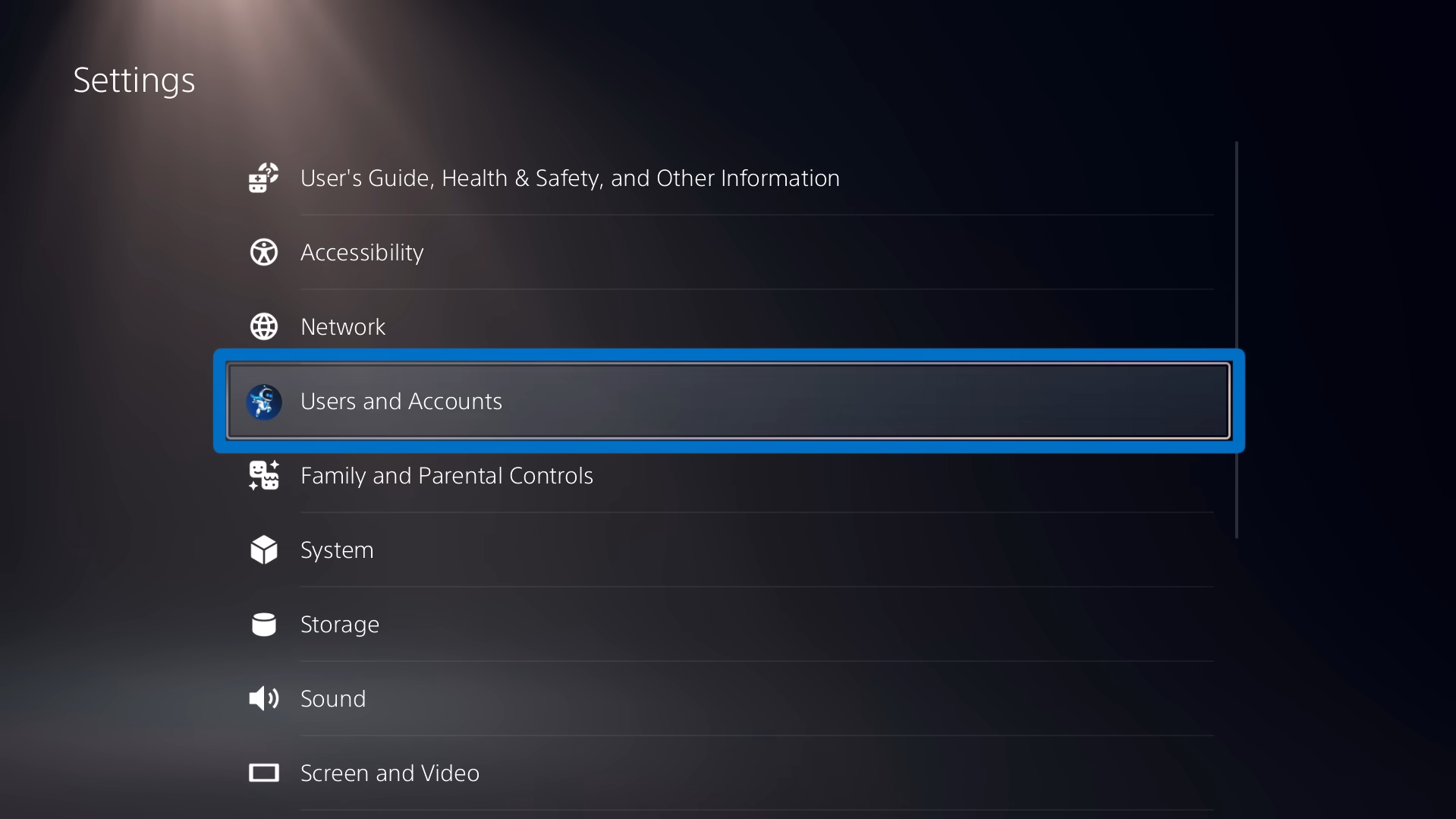
- Go to the settings, in the upper-right corner of your home screen.

- Select «Users and Accounts».
- Scroll down to the section "Other.
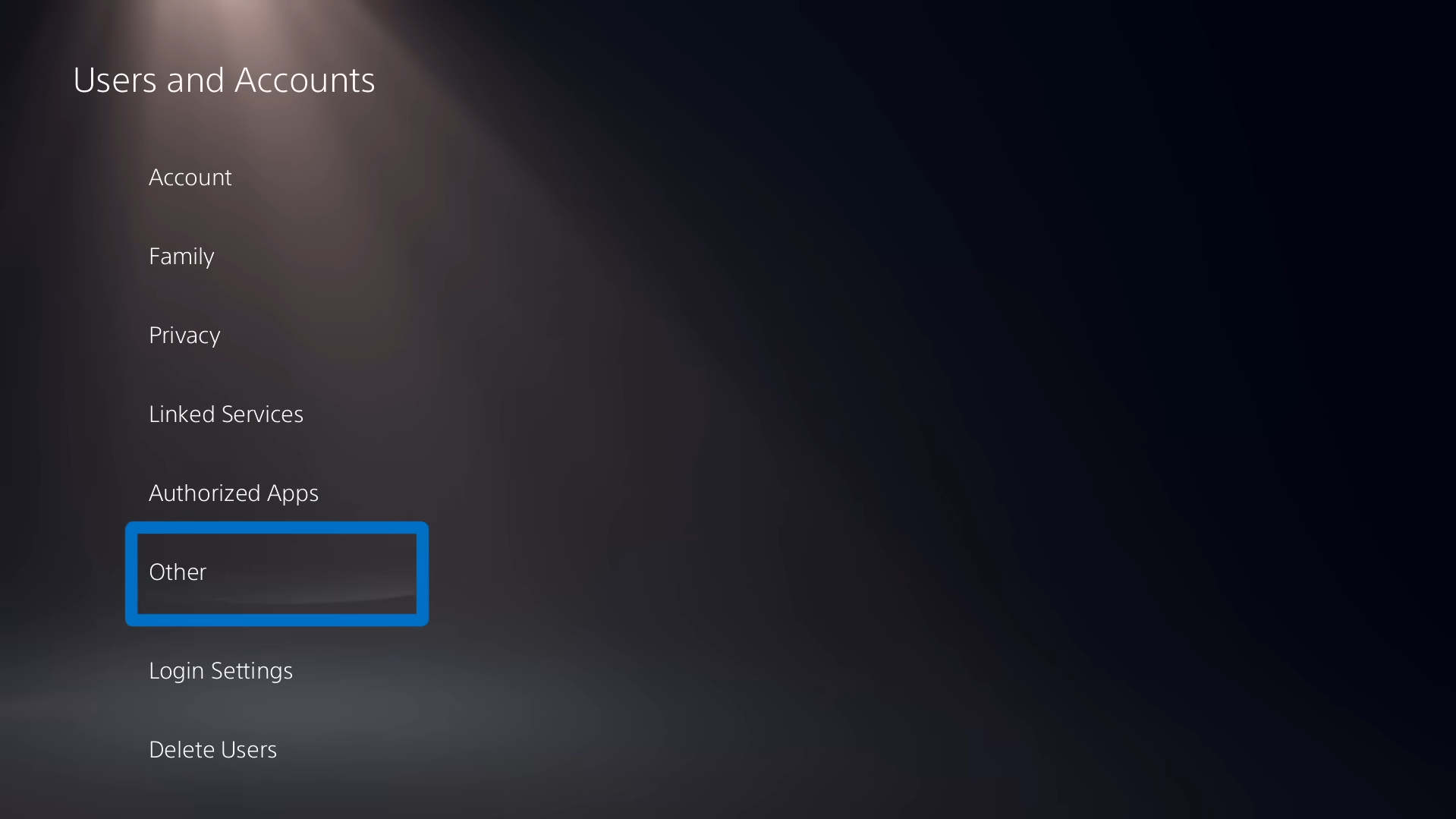
- Select «Console Sharing and Offline Gaming».

- All you have to do now is enable the feature.

How do I set up a master account on PS5?
If you're the account owner, just follow the tutorial above to Enable console sharing. Then, your loved one follows the same path through the Users and Accounts Settings, then selects «Do not disable».
Its console then becomes the main console, and all the secondary accounts linked to it get to enjoy your games and perks.
Can I play at the same time when sharing a PS5 account?
Good news: You can play at the same time when sharing a console. To do this, your main account must remain connected to the internet on your own console.
Your loved one's console, with a secondary account and the option «Console Sharing and Offline Gaming» Once enabled, you can access your games without interrupting your session. There is one limitation, however: you cannot launch the same online game on both consoles at the same time.
In that case, one of the two has to go offline. On different games, no problem.
How do I share my PlayStation account with Sharesub?
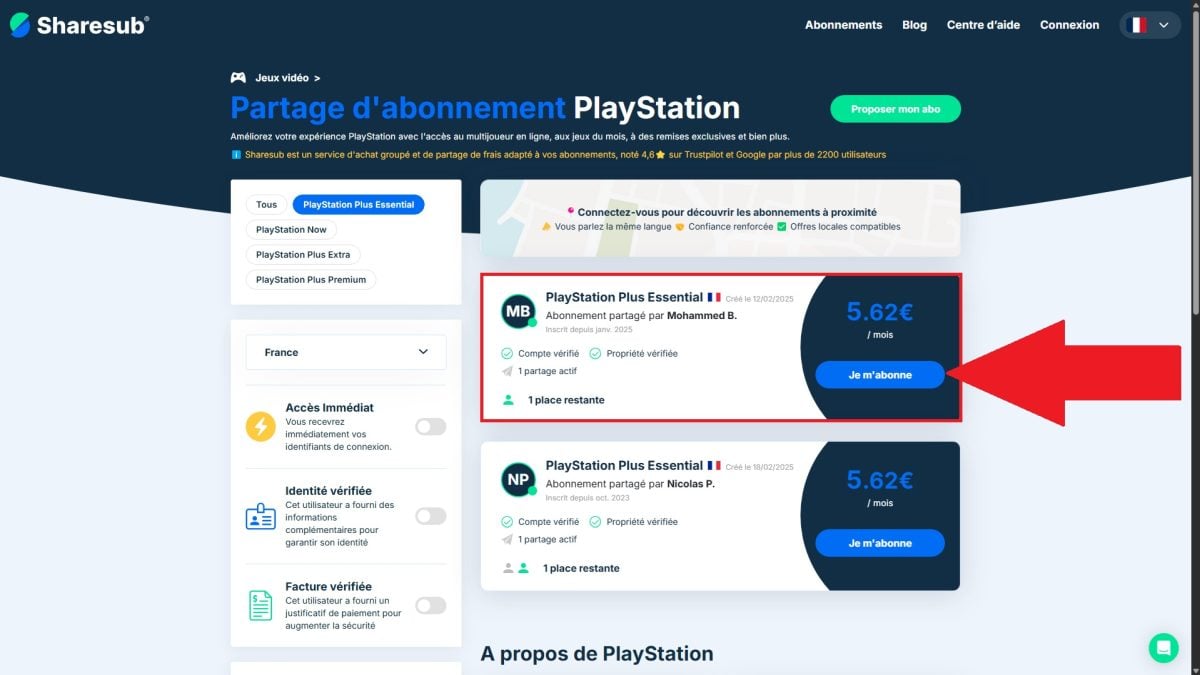
By going through a subscription-sharing site as Sharesub, you can Reduce the cost of your online subscriptions. Here, it's the’subscription PlayStation Plus Essential that we're interested in.
This service offers several benefits: access to the online game, of the free games every month and some exclusive discounts on the store. Note that this practice is not officially supported by Sony : Use it with full knowledge of the facts.
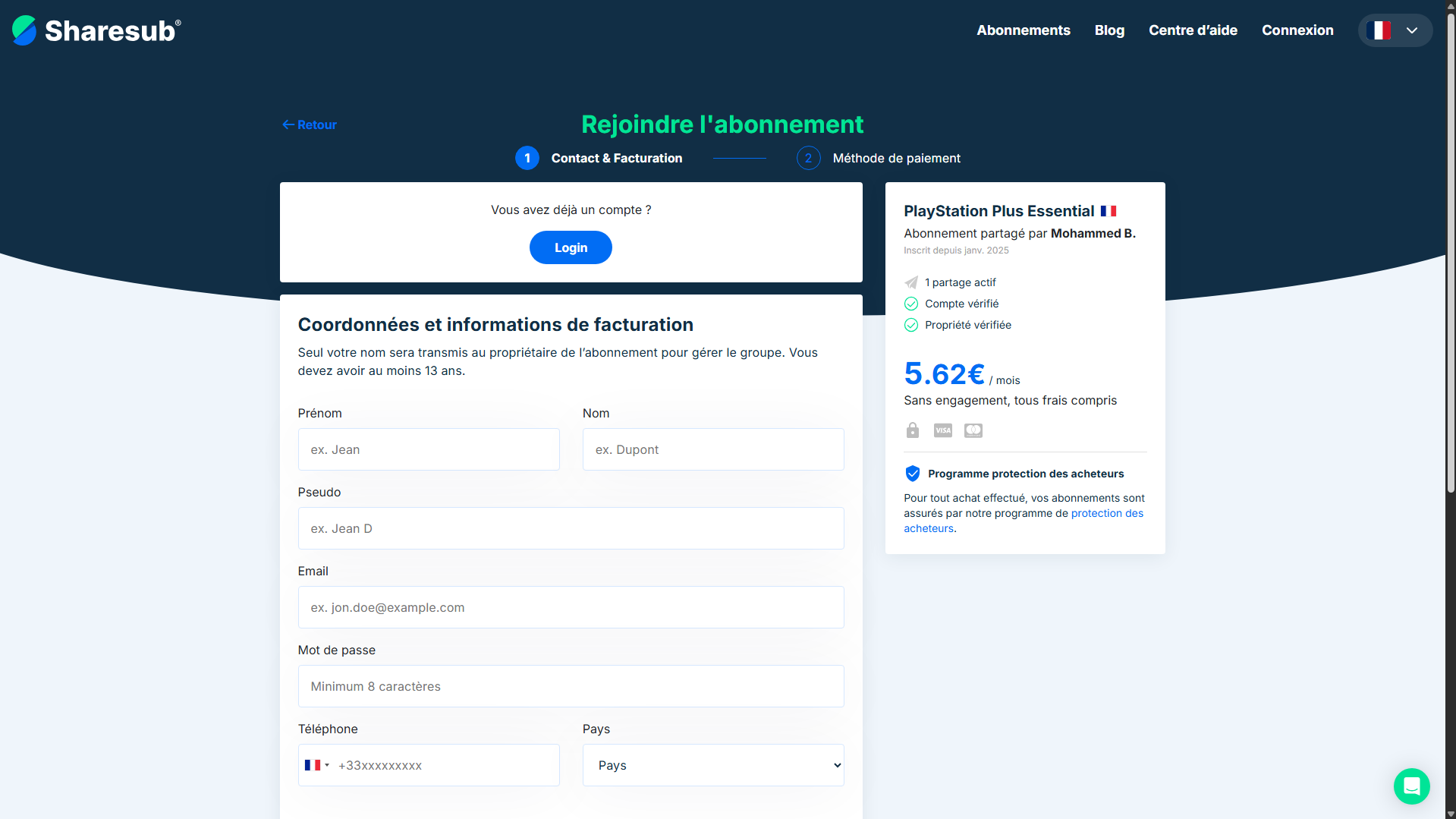
Here's how to do it via Sharesub :
- Go to the website of Sharesub.
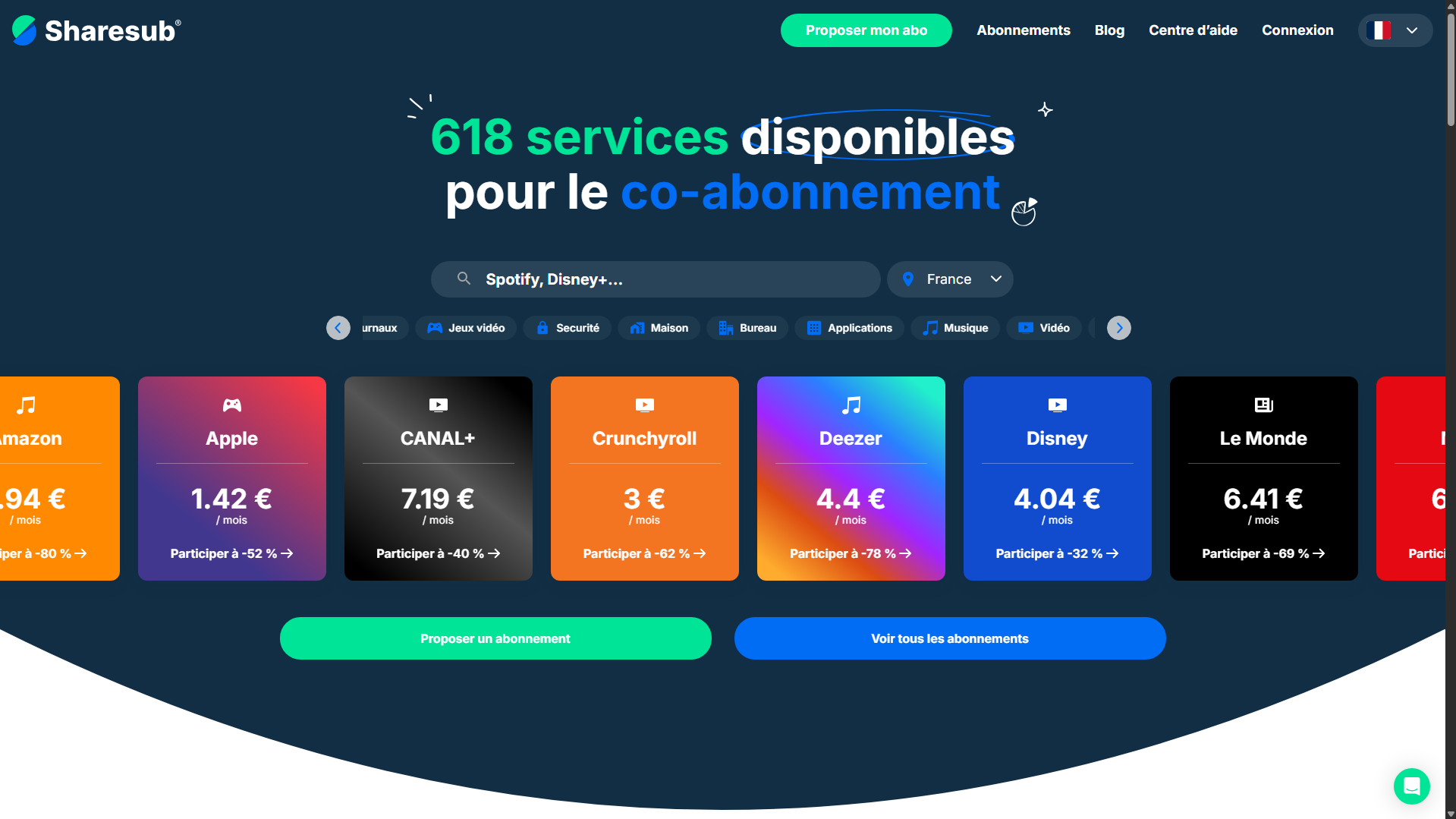
- Select PlayStation.
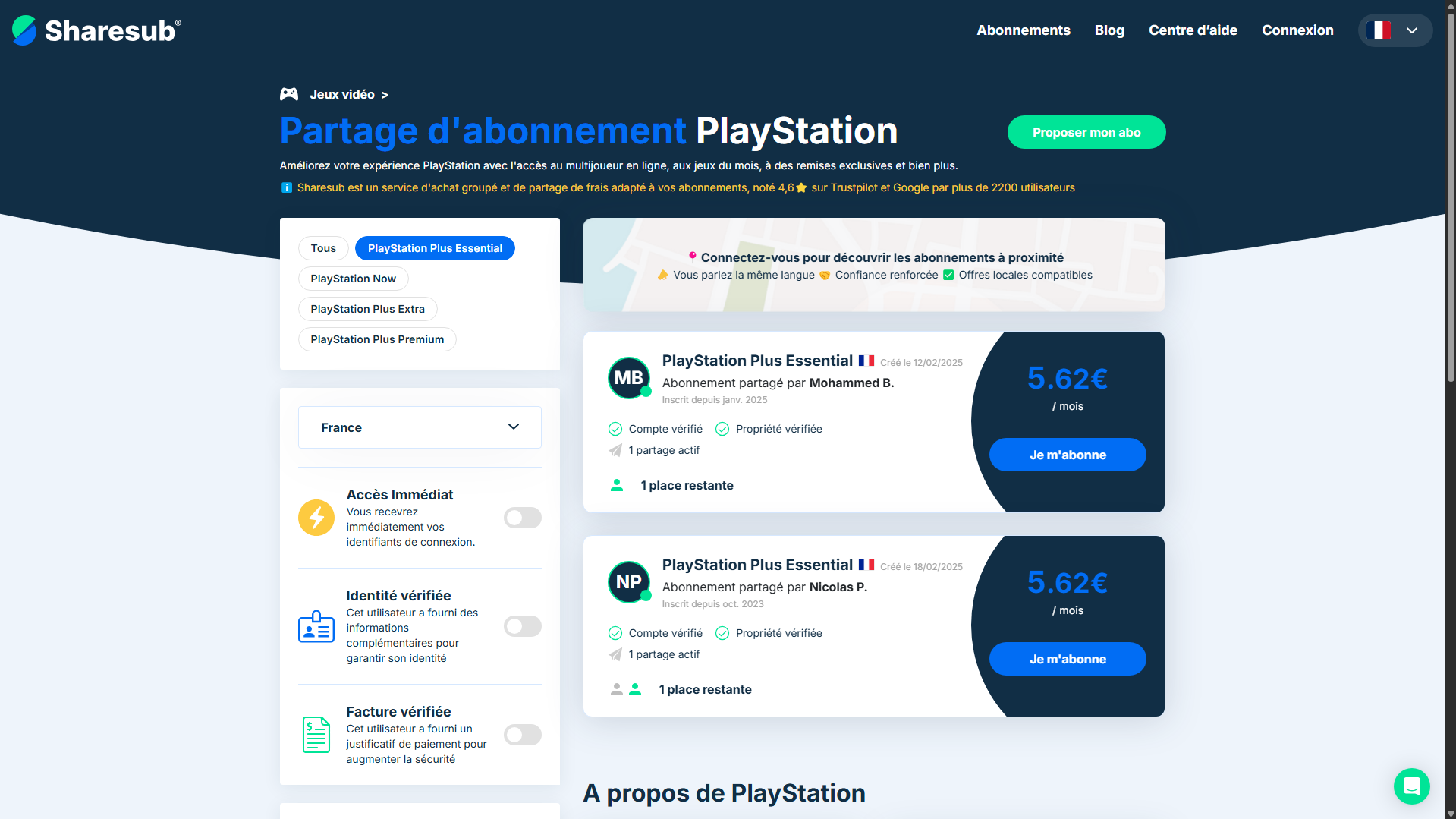
- Select a payment group.
- Proceed with payment.
- Enjoy the PS Plus Essential at a lower price!
Feel free to check out our opinion about Sharesub.
What is PS5 account sharing?
the account sharing PS5 allows two users to share their game libraries. You can expand your collection without having to buy titles that your friend or family member already owns. A friend or family member can thus enjoy your digital games and your benefits PlayStation Plus, on another console, without spending a single penny more.
It is important to distinguish between two types of sharing, which are often confused:
- the game sharing : You allow a family member or friend to play your digital games on their own console using your account.
- the console sharing : You define a console PS5 as «primary,» which allows the secondary accounts to enjoy the games and benefits of this account.
On the PS5 designated as the primary one, all profiles will inherit your rights: access to your library and your subscription.
What are the advantages and disadvantages of account sharing on PS5?
Before activating the console sharing, it's best to weigh the pros and cons.
On the plus side:
- Of great savings : You get free access to the purchased games from the other account, without redeeming them.
- A a more diverse library : You get to enjoy the songs PS5 and PS4 the family member who enables sharing.
- The benefits PlayStation Plus are shared on the main console with all profiles logged in to it.
- The possibility of play on two consoles at the same time, each playing different games.
On the downside:
- On your own console, which has now become secondary, only your account maintains access to games and shared benefits.
- Some DLC, virtual currencies, or third-party content are not shared: only the account that purchased the content can access it on the secondary console.
- Regarding the safety risks real: You're granting access to your account—and therefore to your purchases and your payment details.
What are the solutions to common problems with PS5 account sharing?
Console sharing on PS5 sometimes causes a few problems. Here are the most common problems and how to fix them quickly.
Having trouble connecting?
Start by checking the condition of your internet connexion. If everything looks good on that end, log out of your account PSN, then log back in to see if the problem goes away. A simple console restart is often enough to break the deadlock.
Having trouble enabling or disabling account sharing?
Check that a another console is not already enabled. Console sharing only works on just one PS5 at the same time, so be sure to turn off the other console before turning on yours.
If you don't have remote access to this machine, you can manage everything from the menu account management online:
- Log in to the menu account management since site PlayStation.
- Open the section security followed by the list of devices.
- There, you can disable remotely registered devices.
Having trouble downloading or launching games?
First, check that the console sharing is enabled on the PS5 main and that you're signed in to the right account. Also make sure your console is up to date on the system. As a last resort, the support for PlayStation I'm here to help if the problem persists.
Some tips and recommendations for account sharing on PS5
Before sharing your account, Choose the right person. A malicious person could gain access to your games, your purchases, and your personal information. Do not enable this feature lightly.
To keep your account secure, follow these simple rules:
- Enable the’two-factor authentication in the connection settings.
- Use a strong password and unique.
- Check the following regularly: active connections on your account.
- Don't share never your login credentials, even to a loved one.
You now have everything you need to share your account PS5. This feature encourages players to help one another and allows you to save money about your games and your subscription PS Plus.
And with a platform like Sharesub, you can lower the cost of your subscription even more.









 FR
FR  RU
RU  EN
EN  ES
ES  IT
IT  DE
DE  ZH
ZH  PT
PT  ID
ID  JA
JA  DA
DA