Buying music online means own the file An MP3 (or FLAC) downloaded once, yours forever, with no subscription and no dependence on the network.
Safe values for buy by title or album are Bandcamp (best for artists), Qobuz (best quality) and Amazon or iTunes (mass-market).
And no, you don't no subscription required to buy a song: we show you exactly where to click.
| 🌐 Site | 🎵 What you buy | 📁 Format | 💳 Subscription required? | 💰 Indicative price / title | 👌 Ideal for |
|---|---|---|---|---|---|
| Amazon | Single titles & albums | MP3 256 kbps | ❌ No | ~1,29 € | The mass market, a large catalog |
| Qobuz | Single titles & albums | FLAC up to 24 bits / 192 kHz | ❌ No | ~1,49 € | Audiophiles and Hi-Res |
| Bandcamp | Single titles & albums | MP3 or FLAC (your choice) | ❌ No | Price set by the artist | Direct support for artists |
| iTunes (Apple) | Single titles & albums | AAC 256 kbps | ❌ No | ~1,29 € | The iPhone / Mac ecosystem |
TOP 1: Amazon
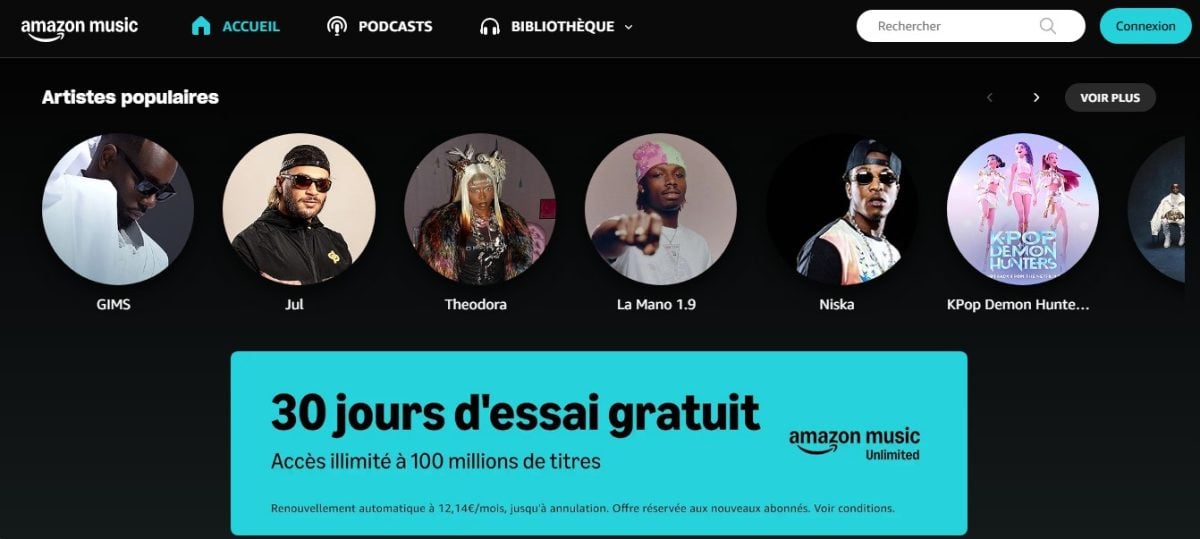
In the music industry, you can choose between getting a physical and digital versions of your favorite single on Amazon.
Please note Amazon is gradually reducing its download store, so check title availability before you buy.
What does Amazon offer its users?
You can listen to free streaming with ads, but the sound is compressed and the track disappears if you cancel; that's why we show you below how to buy it once and for all. have the file for life.
How do I buy music from Amazon?
Here are the next steps :
- Go to this page :
- Type the title or artist search in the Amazon search bar at the top.
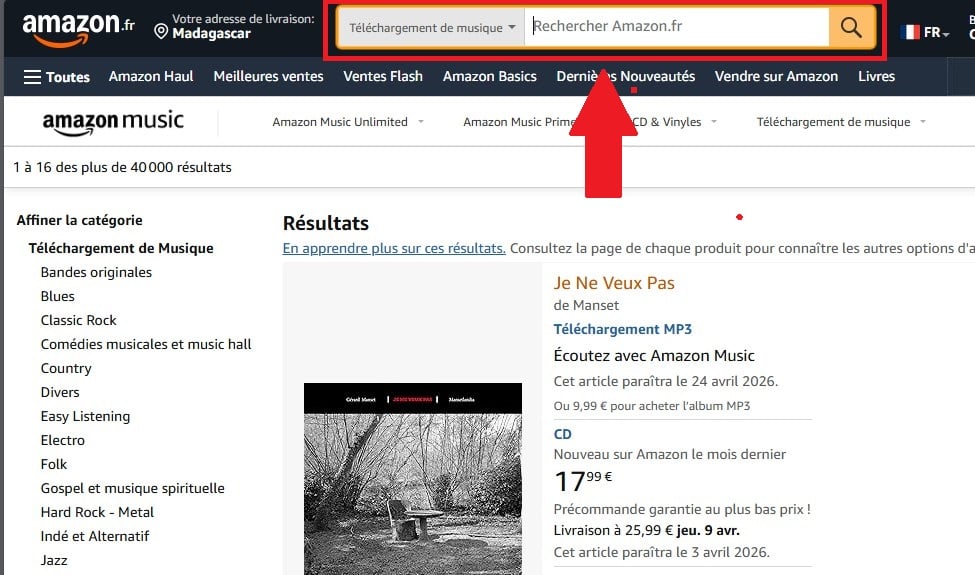
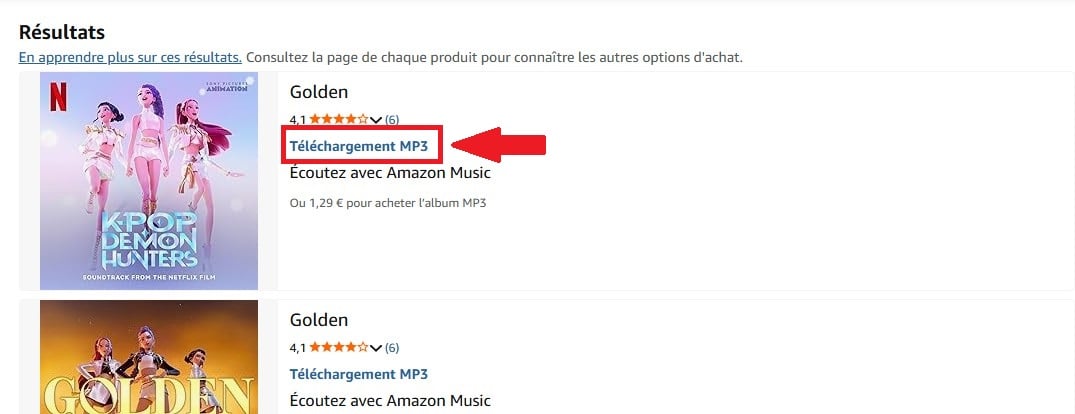
- Your music appears in the list : look for the MP3 download version.
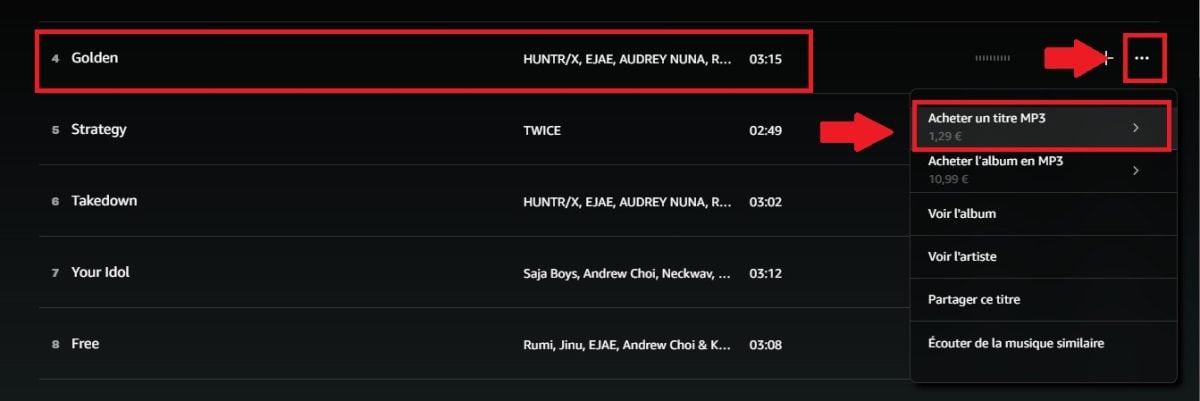
- First listen to a extract, then click on the three dots to the right of the title and on To buy an MP3 track. (Sometimes unavailable: this title cannot be purchased on Amazon).
You can download MP3 files to your device or listen to them directly from your computer. digital library if you have an Amazon Music account.
Where can you find the music you bought on Amazon?
Once your purchase has been validated, your title is available in two ways:
- In your Amazon Music library Connect to the Amazon Music application and go to My Library > Purchases. The track will appear there, and can be accessed without logging in if you've downloaded it.
- Download MP3 file : Go to "Manage Your Content and Devices" on Amazon, find the title, and click on Download to retrieve the MP3 file directly from your computer.
TOP 2: Qobuz
Qobuz is a service that offers high-resolution content and online music downloads.
It was created in 2007 in France, and is currently very popular in several European and North American countries.
What does Qobuz offer its users?
Qobuz is all about better audio quality of the market. In concrete terms, the platform offers :
- Access to a music library High quality in resolutions up to 24 bits/192 kHz. Choose from most listened music in the world.
- A sound quality higher than the CD standard.
- Regarding the recommendations personalized.
- Regarding the detailed information about artists and albums.
- A access press articles and interviews.
Qobuz is primarily aimed at music lovers who appreciate superior sound quality and a more immersive listening experience.
Note:
Among streaming services, Qobuz pays artists better than Spotify or Deezer. But if your aim is to support an artist, buying a track pays much more than streaming, and Bandcamp pays the most.
How can I buy music from Qobuz?
Good news The Qobuz download store is accessible without a subscription. The Sublime subscription only gives discounts on Hi-Res purchases, but is not necessary to purchase a track.
To use the services of this platform and buy music :
- Visit the Qobuz website via this link:
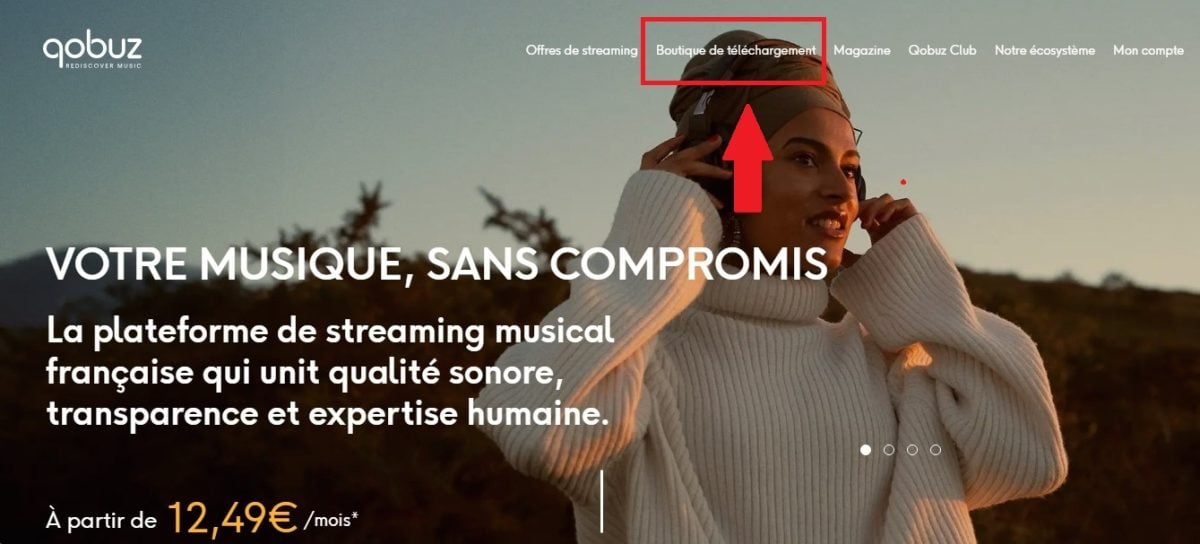
- Click on Download store.
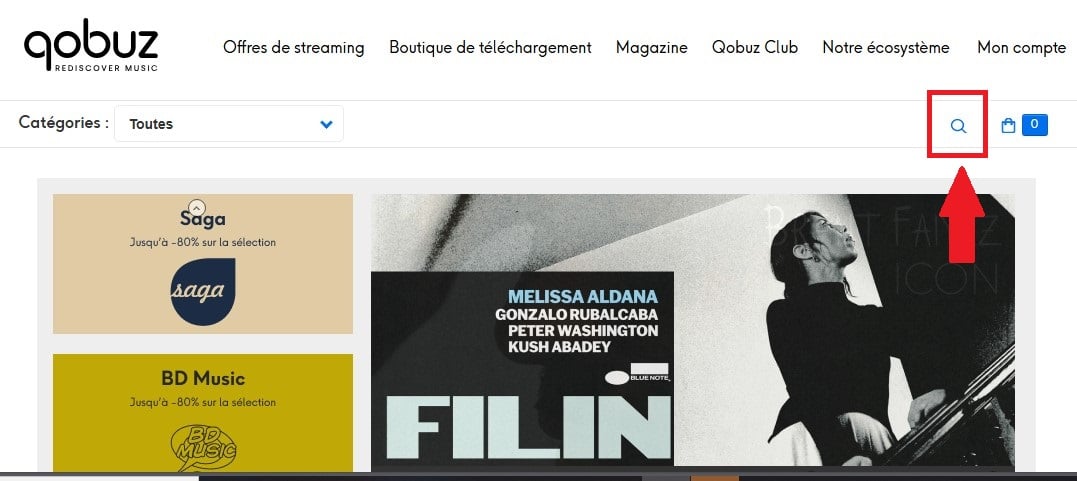
- Visit the search bar to find the title.
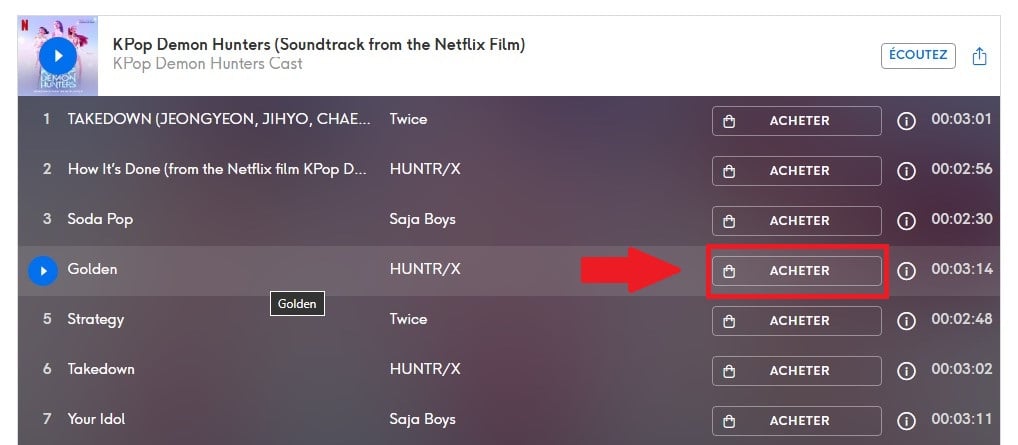
- Scroll to find the title in the album, then click on To buy.
- Finally, validate the purchase.
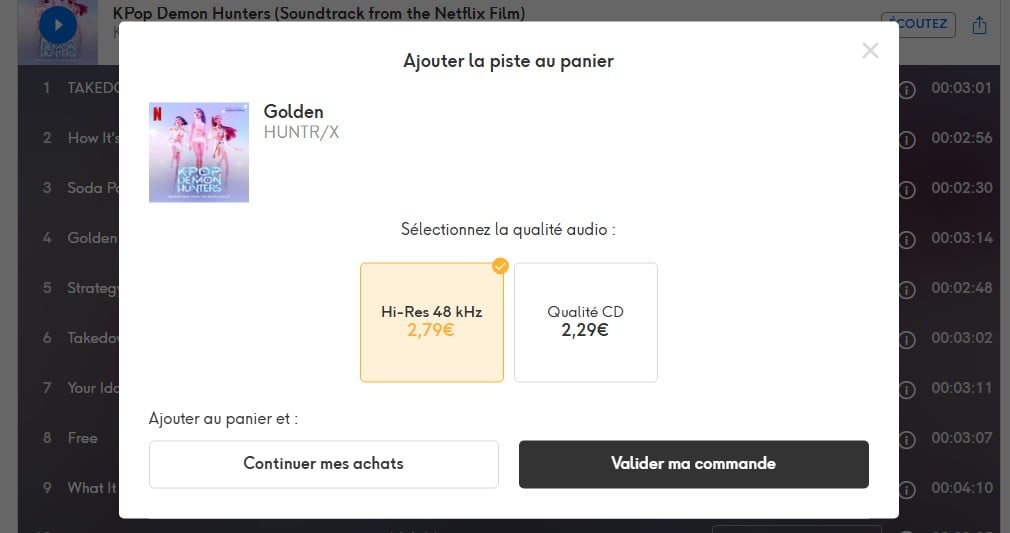
Where can you find your music purchased on Qobuz?
Once your purchase has been validated, your title is available in two ways:
- In your Qobuz library Log in to the Qobuz application or website, then go to My account > My purchases. The track appears in your collection.
- Download FLAC or MP3 file From the My Purchases page, click on the Download button next to the title. You can choose the quality (MP3 320 kbps or high-resolution FLAC depending on your subscription) and save the file to your device.
The downloaded file is yours for good, DRM-free You can transfer it to any device or audio player.
TOP 3: Bandcamp

If your aim is to buy, but also to support the artist directly, Bandcamp is unbeatable.
The platform works no subscription You buy a track or an album at the price set by the artist, sometimes in «name your price» mode, i.e. whatever you want. You then choose your download format (MP3 320 kbps, FLAC, AAC, OGG...), and the file is yours for good.
What sets Bandcamp apart?
Bandcamp reverse about 82 to 85 % from price to artist, the highest market share. Buying a single album on Bandcamp is equivalent to thousands of streams for an independent artist.
Please note The catalog is geared towards independent music, electronica, jazz, metal, folk and niche scenes. You won't necessarily find mainstream Top 50 artists here. For that, Amazon or iTunes are more suitable.
How do I buy music on Bandcamp?
Here are the steps to follow:
- Meeting on Bandcamp and use the search bar to find the artist or album you want.

- On the album page, click on the Buy the digital album.
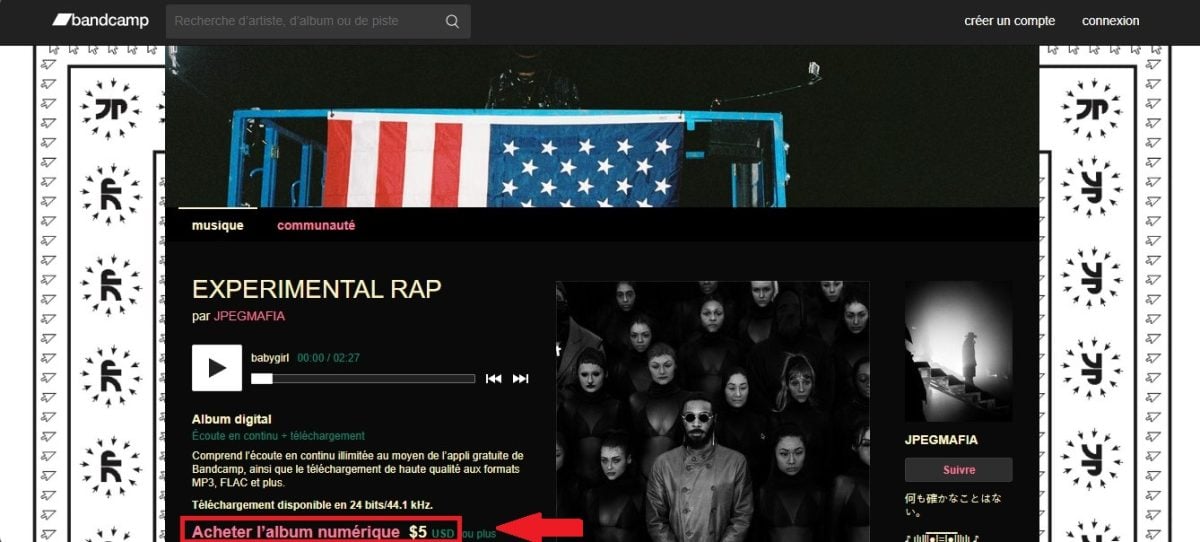
- Enter the price (or the amount of your choice if it's a «name your price»).
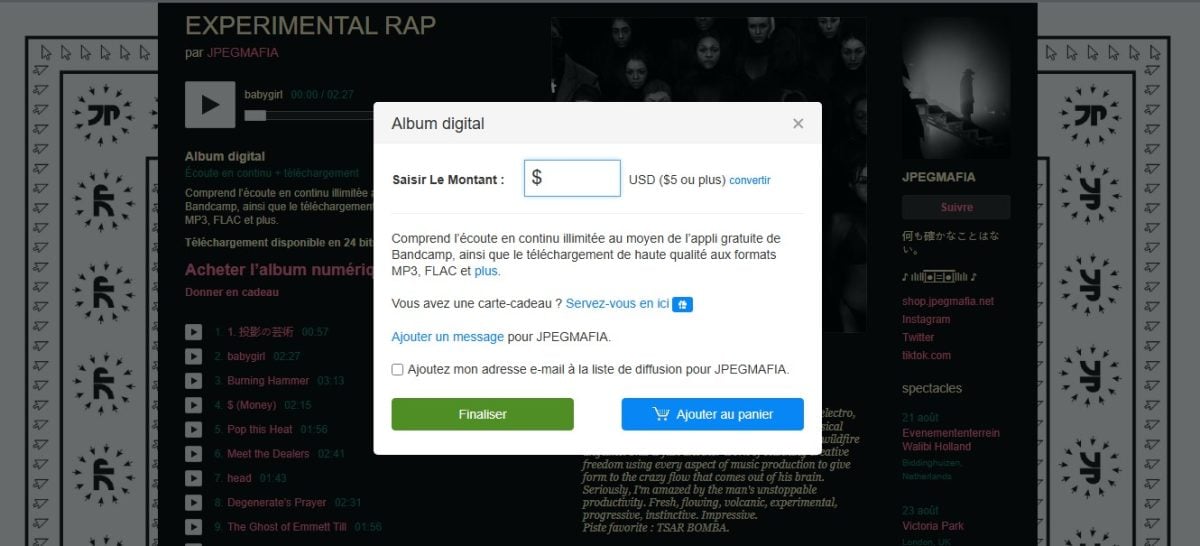
- Contact Your email address and confirm payment.

- Choose your format download (MP3 V0, MP3 320, FLAC, etc.) and download the file to your device.
Your purchase is also saved in your Bandcamp account: you can re-download the file at any time from your library.
TOP 4: iTunes / Apple
For iPhone and Mac users, it's still possible to buy a title via the’Apple ecosystem. From the Apple Music application on iOS or macOS, go to the iTunes Store tab.
You can buy individual titles or albums, without a subscription. The files are in AAC 256 kbps format and can be added directly to your Apple music library.
What sets iTunes apart?
This option is particularly useful if you already use an iPhone, iPad or Mac: your purchases are stored on your computer. synchronized automatically on all your devices via iCloud.
How to buy music on iTunes / Apple?
- Open the application corresponding:
- On iPhone/iPad, open the iTunes Store app (a separate app from Music), then tap Music at the bottom of the screen.
- On Mac, open the Music app and click on the iTunes Store in the sidebar.
- Search for the artist or title using the bar research.
- Press the price next to the title or album, then confirm the purchase with Face ID, Touch ID or your Apple password.
- The file is immediately added to your library and can be accessed offline.
Which platform is right for you?
- ✅ You want the simplest, with the largest catalog → Amazon or iTunes.
- 🎧 You're an audiophile (good headphones, Hi-Fi amp) → Qobuz, for 24-bit FLAC.
- ❤️ You listen to indie music and want to support the artist → Bandcamp, without hesitation.
- 📱 You are 100 % iPhone / Mac → iTunes, for automatic iCloud synchronization.
Our combo after testing them all: Bandcamp for the artists you love, Qobuz when quality is paramount, and Amazon or iTunes for mainstream titles you just want to own fast.
FAQs
Why buy music instead of streaming it?
L'music purchase allows you to:
- Enjoy better sound quality This is because you benefit from a different sound quality from that which is often compressed on music streaming platforms with downloads.
- Supporting artists With the purchase of tracks online, you can guarantee more income for the artist than just a few pennies from streaming.
- Listen offline at any time Once you've downloaded a track, you can listen to it on your devices at any time, without the need for a connection or access to a streaming platform.
- Own a DRM-free file The purchased file is transferable to any device or audio player, without restriction.
- Avoid catalog withdrawals A purchased title never disappears from your library, even if it is withdrawn from a streaming platform.
- Protecting yourself against price rises : Once you've purchased it, the file is yours no matter what—no subscription price increase can take it away from you.
How are artists remunerated when their music is purchased?
The artist compensation involves several complex elements.
- The labels are those who pay the performers.
- The publishers and collecting societies remunerate songwriters.
- Independent artists receive direct remuneration from their distributor Where aggregator.
For streaming platforms, They pay subscription and advertising revenues to labels and distributors, who in turn pay the artists according to the contract.
Often, this is done on the basis of total listening share, which often raises questions of fairness for artists. That's why it's often more interesting to’buy music instead of streaming.
Is it legal to buy music online?
Yes, totally. On Amazon, Qobuz, Bandcamp or iTunes, you pay a listening license and the file is legally yours. This is the opposite of illegal free download sites, which expose you to risks (viruses, penalties).
What's the difference between buying and subscribing to streaming?
When you buy, you pay once and the file is sent to you. yours for life, even offline. With a streaming subscription, you «rent» access: everything disappears as soon as you stop paying.
Where can I buy high-quality (Hi-Res) music?
For Hi-Res, choose Qobuz (FLAC up to 24 bits / 192 kHz) and Bandcamp (FLAC available). Amazon and iTunes, on the other hand, cap at around 256 kbps, largely sufficient for conventional listening, but below studio quality.
In sum :
- Amazon and iTunes are the simplest for the general public,
- Qobuz offers the highest audio quality (Hi-Res), and
- Bandcamp is the best choice if you want to support artists directly.
We hope that our selection of the best online platforms for buy music legally in 2026 helped you.
Have you tested any of these sites? If so, what is the platform you recommend? If you need similar content, please visit our Practical Web. To find out more, read our article how to download music from YouTube.








 English
Thank you for this very detailed article! I've been looking for options to buy MP3 music online for a long time, and it seems that Amazon offers a good variety of options. I like the idea of being able to download these tracks directly to my device. In addition, buying music online on iTunes remains another interesting alternative, especially for those who already use the Apple ecosystem, but that's not the case for me. However, I turned to Qobuz for buying music online, especially after reading about their superior sound quality and support for artists. This is ultimately quite important because if we don't support artists, we wouldn't have access to music as we do now.
Feel free to tell us what you think of Qobuz!