Keeping a server running smoothly Minecraft is largely due to the RAM quantity you have. If there's not enough of it, its fluidity is compromised, hence its importance.
So, before setting up your own business, we invite you to consult our complete guide to find out how much RAM for a Minecraft server is required.
Minimum 1 GB RAM for a Minecraft server
The minimum amount of RAM (random access memory) for a Minecraft server is 1 GO. With this, you'll be able to accommodate a small number of players with decent fluidity.
All this, with smooth operation of the various plugins/mods and your world's chunks, which will generate correctly as you walk.

At the same time several factors will have an impact on the amount of RAM you need for your server, such as :
- The server version Minecraft that you use, such as Vanilla, Bukkit, Spigot, Paper... Or if you own a modded version like Forge or Fabric ;
- the number of players present on your server, since the more of them there are, the more your RAM will be used;
- The types of plugins/mods installedThe most complex of these will consume more RAM than others;
- The size of your world, as its loading will depend on your RAM quantity;
- And finally the rendering distance the higher it is, the more RAM you'll need.
What RAM for a Vanilla Minecraft server?
Depending on your type of server, your requirements will vary. For example "Vanilladeveloped by Mojang, do not benefit from any plug-ins or mods.
So, for players who want to experience Minecraft in the most authentic way, this is the type of server to head for. But above all, they are less greedy :
| 🎮 Number of players | 📊 RAM quantity required |
| 1-2 | 1 GB |
| 3-5 | 2 GB |
| 6-10 | 3 Go |
| 11-15 | 4 GB |
What RAM for server software on Minecraft?
Minecraft server software such as Bukkit, Spigot and Paper allow players to modify their servers, via plugins, to offer a better gaming experience.
Naturally, the use of the latter will require more resources than conventional servers like Vanilla, since they optimize performance.
| 🎮 Number of players | 📊 RAM quantity required |
| 1-2 | 2 GB |
| 3-5 | 3 Go |
| 6-10 | 4 GB |
| 11-15 | 5 GB |
Which RAM for servers modified on Minecraft?
Finally, you should be aware that modified Minecraft servers, such as Forge or Fabricare the most demanding in terms of RAM.
These give players the opportunity to customize their servers through modswhich are by nature quite resource-intensive. Here's what to expect:
|
🎮 Number of players |
📊 RAM quantity required |
|
1-2 |
3-4 GB |
|
3-5 |
4-6 Go |
| 6-10 |
6 to 8 GB |
| 11-15 |
8-10 GB |
How do you allocate more RAM to your Minecraft server?
In order to allocate more RAM to your Minecraft server, please follow the steps below.
- Go to your server Minecraft.
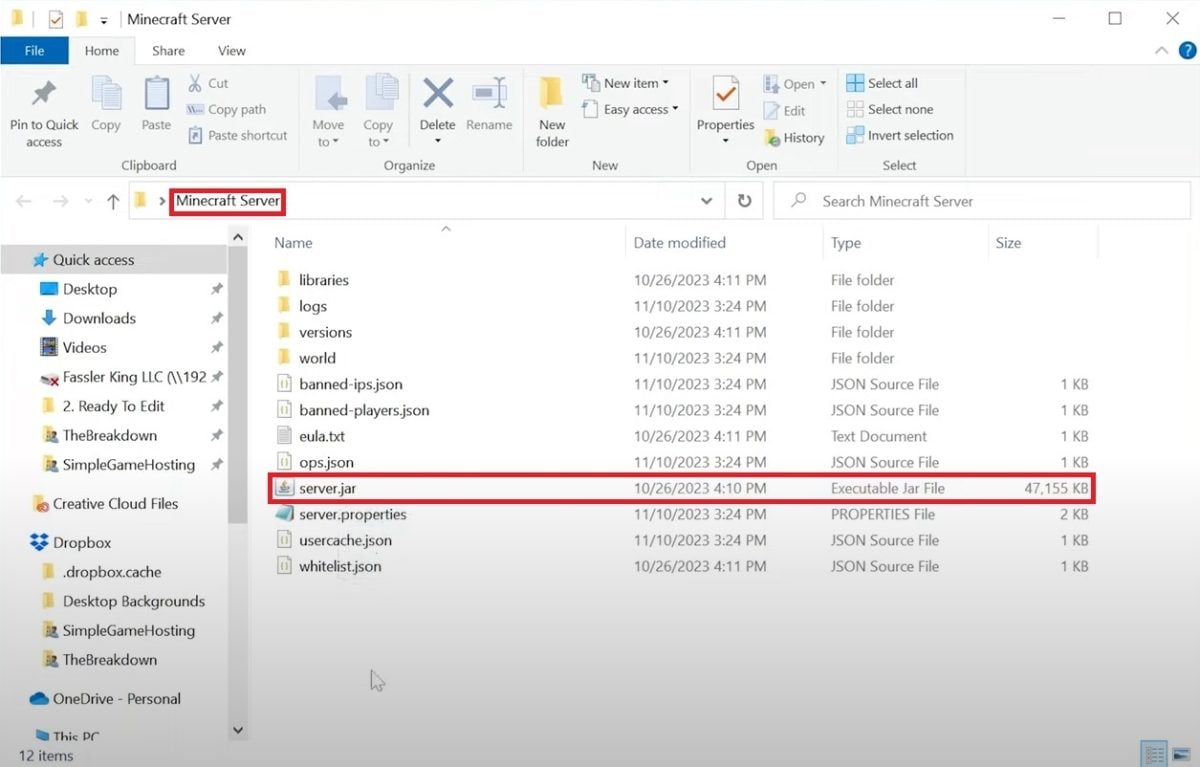
- Next, create a new text file.

- Copy and paste "java -Xmx2048M -Xms2048M -jar server.jar nogui PAUSE" (2 GB). To change the amount of RAM allocated, modify the values "Xmx2048M -Xms2048M."
- For example, if you want to allocate 4 GB instead of 2 GB, multiply 2048 by two. The text then becomes “java -Xmx4096M -Xms4096M -jar server.jar nogui PAUSE”.
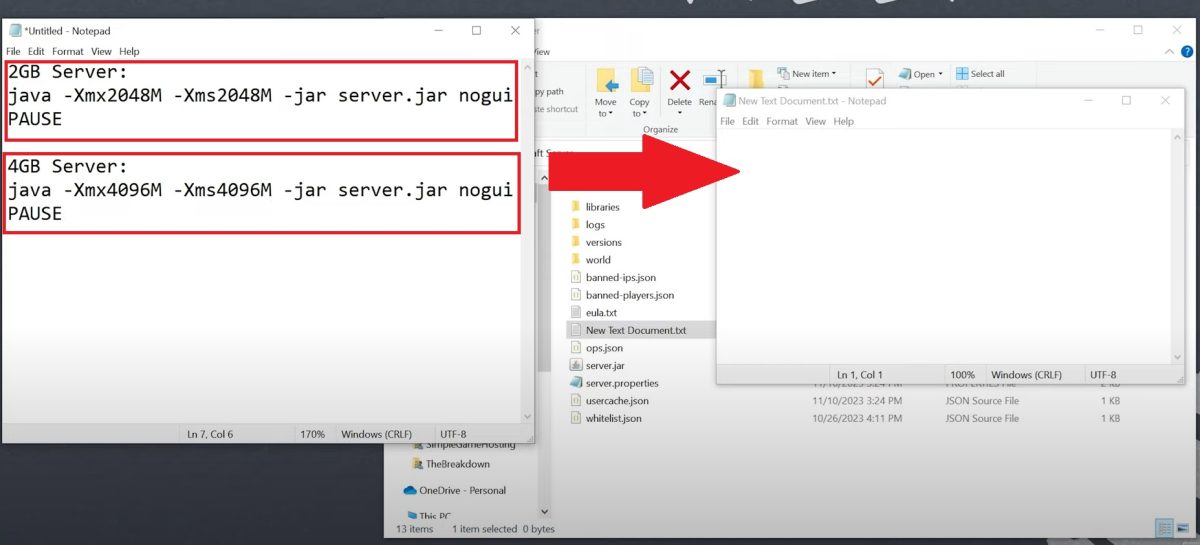
- Once you have done this, save the text document under the name "run.bat"and make sure that the type is on “all files”.

- Go to the file "run.bat". Your server will be up and running, and as you can see, with the RAM you decided to allocate to it.

The quantity of RAM for a Minecraft server depends on several factors: server type, number of players, installed mods and plugins, world size and rendering distance.
Feel free to share your experience in the comments, and check out our other guides such as how to install a map on Minecraft.









 English