For a server Minecraft, count At least 1 GB of RAM Vanilla version for 1 to 2 players (2 GB recommended for stable performance), 2 to 4 GB with plugins (Spigot, Paper), and 4 to 12 GB for a server modded with Forge or Fabric, depending on the size of the modpack. Details by server type are listed below.
The amount of RAM is the main factor affecting a server's performance and stability Minecraft : Insufficient memory causes lag, frame rate drops, and sometimes crashes during chunk generation or during peak player activity. But that’s not the only factor—the CPU is just as important for processing entities and mobs. This comprehensive guide helps you choose the recommended amount of RAM based on your setup: vanilla, plugins, or a modded server.
Here are the topics covered in this guide:
- At least 1 GB of RAM for a Minecraft server
- What amount of RAM should I use for a Vanilla Minecraft server?
- What RAM for server software on Minecraft?
- Which RAM for servers modified on Minecraft?
- How do you allocate more RAM to your Minecraft server?
At least 1 GB of RAM for a Minecraft server
The basic rule is simple: 1 GB of memory This is enough to run a small Minecraft Vanilla server with decent performance, ensuring that installed plugins and mods work properly and that your world’s chunks generate correctly as you move around. In practice, though, you should plan on 2 GB to give yourself some leeway for recent versions of the game, where chunk generation is more resource-intensive.

RAM isn't just about performance; it also affects your server's stability and its ability to handle traffic spikes without lag or crashes. Several factors determine how much RAM is needed:
- the server type Minecraft used: Vanilla, Bukkit, Spigot, Paper, or a modded version such as Forge and Fabric; ;
- the number of players connected, because the more there are, the more RAM is used; ;
- Installed plugins and mods, with the more complex ones consuming more memory; ;
- The size of your world, which depends directly on the amount of available RAM; ;
- Render distance: the higher it is, the more chunks and entities the server loads, so the more memory it needs.
These recommendations are in line with those shared by the community (r/admincraft forums, PaperMC documentation) and by specialized hosting providers. Keep in mind that with more than 15 players or a large modpack, these minimum requirements will no longer be sufficient: we’ll go into detail about each scenario in the following sections.
What amount of RAM should I use for a Vanilla Minecraft server?
For a Vanilla server, count At least 1 GB of RAM 1 to 2 players, and up to 4 GB for about ten players. In practice, you should plan on 2 GB for a stable Minecraft server running recent versions (1.20+), since chunk generation uses more memory than before.
Vanilla, developed by Mojang, is the base version of the game, without any mods or plugins. It’s the ideal choice for players who want to experience Minecraft in the most authentic way possible. Since no additional content is loaded in Java, this type of server remains not very demanding in RAM, which makes it easy to run on a low-spec machine.
Here is the recommended amount of RAM based on the number of players on a Vanilla server:
| Number of players | Amount of RAM Required |
| 1-2 | 1 to 2 GB |
| 3-5 | 2 GB |
| 6-10 | 3 Go |
| 11-15 | 4 GB |
| 16 and older | 6 to 8 GB |
These recommendations are for guidance only: other factors influence the actual amount of memory used. A high render distance, a large world, or a large number of entities (mobs, animals) increase the load and can cause lag if there isn't enough RAM. For a Vanilla server, these settings are sufficient to maintain good performance without needing to upgrade your hardware.
What RAM for server software on Minecraft?
Server software such as Bukkit, Spigot and Paper allow you to install plugins to enhance the gaming experience (economy, mini-games, zone protection, etc.). Unlike a standard Vanilla server, they support these extensions, which increases RAM usage depending on the number and complexity of the installed plugins.
It’s important to note that Paper primarily optimizes CPU usage and TPS (ticks per second)—and thus the smooth operation of the Minecraft server—rather than memory. The recommended RAM remains close to that of a vanilla server, with some extra headroom for plugins. Here are our specific recommendations based on the number of players:
| Number of players | Amount of RAM Required |
| 1-2 | 2 GB |
| 3-5 | 3 Go |
| 6-10 | 4 GB |
| 11-15 | 5 GB |
| 16-30 | 6 to 8 GB |
Beyond these values, several factors can increase RAM requirements: a high render distance (which loads more chunks), a large world, a high number of entities and mobs, or simply a large number of players connected at the same time. If you’re planning to run a high-traffic public server with many plugins, allocate 8 GB or more to avoid lag and keep the server stable during peak traffic times.
Which RAM for servers modified on Minecraft?
For a server Minecraft For a modded server, expect to need 2 to 4 GB of RAM with a small mod pack (fewer than 50 mods), 4 to 6 GB for a medium-sized mod pack, and 8 to 12 GB for large mod packs. This is the type of server that uses the most memory, because mods like Forge or Fabric add entities, blocks, and systems that place a heavy load on available RAM.
In fact, these games allow players to customize their worlds using mods, which are inherently very resource-intensive. Here’s what to expect based on the number of players:
|
Number of players |
Amount of RAM Required |
|
1-2 |
3-4 GB |
|
3-5 |
4-6 Go |
| 6-10 |
6 to 8 GB |
| 11-15 |
8-10 GB |
| 16-30 |
12 to 16 GB |
The recommended amount of RAM depends mainly on the size of the modpack, not just the number of players. A small pack, such as a handful of decorative mods, remains lightweight, whereas a large modpack like RLCraft, Pixelmon, Cobblemon, or All the Mods (ATM9, ATM10) generates a huge number of chunks and entities to load into memory. For these heavy modpacks, never go below 8 GB, or you’ll experience lag and stability issues, even with just a few players.
Side Forge And with Fabric, performance differences also come into play. Fabric is lighter and starts up faster, so it requires less RAM for equivalent mods. Forge remains essential for most large Java modpacks, but its memory usage rises quickly. If you have a choice and your modpack allows it, Fabric can help you save a few hundred MB.
To minimize memory usage, keep the render distance at a reasonable level (8 to 10 chunks) and restart the server regularly to free up RAM.
How do you allocate more RAM to your Minecraft server?
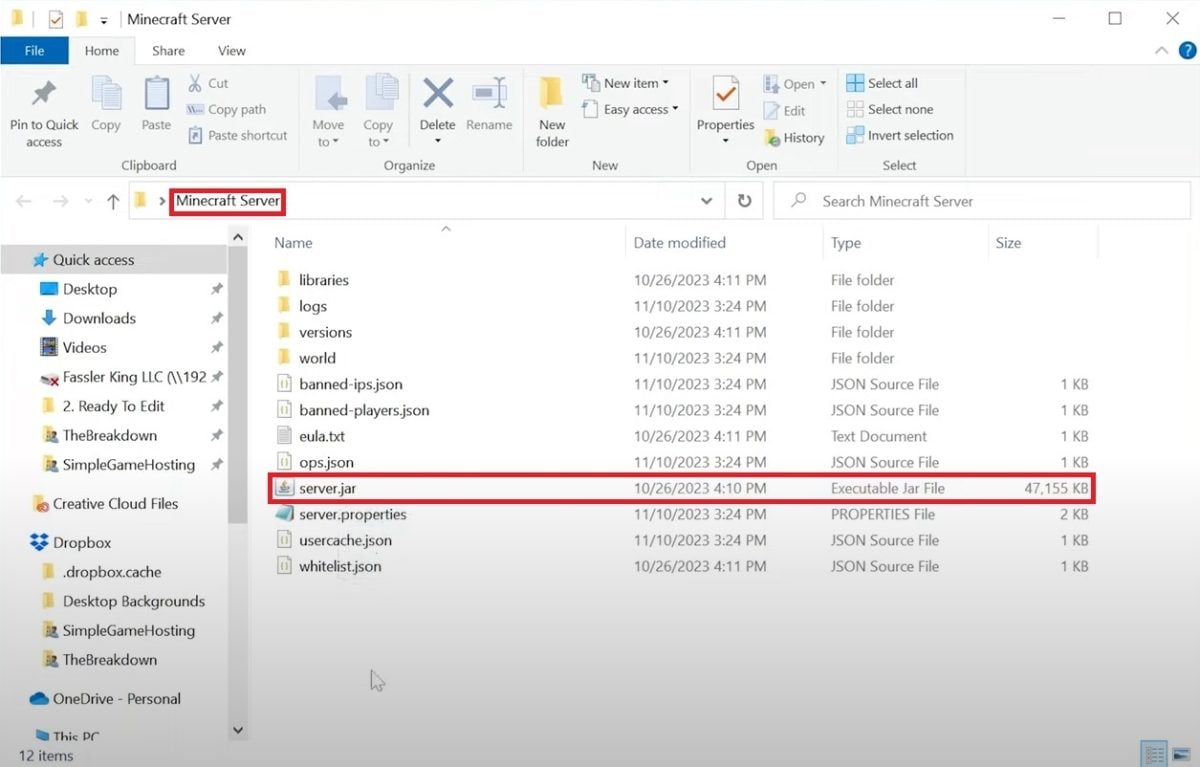
To assign more RAM On your Minecraft server running Windows, create a file .bat which launches the game using the memory of your choice. Here are the steps to follow.
- Go to the file directory on your Minecraft server.
- Next, create a new text file.

- Copy and paste "java -Xmx2048M -Xms2048M -jar server.jar nogui PAUSE" (2 GB). To change the amount of RAM allocated, modify the values “Xmx2048M -Xms2048M”.
- For example, if you want to allocate 4 GB instead of 2 GB, multiply 2048 by two. The command then becomes “java -Xmx4096M -Xms4096M -jar server.jar nogui PAUSE”.
The parameter -Xmx sets the maximum memory, and -Xms sets the memory allocated at startup. Setting both to the same value prevents the system from constantly resizing memory, which stabilizes performance and limits lag spikes.
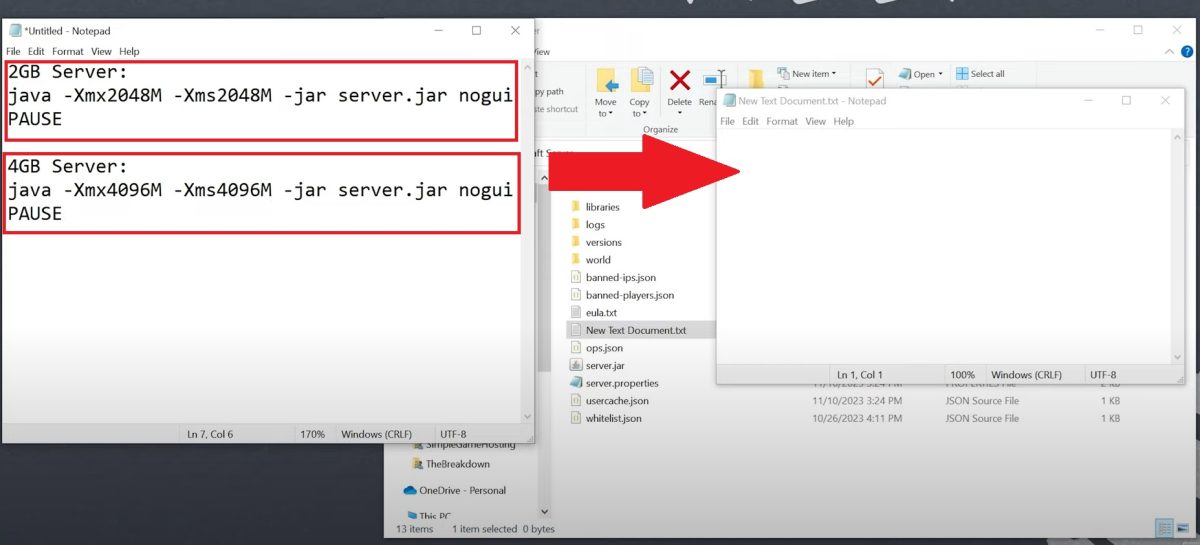
- Once you're done, save the document as "run.bat", and make sure the option is set to “all files.”.

- Run the “run.bat” file. Your server will start up with the amount of RAM you have chosen to allocate to it.

On macOS and Linux, the .bat method doesn't work. Instead, create a “run.sh” file containing the same Java command, then make it executable with chmod +x run.sh before running it. This launch script is not provided by Mojang: you'll have to create it yourself.
For more advanced users, high-load servers (large Forge or Fabric modpacks, many players) benefit from using “Aikar’s Flags,” a set of JVM arguments that optimize memory management and reduce lag during chunk generation. You can find them on the official flags.startmc.sh generator.
How can you tell if your server is running low on RAM? Monitor the TPS (ticks per second) in the console: a TPS that drops below 20, micro-freezes when exploring new chunks, or “OutOfMemory” errors are typical signs of insufficient memory. Conversely, allocating too much RAM can also hurt performance by increasing the intervals between Java garbage collection runs: stick close to the recommended amount of RAM for your configuration.
Feel free to share your experience in the comments, and check out our other guides, such as how to install a map on Minecraft.









 English