In brief
Positives
- Free and unlimited use
- No connection required
- Anonymous use
Negative points
- Unable to select the resolution of the video to download
iGram at the best price
instagram does not offer a built-in button to save a video. The simplest solution: iGram, a Free online Instagram video downloader that works in just a few seconds, with no account or installation required.
iGram: the best tool for downloading videos from Instagram
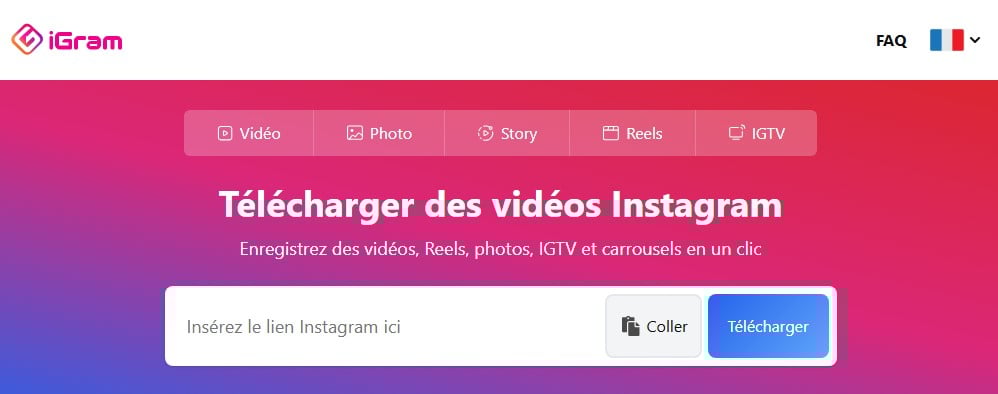
Since Instagram doesn't let you save a video directly from its app, you'll need to use a third-party tool. iGram is the reference: you copy the link Once you have a video, you upload it to the website, and then you download the file as a few seconds. No need to create an account or install anything.
This Online Instagram Downloader is compatible mobile (iPhone, Android) And computer, from any browser (Chrome, Firefox, Opera, Safari).
What You Can Download with iGram
iGram records several types of Instagram content in high quality :
- Instagram Videos : a single video or multiple videos from a carousel.
- Instagram Reels : Save your favorite Reels to watch them offline.
- Stories : saves the content of a public account before it disappears after 24 heures.
- Photos and Carousels : retrieves individual images or all the photos in a post at once.
- Long videos : old videos IGTV and long formats are also supported. IGTV refers to videos longer than one minute posted on Instagram.
Why Use an Online Downloader
The main advantage is being able to Watch your favorite videos offline. You also keep a local backup in case the owner deletes their post.
Still on the topic of Instagram, check out how to make a real Instagram in another article on our website.
Steps to download Insta videos with iGram
The method is the same on mobile and on computer. Here are the detailed steps, along with the corresponding screenshots.
- Access iGram via the button below.
- Open Instagram on your phone or on the web. Find the video you want to download, then tap the share button to see the available options.

Button to display options for an Instagram video. ©Antonin for Alucare.fr - Copy the video's URL using the “Copy Link” option. This option works for Instagram Reels, Stories, and regular posts alike.
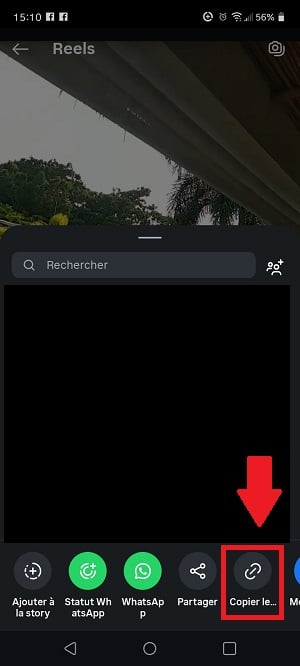
Option to copy the video link to a real Instagram account. ©Antonin for Alucare.fr - Come back to iGram, paste the link into the field provided, then click the Download button.
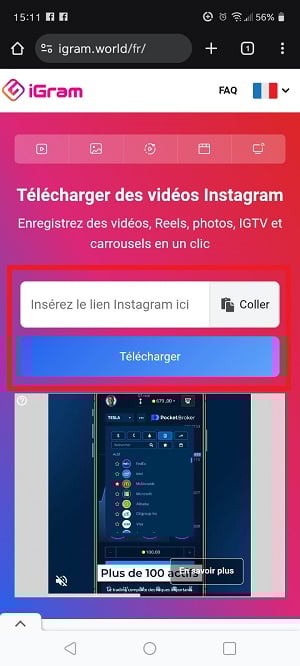
Added link to download the video on iGram. ©Antonin for Alucare.fr - iGram asks you to confirm that the video displayed is the correct one. If so, tap the blue button to save the file.
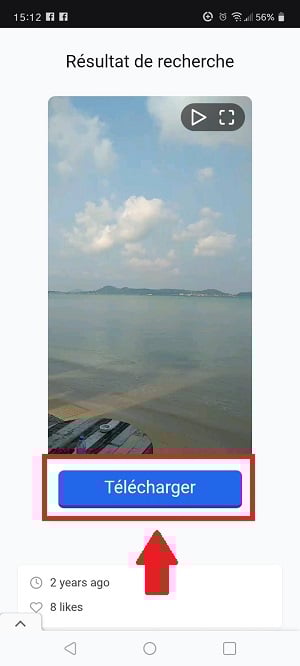
Confirmation of Instagram video download on iGram. ©Antonin for Alucare.fr
The same process also allows you to upload photos or an entire carousel in high quality. Just paste the link to the relevant post.
Check out how to enlarge photos on Instagram in another article on our website.
Reasons to choose iGram
Here's what sets it apart iGram other services of the same type:
- Quick and easy : Copy the link, paste it, and click. The download takes a few seconds thanks to high-speed servers.
- Compatible with all your devices : mobile (iPhone, Android), tablet, or computer—everything works right in your browser, without having to install anything.
- High quality : Videos are recorded in the highest available resolution (up to 720p (according to the original publication).
- Free and unlimited : videos, Instagram Reels, Stories, photos, full carousels, videos IGTV… everything is available for download in unlimited quantity, without paying.
- Respect for Your Privacy : No need to log in to your account; no login credentials are required. You remain anonymous with every download.
FAQs
Can I download anything other than videos with iGram?
Yes. iGram isn't limited to videos. You can also record Pictures, of the Instagram Reels and Stories directly on your device:
- Photos and Carousels : Save a single image or all the photos in a post with just one click.
- Stories : keeps a story going beyond the 24 h by recording it before it disappeared.
- Reels and Long-Form Videos : The downloader also supports the longest file formats, including videos IGTV.
Content from other platforms, however, is not, not supported.
Which devices are compatible with iGram?
The service runs on all devices, no installation required:
- Mobile : smartphones Android and iPhone, as well as tablets.
- Computer : PC or Mac—just use your usual browser.
- Navigator : Chrome, Firefox, Opera Where Safari, everything is compatible.
Is there a download limit?
No. You can download Instagram content in unlimited quantity.
Can I download content from any account?
Yes, for all accounts audiences. The private content are not available for download, for reasons of privacy and privacy.
What is the maximum download quality?
Here are the maximum resolutions available :
- Videos : up to HD 720p, in the format MP4.
- Photos : up to 1080 x 1350 pixels, which is the limit set by Instagram.
The highest quality originally available is preserved.
Is it legal to download Instagram videos?
Upload a video for a personal use is still permitted. Reposting or reusing a third party’s content without their consent, however, violates Instagram’s terms and conditions and the copyright.
The rule is simple: ask the creator for permission before doing anything public reuse.
Need more tutorials like this? Check out our page instagram. And feel free to ask any questions in the comments section.







 English
I want to download free TV shows and movies.