The Instagram certification can be purchased directly through Meta Verified, the official subscription to Meta, starting at 11.99 $/month on the web.
There is also a way free of charge, but it's reserved for profiles and brands that are already recognized by the platform. Here's how to get your badge, no matter which option you choose.
1. Buy Instagram certification with Meta Verified
The official way to purchase the certification is to subscribe to Meta Verified. There is no legitimate third-party website for this. Everything happens directly within the app Instagram.
What is Meta Verified?
Meta Verified is a paid subscription that gives you access to a verified badge on a instagram account and Facebook. Launched in 2023, this subscription is open to everyone, and no longer limited to well-known figures, as was the case with the previous certification.
Subscription Meta Verified is available in two options:
- The start-up accounts individuals (Meta Verified for Creators).
- The companies and brands (Meta Verified for Businesses).
The badge isn't the only perk. You also get to enjoy a better visibility, access to the’priority assistance and a protecting your identity : Meta Monitor your profile to spot fake accounts that are impersonating you.
Please note that the same subscription also covers WhatsApp in some countries.
What are the eligibility requirements for the blue sticker?
Anyone can apply, but eligibility is subject to specific criteria. Your profile must meet the following requirements:
- To be of legal age : You must be at least 18 years old.
- Authentic account : It is impossible to certify a fake account. The profile must represent a real person, an existing business or a legally registered entity.
- Single account : The profile must be the sole representation of the person, brand, or company. You cannot have multiple verified accounts for the same identity.
- Full account : The profile must have a bio, a profile photo, and be active at the time of the request.
- Two-factor authentication : Enables the’two-factor authentication before running the check.
- Official identification document : Keep a form of ID in your name on hand to complete the identity verification process.
For the companies and brands, two additional eligibility requirements apply:
- Have a account Meta business.
- Have a professional page Facebook and one business account Instagram, both of which have a long history of operations.
How much does Instagram certification with Meta Verified cost?
The subscription price depends on the account type and the platform used to sign up. Instagram is a paid service via Meta Verified according to the following scale:
- Standard : 14 $/month for web and mobile registrations.
- Plus : 49.99 $/month; available for sign-up on mobile only.
- Premium : 149.99 $/month, which adds the option to request a call from customer support to the previous plan. Available for sign-up via mobile only.
- Max : 499$/month; available for purchase via mobile only. All features included, with active issue monitoring.
The exact rates are listed on Meta's official help page: https://www.facebook.com/help/, and may vary depending on your country.
What are the steps to get certified with Meta Verified?
Here are the steps to subscribe to Meta Verified from your phone:
- Open the app Instagram and go to the menu by pressing the three horizontal lines in the upper-right corner to access the settings.
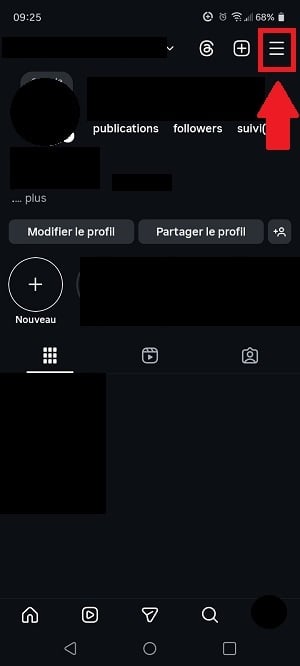
- Enter the’Accounts section Meta.

- Scroll down to the option Meta Verified.

- The app suggests that you unlock the benefits of Meta Verified. Press the blue button at the bottom.
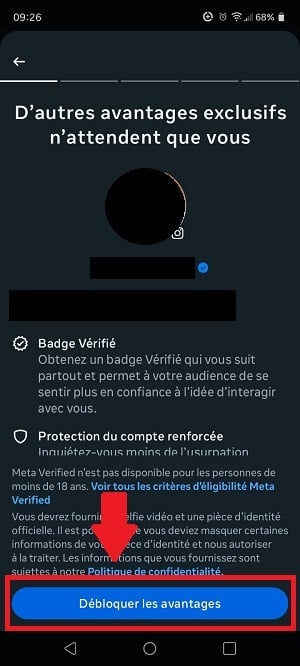
- Choose the account you want to verify, then select your account Instagram, then press Enter this profile.
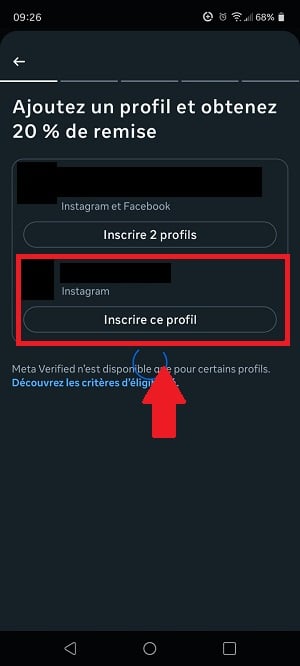
- Choose one payment method and press Pay now. You will then need to verify your identity with an official form of identification.
All you have to do now is wait for approval of your request by Meta Verified.
2. Get Instagram certification without paying
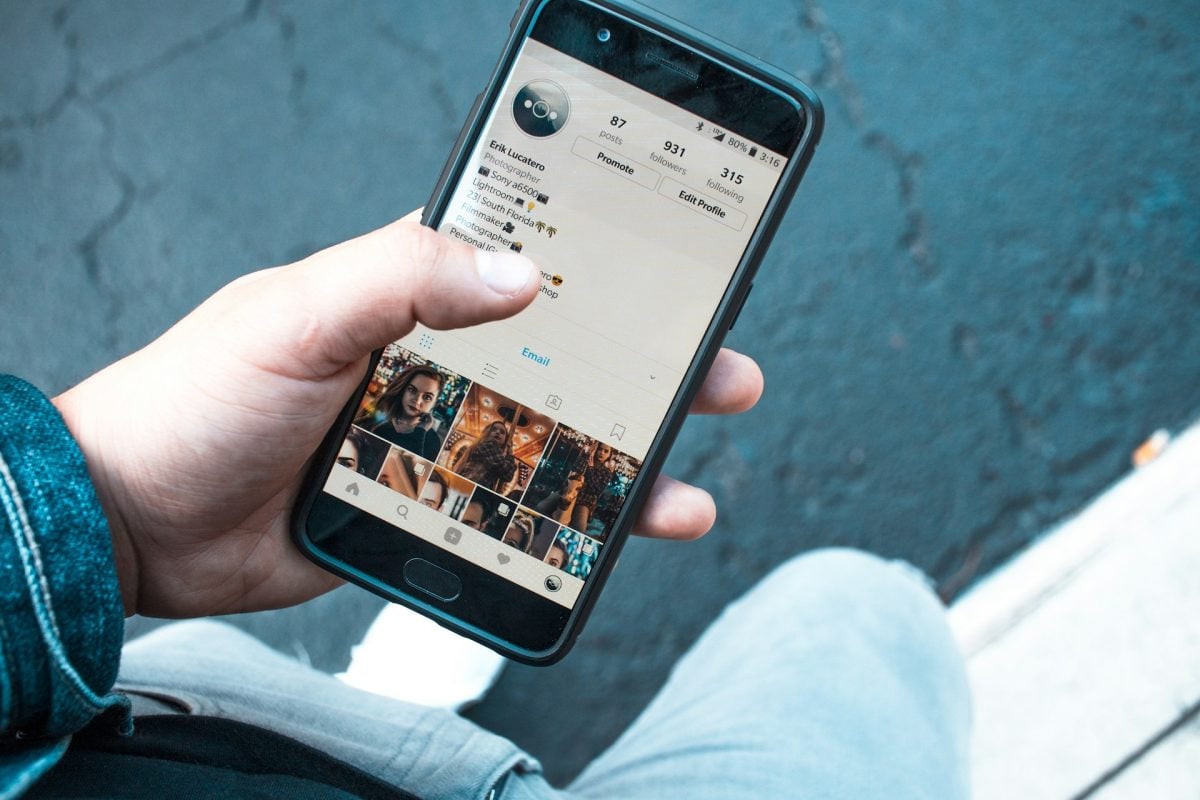
The Path free of charge still exists, but it is reserved for well-known brands and profiles. Unlike the subscription Meta Verified, there is no charge. However, the process takes longer and there is no guarantee of a result.
What information do I need to provide?
Instagram first checks to see if your profile really deserves the blue badge. Here are the documents you need to prepare to obtain the verification:
- An official form of identification : driver's license, national ID card, or passport with your photo, issued by the government.
- Documents proving your reputation : articles published on websites, in magazines, or in newspapers that mention you or your brand.
- Official business documents : registration documents or utility bills if you represent a company or a brand.
- Information about your notability : Specify your industry, your target audience, and the brand name by which people know you.
Processing this first step takes about 7 days. Instagram then contacts the account owner before taking further action.
What steps do I need to take?
Once this step is complete, it only takes a few taps in the app to submit your request for verified badge.
Here are our tips for optimizing your request before you submit it: Make sure your profile is complete, that your identity is clearly verified, and that you've enabled two-factor authentication.
- Log in to your Instagram account, then open the settings.

- Press Account type and tools.

- Select Request verification.

- Fill out the form Please include your name and what you do. Be sure to describe your work in detail, especially if you represent a brand or a company.
- Confirm by pressing the Send button, then wait.
This verification process takes usually 30 days, with variations depending on the volume of requests. In the meantime, keep Optimize your profile : publishes regularly, including Reels, and work on building engagement within your community.
These steps really do increase your chances of getting the badge. Instagram will then contact you to let you know its decision: validation Where refusal.
FAQs
What does Instagram verification mean?
Instagram certification, also known as “Verification,” refers to the blue badge displayed next to the profile name. It proves two things:
- He validate your expertise on Instagram and social media.
- He confirms that this is a official account, which is particularly useful for public figures and brands.
Users naturally trust verified profiles more. The blue badge is therefore a real added value for your profile.
What are the features of the Blue Badge system?
Here are the features of the certification via Meta Verified on Instagram:
| Features | Details |
|---|---|
| A verified badge |
|
| Exclusive features |
|
| Online assistance |
|
| Greater visibility and reach |
|
| Protection Against Identity Theft |
|
Instagram verification is especially useful if you want to Build Your Brand and use Instagram as a real marketing tool to generate more engagement within your community.
What are the benefits of being verified on Instagram?
The blue badge allows you to Stand Out on Instagram and prove your worth. Here are the main practical benefits.
Find new opportunities
Certification helps to demonstrate your expertise with potential collaborators, clients, or employers. The blue badge proves that your profile is trustworthy and that you are a true expert in your field.
- It attracts the recruiters if you're looking for a job.
- He brings in the prospects Whether you're looking for customers as a seller or building your brand.
It also opens doors for you abroad, where blue badges have become a benchmark for collaboration opportunities.
Increase the engagement rate
Instagram displays a conversion rate higher than most other social media platforms, which is why brands and marketers are making the most of it. The engagement rate for verified accounts is approximately 30 % higher than that of regular accounts. Having a verified profile allows you to’attract a wide audience more easily and grow your community.
Stopping copycats
The badge assures users that you are indeed the person you claim to be. It also protects your identity and that of your brand. You can report directly people who impersonate you on Instagram, which gives you added credibility and protection.
Gaining influence
Most influential accounts have a blue badge. Whether you're already influencer Whether you’re already certified or want to become certified, certification enhances the professional image of your profile and your brand.
Users will think that your account worth following, especially if you post content that appeals to your community.
Access exclusive features
Audited financial statements often receive the updates and new tools Get a sneak peek before anyone else: stickers, new features, and more.
Receive offers of collaboration
Even though the badge is no longer reserved for celebrities, many users still associate it with a a certain degree of authority in its industry. This status attracts the attention of those looking for collaborations, such as the launch of a new product or brand.
Position yourself better in the suggestions
When someone searches for something related to your industry, your verified profile appears in the initial suggestions. It's an effective way to gain visibility and attract new subscribers.
Boost sales
If you sell products or services on Instagram, certification can directly boost your sales. It improves the visibility of your profile and your brand on the platform, while also helping you gain trust of your customers to build their loyalty more easily.
Who can be certified on Instagram?

The eligibility criteria focus primarily on the applicant's identity. The following are eligible for verification:
- The companies and brands, accounts belonging to real people or registered entities.
- The known entities such as pets or the media.
In practical terms, those who need the certification the most are the entrepreneurs, them celebrities, them influencers and content creators who want to grow their brand and marketing on Instagram.
Do I need to buy Instagram certification?
It all depends on your goals. If you want quick recognition and a more reliable approach, go for the subscription Meta Verified. If the price is a concern or if you don't need the badge right away, the free checkup remains a viable option, even if it requires more patience.
What should you do if your application is denied?
Here are the steps to follow if your Instagram verification request is denied:
| Solution in case of rejection | Details |
|---|---|
| Understanding the Reasons for Rejection |
|
| Analyze the eligibility criteria that have not been met |
|
| Resubmit the verification request |
|
Can you lose your Instagram certification?
Even with a verified profile, you're still subject to Instagram's Terms of Use just like everyone else. The free certified profiles are more vulnerable than those who signed up through a subscription Meta Verified : They may face disciplinary action and lose their badge. The following situations may lead to badge pickup :
- Promotion, transfer or sale of the badge : Using someone else's identity or personal information for activities that violate Instagram's rules.
- Frequent changes in account status : Switch regularly between a public and a private account.
- Attempts to verify through a third party : You must always verify this yourself, directly.
- Providing false information about your identity during the certification process, which may even result in the account being deactivated.
These rules apply primarily to free verified profiles. Instagram has not yet provided any details for those who have subscribed Meta Verified. In any case, follow the rules of the platform to avoid any problems.
To learn more, check out other guides on our page instagram. If you have any questions, please post them in the comments area.









 English