As a parent, what you want above all else is Protect Your Child from the Internet. An app like SpyX promises to ensure your security, but is it really reliable, legal, and effective?
Here's everything you need to know to form your own opinion.
How does SpyX work?
SpyX is a remote monitoring app designed for Parental controls on a cell phone, employee monitoring, or investigations.
Here's what you can do with SpyX:
- Communications & Display : Monitor calls, read text messages, access social media, and record keystrokes.
- Location : Track GPS location in real time and set up alert zones.
- Media & Access : View photos and videos you've taken and remotely block apps.
Keep in mind : Its use requires the legal consent of the person being monitored. Furthermore, since the tool is not infallible, keep in mind that some data may occasionally lack accuracy.
Is SpyX a legal app?
The answer depends on where you live and how you use it. Even though SpyX is presented as a tool for parental controls that comply with the law, the rule remains strict: you must obtain the consent of the person being monitored before installing the app.
The only common exception : monitoring a minor under your legal guardianship (according to the laws of your country). Using it without the knowledge of an adult, such as a spouse or an employee, is completely illegal and exposes you to legal action. Always remember to check the local laws before you use it.
SpyX vs. Eyezy: Which One Should You Choose?
Faced with the multitude of spyware, finding the right tool can quickly become a headache. Compatible with Android and iOS and considered the’one of the best choices for phone monitoring, Eyezy is emerging as SpyX's main competitor.
Both offer very similar monitoring features and various subscription plans, but some key differences may tip the scales depending on your needs.
Advantages and Limitations of Eyezy
Even though Eyezy is known for being a powerful application that offers good value for the price, you should weigh the pros and cons before getting started.
| Advantages | Disadvantages |
|---|---|
|
|
For more information, see our article, which explains in detail our opinion on the use of Eyezy.
Advantages and Limitations of SpyX
Although SpyX is a very popular app with a wide range of tools, you should carefully weigh its strengths and weaknesses before getting started.
| Advantages | Disadvantages |
|---|---|
|
|
SpyX or Eyezy: Which One Should You Choose?
Your choice depends mainly on your priorities:
- Choose SpyX if you're looking for the most comprehensive range of features and forced out of the market.
- Choose Eyezy if you prefer a modern and intuitive interface, a high-performance keylogger and automatic real-time screenshots.
Even though both apps share a very solid foundation for remote monitoring, it’s these specific features that will make the difference depending on your needs.
| Features | SpyX | Eyezy |
|---|---|---|
|
|
|
As the table shows, the real difference comes down to two key points:
- The Eyezy stands out with the remote screen capture and a keylogger (keylogger) that is more advanced and capable of intercepting passwords and messages as they are typed. Its interface is also more intuitive.
- SpyX does not offer these two features: video recording and advanced keystroke logging.
When it comes to the budget, here's what you need to compare:
| Prices for SpyX | Prices for Eyezy |
|---|---|
|
|
Rates vary depending on the length of the subscription and the promotions in progress. Eyezy appears briefly cheaper than SpyX, but a tool's effectiveness isn't just about its price.
To find out which one best suits your needs, you can take advantage of the’free trial proposed by SpyX.
Reviews of SpyX
Reviews of SpyX are very divided. On Trustpilot, the ratings are divided almost equally among the 5 stars and the game's 1 star.
Positive reviews highlight the range of features and value for money. Negative reviews point to features not available on certain devices. Some users also complain that the’app may be flagged by their antivirus software.
My opinion on SpyX
Overall, I'm satisfied with the services offered after trying them out myself. Here are the points that convinced me:
- Ease of installation and use: The process is really simple, with account creation in 4 steps only.
- Clear and user-friendly dashboard: Well-organized, easy to navigate. I was also able to access the demo before signing up, which gave me a clear idea of what the interface was like.
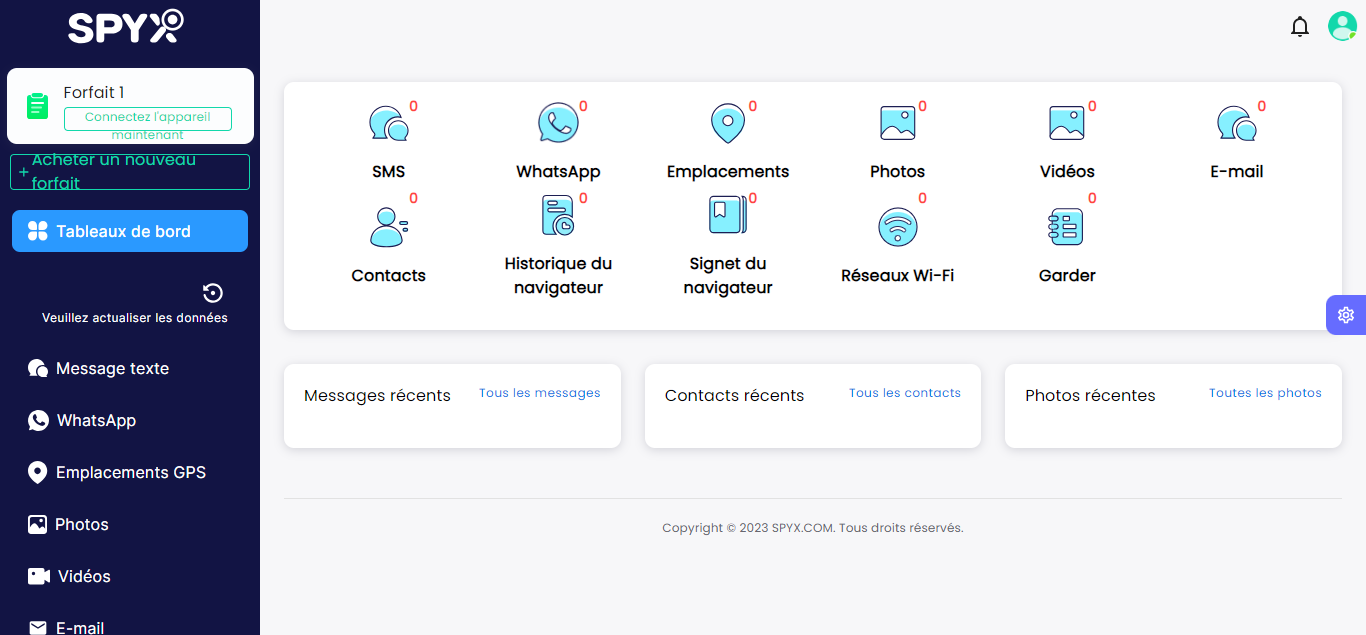
- Call and Text Message Tracking: As a parent, I can keep an eye on who my child is hanging out with.
- Social Media and Web Browsing Monitoring: I make sure my child doesn't view inappropriate content.
- Real-time GPS tracking: Knowing where he is and getting an alert when he strays too far is reassuring.
Despite these advantages, using such software makes me raises ethical concerns. Accessing my child's messages seems to me to be an invasion of his or her privacy, even if he gave his consent for the test. The challenge is to find the right one balance between security and privacy, especially with older children.
For follow-up reliable, SpyX needs a stable internet connection. In my case, the tracking was interrupted due to an issue between the tracked device and the dashboard. I also noticed that someone who is tech-savvy may end up detect the app, despite the stealth mode, which can create tension.
The tutorials are intuitive and easy to understand.
What do parents think?
Parents who use SpyX to monitor the screen time and their children's online activities are generally satisfied. They appreciate the wide range of features (calls, text messages, location services, social media, camera) and access to data from a clear dashboard. Despite a higher rate Compared to other similar apps, most people find it really easy to get the hang of.
SpyX can be useful for ensuring the online safety of young children, provided it is used with their consent.
How do I install SpyX?
L'SpyX Installation is done in 4 steps and usually takes less than 10 minutes in simple cases. Here is the complete process, from the account to the first display of the data of the target device.
- Create an account on the official website of SpyX with a valid email address.
- Choose a subscription tailored to your needs (the price varies depending on the subscription term).
- Configure the target device according to his system. On iOS, enter your login credentials iCloud (often without physical access, unless two-factor authentication is enabled). On android, a physical access You'll need to use your phone to install the app.
- Follow the tutorial on the screen in your dashboard, then wait for the first ones to sync data.
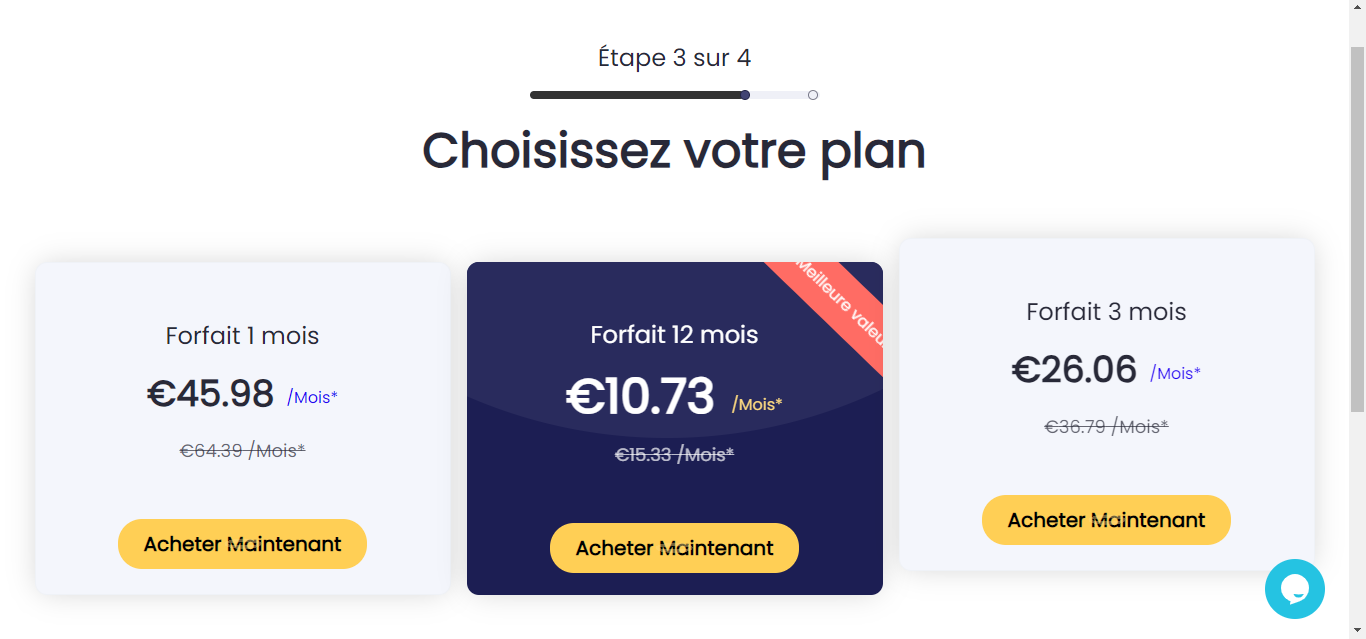
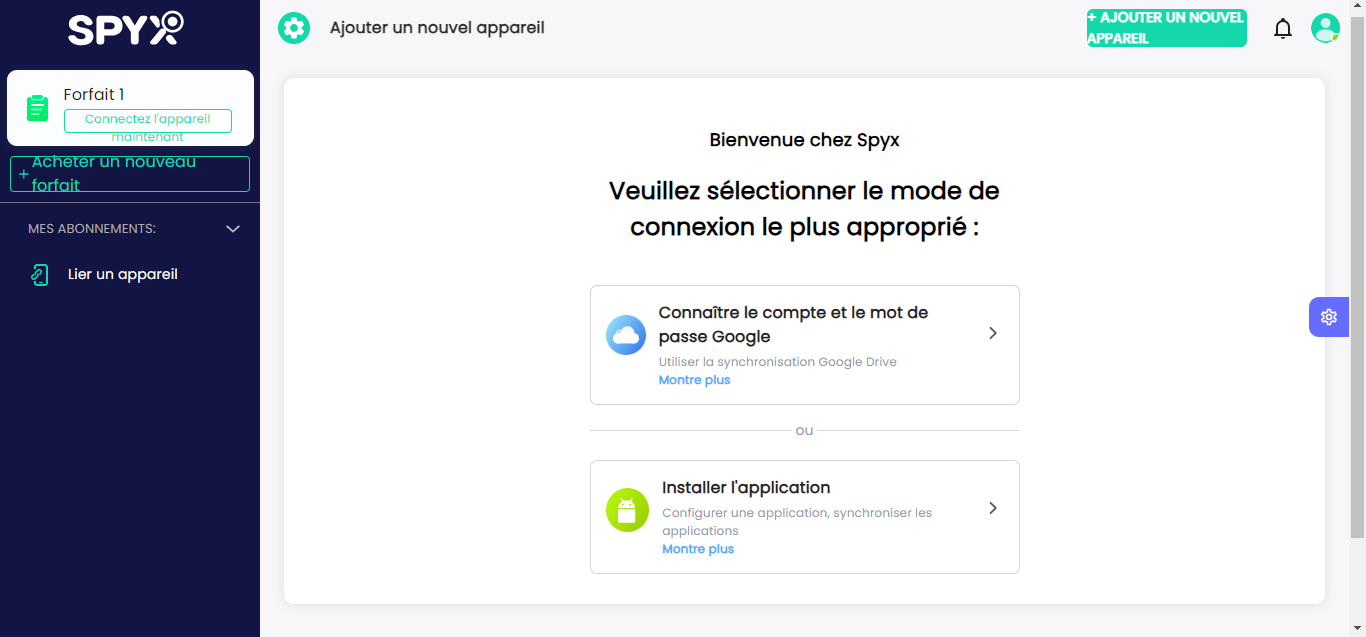
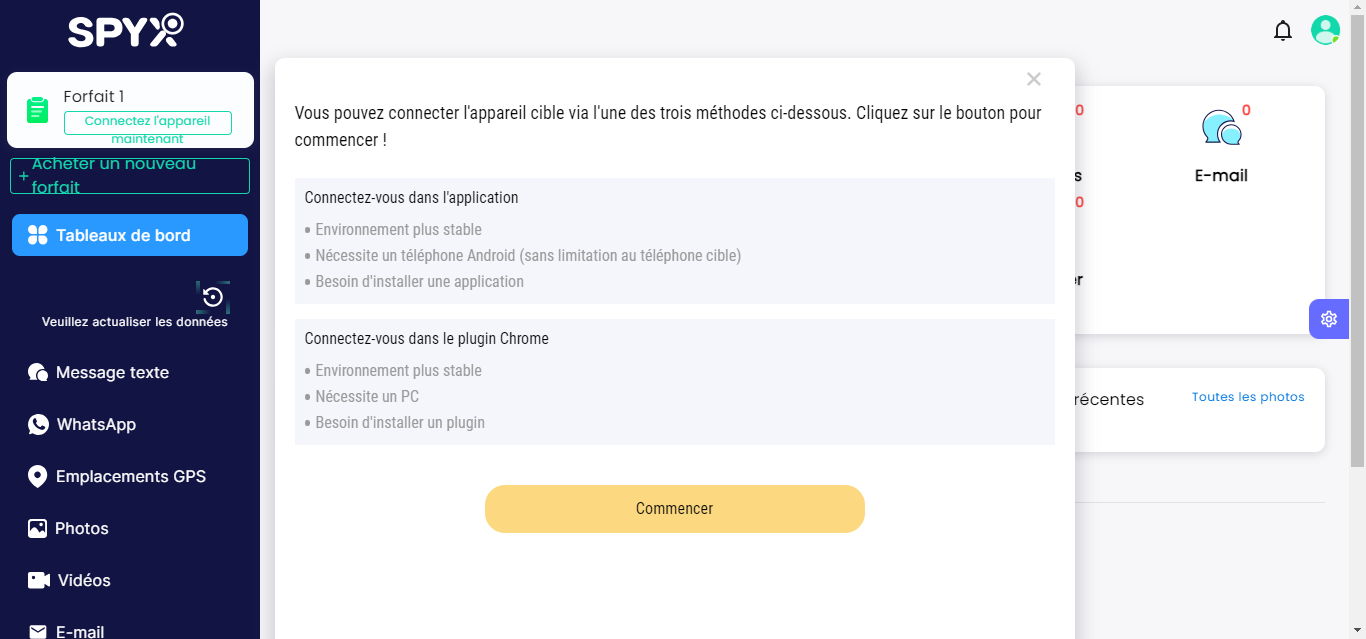
A few things to keep in mind for a smooth installation:
- On Android, the’app is installed via a APK external. Play Protect or your antivirus program might flag it as “unknown source” : Then temporarily allow the installation from the device's security settings.
- Enable the requested permissions (GPS location, access to messages, etc.) so that tracking works.
- Don't install the app on your own phone : It's designed for the device you want to monitor.
Having trouble with the setup? Check out the site's FAQ or contact customer support via chat to get help with the technical steps.
SpyX is a monitoring tool reliable and comprehensive, useful for the parental control or managing professional devices. Use it responsibly and legally, with the consent required.









 English
thanks for this article
I was hesitant to try it, but your explanations and the Spix reviews really helped me understand its features. Thank you.