To make a axe in Minecraft, you need to 3 blocks of material and 2 sticks, placed on a craft table. This tool cuts wood faster, but it's also used for fight and to strip the bark off the logs.
This tutorial guides you from gathering resources all the way to the Netherite axe, on the versions Java and Bedrock.
Step 1: Gather the necessary materials
Before you start making it, you'll need two things: the materials to make the round and enough to make the blade.
For the round, plan on at least 3 logs of wood. They will be used to create the panels, then the sticks required for assembly.
As for the blade, the material depends on the type of axe you're looking for. Each option has its advantages in sustainability, in speed and in damage :
- Wood : the simplest option, perfect for your first tools at the start of the game.
- Rock : stronger than wood, easy to mine with a pickaxe.
- Iron : a good compromise. You have to smelt the ore to get iron ingots.
- Diamond : very durable and high-performance, but harder to find underground.
- Gold : fast-growing but not very durable, so not recommended for an axe.
Step 2: Making wooden planks
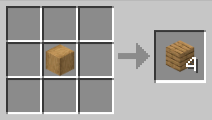
The wooden planks are made from logs. With a single log, you get 4 boards. These planks are then used to make your crafting table, your sticks, and the body of your future axe.
Good news: you don't need a table for this step. You can create your first boards right from your inventory (2×2 grid). For example, for oak:
- Open your production schedule (inventory or crafting table).
- place one oak log in a box.
- Get your 4 oak planks in the result box.
The type of wood (oak, fir, acacia, etc.) doesn't change the method. Set some aside—you'll need it for the sticks.
Step 3: Set up a craft table
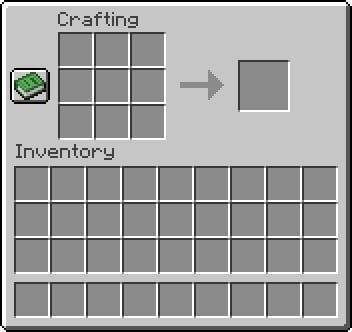
The grid 2×2 from your inventory is enough for the planks, but to make a axe or some sticks, you need a craft table and its grid 3×3. This is the basic workbench, essential for most tools.

Don't have one yet? The recipe is simple: just add 4 wooden planks in the grid 2×2 from your inventory. Any type of board will work.

Once you've placed the planks, you'll have a crafting table that's ready to use.
Step 4: Making sticks
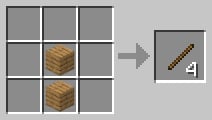
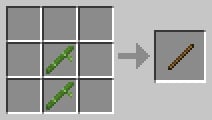
The sticks serve as the handle for your axe. Without them, no tool can be assembled. Here is the recipe to follow on your craft table (or directly from the grid) 2×2 from your inventory—the result is the same):
- Submit a wooden plank in the second cell of the first row.
- Wait a second board in the second box of the line below.
- You get 4 sticks in the result box.
Important : You can replace the boards with bamboo, placing it exactly the same way. Keep the yield in mind: with 2 bamboo stalks, you only get’Just 1 stickagainst 4 poles for 2 boards using the traditional method. The bamboo recipe was added using the Version 1.20on Java as on Bedrock.
Step 5: Making an axe on Minecraft
Method 1: Traditional Craft Table Production
To make a axe in Minecraft, you'll need:
- 2 sticks
- 3 blocks of the selected material (wood, Pierre, iron, diamond…)
In this tutorial, we'll start with a wooden axe. Go to your crafting table, then place the materials in the grid 3×3 like this:
- Removal two wooden planks in the first two boxes of the first row.
- Place the third panel in the first box of the second line.
- Add a stick right next to it, in the middle square of the second line.
- End with the second stick in the central square of the third line.
The three materials form a top-left corner, and the two sticks run down the center column. The recipe can also be flipped horizontally—it works the same way.
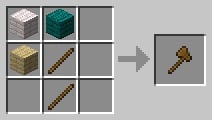
Once all the materials are in place, your wooden axe appears in the result box. This method works the same way in the versions Java and Bedrock, as well as on Xbox.
Method 2: Combining Two Damaged Axes
You can also get an axe by combining two damaged axes of the same type. For example, two wooden axes Damaged items give you a single repaired wooden axe. This technique also adds a bonus of 5 % for sustainability compared to the sum of the two tools.
It's an easy way to extend the service life your axes without using an anvil.

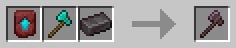
Method 3: Upgrading a Diamond Axe to Netherite
To obtain the axe the toughest in the game; you have to upgrade a diamond chisel in Netherite. This manufacturing process takes place on a forge table, not on the crafting table.

Since the Version 1.20, the recipe has changed. It’s no longer enough to have just a single bar of Netherite. You now need three resources:
| A improvement forging model in Netherite (Netherite Upgrade Smithing Template) | 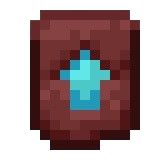 |
| A diamond chisel |  |
| A bar of Netherite | 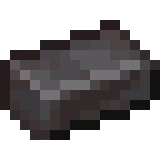 |
Place the three items in the slots on your smithing table, and you'll get a axe in Netherite In the "Results" section, the game's most durable tool.
What are the different axes available on the Minecraft?
Depending on the resources available and the intended use, you can craft a axe in Minecraft in seven different materials, on the versions Java, Bedrock and console Xbox :
- Wooden axe
- Iron axe
- Stone axe
- Gold axe
- Diamond axe
- Black rock axe
- Stone Axe of the Abyss
The recipe is the same for all of these variations: 3 blocks of material and 2 sticks on a craft table.
The axe in Netherite is a special case: it cannot be crafted directly. It is obtained by upgrading a diamond chisel on a forge table, using the method described above.
| Wooden axe 3 wooden planks + 2 sticks |
|
| Iron axe 3 iron ingots + 2 sticks |
 |
| Stone axe 3 stone blocks + 2 sticks |
 |
| Gold axe 3 gold bars + 2 sticks |
 |
| Diamond axe 3 diamonds + 2 sticks |
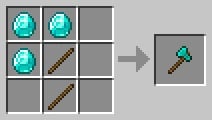 |
| Black rock axe 3 blocks of black rock + 2 sticks |
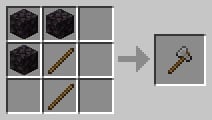 |
| Stone Axe of the Abyss 3 Abyss Stone Blocks + 2 Sticks |
 |
What is an axe used for in Minecraft?
The axe is much more than just a tool for cutting wood. It’s used every day for:
- Cut the logs and wooden blocks much faster than by hand.
- To serve as’weapon in combat, with some damage higher than those of the’sword.
In combat, the axe hits harder than the’sword, but its attack speed A slower speed reduces the number of strokes per second. It's a good compromise when you want to take a big swing.
Now you know how to make an axe in Minecraft. Whether you're aiming for a simple wooden axe for your debut or the formidable axe in Netherite For the endgame, all the recipes are right here.
To learn more, click here lots of other practical guides Minecraft and take on increasingly complex projects.









 English