On a French AZERTY keyboard, the quickest shortcut is Shift + ç, which directly provides the capital C.
On a PC running Windows, you can also type Alt + 0199 on the keypad. On Mac, hold down the key VS hold down and select the VS in the character menu.
Need the character right away? Copy it with one click:
1. How to make an uppercase ç on a PC?
On a PC running Windows, the most reliable method is the Alt code : keep the Alt key While holding it down, type the code on the keypad, then let go. You get the uppercase cedilla, useful for writing words like THAT Where FRENCH all in uppercase.
How to type a capital Ç using the keyboard: ASCII shortcuts
Two codes work on the keypad QWERTY as QWERTY :
- Alt + 0199 (code unicode standard; also works with a keyboard German)
- Alt + 128 (former code ASCII, also works with a keyboard Switzerland)
Both of these shortcuts require a keypad. On a keyboard QWERTY, the ç key shares its position with the number 9. The shortcut Shift + ç accurately conveys the capital C directly, without using code.

How to Type a Capital "ç" on Windows: Solutions Without a Numeric Keypad
On a laptop without keypad, or if the keyboard shortcuts don't work, here are two simple alternatives.
Write an uppercase ç in Word using parameters
This method applies to Word 2007 or a later version:
- Open the menu File.

Location of the File menu in Word. ©Antonin for Alucare.fr - Select Options.
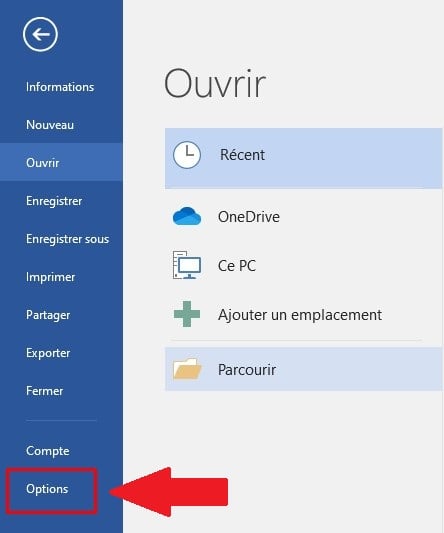
The "Options" section in Word. ©Antonin for Alucare.fr - Go to Verification.

The "Review" tab in Word. ©Antonin for Alucare.fr - Check the box Accented capital letters in French.
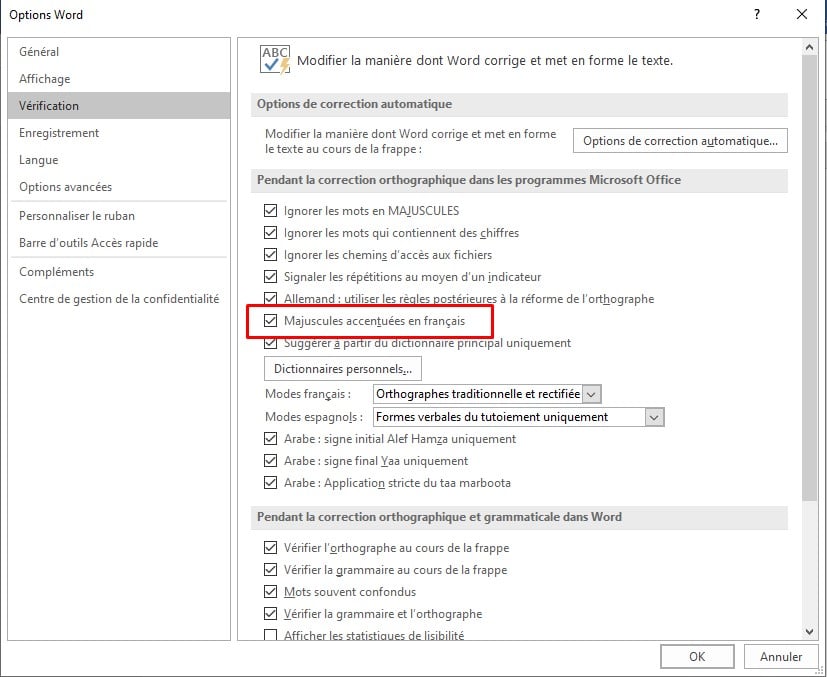
Checkbox for accented capital letters in French in Word. ©Antoninpour Alucare.fr
Make a capital c by copying the character
the copy and paste is still the fastest solution if you're having trouble with the keyboard shortcuts. Copy the VS If you have an existing text, paste it into your document and adjust the formatting as needed.
You can also choose to write the word with a C without a cedilla : The spell-checker flags it as a mistake and suggests that you correct C to Ç automatically. This tip works if the proofreader is set to French.
2. How to make an uppercase ç on the Mac?
On Mac, no Alt code or numeric keypad needed. Entering the capital C is based on long-term support:
- Hold down the key lowercase C Hold down the button until the accented character menu appears: VS, Ć and Č.
- Click on the VS to insert it into your text.

In French, to write THAT Where This with the right one uppercase cedilla It's not an option—it's a spelling rule. For more information, check out our guide on how to add an accent to a uppercase using your keyboard.








 English