Your bow is about to break in Minecraft ? It exists 3 Ways to Fix It.
The manufacturing table is the fastest, but you lose your enchantments. The’anvil keeps them, in exchange for a few experience points. Enchantment Mending remains the best solution in the long run.

The sustainability decreases with each arrow shot. When the bow is too damaged, it eventually breaks. Each repair method restores sustainability points for your ranged weapon. Here are all the available methods, from the simplest to the most effective.
Method 1: Repairing a Bow Using the Crafting Table
The manufacturing table is the fastest method. It doesn't cost any experience points and doesn't require any special tools.
Place two damaged bows on top of each other in the crafting grid. The game combines their remaining durability and adds a bonus of 5 %. You get a bow that's more durable than either one on its own.
Important limitation: This method removes all enchantments from both bows. If your enchanted bow is valuable, use the anvil instead.
Method 2: Repairing a Bow on the Anvil (with Enchantments)
L'anvil is the preferred method for everything enchanted arch. It preserves the enchantments and allows you to combine two bows or use an enchanted book. However, each repair costs experience points.
Step 1: Make or obtain an anvil

L'anvil is an essential component in Minecraft. It serves several purposes:
- Repairing tools, weapons and armor
- Enchanting objects with enchanted books
- Rename objects and blocks
If you don't have one yet, check out our guide on How to Make an Anvil Minecraft.
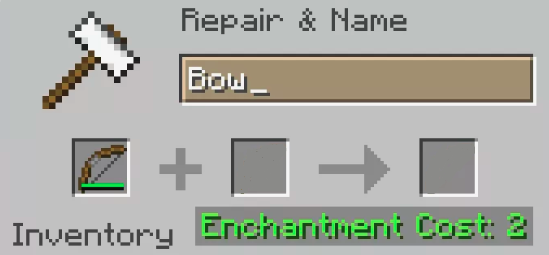
Step 2: Place the damaged bow in the first slot
Open your anvil's interface by interacting with it. Place your damaged bow in the first box on the left.
The description of the arc displays its sustainability remaining and its enchantments. This allows you to see the bow's condition before confirming the action.
Step 3: Add a second bow or an enchanted book
To repair your bow on the anvil, you'll need a second arc as a material. Place it in the second box of the interface. The two arcs combine to form a repaired arc with greater durability.
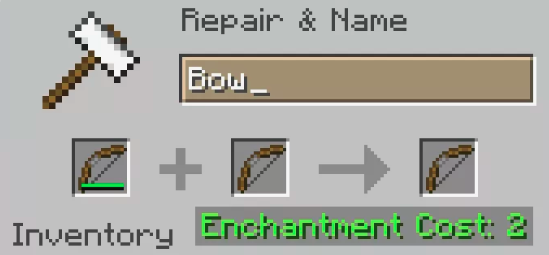
There are several ways to get a replacement bow:
- In in manufacturing a new with 3 sticks and 3 pieces of string
- By killing skeletons, which sometimes drop them on the ground as spoils
- Via the sin, which can drop a bow as loot—sometimes already enchanted
- While searching through coffers in dungeons, fortresses, or temples
- When buying a bow from a villager gunsmith or blacksmith
Step 4: Pay the cost in experience points
Repair a enchanted arch at the anvil costs experience points. You must give up some of your XP to confirm the repair.
This cost increases with each pass on the anvil. The more times your bow has been repaired, the higher the cost. At a certain point, the game blocks the repair with a message stating that the operation is impossible. This is the penalty for previous repairs: each time you use the anvil on the same item, the cost for the next repair increases.
If you're low on XP, farm experience on enemies or on a monster farm.
Step 5: Pick up your repaired bow
Once both arcs have been placed and the XP cost has been paid, a brand-new bow appears in the third box of the interface. Its durability combines that of the two previous bows, with a little something extra.
All you have to do now is slip it into your inventory. The anvil has retained all the spells of your bow, unlike the crafting table.
Method 3: Repairing a Bow with the Mending Enchantment
Enchantment Mending (Mending) is the best long-term repair method. It transforms the experience orbs which you gain directly as durability points for your bow.
In practical terms: as soon as you collect XP orbs, a portion of them automatically repairs the bow you're holding or secondary hand. Your bow repairs itself as you play, without an anvil or any materials.
How do I get the Mending enchantment? It cannot be obtained through the standard enchantment table. You must find it through:
- A enchanted book in a structurally generated chest
- The sin with a bow or an enchanted fishing rod called "Chance of the Sea"
- A villager a librarian who sometimes recommends the book *Raccommodage*
- A conversation with a villager Advanced Commerce
Once you've obtained the book, apply it to your bow using the anvil. The bow will then repair itself automatically every time you pick up an XP orb.
Comparison of the 3 Repair Methods
| Method | Cost | Keep the enchantments | Ideal for |
|---|---|---|---|
| Production Table | None | Nope | Unenchanted bow that needs to be repaired quickly |
| Anvil | Experience Points | Yes | Enchanted Bow: Needs Occasional Repairs |
| Mending | In-Game XP Orbs | Yes (permanent enchantment) | Enchanted Bow Used for Long-Term Survival |
How to Make a Bow in Minecraft
If your bow is too damaged to be repaired, make a new one. The recipe is simple: place 3 sticks and 3 pieces of string in the production table according to this diagram:
- Middle column, top row: club
- Right column, top row: string
- Left column, middle row: stick
- Right column, middle row: string
- Middle column, bottom row: stick
- Right column, bottom row: string
The strings are obtained by killing spiders or looting cobwebs. The sticks are made from two wooden planks.
You can also find a bow directly, such as spoils in chests within structures, by killing skeletons, or through fishing.
How to Use a Bow in Minecraft
The bow is the’long-range weapon main game mechanic. To shoot arrows, hold the bow in your hand and hold down the right mouse button to draw the bow. The longer you hold it, the farther and harder the arrow will fly.
A shot fully loaded (about 1 second of charge) deals maximum damage. A critical hit is possible if the arrow is fired at the right moment. The bow consumes one arrow per shot, except when enchanted Infinity.
The bow works just as well on Java Edition than on Bedrock Edition, with the same enchantments available in both versions.
Which enchantments are best for a Minecraft bow?
A enchanted arch completely transforms your gameplay. The right enchantments increase your damage, your bow's durability, and even its ability to repair itself. The table below summarizes the best enchantments available.
| Enchantment | Description |
|---|---|
| Power (Power) | Increases the damage of your arrows, up to level V. A must-have against tough enemies. A Power V bow deals about +150 % damage more. |
| Flame (Flame) | Enemies hit by your arrows take fire and take damage over time. Very useful against creatures vulnerable to fire. |
| Strike (Punch) | Increases recoil of your shots. Increases the distance enemies are pushed back, which helps you keep your distance. |
| Infinite (Infinity) | You can shoot as many arrows as you want as long as you keep at least one normal arrow in your inventory. Has no effect on Blast or Specter arrows. |
| Mending (Mending) | Use your experience orbs to repair the bow automatically, provided it is held in the hand or in secondary hand. |
| Unbreakable (Unbreaking) | Increases sustainability of your bow by reducing wear with each shot. Level III is the maximum. |
Infinity and Mending: Incompatible
Enchantments Infinity and Mending are mutually exclusive. You can only place one of the two on the same bow. For a bow Minecraft sustainable in the long term, Mending is still the best choice: your bow repairs itself as you collect experience orbs.
The Enchantment to Avoid
The curse of disappearance (Curse of Vanishing) isn't a bonus—it's a penalty. At the player's death, your bow disappears permanently instead of falling to the ground. Avoid applying this enchantment to a bow you want to keep.
Frequently Asked Questions About Bow Repair
Can you repair a bow with a grinding wheel?
The grinding wheel It lets you repair a bow, but it removes all enchantments, just like the crafting table. It also gives you a few XP orbs in exchange for the removed enchantments. This is only useful if you want to recover XP from an enchanted bow you no longer want.
Why is the repair blocked by the anvil?
The game blocks the repair when the cost in experience points exceeds 39 levels. This happens when a bow has been repaired or enchanted too many times. Each time you use the anvil on the same item, the cost increases. The Mending enchantment prevents this problem.
Can you repair a bow on a console or mobile device?
Yes. The repair methods work the same way on all platforms: Java Edition (PC), Bedrock Edition (Xbox, PlayStation, Switch, mobile). The anvil interface and the available enchantments are the same.
Can you repair a bow using "Mending" through a vendor?
No. The "Mending" enchantment only works when you collect experience orbs while holding the bow in your main or off-hand. A dispenser does not trigger this effect.
Do you have any other tips for repairing a bow in Minecraft ? Share them in the comments. To continue with the game's practical tools, find out how to craft a axe in our full tutorial.









 English