Your ID Roblox is the unique number that identifies your account. On computer, it appears directly in your profile's URL. On mobile, you have to use a web browser, because the app doesn't display the page's URL.
How to Find Your Roblox ID on a PC
On a computer, your ID Roblox appears directly in the’your profile page URL. Follow these steps:
- Visit the official website of Roblox and log in with your Roblox username, your e-mail address or your password. If you've forgotten your password, use the password recovery option on the login page.

- Once connected, Click on your username to open your profile.

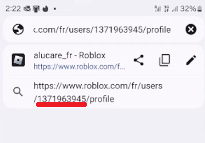
- On your profile page, your The Roblox ID is included in the website address, in the form of www.roblox.com/users/[ID]/profile.

Your ID corresponds to the sequence of numbers in the address bar. This issue is unique to your user account. Once you've copied it, you can use it to customize your account or reload it by Robux safely, or to find a marker precise.
Find your ROBLOX ID on mobile
Don't have a computer handy? You can Retrieve your Roblox ID from your smartphone or tablet. The only requirement: you have to use a web browser, because the mobile app doesn't display your profile URL.
- From your browser, search Roblox Then tap the first result to go to the official website.
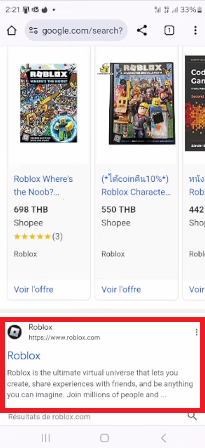
- On the official website, click “Continue in the browser”.

- Log in to your Roblox account Enter your username, email address, or phone number, followed by your password. Select your country code if you're signing in with your phone number.
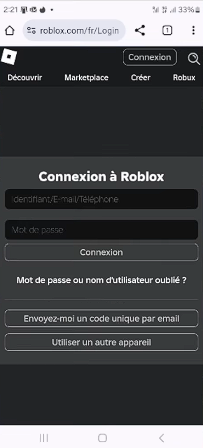
- Once on the home page, Tap your profile picture.

- Press the “Share” button” to retrieve the link to your profile.

- You can also tap at the very top to edit the link and see your ID right there in the address.
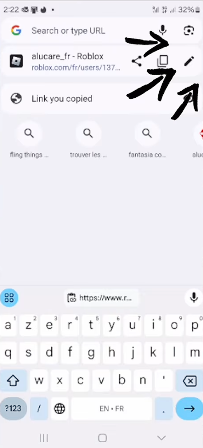
- Your Roblox ID appears as a series of numbers in your user profile URL.
To add Robux When adding items to your inventory, always use reliable partners:

Do you have a question? Leave a comment, and we'll get back to you.
And for more information, check out our articles and tips on win free Robux.







 English