The Game Pass on Roblox are one of the easiest ways to give your players bonuses and earn a few Robux along the way.
In this article, we explain step-by-step how to create a Game Pass on Roblox easily over the phone.
Need Robux? Go here to get them:
Video tutorial on how to create a Game Pass on Roblox using a phone
Would you rather follow the steps in a video? This tutorial shows you how to create a Game Pass using a phone :

Requirements for creating a Game Pass on cell phones
1. Have an active Roblox account
To create a Game Pass, you must :
- Have an account on Roblox ;
- Log in to your account ;
- Access to an experience (game).
It is through this experience (game) that you will be able to add your Game Pass.
2. Access a web browser on your phone
⚠️ You cannot create a Game Pass on the Roblox application.
You must use a mobile browser such as :
- Google Chrome ;
- Safari ;
- Or any browser that can open the Roblox site.
Steps for creating a Roblox Game Pass on cell phones
Here are the general steps for create a Game Pass from your phone.
1. Open Roblox in your browser
Go to Roblox official website in your mobile browser and log in to your account.
2. Access your creations
- Go to your profile menu.
- Find the «Create» button.
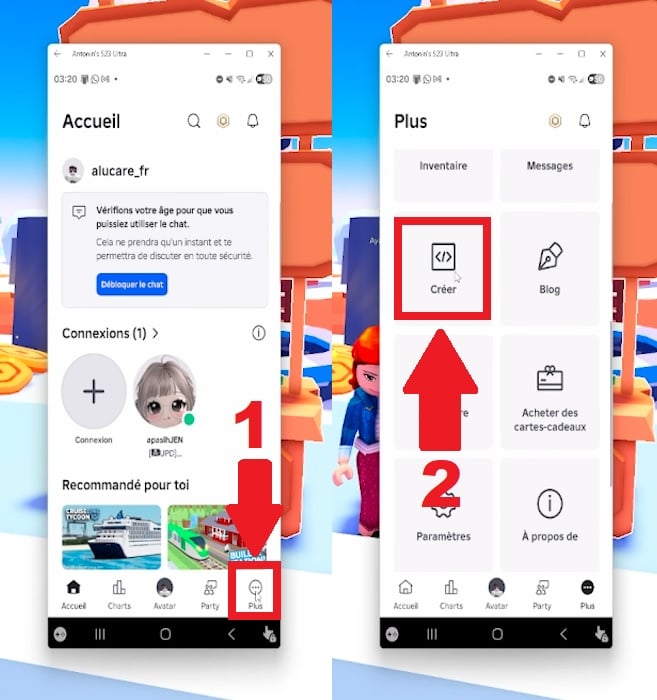
- You won't need to download Roblox Studio. Just click directly on your «Experiences.».
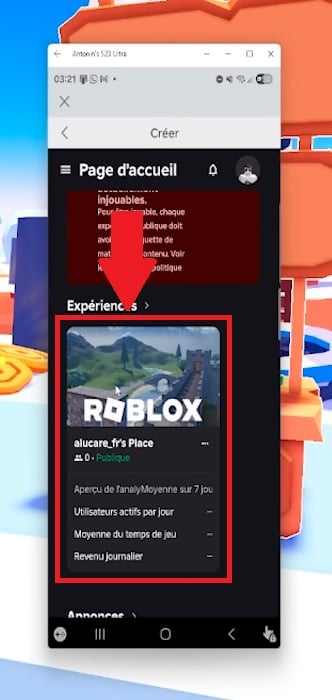
3. Find the Pass section
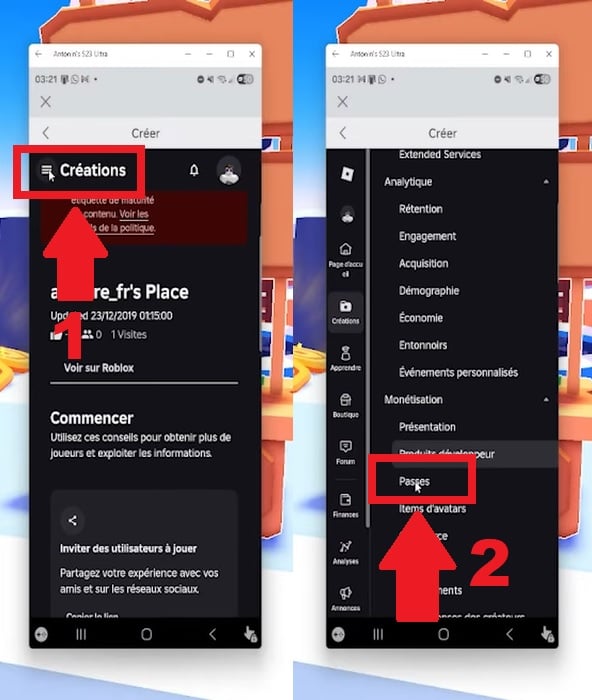
Once you're on the «Creations» tab:
- Click the menu in the upper-left corner of the screen.
- Scroll down until you see «Monetization» and click on «Passes.».
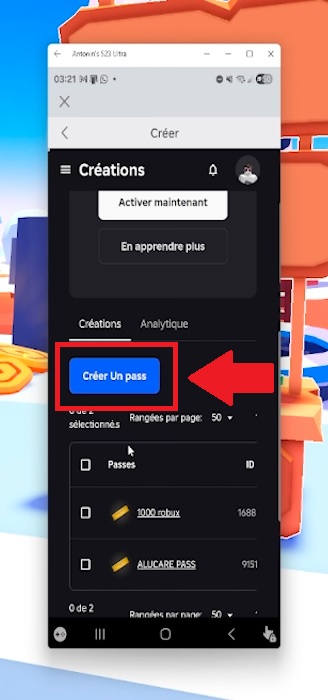
- Tap «Create a Pass.».
4. Create Game Pass
When you create a Pass, you will generally have to :
- Add an image,
- Give Game Pass a name,
- Write a description (optional),
- Then confirm the creation of the Pass.
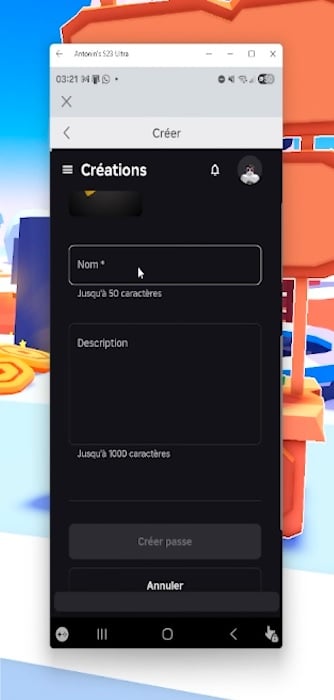
Attention : since late May 2026, Roblox has disabled the ability to purchase a Game Pass from another game. Donation games like PLS Donate no longer allow you to purchase your Pass—it can only be purchased from within your own game.
5. Put Game Pass on sale
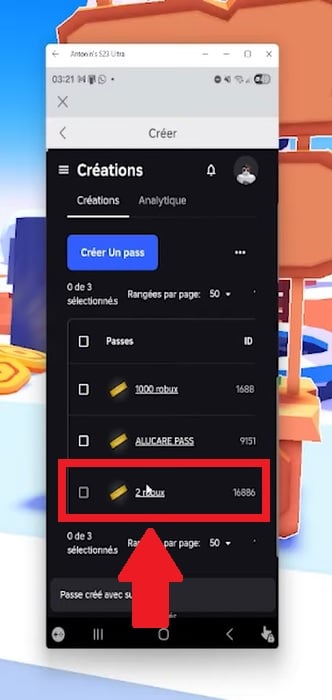
Once the Pass has been created, you still need to :
- Return to the Pass you've just created.
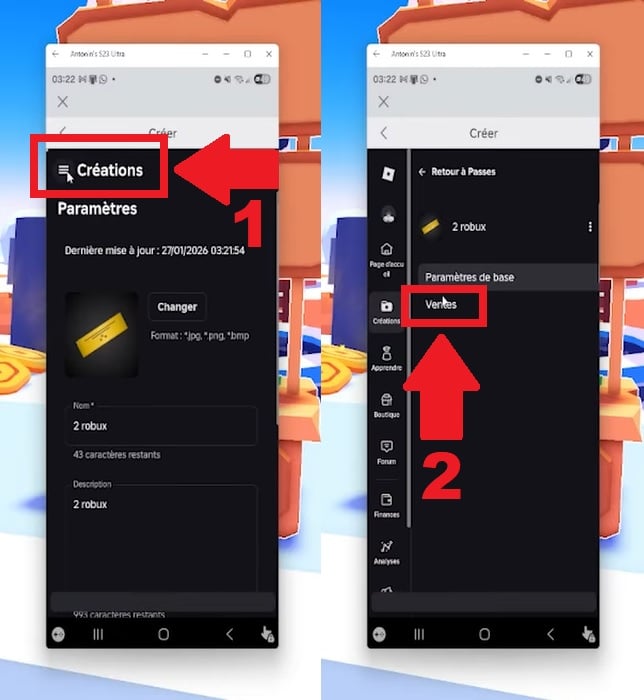
- Click the button in the upper-left corner to go to «Sales.».
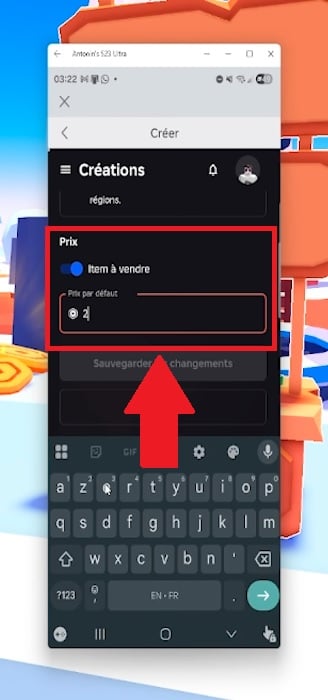
- Click the «Item for Sale» button.
- Set the price in Robux.
- Click on Save Changes to confirm everything.
- (Optional) If you want all players to pay exactly the same price, disable regional pricing. It is enabled by default: from your list of Passes, select your Pass and then click «Disable managed pricing» (Managed Pricing).

- Then click on « Save Changes » to confirm everything.
Once you've signed up, your Game Pass It's finally ready! Players will be able to purchase it from the «Store» tab on your game's page.
Need Robux? Go here to get them:
Why create a Game Pass on Roblox?
Creating a Game Pass allows you to :
- Add premium content
- Offer exclusive bonuses
Game Passes are therefore used to monetize the game.
In fact, when a player purchases a Game Pass:
- He pays in Robux
- You receive a part of these Robux
This is one of the most widespread monetization systems in Roblox games.
Some important points to remember about Game Passes in Roblox
- 🎮 A Game Pass is linked to a single game (experience).
- 🚫 A Game Pass purchased in one game will not work in other games.
- ❌ You cannot create a Game Pass from within the Roblox app.
- ✔️ You need to go to the Roblox website to access the experiment configuration section.
- 💰 Revenue generated by Game Pass is distributed after a processing period (pending) before they are added to your balance. This usually takes a few days, but can take up to several weeks for large amounts.
FAQs
I can't seem to find the option to create a Game Pass
Make sure that :
- You are using the Roblox website, not the app, correct?.
- You are now in your experience (game) page.
- You are the creator of the game or have permissions.
Otherwise, don't forget to enable desktop mode in your mobile browser.
My Game Pass isn't showing up in my game
There are several reasons for this:
- Game Pass sales are not enabled.
- The price has not been set.
- Your review has not been published or is not available.
Once it goes on sale, the Pass appears in the « Store » on your game's page. However, to offer it directly within the game and give the bonus to purchasers, you'll need to program it into Roblox Studio.
Why do I earn less Robux than the Game Pass price?
When you sell a Game Pass on Roblox :
- A commission is charged by the platform.
- So you don't get 100 % of the prize.
- The designer receives around 70 % of the prize in Robux.
So for a Game Pass sold at 100 Robux, you receive around 70 Robux after commission.
This is normal for monetization on Roblox.
Need cheap Robux?
You can therefore create a Game Pass EASILY on your phone provided you use the Roblox website rather than the application.
What benefits and bonuses do you plan to add to your Roblox games thanks to Game Pass? Tell us all about it in the comments!
And for even more articles and tutorials on Roblox:








 FR
FR  RU
RU  EN
EN  ES
ES  IT
IT  DE
DE  ZH
ZH  PT
PT  ID
ID  JA
JA  DA
DA