To Change your username Fortnite, everything happens on the Epic Games website, not in the game. The change is free of charge. Here's exactly how to do it.
How to Change Your Fortnite Username: Step-by-Step Guide

Before you begin, make sure your The email address has been verified : Otherwise, the option remains grayed out and you can't change your username.
The procedure is free of charge and takes less than a minute. It's the same on all platforms: computer, Mac, consoles, and mobile.
- Log in to account.epicgames.com: https://www.epicgames.com/account/personal with your Epic Games account.
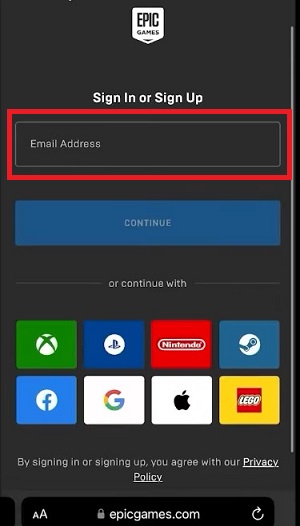
- Go to the page Account Information, tab General.
- Locate the field Display Name and enter your new username Fortnite.
- Click on Save changes to validate.
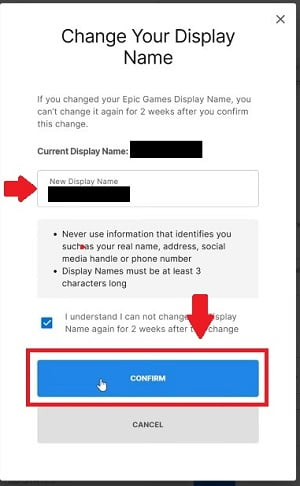
Your profile is updated immediately. The change applies to All Epic Games, not just to Fortnite.
Note: You can't change your username only once every two weeks. This limit applies to all of your Epic Games account. Take your time to choose carefully before confirming.
Is it free to change my username on Fortnite?
Yes, Changing your username on Fortnite is completely free. Epic Games does not charge any V-Buck nor any subscription required for this change.
The only requirement is the frequency limit : a name change has been approved every two weeks. If you try to change your username before this time limit expires, the option will be automatically disabled.
Note if you're playing on a console:
If your PSN ID or Xbox gamertag is displayed in the game, changing them is not free only the first time. Sony and Microsoft then charge about 10 € per exchange.
Changing Your Fortnite Username on PC and Mac
On computer Where Mac, open a browser and go directly to epicgames.com/account/personal: https://www.epicgames.com/account/personal. Log in to your Epic Games account, then go to the tab General.
The "Display Name" field appears in the General Account Information. Edit it, then click Save changes. The update is instantaneous. It's the fastest way to Change your username Fortnite on PC.
You can also use the game launcher Epic Games : Select your profile in the top right corner, then go to Manage Account and go to your profile settings.
Changing Your Fortnite Username on PS4, PS5, and PlayStation
On PS4 and PS5, the method for Change your username in Fortnite remains the same: everything takes place on the Epic Games official website from a browser. The console does not have a dedicated menu for this change.
There is one important exception to be aware of regarding PlayStation. If your Epic account is linked to your account PSN, your PSN Online ID can be displayed instead of the Epic username in the game.
In that case, you need to change your PSN ID directly from your console's settings PlayStation, and not from the Epic Account Management. These two identifiers are independent of each other.
Please note that changing your PSN ID is free only the first time. Subsequent changes cost between 4,99 € and 9,99 € depending on your PlayStation Plus subscription.
Changing Your Fortnite Username on Xbox
On Xbox, the process is the same. Changing Your Username on Fortnite is done through the website Epic Games through a browser, not through the settings Xbox.
If your Epic account is linked to your profile Xbox Live, your Xbox gamertag may appear in-game. If so, change it in your Xbox profile settings to update your username on the console.
The first gamertag change is free. After that, Microsoft charges about €9.99 per change.
Changing Your Fortnite Username on Nintendo Switch
On nintendo-switch, the process is the same. Log in to your Epic account from a browser at computer, Mac or on your mobile device, and follow the steps described above.
There is no menu option for changing your username directly from the nintendo-switch. nintendo and Epic Games manage separate profiles: changing one does not affect the other.
Changing Your Fortnite Username on Mobile (iOS and Android)
On mobile (iOS and android), open your browser and go to epicgames.com/account/personal: https://www.epicgames.com/account/personal. Log in to your Epic Games account and follow exactly the same steps as on computer.
The mobile app Fortnite does not offer an option to change your username directly in its settings: everything is done through the Epic website. The process works just as well on iOS than on android.
How to Change Your Address and Name on Your Epic Games Account
In addition to your username, you can edit other information in your Epic Games account. Here's how to quickly access each setting:
- First and last name : Go to Account Information, tab General. You'll find the "First Name" and "Last Name" fields right below the display name. Edit them and click Save changes.
- Email address : Go to the tab General of the account management. Click the pencil icon next to your current address. You'll need to confirm using a code sent to your existing address.
- Password : still in your settings Epic profile, you can edit it in the Password and security.
These changes are independent of the username in Fortnite. Change your real name on the Epic account Don't change your display name visible to other players.
Rules for your username Fortnite
Epic Games sets clear rules for choosing a pseudo. A username that violates these rules may be deleted without notice. Avoid:
- Offensive, vulgar, or hateful speech.
- Direct references to employees, products, or characters from’Epic Games.
- Imitation of a identifier an official or a well-known streamer who deceives other players.
Check out the complete rules on the official Epic Games Help site: https://www.epicgames.com/help if you're unsure about your choice of username.
FAQs
Why can't I change my username Fortnite?
There are several reasons why you might not be able to change your username Fortnite.
- First: Have you ever changed your username in the the past two weeks.
- The second one: Your email address hasn't been verified on your Epic Games account. The third: the pseudo The one you want is already being used by another player.
Is the new username immediately visible in the game?
Yes. The update is almost instantaneous. A few seconds after saving the change to the Epic website, your new username in Fortnite is displayed for all players. You don't need to restart the game, although doing so may speed up the display.
Can you change the username for a Fortnite child account?
Children's accounts (called «restricted accounts» at Epic Games) are assigned an automatically generated username.
To change it, a parent or guardian must first verify the account via the consent email sent by Epic Games.
Once this step is complete, the child can change their username themselves from their account by following the usual steps. The same rules and limits apply.
What if my nickname is already taken?
If the username Fortnite The one you want is already taken, so you'll have to choose another one. Epic Games does not allow you to use a display name the same as another player's. Add numbers, uppercase letters, or a prefix to find a pseudo available soon.
Cool Fortnite Username Ideas
Find a good username Fortnite is harder than it looks. The simplest trick: combine a strong adjective with a noun. Here are a few ideas for usernames on Fortnite To be adapted:
- BlackDiamond
- BluePanther
- WildKilla
- ToxxVapor
- UnknownKiller
- DoctaKilla
To find more ideas, use our free username generator.

What is an Epic Games username?
Your Epic Games username is the display name visible to other players in Fortnite. This name is related to your Epic Games account, not just one video game. It appears on computer, Mac, consoles, and mobile devices as soon as you log in with your account.
This username is separate from your console ID. Edit your Epic display name don't touch either PSN ID or your profile Xbox Live : These are completely separate settings. Changing Your Username on Fortnite through the settings in the Epic Games account It doesn't affect your console credentials. These are two separate systems.
Don't have an account yet? Check out our guide on how to create an Epic Games account. Do you only play on console without Epic account dedicated? You need to link your console account to a Epic Games account through the official Epic Games website so you can choose and change your username.
To support Alucare.fr, be sure to use the creator code: ALU-CARE
Do you want to go further in Fortnite ? Find out how many players are playing Fortnite right now, and how to get V-Bucks for free, or how to get the Battle Pass for free.









 English
I want to change my fortnite nickname
Hello, I work for Alucare, if you have a question don't hesitate to ask it on the Alucare discord: (link at the bottom of the site)
It's really good fortnite