ExitLag is a ping reduction software Designed for PCs and mobile devices, but it is not natively compatible with consoles such as the PS5, Xbox, or Nintendo Switch.
However, there is a workaround that some players are trying out: the Sharing an Internet connection from a PC. We'll explain how to set it up—and, most importantly, its limitations.
Is ExitLag compatible with consoles?
No, ExitLag is not not natively compatible with consoles. The software is designed primarily to work with mobile games and PCs (Windows), and it is not compatible with console games at this time.
In other words, there is no No ExitLag app to install directly on your PS5, Xbox, or Switch. You won't find anything in your console's store.
| Console | ExitLag Compatibility | Possible solution |
|---|---|---|
| PS5 | Nope | Sharing an Internet connection via a PC |
| Xbox Series X|S | Nope | Sharing an Internet connection via a PC |
| nintendo-switch | Nope | Sharing an Internet connection via a PC (less stable) |
In all three cases, the only viable option is a workaround, via a PC that shares its internet connection.
Ways to Use ExitLag on a Console
Even without native compatibility, many players find ways to work around the problem. Here are the most common methods.
- Sharing an Internet connection from a PC : Install ExitLag on your computer, then share its internet connection with your console via an Ethernet cable. Traffic from your console then passes through your PC before reaching the game server.
⚠️ Warning: ExitLag is designed to optimize games played on a PC. There is no guarantee that it will also optimize traffic coming from a console.
- Connecting via a PC hotspot : This is a variation of the previous method. Here, the connection is shared via Wi-Fi rather than Ethernet. It's less stable, but easier to set up.
- Advanced Network Configuration : Some players try more advanced configurations on their router or local network to redirect console traffic to a PC running ExitLag.
These configurations are not officially supported by ExitLag, so technical support won't be able to help you if you run into problems. Player feedback is rare and not very detailed, so the results remain uncertain.
If you want to give it a try, the Ethernet sharing method is the most stable of the three. Here's how to set it up step by step.
Set up ExitLag for your console: Ethernet sharing method
Here are the steps to follow to set up a network connection to your console.
- Install ExitLag on your Windows PC.
- Branch One Ethernet cable from your PC to your console.
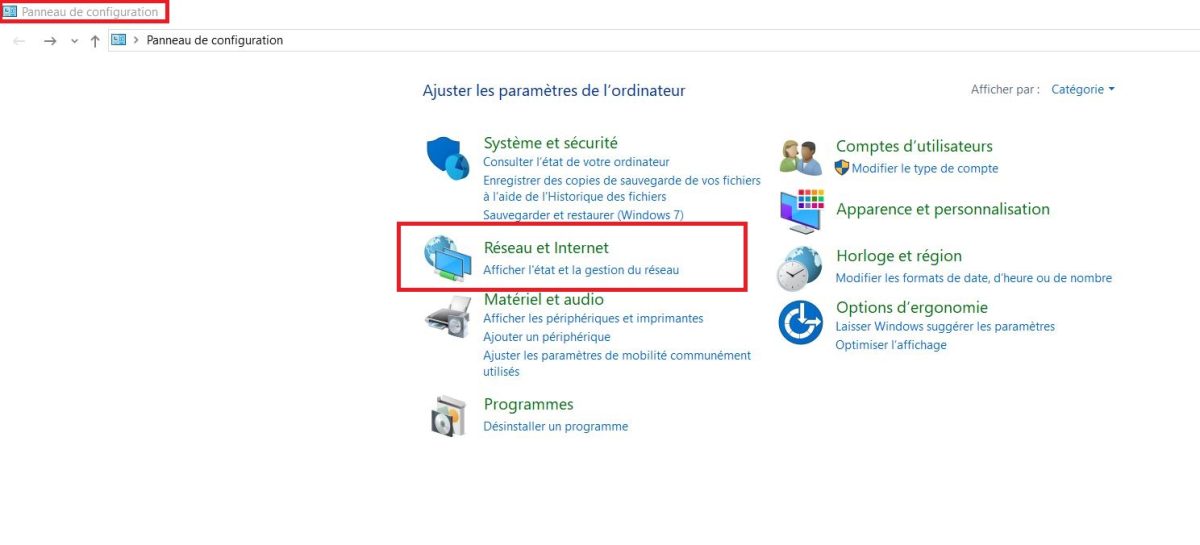
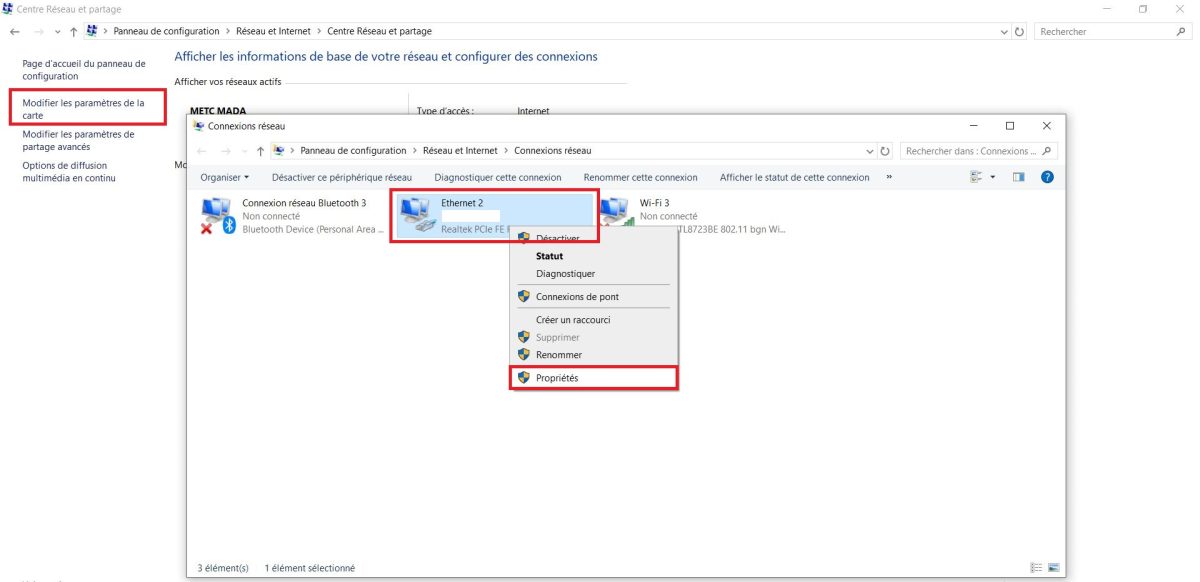
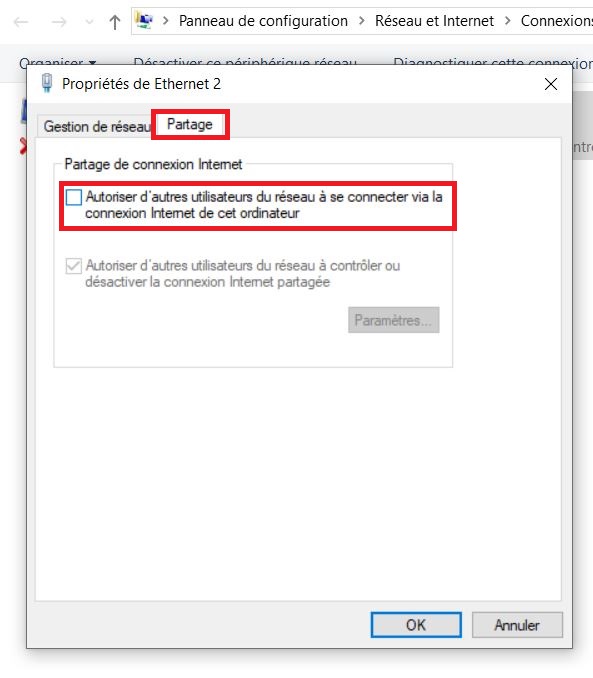
- On Windows, go to Control Panel > Networks and the Internet > Network and Sharing Center > «Change Map Settings» > Right-click on your main network adapter > Properties > Sharing tab > Check «Allow other network users to connect through this computer…,» then select the Ethernet connection linked to your console from the drop-down menu.

- On the console, force a wired connection in the network settings.
- Spear ExitLag on the PC, select your game, and let it run in the background.
- Compare your in-game ping with and without ExitLag enabled: that's the only way to know if this method actually improves your performance.
Alternatives to ExitLag for console gamers
As a first alternative, the following is cited: LagoFast, which offers several solutions for consoles, including a paid hardware device and a console performance boost via a Windows PC.
We also have NoPing, which has officially announced a service for PlayStation and Xbox. It works on the same principle: routing the connection through a PC. The difference from ExitLag is that the console is part of the service announced by the brand.
If you also play on PC, ExitLag is still a A great option for your computer games. For the console, try out the internet sharing feature and compare your ping before committing to a long-term plan.
Why doesn't ExitLag work natively on consoles?
The consoles run on closed operating systems. Sony, Microsoft, and Nintendo are locking down their platforms for for security and monitoring purposes. They do not allow the installation of third-party software that interacts with the network layer.
ExitLag, for its part, must install directly on the operating system to operate on network routes. It needs a low-level access permitted by Windows and mobile devices, but the consoles won't accept them.
It's a structural limitation, not simply a failure on ExitLag's part to develop the feature.
The limitations and points to watch out for with these workarounds
Before you get started, you need to understand the limitations of these workarounds.
| Point to Watch For | Explanation |
|---|---|
| Official Support | ExitLag does not guarantee any technical support for these configurations |
| PC required | Your computer must remain turned on and connected throughout the entire gaming session |
| Additional latency | Routing through a PC adds an intermediary, which can reduce the effectiveness of the ping improvement |
| Complexity | Network configuration requires a basic level of technical knowledge |
| Stability | A Wi-Fi connection is less reliable than an Ethernet connection |
| Strict NAT | Sharing from a PC adds an additional network layer, which can result in strict NAT and interfere with voice chat or matchmaking |
Basically, these methods can work, but with no guarantee of consistent results.
FAQs
What is ExitLag, and what is it used for?
ExitLag is a network optimization software designed for online gaming (not a traditional VPN) that reduces ping, jitter, and packet loss by avoiding congested routes. It works on most internet connections, but is currently limited to Windows and mobile devices. To learn more, check out how ExitLag works in detail.
Will ExitLag ever work on the PS5?
Nothing has been confirmed yet. ExitLag has not announced no date or official plan native compatibility with the PS5. Until an announcement is made, the Workaround using a PC remains the most feasible solution.
Does sharing a connection via a PC add a lot of latency?
A little, yes. The traffic goes through a additional intermediary, which adds a few milliseconds. With Ethernet, the impact is minimal. With Wi-Fi, the added latency is more noticeable.
Should you keep your computer on for the entire gaming session?
Yes. Your PC must remain turned on and connected. from the beginning to the end of your session. If it turns off or goes into sleep mode, your console will lose its internet connection.
Is there an ExitLag version for the Xbox Series X?
No. There is no ExitLag app for the Xbox Series X, nor for any other console. The software is available only for PC and mobile devices.
If you'd like more information about this tool, we invite you to check out our other articles:









 FR
 RU
 EN
 ES
 IT
 DE
 ZH
 PT
 ID
 JA
 DA