Play Monopoly Go online, earn money, build, collect stickers along the way, and compete with friends to become the most successful tycoon. Cards, which are valuable items in the game, can be traded with other players to complete your collections when you have trouble finding certain ones. Wondering how to do it? You've come to the right guide.
Here, we reveal some practical tips on how to swap cards in Monopoly Go and information on whether or not gold stickers can be exchanged.
For the latest information on Monopoly GO :
☑️Rejoindre our server discord☑️
Exchanging cards on Monopoly Go: conditions and steps
Requirements and important notes
Before diving into sticker trading on Monopoly Go, keep a few key points in mind:
👉 Make sure you have at least one or more duplicate cards in your collection to trade or send to your friends.
👉 Duplicate stickers in your collection are identified by a distinctive mark (Example: a unique duplicate sticker will be marked with a +1).

👉 Trading requires that the other player be on your in-game friends list.
👉 Make the most of the trade feature in Monopoly Go, because the daily limit is set at 5 cards only.
The steps to follow
Here are the steps to follow to make the exchange:
- Launch the game and tap the icon. "Album located at the bottom right of the home screen;
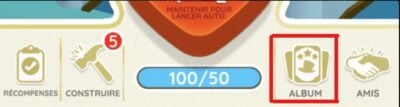
- You will be redirected to a screen displaying your current maps and specific duplicatesYou'll find out how much you can exchange for your collection;
- Select the card to be exchanged by pressing ;
- If the card is duplicated, the "Send to a friend will appear. Press it and a list appears, displaying all the players belonging to your friends list, in the option "Select a friend".
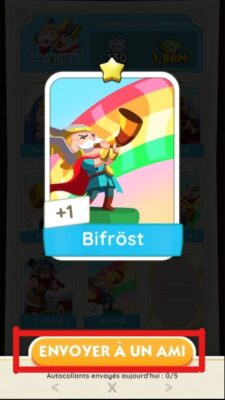
All you have to do is choose the friend's name with whom you wish to exchange, click on it, then press "send and you're done.
By joining our server, you'll be kept up to date with the latest information on Monopoly Go :
▶️Rejoindre our server discord◀️
Is it possible to exchange a gold card on Monopoly Go?
Obtaining gold stickers is a notorious challenge in Monopoly GO. Regular stickers are easy to obtain, but gold ones are rare, sometimes requiring duplicates before you can reach your goal.
Limitations
As a general rule, The exchange of gold stickers is prohibited., except during the Golden Blitz event. However, its limited availability and restrictions make it an unreliable option, often forcing you to rely on the opening of Monopoly Go sticker packs.
What is this event?
Little information exists about the event. Golden Blitz, which has recently appeared in certain regions. Lasting 24 hours, it allows you to exchange gold stickers for random versionsAlthough occasional, it offers a daily trading opportunity for avid players.
The Golden Blitz event is intermittent and rare, with no guarantee of high frequency. Stay alert, but don't miss it, as it could be your only trading opportunity.
Bonus: Tips for getting stickers to trade quickly
In Monopoly Go, the variety of methods for obtaining stickers gives you options to suit your playing style.
Play regularly and roll the dice frequently is the most effective way. This helps to supplement various activities, from daily treats to limited-time tournaments, allowing you to improve your net worth and unlock rewards such as cash, rolls, and of course stickers.
The stickers can also be accessed in a variety of ways:
- In finishing fast
- In progressing in the stages
- Ranking among the top three in a tournament
- In doing so turn the wheel assembly of colors
- By receiving friend stickers
- By opting for purchasing packs in the game store.
The variety of sticker sources offers a rich and engaging gaming experience. Be sure to log in regularly to participate in daily Monopoly Go events and increase your chances of finding more cards that you can then trade with other players.
You can also find :









 English
Netter Beitrag und gut erklärt. Aber kann mir jemand erklären wie ich in solchen Tauschgruppen Karten tauschen kann und dann meinen Link zu posten?? Entweder bin ich zu blond oder zu alt für das Spiel. Ich hab keinen Plan wie ich des mache. Besten Dank und Grüße aus Bayern sendet Peggy
Hello, I work for Alucare, if you have a question don't hesitate to ask it on the Alucare discord: (link at the bottom of the site)