To Trade a card on Monopoly Go, open your Album, select a duplicate and press the button "Send to a friend.
You can earn up to 5 exchanges per day per friend, only with your friends in the game. The gold cards, however, are only traded during the event Golden Blitz.
Here's everything you need to know to get the most out of it.
Join our Discord server to get all the latest information on Monopoly GO
☑️Rejoindre our server discord☑️
Exchanging Cards on Monopoly Go: Requirements and Steps
Requirements and important notes
Before you get started with the sticker swaps on Monopoly Go, there are a few basic rules to follow. The exchange system is based entirely on your duplicates and your in-game friends list.
- You need at least one duplicate card in your collection so you can send it.
- A duplicate can be identified by its indicator +1 shown on the sticker.
- The other player must be included in your friends list in the app.
- The daily limit is set at 5 cards per day per friend, so choose your shipments carefully.

An important note: the gold cards (also known as golden stickers) do not follow these standard rules. They are traded only during the event Golden Blitz, which is discussed below.
The steps to follow
Here's how to exchange a sticker, step by step:
- Start the game and tap the icon "Album in the lower-right corner of the home screen.
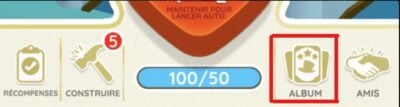
- You'll see a screen that displays your current cards and your duplicates. You can see at a glance what you can trade.
- Select the card you want to exchange by pressing it.
- If the card is duplicated, the "Send to a friend appears. Tap it, then select a contact using the option «Select a friend».
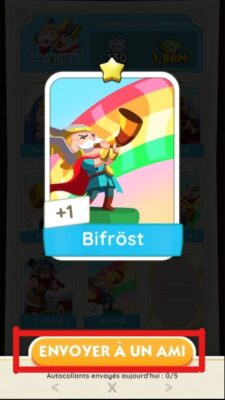
All you have to do then is Select the partner's name, click on it, and then press the button "Send. Your friend will receive the card directly in their account.
To verify that a trade was successful, check your friend's album once they've accepted it: the card will appear in their collection and disappear from your duplicates. Your Daily exchanges are reset every day, which gives you new shipments.
Is it possible to exchange a gold card on Monopoly Go?
Yes, but only during the Golden Blitz event. Under normal circumstances, gold cards are not exchangeable in Monopoly Go. Traditional stickers are easy to come by, but the Golden cards remain rare and often bring an album to a close.
Why is the gold card exchange blocked?
the exchange system of Scopely prohibits trading gold cards by default. This is an intentional rule: these rare cards are a great addition to your collections. Aside from the Golden Blitz, the exchange button simply remains grayed out on these stickers.
If an exchange seems impossible, the cause is almost always one of the following:
- The map is not in duplicate in your inventory.
- Your friend isn't logged into your game account.
- Your daily limit The exchange target has been reached.
- The Event Golden Blitz is simply not active that day.
How does Golden Blitz work?
the Golden Blitz is a flash event that usually lasts 24 heures. During this time, you can send and receive certain Selected gold cards with your exchange partners.
Basically, you open your album, select the duplicate gold card, and then tap the «Send» button» to forward it to a friend.
How can we prepare for the event?
the Golden Blitz is not permanent, but it is predictable: it is a recurring event, planned in advance by Scopely and closely followed by the community. Check out the calendar of events so you don't miss it. You can also prepare for it in two ways:
- Turn on notifications of the application Monopoly Go to be notified as soon as it launches.
- Keep your duplicate gold cards set aside, ready to be shared on the big day.
Also, remember to find some reliable exchange partners Before the offer begins. Join dedicated player groups (Facebook, Discord community groups, or Reddit) and add them as friends in the game before sending your stickers.
By joining our server, you'll stay up to date on the latest news about Monopoly Go :
☑️Rejoindre our server discord☑️
Bonus: Tips for Quickly Earning Stickers to Trade
In Monopoly Go, there are several ways to accumulate stickers to trade. The most effective strategy is still to play regularly and roll the dice often to complete the day's activities and unlock rewards (money, reels, and cards).
Here are all the ways to get stickers:
- In closing, quick wins
- Progressing through the game stages
- Ending in the top 3 in a tournament
- By turning the color wheel
- By receiving friend stickers
- When you buy Sticker Packs in the game store
To log in every day Participating in daily events increases your chances of finding extra cards that you can then trade with other players.
To learn more, check out our other guides:









 English
Netter Beitrag und gut erklärt. Aber kann mir jemand erklären wie ich in solchen Tauschgruppen Karten tauschen kann und dann meinen Link zu posten?? Entweder bin ich zu blond oder zu alt für das Spiel. Ich hab keinen Plan wie ich des mache. Besten Dank und Grüße aus Bayern sendet Peggy
Hello, I work for Alucare, if you have a question don't hesitate to ask it on the Alucare discord: (link at the bottom of the site)