To contact Monopoly GO support, start the game, tap the three dashes in the upper right corner, then go to Settings and choose Customer service.
This is the fastest way for a player to solve a problem on Android Where iOS. If you can't launch the game anymore, you can also contact support Monopoly GO via the website of Scopely, or by email.
How to contact Monopoly GO support from within the game
The fastest way to contact customer service Monopoly GO is done directly in the app, in just a few simple steps.
Step 1: Open the main menu
Start the game and click on the three dashes in the upper-right corner of the screen to open the menu.
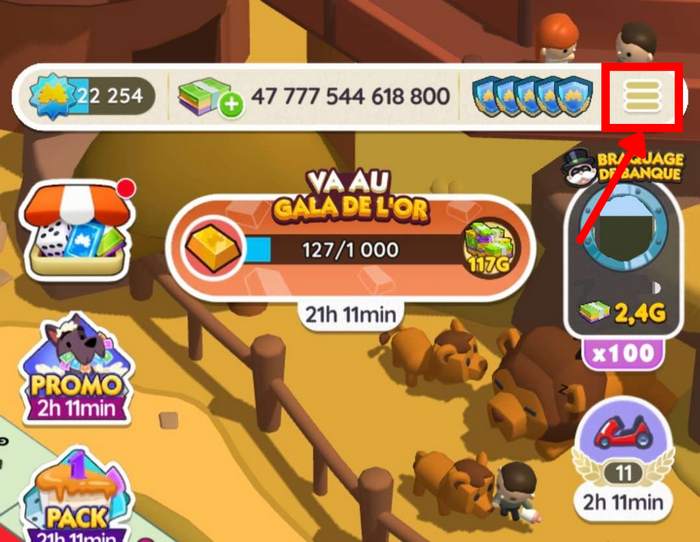
Step 2: Go to Settings
In this menu, select "Settings at the bottom of the screen.
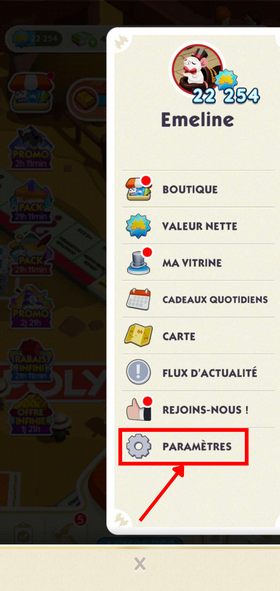
Step 3: Open the Customer Service section
In Settings, click “Customer Service” to access the support portal.
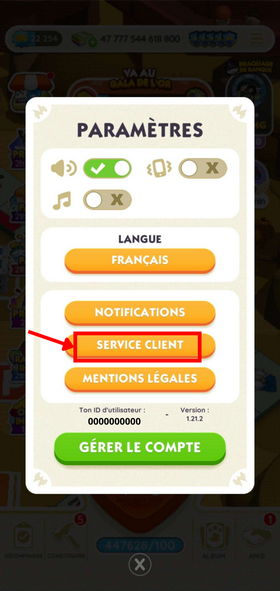
Step 4: Select the category that corresponds to your problem
Select the category that applies to your situation. For example, choose “Albums“ then “Duplicate Stickers” If you have a problem with your stickers.


The vast majority of categories already provide automated answers to players' most common questions.
If this information isn't enough to solve your problem, you can contact a support representative directly Monopoly GO : Scroll all the way to the bottom of the selected category, then click the contact button.

A cat Then start by speaking with a representative. Explain your problem clearly, providing as many details as possible: your request will be much more likely to be resolved quickly.
Usually, you receive a Response within 24 hours. This chat-based interaction is the smoothest for players who still have access to the game.
How to contact Monopoly GO support outside the game
If you can no longer launch the game, there are other options available to contact support Scopely from a web browser or via email.
Contact support through the Scopely website
The official support portal is available at scopely.com/help, whether on a mobile device or a computer. It's the ideal solution when startup bug or of problem accessing your account.
There you'll find the same categories as in the game, along with the option to submit a written request. The website Scopely also lists the known issues currently being resolved, which may save you from having to contact support if your issue has already been identified.
Contact Monopoly GO Support by email
You can also send a message directly to support@scopely.com. This is a viable option for contact customer service Monopoly GO without opening the app.
In your email, include your player ID, a clear description of the problem, and, if possible, a screenshot. It generally takes longer to receive a response via email than through in-game chat, but this method is still effective for complex issues such as refunds or disputes over a purchase.
Contact Scopely on social media
Scopely is available on Facebook, Instagram and YouTube. These channels are primarily used to track the events and game news.
They don't allow you to resolve a technical issue directly, but you can sometimes get information about an ongoing bug or an uncredited event. For any specific issues, please use the in-game chat or email.
Why contact Monopoly GO support?
the customer service Monopoly GO steps in whenever a problem is hindering your gaming experience. Here are the most common situations players face:
- Recover Your Account Monopoly GO : The team will verify your identity and restore your access. You cannot regain access without contacting support.
- Uncredited dice purchase : If a purchase has been charged but your points (dice) If you haven't been credited, customer support can refund you or deliver the missing resources. Provide the transaction number to speed up the resolution.
- Unclaimed Event Rewards : If you haven't received your rewards after an event such as a Sticker Boom Monopoly GO, the support team can check and fix the problem.
- Dice-rolling bug or game crash : Reporting these bugs helps Scopely to fix them. Players who report bugs help improve the experience for the entire community.
- Problems with Friends : Shield sending blocked, friends list not updated, gifts not received. These multiplayer issues are being addressed by support.
- Purchases and Refunds : All refund requests for purchases must be submitted through customer service. Please prepare a clear description and the details of the transaction.
The more detailed your description is, the faster your problem will be resolved. Contact Support Monopoly GO This is still the only way to take concrete action on your own: no guide or forum can do it for you.
Frequently Asked Questions About the Monopoly GO Stand
How long does it take to get a response?
Via the in-game chat, the response usually comes within 24 hours. Via email, the response time may be longer, especially during periods of high traffic at a major event. For urgent issues, live chat remains the best option.
What should I do if customer support doesn't respond?
If you haven't received a response within 48 hours, you can resubmit your request from the Customer service from the game or from the site Scopely. Avoid opening multiple requests at the same time: this slows down the team's processing.
Is the Monopoly GO manual available in French?
Yes. The customer service Monopoly GO is available in French. You can write in French in the chat or by email, and you'll receive a reply in your language.
Do I need my username to contact support?
To have one's identifier Monopoly GO Having it on hand speeds up the process. It allows the team to locate your account right away. If you don't know it, check out our guide on How to Find Your Username Monopoly GO.
See also:









 English
Compleanno
I've had a multi-account for two years, and since last week it won't let me log in. Now it's telling me I have to subscribe to the Monopoly Go server. What should I do?
Hola.
Yo tengo días de no recoger mis dados y me metí ahora para recogerlos y solo 2 me dió.
Hace un tiempo venía notando eso y no hice reclamo ,pero ahora estoy segura e hice el reclamo.
Si serían tan amables de ayudarme con ese problema,me imagino que ustedes tienen el control para saber cuantos dados me deben.
Hello, we are not in contact with Monopoly GO. You must contact them yourself as explained in the article.