To Recover your account Monopoly GO, you need to contact customer service directly from within the game. It works even if you were playing as a’guest, without ever having linked your account to Facebook.
Before you begin, make a note of this information: your identifier Monopoly GO, your name in play, your device (iPhone Where Android), and an estimate of your number of dice and your silver. The more specific you are, the more likely the recovery will be successful.
Video tutorial on how to recover your account Monopoly GO
This video shows you step by step how to Recover your account Monopoly GO, even if you were playing as a guest.
Explanatory video in French by Alucare, ideal complement to the page. View video (you can use YouTube's automatic translation)

Would you prefer the text version? Each step is detailed right below.
What You Need Before You Start
Support Monopoly GO will ask you for several pieces of information to verify your identity. Have them ready in advance to speed up the process of recovering your account.
- Your username Monopoly GO : visible on the loading screen or in the settings.
- Your Name in the Game : the username displayed on your account.
- Your device : iPhone, iPad Where Android (brand and model, if possible).
- An email address valid for receiving support information.
- The date of your last connection and an estimate of your dice and your silver.
- All order number if you bought dice or a pack.
Even without a username, it's still possible to recover an account, but your chances of retrieving your progress are lower. This is the first piece of information you should provide to support.
How to Recover Your Account Monopoly GO : The Complete Method
Whether your account is linked to Facebook or whether it is a guest account, the method is the same. You go through the in-game customer service.
Create a temporary account to submit the request, then follow the support team's instructions to restore your progress.
Step by Step: Contacting Customer Service Monopoly GO
- Step 1 : Click on the three dashes in the upper-right corner of the home screen:
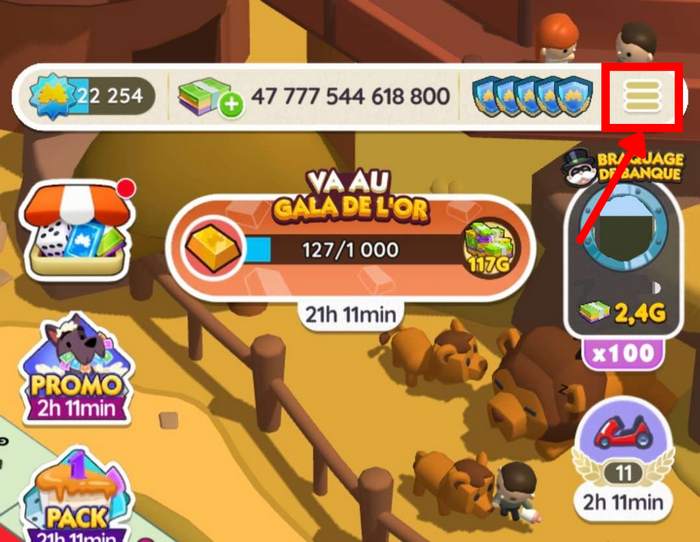
- 2nd step : Click on "Settings below:
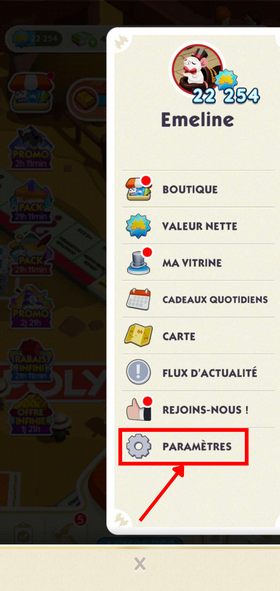
- Step 3 : Click on “Customer Service” :
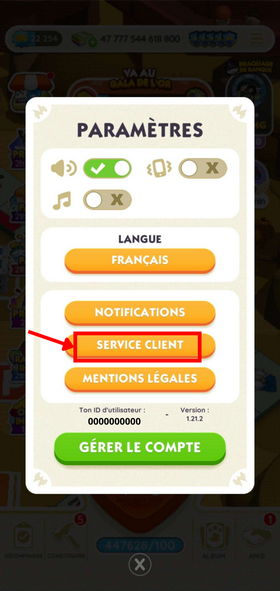
- Step 4 : Click on “I lost my progress in the game” :
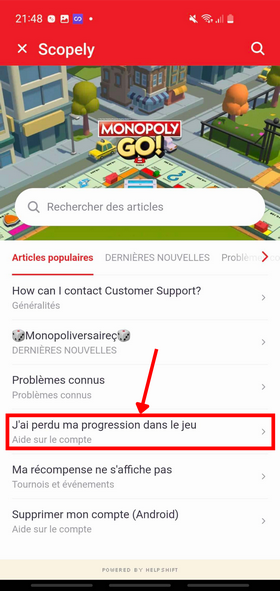
- Step 5 : go down to “Talk to us” and click on it:
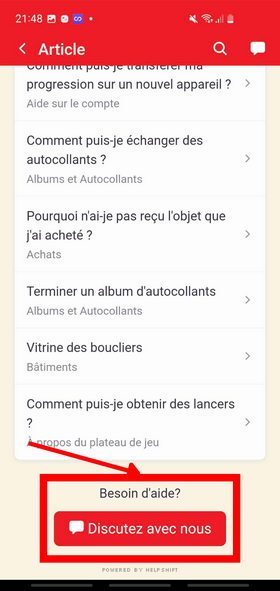
You are now entering a face-to-face discussion with the support Monopoly GO :
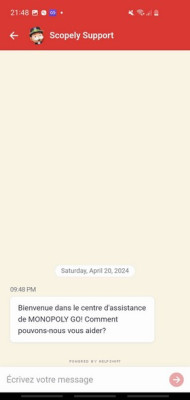
An example of a message to send to support
Explain that you lost your progress in the game, give your name in play and your identifier Monopoly GO. Here is a sample message you can send to support to recover your account:
“Hello. I’m contacting you because I’ve lost my progress in the game and would like to recover it. My account name is XXXX and my username is XXXX. Thank you in advance for your help.”
Replace XXXX with your actual information.
You can find your identifier at two different locations:
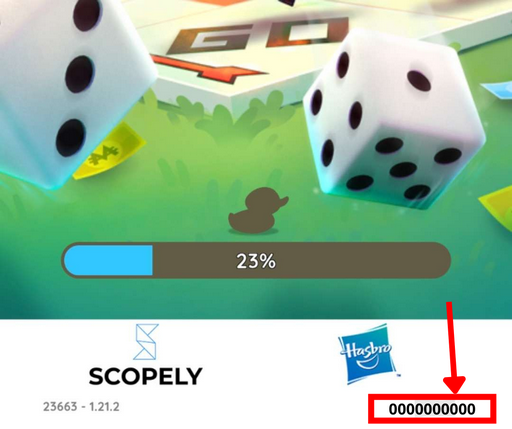
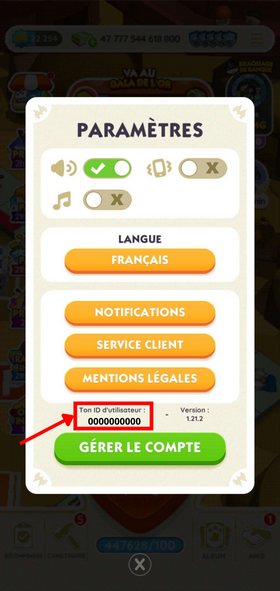
Note: Be sure to provide the’Lost Account ID, not the one for the temporary account. This is a common mistake that slows down the recovery process.
Additional information requested by support
Support Monopoly GO usually responds within the day, sometimes within a few hours. He'll then ask you for additional information to Restore your progress :
- Your name in play and your identifier
- L'device used (iPhone 14 or model Android (for example)
- A e-mail address valid
- The date of your last connection
- the number of dice and D'silver that you had
If you have any other proof (purchase of dice, a pack with order number), include those as well. The more specific information you share, the more the account recovery is likely to succeed. That's why I recommend taking a screenshot every time you exit the game.
Once all this information has been submitted, the support team will review your request. You should receive a confirmation message similar to one of the following:

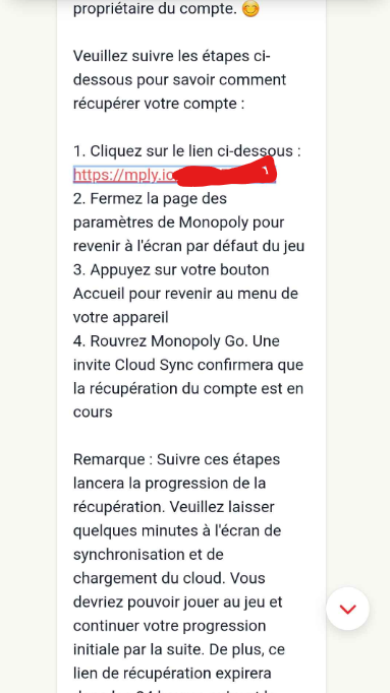
Restoring Your Progress: The Final Steps
Follow the instructions provided by support. Here's exactly how it works:
- Click on the link sent by Monopoly GO.
- The game opens to the home screen: click on “Play as a guest”. If you're already logged in to an account, that's fine, too. You'll lose the temporary account, but that's okay since you haven't played on it.
- Click on the three dashes in the upper-right corner, then click again on the link sent by Monopoly GO.
- A message appears: “Recover your account, confirm that you want to recover your account and restore your progress”. Click on “Yes”.
- You'll see the home screen. Log in via Facebook or continue as a guest. I strongly recommend that you Link your account to Facebook to avoid losing everything again.
There you go—you can play again without losing anything.
Sometimes the customer service Don't answer. In that case, returns a message to follow up on your request. If they close your request without responding, opens a new request and provide as much detail as possible. The average response time is 24 to 48 hours on weekdays. On weekends, it should be a little longer.
Recover Your Account Monopoly GO on iPhone Where Android : Is there a difference?
The procedure for contacting support is the same on iPhone (iOS) and on Android. In both cases, you'll need to go through the game menu.
Recover Your Account Monopoly GO on Android
On Android, you can check if a backup exists via Google Play Games : Open the app, search for Monopoly GO in your library, and check to see if any progress has been recorded.
If so, you can try to restore it directly without contacting support. This is the fastest way to recover an account. Monopoly GO on Android.
You can also link your account to Google for a quick connection via Google Play. The combination Facebook and Google offers two levels of protection in case of a problem.
Recover Your Account Monopoly GO on iPhone
On iPhone, Monopoly GO is not based on Apple Game Center to back up your progress. The most reliable solution is still to link your account to Facebook.
If you didn't link your account before losing it, your only option is to contact support as described above.
Contact Scopely outside the game
If you can't access the game to contact support, there are other ways to Recover your account Monopoly GO.
- The official help site for Scopely : Go to support.scopely.com to open a support ticket and share your account information directly online. This is the best option if the in-game chat isn't working.
- Social networks Monopoly GO : the official page at Facebook or the account Twitter/X can help direct you to the right person, even if the response takes longer than the in-game chat.
- WhatsApp : Some players report having received assistance from support via WhatsApp after submitting a request on the official website. It's not guaranteed, but it's worth a try if the chat isn't responding.
If you've provided all your information and support hasn't responded after a few days, be sure to follow up on your request or open a new ticket. Also, don't forget to check your spam folder: sometimes the support response ends up there.
How to Avoid Losing Your Progress on Monopoly GO ?
Now that you know how to Recover your account Monopoly GO, so let's make sure it doesn't happen again. Here are the best tips to put into practice starting today.
Link your account to Facebook or Google
A guest account isn't linked to anything. If you uninstall the game or switch phones, your progress disappears. By linking your account to Facebook, you can log back in with just one click.
This is the easiest way to keep your dice and your silver in the game. On Android, the combination Facebook and Google offers two levels of protection. It's the best way to avoid having to recover your account Monopoly GO lost.
To link your account, go to Settings, then in the "Sign In" section. You can sign in to your account Facebook Where Google in just a few seconds. You should do this right now, before you lose your progress.
Save your username Monopoly GO
Rate this ID Monopoly GO somewhere safe. Your request for account recovery Monopoly GO is much more likely to succeed if you give your identifier to the support team. This is the most useful information to share during a recovery.
Take screenshots regularly
Support will ask you for your number of dice and your silver to verify your identity. A recent screenshot speeds up the recovery process. Taking a screenshot every time you exit the game takes only a few seconds and can save you a lot of time if a problem arises.
Share these tips with your friends
If a friend or a player in your network has lost access to their account, share this article with them. Many players lose their progress because they haven't linked their accounts. Monopoly GO at Facebook or saved their identifier.
The more informed the community is, the fewer losses there are. Every friend you help is one more player at your partner events.
If you run into a problem, post your question in the comments, I'm here to answer your questions.
Feel free to join our server Discord. Many contests for’card exchange events take place there, and people share lots of tips on Monopoly GO :
Read also:
Alucare.fr specializes in Monopoly GO. There you'll find tips on events currently, the Lucky Chance or even thepartner event, as well as methods that have made it possible to reach accounts with more than 400,000 dice.
Hundreds of thousands of players have already benefited from the articles and videos YouTube and Discord mutual support. Your turn!









 English
Hallo
A friend of mine—his son broke his cell phone about 2 or 3 months ago or so—but now he has a new one. It’s a HONOR; I guess it must be some kind of Huawei model, and I put the Monopoly on it again. But I’d like him to get his old account back, but it’s not working because I can’t access customer service on this phone.
Hi Tiger, thanks for your message!
No problem—customer service isn't tied to your old cell phone; you can also reach them from your new cell phone, even with a new (guest) account:
Open Monopoly GO and tap the three lines in the upper-right corner.
Go to the Support/Help section and write a message explaining that the old account (from the broken cell phone) has been lost and needs to be recovered.
Please include as much information as possible about the old account: player name, level, approximate creation date, approximate number of dice/credits, and, if available, the player ID (which is briefly displayed when the game starts, for example) or a proof of purchase.
If the old account was linked to Facebook, Google Play, or Apple: just sign in with the same account on your new phone—your progress will usually be restored automatically.
If Support doesn't respond within a few days, just submit a new request or try reaching out through Monopoly GO's official social media channels as well. Good luck!
I would like to recover my Monopoly go account thank you
Por favor estoy muy triste porque perdí mi cuenta y casi estaba por terminar mi album eso me tiene triste por favor ayudeme
Me siento triste xq perdi mi cuenta de Monopoly y ya iba adelantada con el album por favor ayudeme
Hello, I lost my game and my progress, so I no longer have access to the tycoon club either. Please help me.
If I recover my second account that was lost thanks to the link sent by customer service, do I also lose my main account in virtual master?
Is your main account connected to the same Facebook account? I don't quite understand your question
I created a second Facebook account, but apparently it is linked to my first account.
Ah, very strange.