To get two accounts Monopoly GO At the same time, the most reliable method is to run your second account on another one device (an old phone will do), linked to a second Facebook account.
You can also go through a cloning application on android, but this method has become unstable since a recent security update to Monopoly GO.
First, let us introduce you to the a method that's sure to work, or the old solution if it still works on your mobile device.
Create a second Monopoly GO account
The Reliable Method (Android and iPhone): A Second Device + a Facebook Account
It's the safest way to manage two accounts Monopoly GO. It works just as well on android than on iPhone, and no game update can break it.
- Step 1 : retrieves a second device. An old Android or iOS smartphone or tablet that you no longer use will work just fine.
- 2nd step : creates a second Facebook account, or use one you already have. It will be used to save your connection to the second account Monopoly GO.

- Step 3: installs Monopoly GO since Play Store or theApp Store on this second device.
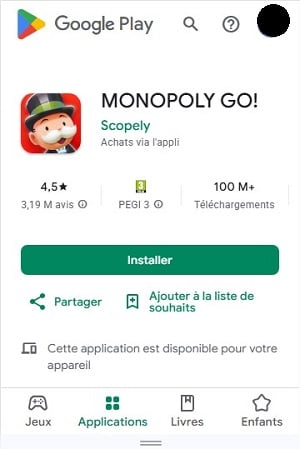
- Step 4: Launch the game on this second device and log in with your second Facebook account. Avoid guest mode: without logging in Facebook, you'll lose this account permanently if you uninstall the app.
That's it. Your Two accounts are running in parallel, each on their own device, without ever having to log out. No third-party apps, no risk of crashes, and it works just as well on iPhone than on Android.
The Cloning Method (Android Only)
This method has long been the fastest to have two accounts on the same phone. Since late 2025, the’cloned app It often closes as soon as it opens (see the troubleshooting section below). Try it, and if it crashes, switch to the second-device method described above.
- Step 1 : Go to the Play Store and look for «Multiple accounts: 2Space », then install the app. It lets you run multiple accounts independently of the ones already installed on your phone.
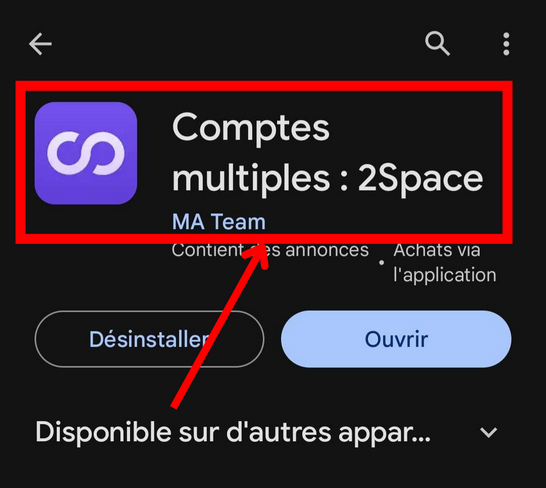
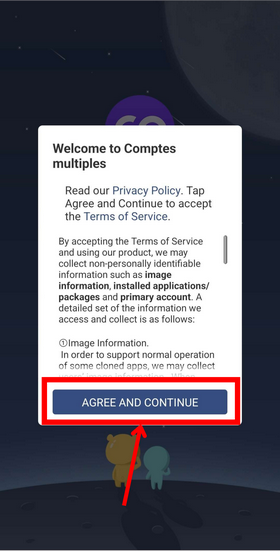
- 2nd step : Open the «Multiple Accounts» app and accept the terms and conditions.
- Step 3: click on the " + " in the lower-right corner to add an app.
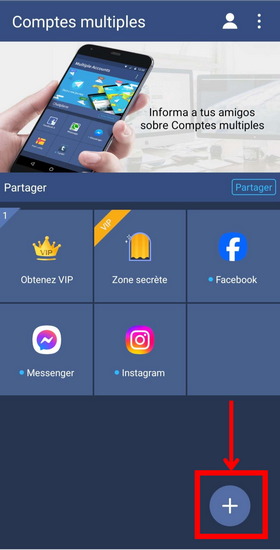
- Step 4: Click the «+» next to Monopoly GO to add it to the list of cloned apps.
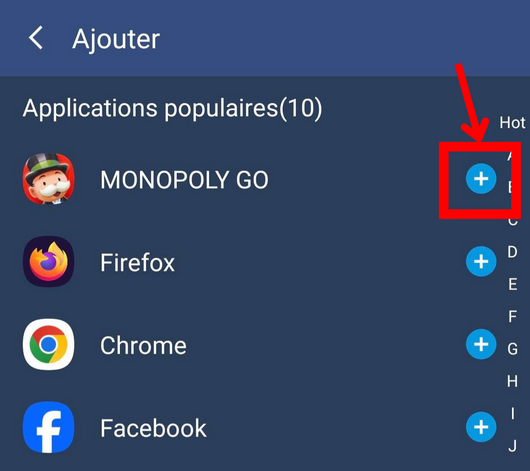
- Step 5: Monopoly GO Once it's installed in the app, you can launch it.
- Step 6: log in with Facebook rather than in guest mode. Without this connection Facebook, you might lose track of them if you uninstall the relevant apps.
You now have two clearly separate accounts : Your main account as usual, and your second account through the Multiple Accounts app.
What about on the iPhone?
iOS does not allow you to clone an app as on Android. If you're on iPhone, the method using the second device described above is the only truly reliable one.
You can also switch between your two accounts on the same iPhone by logging out and then logging back in. However, you won't be able to run them at the same time.
Does the cloned app close when you launch it? (troubleshooting)
Many players are reporting the same issue: the cloned app closes one or two seconds after opening.
It's a protection added by Monopoly GO which causes the game to freeze as soon as it runs in a cloned app. There is no way to permanently resolve this issue.
Before giving up, there's one quick thing you can try: make sure you have the latest version of Monopoly GO since Play Store. If that doesn't solve the problem, switch directly to the second-device method.
You have lost access to your second account ? Don't panic. If he were related to Facebook, it's not lost: log back into this account Facebook on any device, and you'll be able to find it. For more details, check out our guide on How to Recover Your Monopoly GO Account.
Is there a problem not listed here? Leave a comment—we answer questions regularly.
How do you transfer your cards between your two accounts?
Once your second account is set up, you'll want to send your duplicate cards from one account to the other. This is the best way to complete your albums faster. To learn all about this system, check out our comprehensive guide to Trade your cards on Monopoly GO. Here are the essential rules you need to know.
- Your two accounts must first be friends in the game. The easiest way: link each account Facebook in the game. Both of your accounts will automatically appear in your friends list.
- You can only send duplicate cards. Open the card in question, then transfer it to your second account in just a few seconds.
- Monopoly GO limits trades to 5 cards per day. If a "Please wait" message appears, just wait for the counter to reset the next day.
- Rare cards (5-star and gold) are only traded during special events such as the Golden Blitz. Outside of these time slots, you can't send them—not even between your own accounts. The Golden Blitz applies only to a specific selection of cards, which is determined for each edition of the event.
- For certain highly sought-after cards, also consider the’Joker Sticker, which can replace any missing card in an album.
Two Monopoly GO accounts: Is that risky?
Having two accounts Monopoly GO is tolerated in practice and is very rarely punished. Scopely, the game's publisher, primarily targets abusive behavior—not simply the act of managing two accounts to play the game.
The only real risk comes from one specific action: converting an account into a simple one «reservoir» which feeds the other through massive and repeated one-way exchanges. It is this type of abuse that can be detected and flagged as cheating by the system.
The risk of ban This mainly concerns tools that automate gameplay (bots, dice generators), not the fact of having two accounts linked to two accounts Facebook different.
To put it simply: play both of your accounts as usual, switch them up every now and then, and you’ll never have any problems.
Why have two Monopoly GO accounts?
Creating a second account offers several practical benefits, especially if you want to make quick progress without spending a penny:
- No longer having to depend on strangers at partner events. Invite your second account as a partner—no more inactive teammates dragging down your rewards.
- Complete your albums faster by transferring your missing cards from one account to another.
- Enter twice at events and collect twice as many sticker packs. Check out the calendar of events so you don't miss a thing.
Player tip: During an event, always keep moving forward primary account first. Then use the second one to complete the tiers you haven't reached yet. Your second account becomes a stock of cards and rewards which you can draw from when you get stuck on an album in your main account.
To maximize your daily earnings, be sure to follow the Today's Quick Wins on each of your two accounts. That's what really makes a difference in the long run.
You now have everything you need to create a second account Monopoly GO, transfer your cards between your two accounts—risk-free. Any questions? Leave a comment below.
And if you want to take it a step further, check out our tips on boosting Golden Blitz Monopoly GO and on the High Roller Boost.









 English
Hello,
I have been using "multiple accounts" for several months, and for the past few days it has been impossible to open the game.
How can I continue to use the second account?
thank you for your reply
Hello 👋 I've had multiple accounts for over a year, but now the app won't open.
How can the problem be solved?
Thank you for your reply
Hello. I've had exactly the same problem since yesterday and I can't access my accounts! Do you have a solution? Thank you.
Hello,
I have been using "multiple accounts" for several months, and for the past few days it has been impossible to open the game.
How can I continue to use the second account?
thank you for your reply
Hi. Ich habe heute ein neues Handy bekommen. Bei mir funktioniert der Zweitaccount nicht mehr, bzw ich komme bei multiple Accounts nicht beim zweiten rein. Habt ihr da eine Lösung für mich?
LG
PS: der zweite existiert noch, da ich noch in der Bestenliste aufgeführt werde.
Hello I just installed the application to have two accounts but I can't open the monopoly account via this application and I created a facebook account.