Just as it can be complex to bypass someone who has blocked you on FacebookDetermining whether you are in someone's WhatsApp contacts is not always straightforward. Indeed, it is quite difficult to answer this question, as it seems impossible to know whether or not you are in someone's WhatsApp contacts. However, there are still a few tricks you can use to find out using a mailing list.
In fact, with the broadcast function, you can find people who have your phone number among your WhatsApp contacts. Note that someone can send you a WhatsApp message even if they don't have your contact.
How do I know if I'm in her WhatsApp contacts? ? Let's find out in this article how to know if someone has saved your WhatsApp number !
How do I know if I'm in my WhatsApp : iPhone contacts?
One way to find out if you're in someone's contact list is to connect your WhatsApp on iPhone. Here's how to check:
- Open and launch the WhatsApp application and open your account.
- Press on Discussion.

- In the top right-hand corner, you will find an icon in the shape of a + in green ;
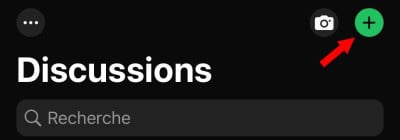
- Then select “the mailing list” among the options presented, one that allows you to open a list of current broadcasts.

- Then press new list to open a contact list.
- Then simply add a contact who has your number. You must at least to add someone who has your number in the broadcast.
- Select then this contact and check whether he has your number or not.
So far, things have been going pretty smoothly...
- Then press create to create your broadcast and open the corresponding discussion page.
- You can now write a message test and then send it.
- This is where you need to be patient. Wait at least two hours before checking who has viewed your message.
- Once the time has elapsed, you can click on the mailing list again.
- Long press on the message untila window opens then select info.
- Just check the header "read by the people who read your message. In fact, these are the people who have your number in their WhatsApp contacts.
- On the header delivered will include contacts who don't have your number in their repertoire
If you're an iPhone user, you now know who has your number in their WhatsApp contacts!
How do I know if I'm in my WhatsApp contacts: Android?
Just like on iPhone, you can also find out if someone has your contact by logging in on Android. To find out, you can start with:
- Open and launch your WhatsApp account on your Android device.
- Then click on thediscussion icon at the bottom of the screen.
- You will then see “mailing list” above your discussion.
- Click on this list and then on New list at the bottom of your screen, a list of your contacts will open.
- Then add to the mailing list someone you know and who has your contact and the person you want to check if he has your contact.
- Then click create once you've added them.
- Then send a message to this newly created list.
- Then please wait a few hours before checking who read the message.
- Click again on the mailing list once the waiting time has elapsed, and long-press the message. This will open the context menu.
- Now all you have to do is click on info,
In the header, you'll find read by people who has your number in its contact.
How can I tell if someone has deleted my number on WhatsApp?
There is no way to determine if someone has deleted your number on WhatsApp. WhatsApp does not have a feature that notifies you when someone deletes or saves your number.
However, here are some clues that may help you figure out if someone has really deleted your number on WhatsApp!
Send a message
To check if someone still has your WhatsApp number, it is best tosend a message directlyIf you don't receive a response from them or if you never see the double ticks or blue ticks on your message, it's possible that they have blocked your number on WhatsApp.
Check your profile
It is also possible to check if someone has deleted your number on WhatsApp by going to their WhatsApp profile. If you can see their WhatsApp profile picture, but it has been replaced by a blank white avatarIt's possible that the person has deleted or blocked your number on WhatsApp. To do this,
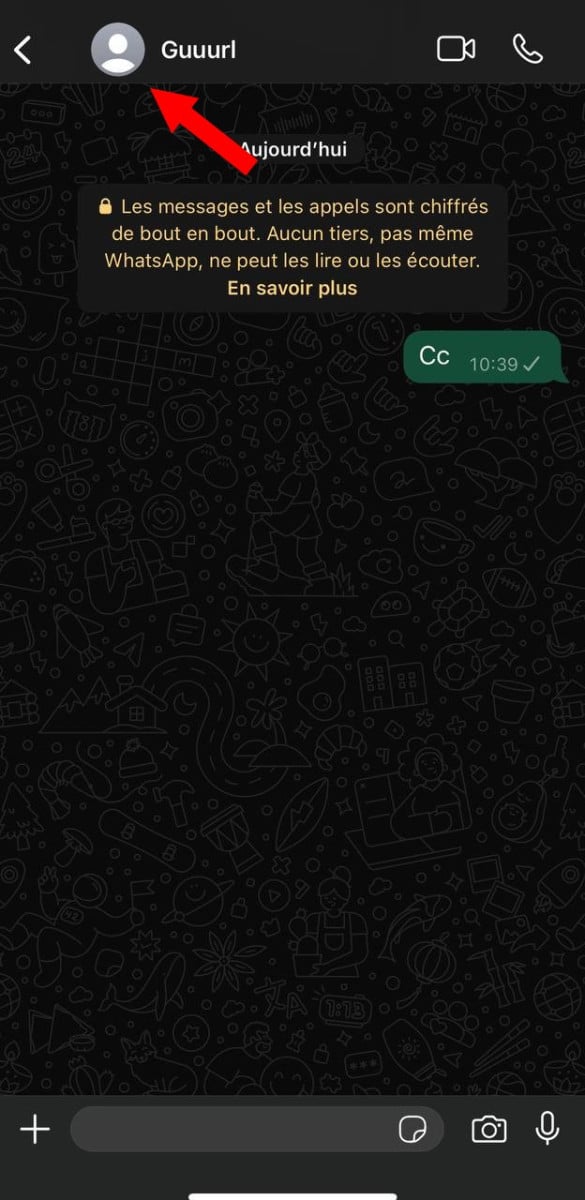
- Open your WhatsApp and go to the person's chat/contact;
- Then tap on the header and select the profile photo of the person you want to verify.
- Check out his profile picture.
WhatsApp contact deleted: can it send you a message?
People who are blocked on WhatsApp can no longer contact you or send you messages. Blocked contacts will no longer be able to see "Last seen" and "Online" statuses, as well as your status updates and profile picture changes.
However, if the person you want to know if they have your number in their WhatsApp contacts rarely uses WhatsApp, it will be difficult to know whether or not they have your number. The same goes for someone who has saved your number without your country prefix. He won't appear in the new mailing list even if he has your number.
If you want view someone's WhatsApp conversations don't miss out on our best tips!









 English
Great