Table of Contents :
ToggleAnd if your computer being monitored without your knowledge? In this article, you'll find all the techniques you need to detect espionage on your device!
Then learn how to remove malware and to protect your computer once and for all!
To detect PC spyware in one click :
Some signs that your computer is being monitored
Here are a few signs which may indicate that your computer is being spied on.
Please note that these indications are not necessarily absolute proof. Sometimes, they just indicate a technical problem or a setting at day system.
1. A light that lights up by itself
The light from your webcam lights up by itself, without you turning on the camera or using a dedicated application?
It is highly likely that activate your camera without your knowledge.
2. A sudden drop in performance
If your computer becomes extremely slow when opening programs, while your processor is at’ordinary fast, you probably have a malicious application which runs and slows down this action in the background.
Similarly, if you've noticed that the battery discharges faster than usual, this may be a sign that spyware is installed on your computer.
3. Strange browser behavior
- You are redirected to websites other than those you've selected?
- The new unexpected toolbars appear in your browser?
In this case, be careful, because you may have a installed malware on your computer that tries to take control of it.
What's more, if certain keys are not operational on your web browser, or they do not work when you select the next field in a form, this may indicate that a malicious script interferes with it.
4. Many pop-up windows
Similarly, if you are confronted with a numerous pop-up windows, This is sometimes a sign of espionage.
Spyware is often accompanied by advertising software (adwares).
5. Unusual network activities
If your computer also has a unusual network activity, like large downloads data, it's quite possible that someone is spying on you.
In fact, these programs may use your Internet connection to’send data from your computer to a remote server without your knowledge.
6. Strange computer programs or processes
If you notice any unknown computer processes taking place on your computer, it's possible that someone is watching your every move.
It could be a toolbar, unusual software or an unknown program.
How can I find out if someone is monitoring my computer?
Here are a few techniques for unmasking a surveillance application:
1. Use antivirus software
The most fast and secure to check whether you have spyware installed on your computer without your knowledge is to call a antivirus service.
Of course, there are manual methods for detecting surveillance, and we'll tell you all about them, but you should be aware that they often have negative consequences. limits.
But if you opt for antivirus software, one of the best is Bitdefender.
Highly appreciated by users for its comprehensive, reliable functionality, Bitdefender allows you to:
- Detecting invisible threats (stalkerwares) on your computer
- Real-time protection (advanced firewall)
- Remove spyware completely.
Here's how it works:
Go here :
- Choose the subscription plan that's right for you, or opt for the 30-day free trial.
- Then click on the Download free antivirus software.
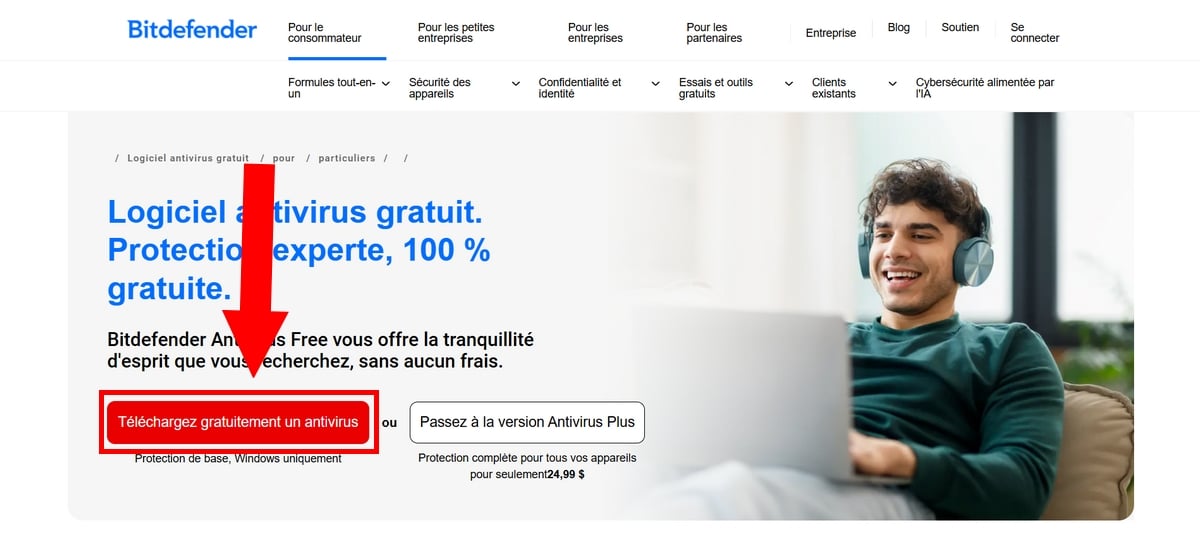
- Then, click on thedownload history in your browser to launch the installation of BitDefender on your device
- Then wait and follow the instructions on your screen to complete the operation.
- If you don't have an account yet, we've come to the stage where you need to create one.
- Enter your name, e-mail address and password (as requested by the software). Then click on Create an account
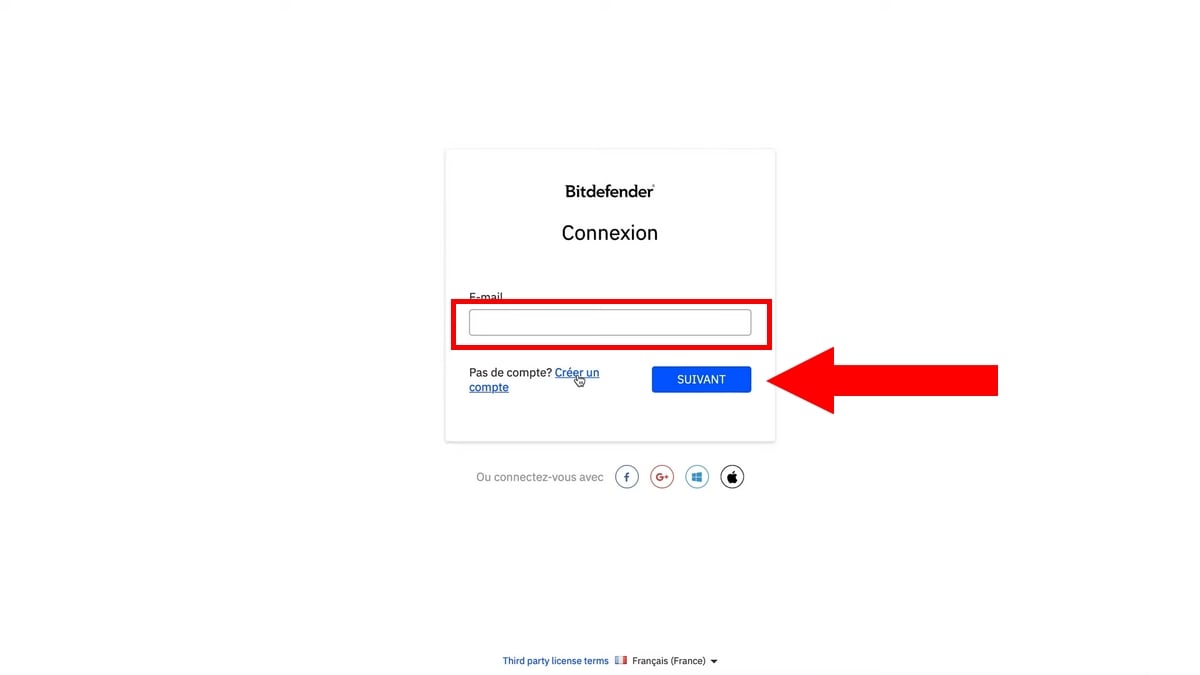
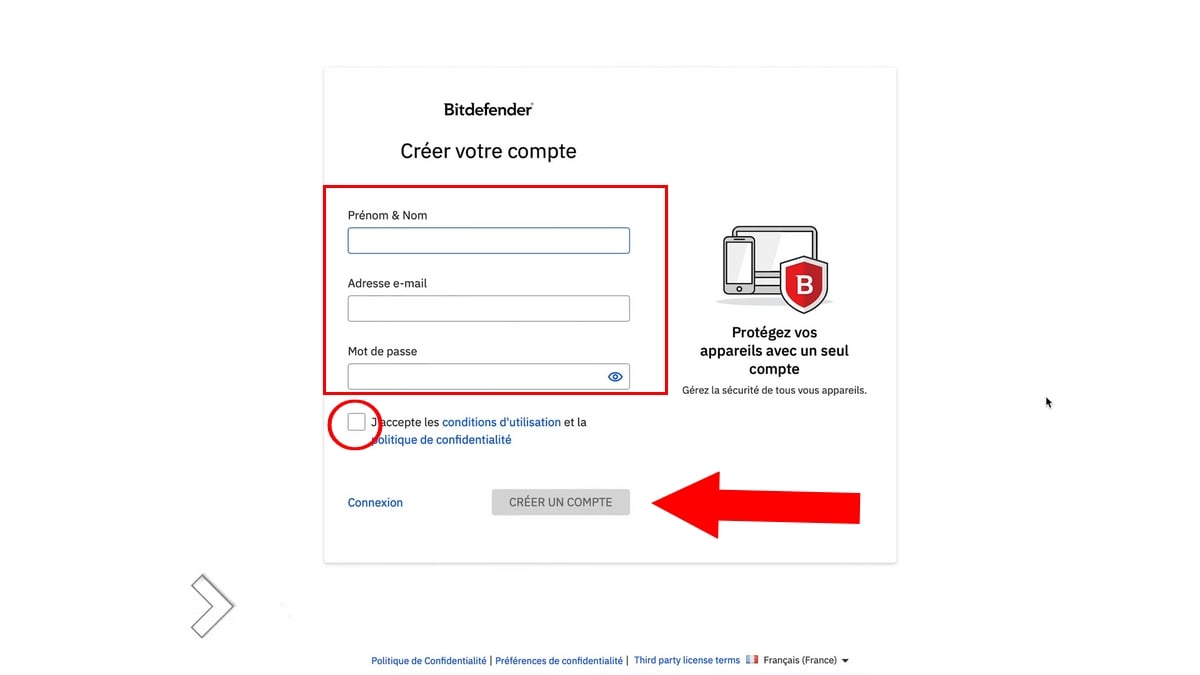
- Then we come to the stage where Bitdefender detects threats and gets rid of malware that may be installed on your computer
- Once you've logged in, you'll come to this menu. Click on Protection, activate the firewall to prevent suspicious applications from sending your data over the Internet.
- Also go to Antivirus, click on Open Where Open
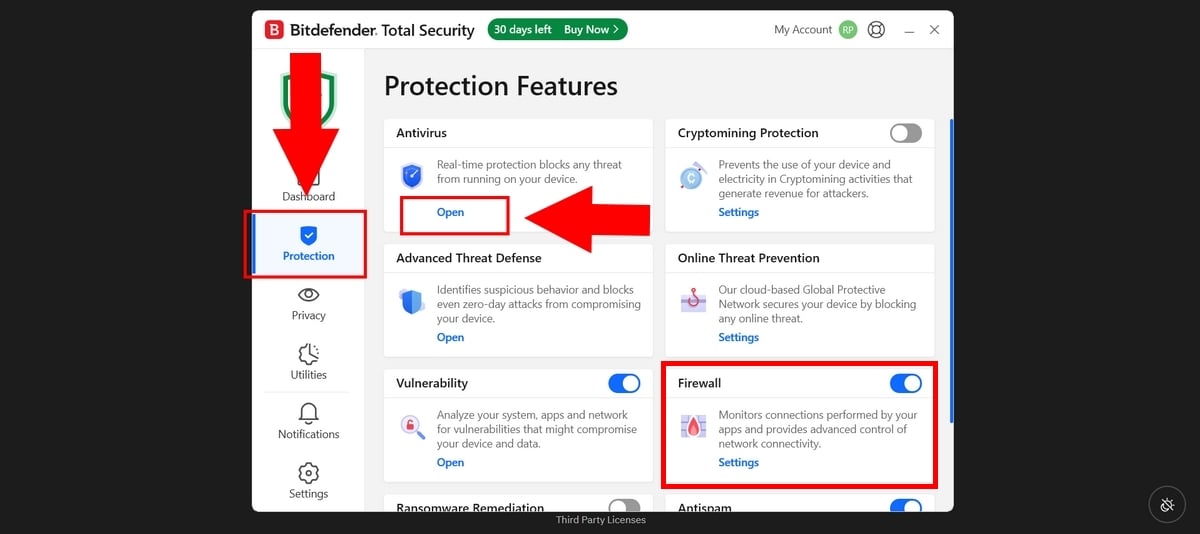
- Look for the option Scan System and then click on Start scan Where Run Scan
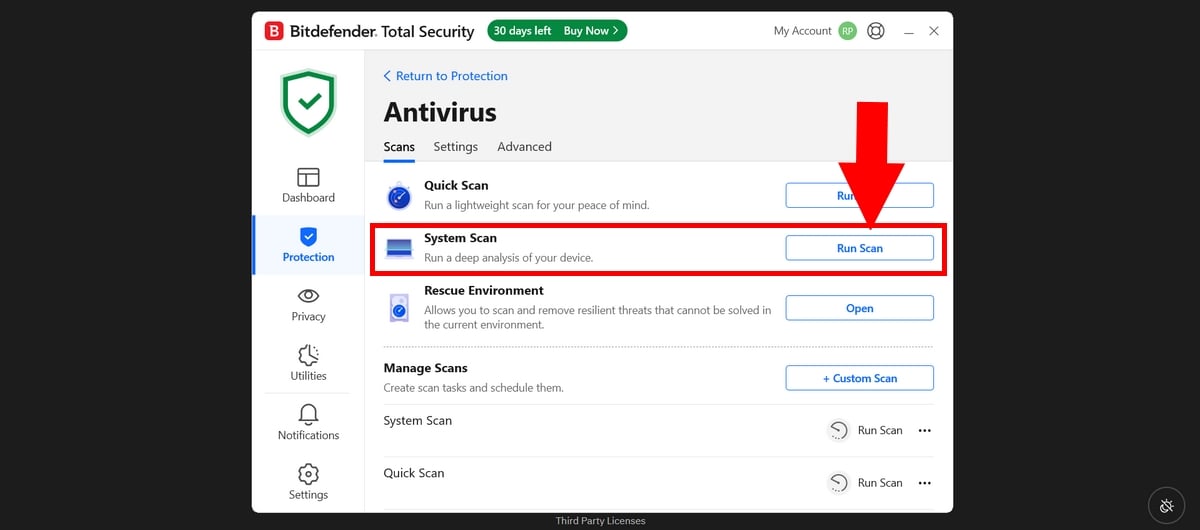
- The scan will then begin, and you must wait while it analyzes all the files on your machine.
- Meanwhile, in the’Privacy tab Where Privacy, you can set options to receive a notification every time an application or other software tries to access your camera and microphone.
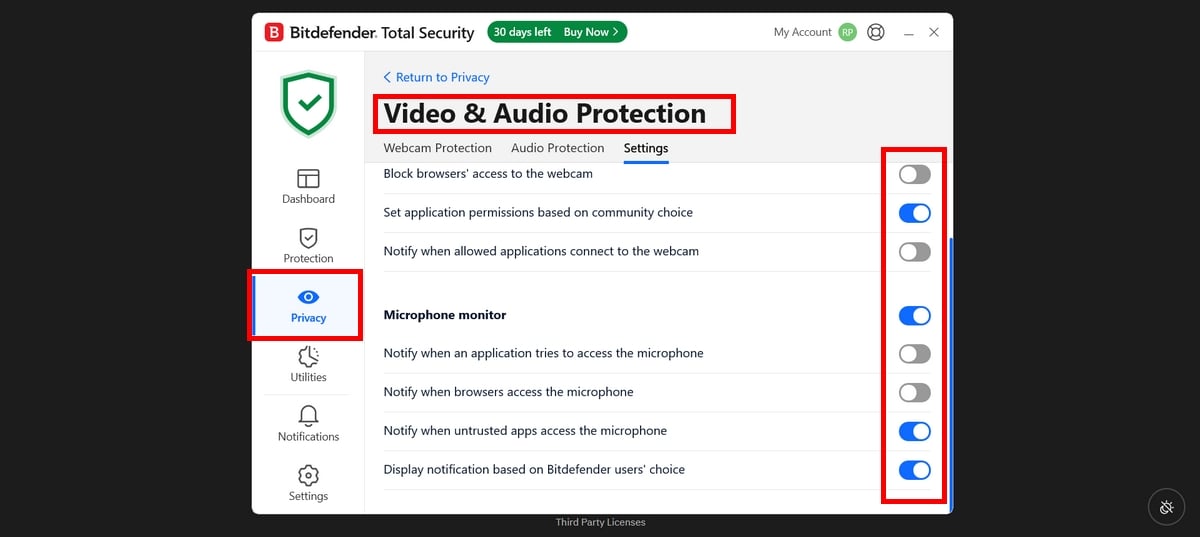
- Once the scan is complete, if Bitdefender finds something suspicious on your device, it will block it.
- And if he asks you what to do with it, you can choose the option Delete.
To note :
The stages remain the same on MacOS. Please note, however, that the free version offers rather limited functionality.
- If you want premium protection, don't hesitate to opt for the free version for the duration of your stay. 30 days for starters.
- However, in the free version, the vpn is limited to 200 MB of data per day. So only use it when you need it, i.e. when you're away from home, or making an online purchase.
On the other hand, if you want to opt for a different Free VPN, Click here to find out how you can benefit!
2. Check task manager
There are a myriad of devices and programs that can be downloaded to track your activities.
They can be added to your PC without you even knowing it.
To check them manually :
- Open the Task manager by clicking on Ctrl + Shift + Escape (Windows) or touch the [CMD]. + [ALT] + [Escape] (Mac)
- You can also search for Task manager next to the To start up on Windows
- Under the Process in the background, you'll see the full list of applications running on your PC
- Browse the list. If an app looks suspicious, don't hesitate to do some research to find out more.
❌ Limits :
Remember that spyware are rarely called by their real names. Sometimes, they use system process names identical to those of Windows.
In addition, other malware is programmed to close manually as soon as you open the task manager, so as to remain undetectable.
- In any case, if you have any doubts and want to terminate a program, click on it and choose the “End of tasks”on Windows or “Force quit”on the Mac.
3. Check user accounts
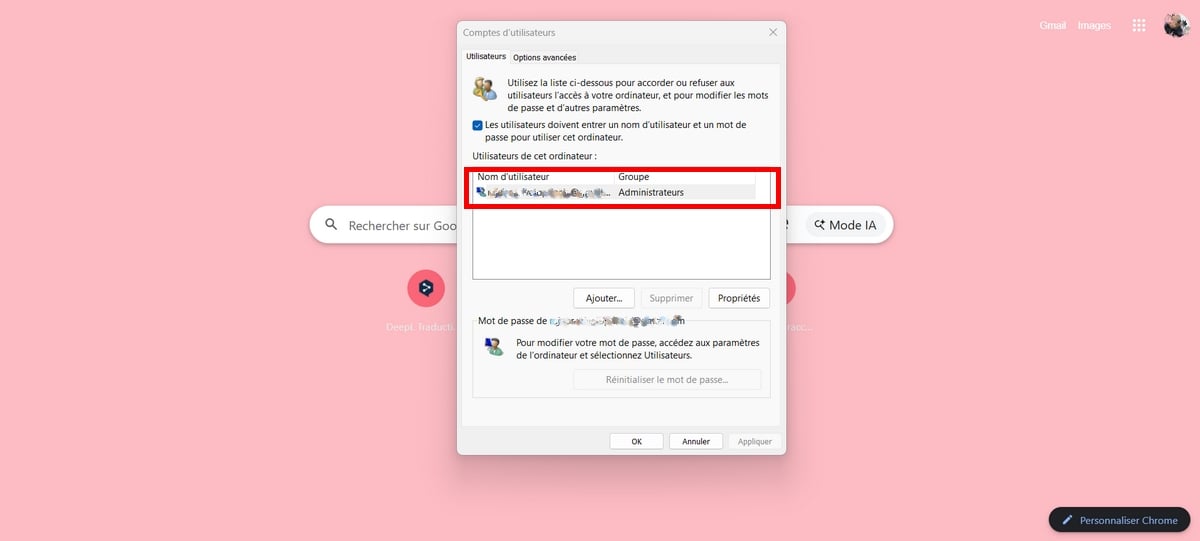
If you think your computer is being monitored, you can also check the local user accounts on this one.
On Windows :
- Click on Menu To start up at the bottom of the screen
- Right-click and select Run
- Type the command netplwiz then OK
On Mac :
- Click on the Apple icon on the left of the screen
- Then click on System Preferences
- You will find “Users and groups“.
- Normally, you will find all active accounts on your computer
- If you find a administrator account, If you want to create a new account, other than your own or one you haven't created yourself or one that isn't linked to the main account, click on it and delete the.
❌ Limits :
A spy doesn't always need to create a user account to spy on what you're doing. Sometimes, it can just install a hidden script on your user account.
As a result, you will find nothing by browsing the list, while malware is active in the background of your session.
How can I protect my computer from being spied on?
Here are a few precautions to be taken to protect you against malware in the future.
1. Install an anti-virus security program
Install anti-spyware software and make sure they are updated automatically and frequently. After all, new and potentially dangerous viruses appear every day.
Among the best solutions, Bitdefender is a powerful solution for detect invisible threats, to block suspicious outgoing connections, but also to delete them malware on your machine easily, even if they use false names.
To protect your device and install a powerful antivirus :
I trust Bitdefender to protect my computer
2. Prefer official stores for applications
To avoid knowingly installing spyware on your computer, it's important not to click on attachments or e-mails. from unknown sources.
It is also important to give priority to official stores to download games and other applications.
3. Buy a brand new computer
If you can afford a new computer, this is one of the best ways to avoid hacking.
If you opt for this solution, do not move files (documents, images, videos, etc.) from the infected computer. to this new computer because spyware may be able to relocate on the new system.
5. Keep your device up to date
Often pirates use security loopholes on your device to easily infiltrate it. So, to remedy this, update your Windows or macOS.
6. Create new accounts and update your passwords
If you're worried about surveillance, change your passwords from another secure device.
And most importantly, never use the same passwords for all your accounts.
FAQs
How do I know if I'm being spied on?
There's no specific dedicated code to know if your device is being spied on or not. The safest way is to use a antivirus software performing.
What's the best free antivirus for spyware detection?
There are numerous free antivirus programs on the market. Be careful, however, as some malware masquerading as free antivirus software.
If you want complete protection, you can test the’Bitdefender free trial for 30 days. What's more, it offers a free version dedicated to Windows (Bitdefender Antivirus Free).
However, for a in-depth detection malware on your computer, we recommend you opt for the full version.
Is it normal for my processor to be used at 100% at idle?
Nope, It's not normal for a processor at rest to be used at 100% when you're not using any programs. At rest, utilization should ideally be below 5% or 10%.
How can I check my connection history to my accounts (Google, Microsoft)?
- Go to your Google account ⇒ Security and connection ⇒ go to the Your devices. You'll have access to all the devices that have access to your account.
If you see an unknown device, disconnect it and quickly change your passwords.
Who can see what I'm doing on my PC?
Here is a list of all those who can follow your activities on social networks:
- The public wifi network administrators
- The Internet service providers (ISP): The sites you visit
- Some websites Via cookies
- The authorities and investigators : On request from your ISP
- The pirates Where spies.
Can my employer monitor me?
Monitoring software can be installed by employers on company-supplied devices such as laptops.
However, even if your employer has the right to set up surveillance, according to the’article L1222-4 of the Labour Code, it must inform you in advance.
All in all, you now know how to detect effectively a spyware sur votre computer. Which technique do you find most suitable?
In any case, if you have any questions or comments on this article, go to the comments section.








 English
I suspected my husband was cheating on me, but I didn't know what to do until I saw someone recommend phynachack_01 on Instagram. It helped me spy on my husband's phone, and I discovered that my marriage was a lie.