Do you want to know if someone is following you on Instagram?
🎊 Good news: two free methods and built into the app are all you need. And if you're looking to monitor a account's public activity, there's also a dedicated tool for that.

How can I check who's following me on Instagram?
There are several free and native methods to find out who's following you on Instagram, directly from the app, without any third-party apps.
Through the profile of the person you're targeting
When someone follows you on Instagram, you'll usually get a notification. But you might want to check if that person is still following you.
Here are the steps to follow:
- Open your account Instagram on your smartphone.
- Go directly to the profile of the person in question.
- If she follows you but you don't follow her back, the button «Follow Back» appears in place of the usual «Follow» button.
- This button « Follow back » confirms that this account is actually following you, but that you aren't following it yet.
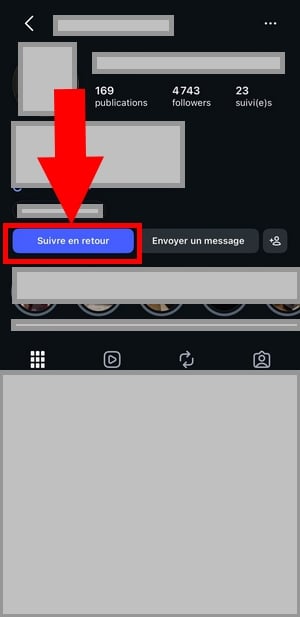
If you already follow this person, the verification process takes a little longer, but it's still doable:
- Press the button "Follow-ups, in the upper-right corner of their profile Instagram.
- You can access the list of accounts she follows.
- Press the search bar and enter your username.
- If your name appears, that person is definitely following you.

You can also remove an unwanted subscriber directly from your list of followers. To prevent an unwanted account from viewing your profile Instagram, you can also to block or report it in the settings.
Would you prefer a quick demo? Check out this 2-minute video tutorial. It shows you exactly where to click to see if someone is following you and how to use your follower lists to your advantage.
Explanatory video in French by Alucare, ideal complement to the page. View video (you can use YouTube's automatic translation)

Through your subscriber list
Another simple method: check your own list of’Instagram followers on your profile Instagram.
Here's how to do it:
- Open the’application Instagram on your phone or tablet, then sign in.
- Go to your profile by tapping your profile picture icon in the bottom right corner of the screen.
- Below your photo and bio, you'll see your Number of subscribers: followers. Click on it to open the full list.
- Scroll through the list to see who's following you, or type a specific username into the search bar.
- If their name appears, that person is definitely following you.

If you have a lot of followers, uses the search field to find the person in just a few seconds. This is the fastest way to avoid having to scroll through the entire list.
What does Follow-up mean on Instagram?
On Instagram, « follow »simply means" subscribe to an account. Add this profile to your list to see all of its content in your news feed.
Once you subscribe, you'll have access to its publications, her Stories and Reels. You can also check out her number of followers and the number of accounts he follows in return.
For a private account, the content remains hidden as long as the profile owner Instagram didn't accept your request. Even Stories are hidden without approval.
App to see who follows me on Instagram
Let's be clear: No third-party app can show you who's following you on Instagram. The app's built-in subscriber list is more than enough for that.
On the other hand, there is a real use for this type of tool.
If you want monitor the public activity of a specific account (his likes, his new follows, the posts he likes)—that's where an app like Snoopreport becomes useful.
To learn more, check out our article on How to Analyze and Track an Account Instagram.
What are the benefits and reviews of Snoopreport?
Snoopreport is a Instagram activity tracker used by thousands of users around the world. It doesn't show you who's following you and does not work on the private accounts : It only follows the public accounts. You choose a profile Instagram to keep an eye on, and the tool provides you with regular activity reports.
These reports compile various pieces of information about the targeted account:
- The likes that he leaves in photos and posts
- His new subscriptions and the accounts he monitors
- The hobbies that result from his work
You can view this data on your phone at any time. It's useful for creators who want to analyze their audience or keep an eye on the activity of a friend's account.
In the main online reviews, users rate Snoopreport a note on 6 out of 10.
The free trial version lets you try it out before you pay, and it offers decent value for this type of tool. Its main limitation is clear: it can't see anything on the private accounts and doesn't show who's visiting your profile Instagram.
Transparency:
The link below is an affiliate link. If you click through it, we’ll earn a small commission at no extra cost to you. We’re recommending it solely because it honestly delivers what it promises (to follow a public activity), not because it would show your followers.
👁️Savoir who follows me on Instagram👁️
What's the difference between following and followers on Instagram?
Many users confuse these two concepts regarding Instagram. Yet the distinction is simple.
- Follow : these are the accounts you follow. On the profile of someone you already follow, you'll see «Following» instead of the «Follow» button.
- Followers : these are the people who follow you. To view this list, tap «Followers» at the top of your profile Instagram.
In practical terms, your number of followers matches your audience. Your number of followers corresponds to the accounts whose content you see in your feed. The two numbers are independent and do not develop in the same way.
You can also delete followers from your subscriber list, directly in your account's privacy settings Instagram. This is useful for preventing certain profiles from continuing to see your Stories and posts.
How do I find my followers on Instagram?
You can access the list of accounts you follow in just a few seconds from your profile Instagram.
Here's how to view your own list of follow-ups :
- Open your profile Instagram by tapping your icon in the lower-right corner.
- Then press followed, at the top of the screen.
- You can access all accounts that you follow.

Would you rather check out the accounts followed by a specific person ? The method is almost identical:
- Go to the profile Instagram of the person concerned.
- Press its subscriptions, located in the upper-right corner of the profile.
- You'll then see all the accounts she follows.
Please note: this list is not not listed in alphabetical order, nor in chronological order. Instagram It displays posts based on its own engagement criteria, so the accounts that are most relevant often appear at the top.
Just a quick reminder: if the profile Instagram that you're viewing is private, you must follow each other to view each other's lists. Otherwise, the content and subscriptions remain hidden.
Why can't I see the full list of follow-ups?
There are several possible reasons for this. Most often, the user has changed their privacy settings to hide their subscription list from others.
On a private account, you won't be able to see anything until your subscription request is approved. To avoid this issue, you can also report an account that denies access for no reason through the profile settings Instagram.
Finally, the subscriber search feature is sometimes temporarily unavailable For technical reasons: Please try again a little later in that case.
How can I find out who has viewed my Instagram profile?
Instagram Don't show who has viewed your profile. The social network keeps its inner workings a secret and prohibits any third-party apps from accessing this information. Therefore, no tool can display the actual list of your visitors, despite what some apps promise.
Be wary of tools that claim otherwise. At best, they make up data. At worst, they steal your login credentials and put your privacy in danger.
To avoid any risks, never connect an unofficial third-party tool to your account Instagram. If you've already installed one, be sure to let Instagram and revoke their access through your privacy settings.
On the other hand, you can to guess who often checks your account based on a few natural clues:
- Look at the order of the views on your story : The people who appear at the top are often the ones who engage most with your content.
- Keep an eye on your Recent likes and comments : The users who are most active on your posts usually check out your profile Instagram most often.
- Check your statistics If you have a business account: Names aren't displayed, but the cities, countries, and average age of your audience help you better understand who's viewing your account.
A quick, useful note about Stories: Instagram does not indicate if someone takes a screenshot of your regular Story. And if that same person views your Story several times, it appears only once in the list of views, with no view count.
Simply put, the native app is still your best source of information about your profile Instagram. No external tool does it better, and many do a worse job for your privacy.








 English
My Instagram account was hacked and my second account was deactivated, but thanks to phynachack on Instagram, they helped me recover my account.
I was having doubts about my relationship and didn't know what to do until I saw someone recommend vladimirhacks on Instagram. They helped me access my husband's phone, and I discovered that my marriage was a lie.