The F1 to F12 keys offer practical features to simplify your daily life. In this article, we explain in detail the possibilities they offer so that you can use them correctly.
1. How do I use the F1 to F12 keys on Windows?
On a PC, the F1 to F12 keys are quite useful in everyday life. Here's what you need to know.
How do I activate the F1 to F12 keys on Windows?
The Fn key activates alternative functions of the buttons F1 to F12 on a laptop. It is located in the bottom left-hand row of the keyboard, next to the Control (Ctrl) button. Depending on the manufacturer, it may be located to the left or right of the Control button.
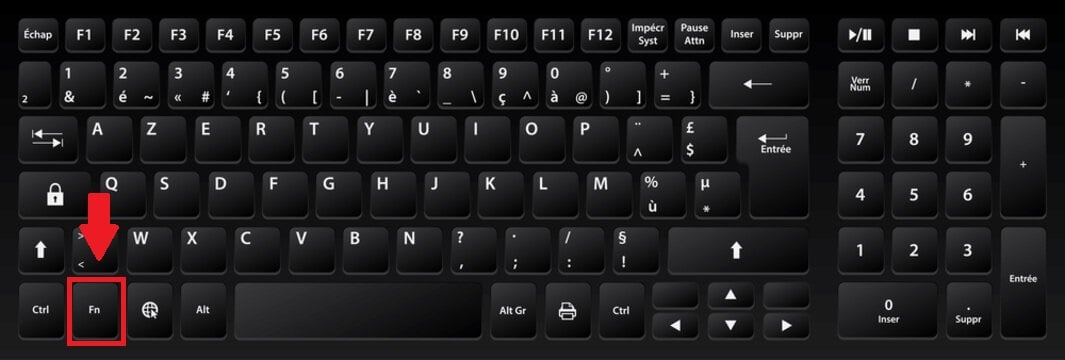
Important :
Note that this key is not not always necessary, bearing in mind that some keyboards do not have them. In this case, the user can press the F1 to F12 keys directly to access their functions without the need for any special activation.
What are the functions of the F1 to F12 keys on a PC?
Here are the options offered by the buttons F1 to F12 on PC.
F1
F1 allows you toopen or close the help center on your computer. Combined with the Ctrl key, it can also be used to hide or show commands in the Word ribbon.
F2
F2 is used to rename any selected file on your computer. It also lets you modify the active cell in Excel.
F3
The F3 key is equivalent to the combination Ctrl + F that lets you search for words, whether in a web browser or other software.
F4
F4 is used to position your cursor in the address bar in Internet Explorer or File Explorer. Using the combination Alt + F4to close the program window on your computer.
F5
F5 allows you toupdate a web page. It also starts slide projection in PowerPoint.
F6
Press F6 to access the address bar of the web browser. Pressing it a second time takes you to a specific tab.
F7
F7 is used to access the spell checking and grammar checking of a document opened in Word.
F8
F8 provides access to the safe mode when you start your computer.
F9
F9 is used in electronic mailIt helps check whether new emails have arrived and forces emails to be sent.
F10
Shift + F10 opens the Windows pop-up window on your computer.
F11
F11 switches your web browser to full-screen mode, but also to exit it by pressing it again. Combined with the Shift key, it allows you to add a new spreadsheet in Excel.
F12
F12 opens the function "Save as” in Word. It is also used to access the source code of a page viewed on the Internet.
2. How do I use the F1 to F12 keys on a Mac?
On macOS, thekey activation is essential before using them. Here are some details you should keep in mind.
How do I activate the F1 to F12 keys on a Mac?
In this case:
- Enter System Preferences.

System Preferences on macOS. Mia for Alucare.fr - Then click on Keyboard.
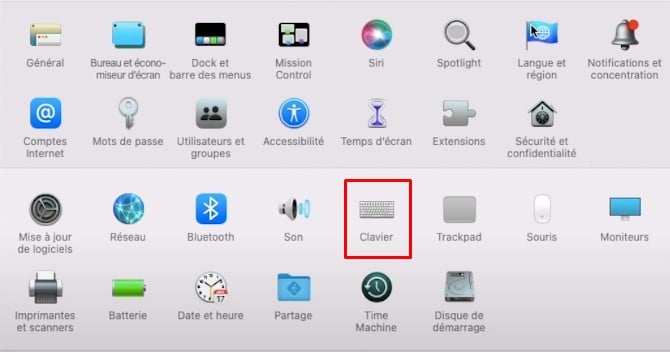
Keyboard option in System Preferences on macOS. Mia for Alucare.fr - Activate the "Use F1, F2 keys etc. as standard function keys.
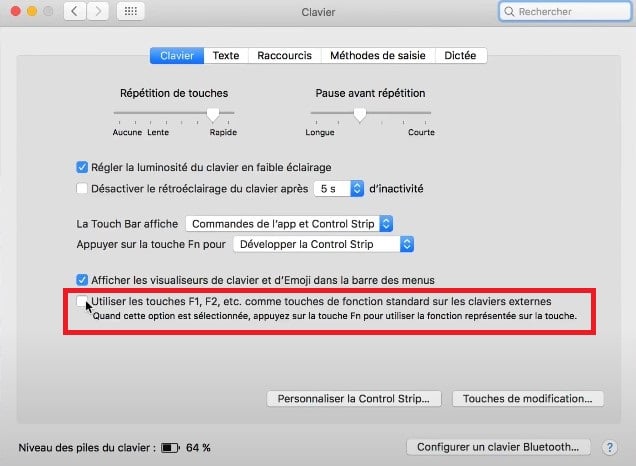
Check this option to enable the use of the F1 to F12 keys on macOS. ©Mia for Alucare.fr
What are the functions of the F1 to F12 keys on the Mac?
The F1 to F12 button functions on macOS are as follows:
| 🔑 Key | 📋 Details |
|---|---|
| F1 | Reduces brightness screen. |
| F2 | Increases brightness screen. |
| F3 | Activates Mission Control and brings up all windows open. |
| F4 | Open Launchpad and lists all the applications on the computer. |
| F5 | Adjust keyboard backlighting. |
| F6 | Increaseskey light intensity. |
| F7 | Help to go back on a multimedia file played on the computer. |
| F8 | Sets a multimedia file to break. |
| F9 | Switches to multimedia file following. |
| F10 | Enables or disables audio computer. |
| F11 | Reduces volume audio. |
| F12 | Increases volume audio. |
As part of the functionalities of keyboardsdiscover how to copy and paste text using the keyboard in our article on the subject.
FAQs
Why don't my F-keys work?
On some PCs, it is necessary to enable the Locking F. This involves using the Caps Lock key or the combination Fn + Escape.
On macOS, you can refer to the section intended foractivate buttons F1 to F12 earlier in the article.
Which key replaces the Fn key on a keyboard?
On a PC, you can use the Verr F (if present).
On macOS, you can use the Control buttonHowever, keep in mind that the latter may not be active on certain programs.
How do I activate the F1 to F12 keys without using Fn?
The method consists of using theBIOS setup utility. You must :
- Turn off, then turn on the computer and before it starts, ptighten F10 Press the F12 key several times to display the BIOS setup utility.

Image showing the position of F10 on the keyboard. Mia for Alucare.fr - Use the left or right arrow buttons to access the Menu of configuration.

Configuration option in the BIOS configuration utility. ©Mia for Alucare.fr - Use the up or down arrow buttons to enter Action Keys Mode.
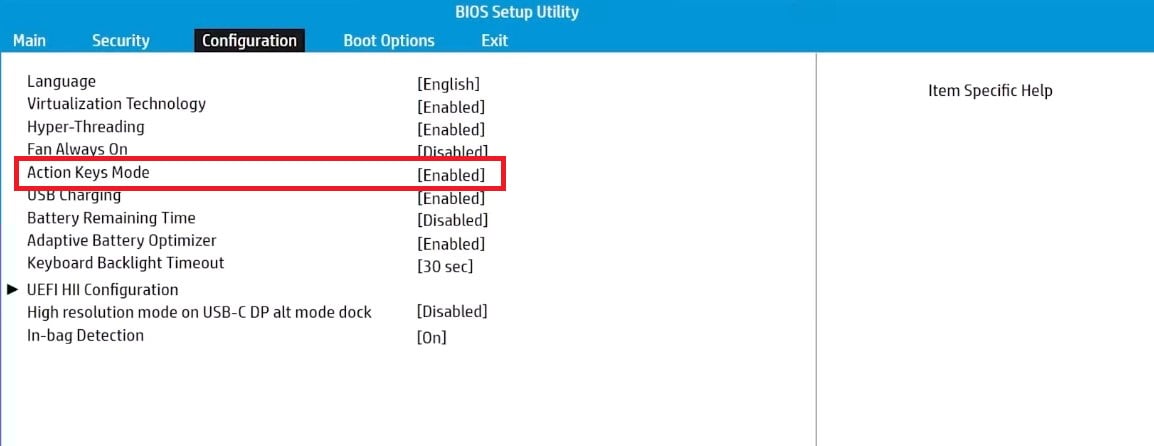
Action Key Mode feature in BIOS. ©Mia for Alucare.fr - Press Enter and select the option. Enable (Enabled).
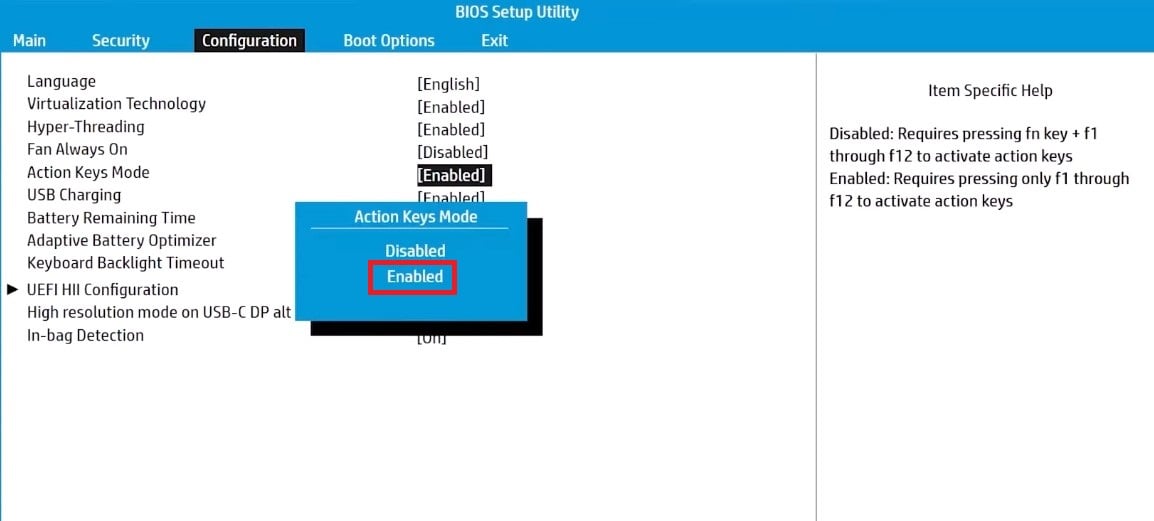
Option to enable the Fn key functionality in BIOS. ©Mia for Alucare.fr - Save changes and exit.

Save the changes and exit the BIOS setup utility. ©Mia for Alucare.fr
To discover other content similar to this one, go to the Practical Web of our site.
Don't hesitate to add a comment If you have encountered any issues when applying the advice presented in this article, or if you would like to share your opinion on the features presented here, please let us know!








 English