Do you want to enjoy a discount of up to 35 % on the packs of Legend of Mushroom ? Install this Mobile RPG mushrooms via Aptoide, the app store alternative to the Google Play, without geolocation, available on android.
Step 1: Install Aptoide
The installation of’Aptoide It only takes a few minutes. Here are the steps to follow.
- Go to the official website ofAptoide to launch the APK download.


- Wait until the download ends up on your phone.
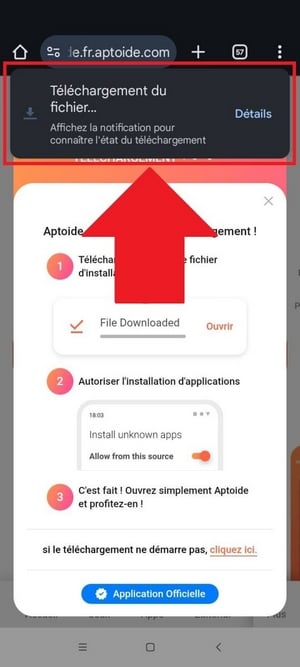
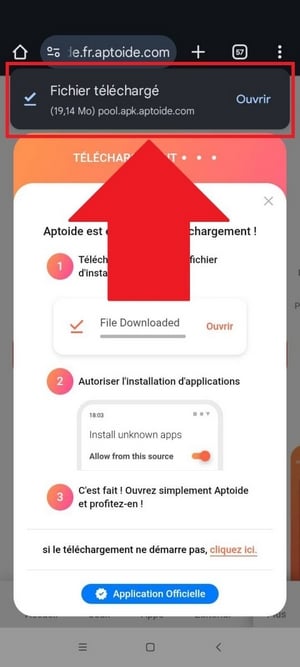
- Once the file has been downloaded, tap “Open” to start the installation of’Aptoide.
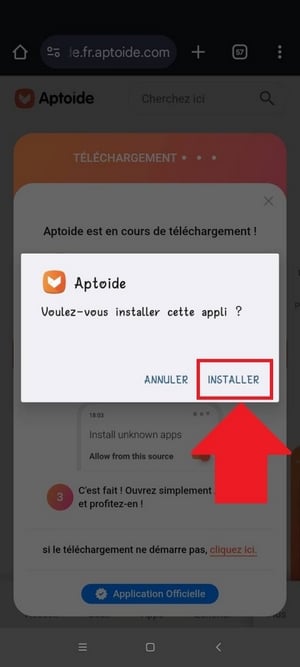
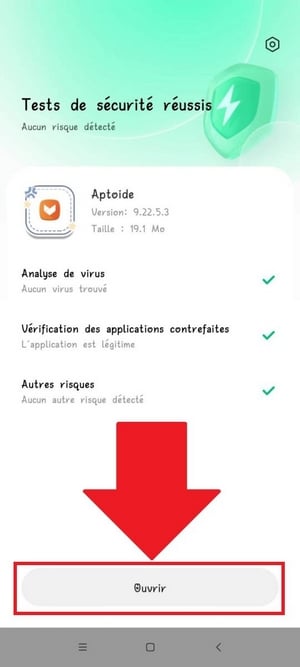
Remark : Your phone can run a check Play Protect to verify the app's security. This is completely normal. Accept or dismiss the alert, then wait for the test to complete before opening the app.
Step 2: Install Legend of Mushroom via Aptoide
Once Aptoide installed on your android, you can download Legend of Mushroom in three quick steps from here app store.
- Launch the app Aptoide from your home screen.

- Use the search bar to type “Legend of Mushroom“.
- Select the set of mushrooms from the results, then Click “Install”.
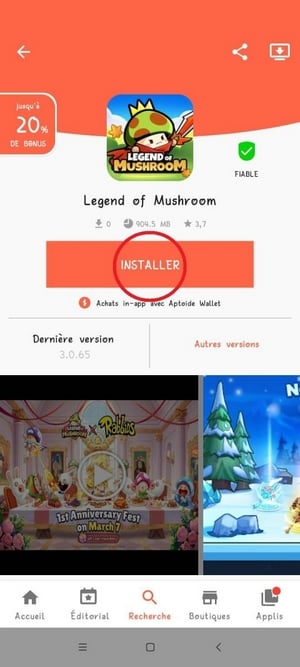
Remark : Remember to tune the additional authorizations required to complete the installation.
Once it's installed, you can get started with a new adventure or continue your existing progress in this Mobile RPG where you play the role of mushroom heroes.
To get off to a good start, remember to Optimize Your Magic Lamp and to avoid mistakes which are expensive early in the game.

Explanatory video in French by Alucare, ideal complement to the page. View video (you can use YouTube's automatic translation)

How to create an account on Legend of Mushroom ?
At the start of the game, you automatically play as a guest account. This account is not secure: if you switch devices, you'll lose your entire backup. Link Your Account is therefore essential to protect your progress.
Here are the steps to follow.
- Go a little further in the tutorial, then Click on your avatar at the top left of the screen.

- A drop-down menu will appear on your left. Select “Benefits”. This menu becomes available starting at the step Normal 1–4.

- In the “Benefits” menu, two tabs appear: Awards and Connection. Click on “Connection”.

- Press “Account Link”, then choose to link your account via Google, Facebook or a e-mail address.


- Once you've linked your account, don't forget to Claim your referral rewards in the “Benefits” tab. These are free bonuses to get your adventure off to a great start.

How to switch accounts on Legend of Mushroom ?
You have several accounts on Legend of Mushroom ? There are two ways to change it, depending on your situation.
Of Google Play at Aptoide
You had installed the game since Google Play and you want to switch to Aptoide to take advantage of discounts ranging from 10 to 35 % on your packs? Here are the steps to follow.
- Uninstall Legend of Mushroom installed via Google Play.
- Install the game from Aptoide, the alternative app store on android.
- Spear Legend of Mushroom, then wait for the update to finish.
- If you've already linked your account on the same device, the app will detect it and ask you to log in with the corresponding account.


Manually, directly in the game
Do you want to Switch accounts manually From the app? Follow these steps.






Now you know how to install Legend of Mushroom via Aptoide, create your account and manage it from your phone android.
To make faster progress in this Mushroom RPG, check out our guide to reaching the level 100 quickly.
And if you're planning to go shopping, check out the promo codes Aptoide to save money by Aptoide Wallet, as well as the list of codes Legend of Mushroom assets to recover awards free.








 English